Solved netgear wg111v2

The one in your first post of the thread.

that's the LED light.
i tried but it's the same.

hey you know? this morning. I tried the installer on Vista x64 and x86... it's the same result.

I discover something weird. A windows alert box came out, asking, "Do you want to accept Netgear product", or something like this. My system has been started with Macros, it keep pressing "i" forever!! It means to install Netgear product by force!

After that I encounter an error. Some MFC error. In Vista:
vsgwue.jpg


I am using wg111v2, should I download drivers for wg111v3?
 

My Computer My Computer

At a glance

Windows 7 Professional x64
OS
Windows 7 Professional x64
Can't see how that would help much but there is only one way to test...so go for it if you want.

You can also click that blue link to see what Microsoft wants to tell you about it.
 

My Computer My Computer

At a glance

7600.20510 x86P4 550 3.4 GHz HT running at 3.5 GHzOCZ 2 GB(2x1GB) DDR400mHz running @ 414 mHzHIS Radeon HD 3850 IceQ 3 Turbo HDMI Dual DL-...
Computer Manufacturer/Model Number
self built
OS
7600.20510 x86
CPU
P4 550 3.4 GHz HT running at 3.5 GHz
Motherboard
MSI PM8M3-V (MS-7211 v1.x) Micro-ATX mainboard
Memory
OCZ 2 GB(2x1GB) DDR400mHz running @ 414 mHz
Graphics Card(s)
HIS Radeon HD 3850 IceQ 3 Turbo HDMI Dual DL-DVI AGP
Sound Card
MOTU Traveler firewire studio interface 192 kHz 24 bit
Monitor(s) Displays
22" widescreen Acer X223W LCD, 17" Compaq P75 CRT
Screen Resolution
1680x1050 and 1280x1024
Hard Drives
SATA I x2 WD, 400 GB and 120 GB, SATA 2 WD Caviar Black 1 TB
PSU
350W generic
Case
Cybertronpc, it glows blue
Cooling
stock cpu fan, Ice-Q 3 gpu and system, many case fans
Keyboard
Logitch Classical Keyboard 200
Mouse
Logitech Mediaplay cordless
Internet Speed
1792/448 kbits/sec
Other Info
SATA II PCI fake RAID adapter, 1 GB Readyboost, original ATI Remote Wonder (even works with WMC perfectly), Logitech Rumblepad 2 game controller x2
Can't see how that would help much but there is only one way to test...so go for it if you want.

You can also click that blue link to see what Microsoft wants to tell you about it.

The wg111v3 driver does not work with wg111v2

I'll be asking around to see if any of my friends have a spare adapter and try it out.

I'll also be bringing my adapter to my work place (Monday) to try under Vista. To confirm that the device is in good working condition.

I'll keep you updated, torrentg.
 

My Computer My Computer

At a glance

Windows 7 Professional x64
OS
Windows 7 Professional x64
Reset the router to default settings.
 

My Computer My Computer

At a glance

Windows 7 7600 1 X64AMD PHENOM II X 550 PROCESSOR 3.1 ghzCorsair 4 gig ddr 3ati radeon 3300
Computer Manufacturer/Model Number
Custom Build
OS
Windows 7 7600 1 X64
CPU
AMD PHENOM II X 550 PROCESSOR 3.1 ghz
Motherboard
ASUS M4A78-TE
Memory
Corsair 4 gig ddr 3
Graphics Card(s)
ati radeon 3300
Sound Card
ati hd
Monitor(s) Displays
syncmaster 2033sw
Screen Resolution
1600X900 60 hz refresh
Hard Drives
twin_seagates SATA's 1 TB & 500 Gig, hitachi_slimline 160 gig
PSU
antec_550 watt
Case
cooler master GLite
Cooling
stock_heat sink
Internet Speed
20mbs up/ 1.5mbs down
Other Info
favorite child "stewie"
favorite dog "brian"
Reset the router to default settings.

There is no prblem with the router. I am able to surf the net with my bro's laptop and my nokia phone.
 

My Computer My Computer

At a glance

Windows 7 Professional x64
OS
Windows 7 Professional x64

My Computer My Computer

At a glance

7600.20510 x86P4 550 3.4 GHz HT running at 3.5 GHzOCZ 2 GB(2x1GB) DDR400mHz running @ 414 mHzHIS Radeon HD 3850 IceQ 3 Turbo HDMI Dual DL-...
Computer Manufacturer/Model Number
self built
OS
7600.20510 x86
CPU
P4 550 3.4 GHz HT running at 3.5 GHz
Motherboard
MSI PM8M3-V (MS-7211 v1.x) Micro-ATX mainboard
Memory
OCZ 2 GB(2x1GB) DDR400mHz running @ 414 mHz
Graphics Card(s)
HIS Radeon HD 3850 IceQ 3 Turbo HDMI Dual DL-DVI AGP
Sound Card
MOTU Traveler firewire studio interface 192 kHz 24 bit
Monitor(s) Displays
22" widescreen Acer X223W LCD, 17" Compaq P75 CRT
Screen Resolution
1680x1050 and 1280x1024
Hard Drives
SATA I x2 WD, 400 GB and 120 GB, SATA 2 WD Caviar Black 1 TB
PSU
350W generic
Case
Cybertronpc, it glows blue
Cooling
stock cpu fan, Ice-Q 3 gpu and system, many case fans
Keyboard
Logitch Classical Keyboard 200
Mouse
Logitech Mediaplay cordless
Internet Speed
1792/448 kbits/sec
Other Info
SATA II PCI fake RAID adapter, 1 GB Readyboost, original ATI Remote Wonder (even works with WMC perfectly), Logitech Rumblepad 2 game controller x2

My Computer My Computer

At a glance

Windows 7 7600 1 X64AMD PHENOM II X 550 PROCESSOR 3.1 ghzCorsair 4 gig ddr 3ati radeon 3300
Computer Manufacturer/Model Number
Custom Build
OS
Windows 7 7600 1 X64
CPU
AMD PHENOM II X 550 PROCESSOR 3.1 ghz
Motherboard
ASUS M4A78-TE
Memory
Corsair 4 gig ddr 3
Graphics Card(s)
ati radeon 3300
Sound Card
ati hd
Monitor(s) Displays
syncmaster 2033sw
Screen Resolution
1600X900 60 hz refresh
Hard Drives
twin_seagates SATA's 1 TB & 500 Gig, hitachi_slimline 160 gig
PSU
antec_550 watt
Case
cooler master GLite
Cooling
stock_heat sink
Internet Speed
20mbs up/ 1.5mbs down
Other Info
favorite child "stewie"
favorite dog "brian"
I installed the driver for "WG111v2 Version 3.4.0".
It installed fine and the device manager shows "this device is working properly"

I am using win7 pro x64.
No errors on device manager but it cannot detect a single network....

wg111v2.gif
Welcome to Windows 7 (SEVEN) Support Forum.
All members are eager to provide support.
To provide support service please provide us with your system specifications.
You may use the bottom of the left of your screen to fill out your specifications.
Best Regards,
Adrian
 

My Computer My Computer

At a glance

Windows 7 7600 1 X64AMD PHENOM II X 550 PROCESSOR 3.1 ghzCorsair 4 gig ddr 3ati radeon 3300
Computer Manufacturer/Model Number
Custom Build
OS
Windows 7 7600 1 X64
CPU
AMD PHENOM II X 550 PROCESSOR 3.1 ghz
Motherboard
ASUS M4A78-TE
Memory
Corsair 4 gig ddr 3
Graphics Card(s)
ati radeon 3300
Sound Card
ati hd
Monitor(s) Displays
syncmaster 2033sw
Screen Resolution
1600X900 60 hz refresh
Hard Drives
twin_seagates SATA's 1 TB & 500 Gig, hitachi_slimline 160 gig
PSU
antec_550 watt
Case
cooler master GLite
Cooling
stock_heat sink
Internet Speed
20mbs up/ 1.5mbs down
Other Info
favorite child "stewie"
favorite dog "brian"
In Net Stumbler, click on device. Does it have any choices at all?

Show me a screenshot of your device manager, showing network adapters.

in net stumbler, it shows that the device is not supported...

28h2wc4.png


here is the device manager...
ehxqp.png
Its not on your end!
Device manager shows the the USB stick as working.
The issue is your router.
 

My Computer My Computer

At a glance

Windows 7 7600 1 X64AMD PHENOM II X 550 PROCESSOR 3.1 ghzCorsair 4 gig ddr 3ati radeon 3300
Computer Manufacturer/Model Number
Custom Build
OS
Windows 7 7600 1 X64
CPU
AMD PHENOM II X 550 PROCESSOR 3.1 ghz
Motherboard
ASUS M4A78-TE
Memory
Corsair 4 gig ddr 3
Graphics Card(s)
ati radeon 3300
Sound Card
ati hd
Monitor(s) Displays
syncmaster 2033sw
Screen Resolution
1600X900 60 hz refresh
Hard Drives
twin_seagates SATA's 1 TB & 500 Gig, hitachi_slimline 160 gig
PSU
antec_550 watt
Case
cooler master GLite
Cooling
stock_heat sink
Internet Speed
20mbs up/ 1.5mbs down
Other Info
favorite child "stewie"
favorite dog "brian"
ROUTER

Whats your router?
 

My Computer My Computer

At a glance

Windows 7 7600 1 X64AMD PHENOM II X 550 PROCESSOR 3.1 ghzCorsair 4 gig ddr 3ati radeon 3300
Computer Manufacturer/Model Number
Custom Build
OS
Windows 7 7600 1 X64
CPU
AMD PHENOM II X 550 PROCESSOR 3.1 ghz
Motherboard
ASUS M4A78-TE
Memory
Corsair 4 gig ddr 3
Graphics Card(s)
ati radeon 3300
Sound Card
ati hd
Monitor(s) Displays
syncmaster 2033sw
Screen Resolution
1600X900 60 hz refresh
Hard Drives
twin_seagates SATA's 1 TB & 500 Gig, hitachi_slimline 160 gig
PSU
antec_550 watt
Case
cooler master GLite
Cooling
stock_heat sink
Internet Speed
20mbs up/ 1.5mbs down
Other Info
favorite child "stewie"
favorite dog "brian"
WIFI

Are you able to take your laptop to a hot WIFI zone to see if you receive a signal?
 

My Computer My Computer

At a glance

Windows 7 7600 1 X64AMD PHENOM II X 550 PROCESSOR 3.1 ghzCorsair 4 gig ddr 3ati radeon 3300
Computer Manufacturer/Model Number
Custom Build
OS
Windows 7 7600 1 X64
CPU
AMD PHENOM II X 550 PROCESSOR 3.1 ghz
Motherboard
ASUS M4A78-TE
Memory
Corsair 4 gig ddr 3
Graphics Card(s)
ati radeon 3300
Sound Card
ati hd
Monitor(s) Displays
syncmaster 2033sw
Screen Resolution
1600X900 60 hz refresh
Hard Drives
twin_seagates SATA's 1 TB & 500 Gig, hitachi_slimline 160 gig
PSU
antec_550 watt
Case
cooler master GLite
Cooling
stock_heat sink
Internet Speed
20mbs up/ 1.5mbs down
Other Info
favorite child "stewie"
favorite dog "brian"
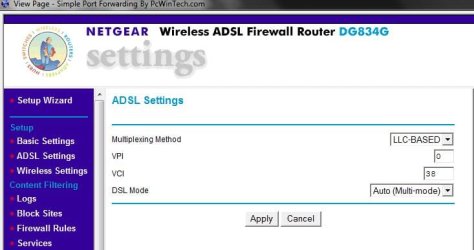
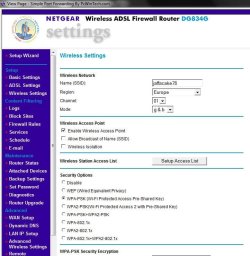
I'm using the WG111v2 with my Netgear DG834G router on windows 7 Ultimate x64,have you checked out your modems settings? you should be able to access modem settings by typing 192.168.0.1 into search bar on I.E.

My adaptor didnt work when i 1st switched over to 7,but after i contacted my ISP(AOL) & followed there instructions it worked fine.
 

Attachments

  • modem1.JPG
    modem1.JPG
    38.9 KB · Views: 275
  • modem2.JPG
    modem2.JPG
    75.1 KB · Views: 164

My Computer My Computer

At a glance

Vista Ultimate x64,Windows 7 Ultimate x64Q9950 2.83Ghz4Gb DDR22x BFG 9800 GT OC+1Gb
Computer Manufacturer/Model Number
Originally a Compaq presario
OS
Vista Ultimate x64,Windows 7 Ultimate x64
CPU
Q9950 2.83Ghz
Motherboard
Asus Striker II 790i SLi
Memory
4Gb DDR2
Graphics Card(s)
2x BFG 9800 GT OC+1Gb
Monitor(s) Displays
22" Acer + 26" Panasonic Viera 1080p
Screen Resolution
Acer 1680x1050
PSU
850W Sli
I had the same Netgear Dongles has you have and i had nothing but problems with them keep going on and off, my advice is to switch to Belkin they are more reliable.
 

My Computer My Computer

At a glance

win 7
OS
win 7
Title:

Hi all,

Thanks for all your replies.

Adrian: Micro, do you have an encryption code?
microboy: Yes. It's 10 digits.

Adrian: Whats your router?
microboy: 2wire 2701

Adrian: Are you able to take your laptop to a hot WIFI zone to see if you receive a signal?
microboy: My is a desktop.

Hi Adrian,
Do let me know if you need any other information. Here is an update, I have borrowed 2 USB wifi adapter from my friends. I am going to test them out.

Here is a question on my mind: I remembered using WinXP pro, I am able to scan for networks. How can I scan for networks in Windows 7?
 

My Computer My Computer

At a glance

Windows 7 Professional x64
OS
Windows 7 Professional x64
I tested my computer on 3 USB adapters:

1) My own's netgear wg111v2: Cannot work.

2) Friend's D-Link WUA-1340: Cannot even enable the device.

3) Friend's Edimax ZD1211: CONNECTED!!!

Now I have a question: When the Edimax is plugged in, Windows 7 shows me the pop-up (shown in image) but not in the Netgear and D-Link's adapter?

What is the reason?

iyoh8y.png
 

My Computer My Computer

At a glance

Windows 7 Professional x64
OS
Windows 7 Professional x64
I tested my computer on 3 USB adapters:

1) My own's netgear wg111v2: Cannot work.

2) Friend's D-Link WUA-1340: Cannot even enable the device.

3) Friend's Edimax ZD1211: CONNECTED!!!

Now I have a question: When the Edimax is plugged in, Windows 7 shows me the pop-up (shown in image) but not in the Netgear and D-Link's adapter?

What is the reason?

iyoh8y.png
On the edimax windows is configuring the connection.
You have preloaded software for the others.
 

My Computer My Computer

At a glance

Windows 7 7600 1 X64AMD PHENOM II X 550 PROCESSOR 3.1 ghzCorsair 4 gig ddr 3ati radeon 3300
Computer Manufacturer/Model Number
Custom Build
OS
Windows 7 7600 1 X64
CPU
AMD PHENOM II X 550 PROCESSOR 3.1 ghz
Motherboard
ASUS M4A78-TE
Memory
Corsair 4 gig ddr 3
Graphics Card(s)
ati radeon 3300
Sound Card
ati hd
Monitor(s) Displays
syncmaster 2033sw
Screen Resolution
1600X900 60 hz refresh
Hard Drives
twin_seagates SATA's 1 TB & 500 Gig, hitachi_slimline 160 gig
PSU
antec_550 watt
Case
cooler master GLite
Cooling
stock_heat sink
Internet Speed
20mbs up/ 1.5mbs down
Other Info
favorite child "stewie"
favorite dog "brian"
Try this:

Remove the adapter, then right click the driver setup and run it elevated, even if you're already an administrator (you may need to run it twice, first time to uninstall). Insert the adapter when asked.

When asked whether to use netgear assistant or windows, choose windows. When setup has finished, remove the netgear assistant shortcut from your startup menu so that it never runs.

Restart and use the windows network center to set up the network.

Worked perfectly for me, although I've got a WG111v3, not a v2.
 

My Computer My Computer

At a glance

7
OS
7
On the edimax windows is configuring the connection.
You have preloaded software for the others.

1) Netgear wg111v2: Yes. I have preloaded the software and then plug in the adapter based on the installation instructions.

2) D-Link: I have not preload any software or drivers. Windows automatically download this driver for me.

3) Edimax: Same as D-Link

Adrian, could you advise on how I could make window to configure the connection? Using my netgear.

One more thing to add, yesterday was the first day I see some progress in my troubleshooting. Really glad to see such responses from you guys.

Please keep it coming...
 

My Computer My Computer

At a glance

Windows 7 Professional x64
OS
Windows 7 Professional x64
Try this:

Remove the adapter, then right click the driver setup and run it elevated, even if you're already an administrator (you may need to run it twice, first time to uninstall). Insert the adapter when asked.

When asked whether to use netgear assistant or windows, choose windows. When setup has finished, remove the netgear assistant shortcut from your startup menu so that it never runs.

Restart and use the windows network center to set up the network.

Worked perfectly for me, although I've got a WG111v3, not a v2.

Thanks ambercab, this is something new to me. I'll try that out. Currently, I am using the Edimax to connect.
 

My Computer My Computer

At a glance

Windows 7 Professional x64
OS
Windows 7 Professional x64
strange (edimax + netgear)

hey guys, here's an update.

Even the edimax wifi adapter enables me to connect using wifi. My system is still very weak as I get occasional BSOD and dropped connections.

I found a work around for the "dropped connections": safely remove the adapter and re-insert and it worked most of the time. (my fren did that for his win7 too)

Here is something special: When I encountered "dropped connections", I plug in my netgear wg111v2, with the edimax already in, the signal strength boost to max!

2s9btl3.png


2w5kmyc.png


Could any explain this?

Update: I removed the Edimax (zydas) adapter and my netgear is working now!!!
Anyone can explain?
 
Last edited:

My Computer My Computer

At a glance

Windows 7 Professional x64
OS
Windows 7 Professional x64
Back
Top