Windows 10 forced update broke my computer

ep2002

New member
Local time
3:58 AM
Messages
14
and maybe my external HD and I'm FURIOUS!!!

I don't know what to do.

I can't reformat this laptop. I have a piece of software on it that is the only copy I have, & only works because I was logged in when they got rid of it and forced everyone to go with the newer version I don't want. Not to mention it has all of my info on it in offline mode.

1. I didn't realize the update affected my external HD which has all of my files on it until I tried to play some music & it kept spinning. Then I started to get a popup saying it needs to be formatted. OMG. I plugged it into my desktop that has Win 7 on it & it also wants me to reformat it. WHY??? What did Windows do to it?

2. I had to restart my laptop 5 times before the Open shell would load & it takes forever to load. Someone else is saying that maybe Open shell caused this. I have noticed recently even on my Win 7 computer that it keeps popping up saying there's a new update or something & I don't know what I'm supposed to do with it.

I HOPE it didn't break my computer. I've been using it for years.

3. It broke my Thunderbird, but now I know why my emails never loaded, it's because it can't get access to my external HD. But even so, even the look of TB looks different now.

I can't believe this. I don't know what to do & no, I don't have a thumb drive with the restore point thingy on it. I needed that, didn't I?

But how would that fix the external HD?

At least I don't think I have it. I may have put it on a thumb drive, but I can't remember & wouldn't even know how to tell.

I have most (not all) of my files backed up using my backup software, but I'm still very nervous about reformatting the external. I don't even know if it will work after reformatting. sigh

Please help me. I haven't slept all night because of this.

Thanks
 

My Computer My Computer

OS
XP 64 (I think) & 7 Home
I'm going to address primarily the software you are concerned you might lose. If you can indeed boot into the computer, is the software still on it? And is the download for that software still there? If, so copy that download somewhere safe. This will allow you to reinstall it when you (hopefully) solve the problem of what actually happened here.

Alternatively, you could try accessing the software on the laptop from another operating system. You would have to dual boot in that case. For example, install some form of Linux. Then when on Linux, you would be able access the software, downloads etc. This may seem drastic, but if you can't boot into Windows, it may be the only way to get at that software.

After that, you may need to reinstall Windows 7, all your programs etc. And make sure this doesn't happen again. One way to insure that is to make an iso image of Windows, which will restore Windows should the same thing happen again.
 

My Computer My Computer

Computer type
PC/Desktop
Computer Manufacturer/Model Number
Gateway GT5656
OS
Windows 7 x64 SP1
CPU
AMD Athlon 64 X2 6000+ / 3.0 GHz
Motherboard
NVIDIA GeForce 6150 SE
Memory
6 GB
Monitor(s) Displays
Lenovo LED
Screen Resolution
1920 X 1080
Hard Drives
Windows on 500 GB spinner; Ubuntu 16 on Sandisk 250GB SSD; Bodhi5 on Samsung 250GB SSD; another old spinner for fooling around.
PSU
Original that came with computer
Keyboard
Logitech wireless
Mouse
Logitech wireless
Antivirus
Microsoft Sec Essentials
Browser
Vivaldi
I'm going to address primarily the software you are concerned you might lose. If you can indeed boot into the computer, is the software still on it? And is the download for that software still there? If, so copy that download somewhere safe. This will allow you to reinstall it when you (hopefully) solve the problem of what actually happened here.

Alternatively, you could try accessing the software on the laptop from another operating system. You would have to dual boot in that case. For example, install some form of Linux. Then when on Linux, you would be able access the software, downloads etc. This may seem drastic, but if you can't boot into Windows, it may be the only way to get at that software.

After that, you may need to reinstall Windows 7, all your programs etc. And make sure this doesn't happen again. One way to insure that is to make an iso image of Windows, which will restore Windows should the same thing happen again.
The applications appears to be on the laptop still including the one piece I can't live without, but whenever I restart the computer, Open shell doesn't load as fast as it did before & ShareX loses one of its settings. The laptop was using Win 10, not Win 7. 7 is on my desktop.

There's no way to export the data from that software b/c it can't be put back once the software is wiped.

I don't know how TB will work because there's no data & it looks completely different then it did before. sigh

And like I said, I can't redo Windows b/c there's that software on there I can't replicate if I reformat & I have no idea what Win 10 would do to that software if it doesn't reformat, but just copies over what's already there.

Right now I don't know what to do with the external drive that I really need. When I first posted this, I didn't know that the external was toast now all b/c of a forced Windows 10 update. This means I can't use the laptop. There's no place to put all of my data. sigh

Thanks
 

My Computer My Computer

OS
XP 64 (I think) & 7 Home
If I understood your posts, there is a problem with an external disk.

You could try attaching the sick disk to a working machine and see if a partition recovery program can fix it.

If not then try data recovery program.

I would run diskgenius (free version) first and see what it says.

DiskGenius Download Center | Free Download DiskGenius

surprising what it can do. Here is an example

windows disk mgmt says

uninitialized1.jpg

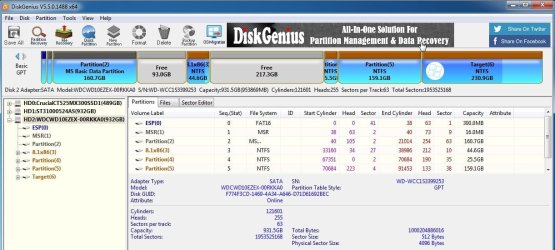
diskgenius can see the partitions

uninitialized2.jpg

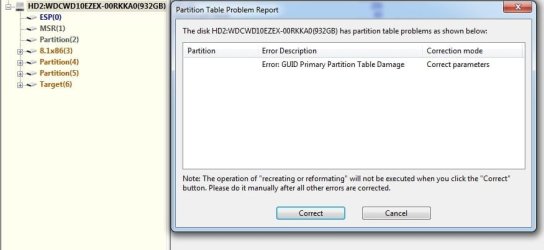
diskgenius has detected a problem which it offers to fix.

Click Correct

uninitialized3.jpg

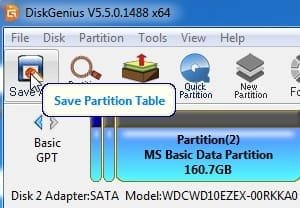
click Save

uninitialized4.jpg

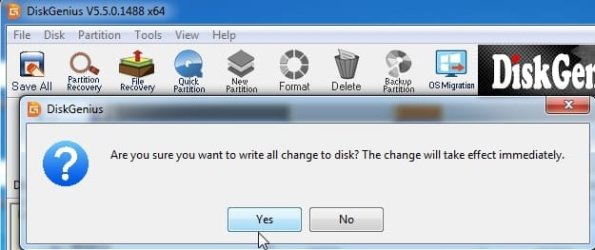
confirm

uninitialized5.jpg

and there you go

uninitialized6.jpg


I cant guarantee it will be able to fix your problem , because we dont know what the problem is. But it might at least throw some light on the matter
 

My Computers My Computers

System One System Two

  • Computer type
    PC/Desktop
    OS
    7 X64
    CPU
    i5 8400
    Motherboard
    gigabyte b365m ds3h
    Memory
    2x8gb 3200mhz
    Hard Drives
    various
    PSU
    pure power 11 400w cm
    Case
    Coolermaster
    Cooling
    cryorig m9i
  • Computer type
    PC/Desktop
    OS
    7x64
    CPU
    g5400
    Motherboard
    ga b365m ds3h
    Memory
    8gb ddr4 2400
    PSU
    xfx pro 450w
If I understood your posts, there is a problem with an external disk.

You could try attaching the sick disk to a working machine and see if a partition recovery program can fix it.

If not then try data recovery program.

I would run diskgenius (free version) first and see what it says.

DiskGenius Download Center | Free Download DiskGenius

surprising what it can do. Here is an example

windows disk mgmt says

View attachment 424972

diskgenius can see the partitions

View attachment 424973

diskgenius has detected a problem which it offers to fix.

Click Correct

View attachment 424974

click Save

View attachment 424975

confirm

View attachment 424976

and there you go

View attachment 424977


I cant guarantee it will be able to fix your problem , because we dont know what the problem is. But it might at least throw some light on the matter
Wow, I tried another data recovery software & as far as I could tell, it couldn't bring up the drive, but yours did, but it threw me this error when I clicked on one of the folders. sigh

Read Sector Error! Disk: HD6:WDElements2667(3726GB) From Sector: 6077560. 2048 Sector(s) Total. (Err:23 Data error (cyclic redundancy check).)

So what does that mean? I can't get the data?

I was just about to format it in hopes that would fix it. sigh

Thanks
 

My Computer My Computer

OS
XP 64 (I think) & 7 Home
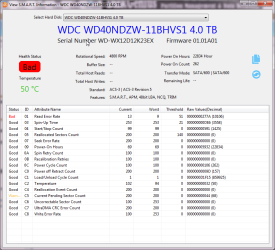
You can try checking the smart data

disk>view smart information

you can try verify and repair bad sectors
 

My Computers My Computers

System One System Two

  • Computer type
    PC/Desktop
    OS
    7 X64
    CPU
    i5 8400
    Motherboard
    gigabyte b365m ds3h
    Memory
    2x8gb 3200mhz
    Hard Drives
    various
    PSU
    pure power 11 400w cm
    Case
    Coolermaster
    Cooling
    cryorig m9i
  • Computer type
    PC/Desktop
    OS
    7x64
    CPU
    g5400
    Motherboard
    ga b365m ds3h
    Memory
    8gb ddr4 2400
    PSU
    xfx pro 450w
If I understood your posts, there is a problem with an external disk.

You could try attaching the sick disk to a working machine and see if a partition recovery program can fix it.

If not then try data recovery program.

I would run diskgenius (free version) first and see what it says.

DiskGenius Download Center | Free Download DiskGenius

surprising what it can do. Here is an example

windows disk mgmt says

View attachment 424972

diskgenius can see the partitions

View attachment 424973

diskgenius has detected a problem which it offers to fix.

Click Correct

View attachment 424974

click Save

View attachment 424975

confirm

View attachment 424976

and there you go

View attachment 424977


I cant guarantee it will be able to fix your problem , because we dont know what the problem is. But it might at least throw some light on the matter
Ok, so at the top it says it's DAMAGED, does that mean your software can't fix it?

Obviously I can't copy large files or folders over, but I don't understand the difference between the standard & pro & I'm on a tight budget.

I really need to try & get this drive fixed until I get a new external.

This is a one-time fee, I don't have to pay monthly, do I?

How do I reach you?

Thanks

- - - Updated - - -

You can try checking the smart data

disk>view smart information

you can try verify and repair bad sectors

Here's what I got. sigh

https://i.imgur.com/YDE7B9a.png

- - - Updated - - -

You can try checking the smart data

disk>view smart information

you can try verify and repair bad sectors
Are you an affiliate or part of Disk Genius? I just filled out the contact form on DG.
 

My Computer My Computer

OS
XP 64 (I think) & 7 Home
I am not connected to diskgenius. You dont need to buy it unless you want to recover large files. Looks like there is a serious problem with the disk.

you can try some free data recovery software first. Recuva for example.

YDE7B9a.png
 

My Computers My Computers

System One System Two

  • Computer type
    PC/Desktop
    OS
    7 X64
    CPU
    i5 8400
    Motherboard
    gigabyte b365m ds3h
    Memory
    2x8gb 3200mhz
    Hard Drives
    various
    PSU
    pure power 11 400w cm
    Case
    Coolermaster
    Cooling
    cryorig m9i
  • Computer type
    PC/Desktop
    OS
    7x64
    CPU
    g5400
    Motherboard
    ga b365m ds3h
    Memory
    8gb ddr4 2400
    PSU
    xfx pro 450w
I am not connected to diskgenius. You dont need to buy it unless you want to recover large files. Looks like there is a serious problem with the disk.

you can try some free data recovery software first. Recuva for example.

View attachment 424978

Ok, I ran that & now I'm off to bed. I haven't slept well in 2 nights. sigh.

Here's a bit of what it found. https://mega.nz/file/10UiGSrL#meTLBA8efSOkZvxkDzuhvSODKMKI1fkQms9TMbCJ8WA

I don't understand what that recycle bin is. I thought the recycle bin is only on C drive, not on an external.

What should I do? Going thru every green file would take forever.

I appreciate your help sincerely.
Thanks
 

My Computer My Computer

OS
XP 64 (I think) & 7 Home
Back
Top