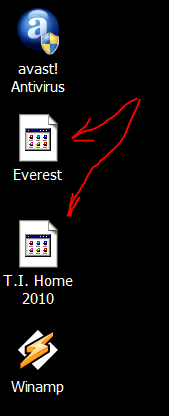
I'm running Win 7 Home premium 64. Everything is running great, but I have one small complaint. As you know, some desktop icons have a really long name, so I like to rename them with a shorter name. When I do, some of them turn into a generic icon the next time I reboot. If I just keep the name given to the icon by the software install, everything is fine. I am including a pic. I've tried refreshing the icons, but that doesn't work. If I change the color depth to 16 bit, then back to 32 bit, that fixes it. I will have to see if it sticks next time I reboot. But why does it happen in the first place?
Capture.PNG
Capture.PNG
Attachments
My Computer
- Computer Manufacturer/Model Number
- Home built
- OS
- Win 7 Home premium 64
- CPU
- Core 2 Duo E8500 Wolfdale 3.16GHz
- Motherboard
- MSI P45 Platinum
- Memory
- Eight gigs Corsair DDR2 8500 1066 RAM @ 5 5 5 18/800/1.8
- Graphics Card(s)
- EVGA GTX 260
- Sound Card
- X-fi extreme gamer
- Monitor(s) Displays
- 26" Viewsonic
- Hard Drives
- Two SATA WD 500 gig, 7200 RPM, 32 MB cache Caviar Black OS drive in RAID0
SATA WD 1 TB, 7200 RPM, 32 MB cache Caviar Black Storage drive
- PSU
- CORSAIR CMPSU-1000HX 1000W PSU
- Case
- LianLi
- Cooling
- Zalman 9900 CPU cooler, factory LianLi case fans.
- Keyboard
- Logitech G15
- Mouse
- Logitech MX 518
- Internet Speed
- Not the best!