LG Monitor Driver

ScourgeDL

New member
Member
Local time
12:26 PM
Messages
27
When I go to the LG website and download the Windows 7 driver for the LG Flatron W2361VG-PF my AVG Anti-Virus goes insane saying the Setup.exe file has the virus Win32/Virut in it. Anyone else run into this?
 

My Computer My Computer

At a glance

Windows 7 Home Premium 64-BitIntel Core i7-960 3.2GHz12GB Triple Channel 1800MhzEVGA GeForce GTX 580 3GB
Computer Manufacturer/Model Number
CyberPowerPC
OS
Windows 7 Home Premium 64-Bit
CPU
Intel Core i7-960 3.2GHz
Motherboard
Asus P6T DELUXE V2
Memory
12GB Triple Channel 1800Mhz
Graphics Card(s)
EVGA GeForce GTX 580 3GB
Sound Card
SoundBlaster X-Fi Titanium Fatal1ty Champion Series
Monitor(s) Displays
LG Flatron W2361VG-PF
Screen Resolution
1980x1020
Hard Drives
300GB Gaming Western Digital VelociRaptor
1TB Western Digital Caviar Black
PSU
Thermaltake ToughPower 1,000 Watts Power Supply
Case
Raidmax Monster
Cooling
Liquid for CPU and case fans
Keyboard
Razer Blackwidow Ultimate
Mouse
Razer Imperator
Internet Speed
Faster Than The Average Turtle
Other Info
Logitech Z-5500 Surround Sound
When I go to the LG website and download the Windows 7 driver for the LG Flatron W2361VG-PF my AVG Anti-Virus goes insane saying the Setup.exe file has the virus Win32/Virut in it. Anyone else run into this?


What website did you use?

When I go to Support - LG Electronics USA
and go to the download section and then list computer items and then displays
all I see are owner manuals and the like listed.

No drivers or software come up with any search there.

Makes me wonder what hole in the wall joint you found 'drivers' at..or
what super secret LG site hides such files.

EDIT.. oh, by the way , why are yyou looking for 'drivers' for your monitor anyway?
My LG monitor didnt' need any special 'driver' to work with Windows 7.
After doing some more searching I've yet to find any drivers of tis sort from LG offiial sites.
I do find LG Display 'drivers' at sites I personally would flag as highly suspect sites to download files from.
Good luck.
 

My Computer My Computer

At a glance

Windows 7 64Intel 8500E4 GB RAMNvidia 285GTX
Computer Manufacturer/Model Number
Homebrew Specials
OS
Windows 7 64
CPU
Intel 8500E
Motherboard
Abit IP35 Pro
Memory
4 GB RAM
Graphics Card(s)
Nvidia 285GTX
Sound Card
Realtek on board
Monitor(s) Displays
L246WP (LG 24 inch flat panel
Screen Resolution
1920x1200
Hard Drives
4 or so. 250 to 1 gig. Seagates/Maxtor and WD. What a crowd.
PSU
Corsair 750
Case
Antec
Cooling
Hot Air
Keyboard
Logitech G15
Mouse
Logitech G5 (best mouse ever)
Internet Speed
Blistering Fast Comcast Cable. Really.
Other Info
Build my own since mid 80's. Yah the century prior to the one your in now.
My LG came with a "driver disc" but as far as I could dig, couldn't find any drivers on it? It works just fine with the standard display driver Win7 is using...are you having problems with yours?
 

My Computer My Computer

At a glance

7 Pro x64Intel Core i7-640M8GBGT330M
Computer Manufacturer/Model Number
Sony VPCZ1390X CTO
OS
7 Pro x64
CPU
Intel Core i7-640M
Motherboard
Sony/Intel
Memory
8GB
Graphics Card(s)
GT330M
Monitor(s) Displays
Built-in 13" + 24" LG Flatron
Screen Resolution
1920x1080, 1920x1080
Hard Drives
Internal-2x128GB SSD (Raid 0), 500GB WD Caviar Green
External- 3TB WD
Keyboard
Logitech Illuminated
Mouse
Logitech Performance MX
Internet Speed
7 MB -- Sprint Overdrive on 4G
Other Info
Sprint EVO 3D (Synergy 2.3.4)
Upload the file to virus total to check.
 

My Computer My Computer

At a glance

Windows 7 Ultimate x86-64[email protected] 1066MHz FSB6GB DDR3 1066MHz9300M GS 256MB Dedicated (Speed) + Intel4500M...
Computer Manufacturer/Model Number
Sony Vaio Z46GDU
OS
Windows 7 Ultimate x86-64
CPU
[email protected] 1066MHz FSB
Motherboard
Sony branded
Memory
6GB DDR3 1066MHz
Graphics Card(s)
9300M GS 256MB Dedicated (Speed) + Intel4500MHD (Stamina)
Sound Card
Realtek HD Audio
Monitor(s) Displays
13.1' WXGA
Screen Resolution
1600x900
Hard Drives
320GB 7200RPM w/ 16MB cache
Internet Speed
1MB/s
LG lack of Windows 7 support

I've had Windows7-64 bit for the last 9 months and have been unable to find a driver from LG that will give me the resolution that I used to have on my 22" screen. At 1280 X 1024 I should receive much higher resolution. BTW, the resolution was perfect prior to upgrading to 64bit. When I contacted LG 8 months ago they basically told me to go pound sand. I'm very disappointed in the company, both at their response and their lack of supporting the largest desktop OS in the world. I will never purchase another LG product and encourage all my clients, family and friends to follow suit. I am now shopping for a new large screen monitor - so if you know anyone that supports 64bit I would appreciate your suggestions to save me some time of researching.
 

My Computer My Computer

At a glance

windows 7 enterprise 64 bit
OS
windows 7 enterprise 64 bit
You shouldn't need a driver for the monotor.

As far as the resolution, make sure you have the current drivers for your graphics card. this should resolve your resolution problem.

In terms of the monitor itself, you can install the one off the disc. Its basically a color profile if you choose to use it.

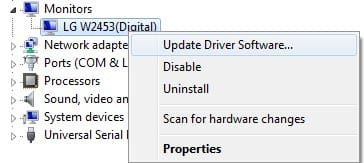
I found it easier to update from the Device Manager manually, and point it towards the CD.

R/Click the Monitor in the Monitor Section and choose Update Driver.
Then Browse my Computer.
Then Browse to the CD/DVD drive as the location. Leave the "Include Sub Folders" box checked.
 

Attachments

  • Untitled.jpg
    Untitled.jpg
    12.1 KB · Views: 193

My Computer My Computer

At a glance

Windows 7 Home Premium 64bitIntel Core i7 2700k8GB Mushkin Redline Ridgebacks @1866EVGA GTX570 SC
Computer Manufacturer/Model Number
Custom (Self Build)
OS
Windows 7 Home Premium 64bit
CPU
Intel Core i7 2700k
Motherboard
eVGA P67 SLI
Memory
8GB Mushkin Redline Ridgebacks @1866
Graphics Card(s)
EVGA GTX570 SC
Sound Card
XiFi Titanium HD
Monitor(s) Displays
LG W2453V
Screen Resolution
1920x1080
Hard Drives
Intel 320 80GB -- Intel X25-V 40GB --WD Black 1TB x2 -- WD Blue 640GB
PSU
Seasonic x750
Case
Corsair 600T SE White
Cooling
eVGA Superclocked CPU Cooler
Keyboard
Saitek Cyborg
Antivirus
Kaspersky
Browser
IE
Other Info
LG BD/DVD
Thanks - slightly different resolution

Thanks for the input. Unfortunately the Disk I have does not have a Windows7 driver and LG does not yet have a Win7 64bit driver. However, upon looking at my display adapter driver I noticed I was using the Standard VGA instead of the NVIDIA driver from Dell. Once loaded - resolution issues are resolved. Hope this helps anyone else struggling with this.
Thanks again.
 

My Computer My Computer

At a glance

windows 7 enterprise 64 bit
OS
windows 7 enterprise 64 bit
LG W2452T and Windows 7

I was having the same problem with the LG W2452T monitor and Windows 7 on my Dell Inspiron 1720 laptop. I originally had Vista but upgraded and the monitor would no longer be recognized.. I went to the Dell website and downloaded - nVidia GeForce 8400M - driver for Vista and it fixed my problem. Here's the link:

http://support.dell.com/support/downloads/download.aspx?c=us&cs=19&l=en&s=dhs&releaseid=R190091&SystemID=INS_PNT_PM_1720&servicetag=741T8F1&os=WLH&osl=en&deviceid=13475&devlib=0&typecnt=0&vercnt=4&catid=-1&impid=-1&formatcnt=0&libid=6&typeid=-1&dateid=-1&formatid=-1&source=-1&fileid=261031
 

My Computer My Computer

At a glance

Windows 7 Professional x32
OS
Windows 7 Professional x32
Get Windows 7 to use a generic driver that works with size you want, especially if it worked in that resolution before.
-------
Otherwise, I think you want video card driver updated, too!
 

My Computer My Computer

At a glance

Windows 7 Ultimate Retail Box (64-bit install...AMD FX-8350 CPU v1.15 (or 1.0F) BIOS was requ...8G CAS-7 G-Skill DDR3 @1333 (2 fours) [mobo n...Radeon HD 7950 [3 gigs of GDDR5] MSI Twin Fro...
Computer type
PC/Desktop
Computer Manufacturer/Model Number
Self Built Custom
OS
Windows 7 Ultimate Retail Box (64-bit installed) + Service Pack 1
CPU
AMD FX-8350 CPU v1.15 (or 1.0F) BIOS was required!
Motherboard
MSI 890FXA-GD70
Memory
8G CAS-7 G-Skill DDR3 @1333 (2 fours) [mobo nonOC max rec'd]
Graphics Card(s)
Radeon HD 7950 [3 gigs of GDDR5] MSI Twin Frozr model
Sound Card
Realtek High Definition Audio (onboard mobo, ALC-889 chip)
Monitor(s) Displays
2 WS LED Monitors: One LG One Viewsonic
Screen Resolution
1920 by 1080
Hard Drives
SSD for OS: Samsung 840 Pro
SSD for VM and utilities: Adata SX900
7200 RPM SATA HDs for the rest: Hitachi and Seagate
PSU
Corsair TX850 - 850W max, in service since August 2010.
Case
Thermaltake Armor A90
Cooling
Thermaltake Spin Q CPU Cooler, in service since August 2010
Keyboard
Logitech G11
Mouse
Logitech M310 Wireless
Internet Speed
100 Megabit broadband supposedly upgraded from 50 (Cable)
Antivirus
Bitdefender Internet Security 2014 suite
Browser
Pale Moon 64-bit main, also IceDragon, Opera, and Maxthon.
Other Info
CompTIA A+ certified (220-800 series) in July 2013.
LG W2442PE windows 7

I tried to connect an LG flatron W2442PE monitor to my HP laptop running windows 7 64 bit professional version through the VGA port. It didn't work, at least not in the resolution I want. Trying to adjust to a higher resolution fails. On the internet I don't find a VGA driver for this screen and I don't believe there is one.

Then I bought a cable: displayport --> HDMI to connect my laptop from the displayport (an HP specific type of HDMI interface) to the HDMI input on the LG screen. The result: automatic recognition of the monitor, the resolution I want immediately and ... 64 bit operation mode.

Conclusion: on my computer with windows 7, an LG display works perfect but not through the VGA port. You have to use the HDMI or similar type of display port. Don't waiste time searching for screen specific drivers!
 

My Computer My Computer

At a glance

windows 7 professional 64 bitIntel quad core4 GBIntel HD 4000
Computer type
Laptop
Computer Manufacturer/Model Number
HP
OS
windows 7 professional 64 bit
CPU
Intel quad core
Memory
4 GB
Graphics Card(s)
Intel HD 4000
It's perfectly normal for VGA to be limited to a specific sub set of the resolutions available - It is a obsolete analogue connector and is only included for backwards compatibility with older hardware display- port is the best to use as it provides some added specific features (daisy chain multi monitor support is one ), then followed by other digital connectors like DVI and then HDMI I have not used a VGA connector for getting on for ten years
 

My Computers My Computers

  • At a glance

    Windows 11 Pro x64 [Latest Release and Releas...Ryzen 9 5950X, 3.8 - 5.2 MHz64GB [2 x 32GB] DDR4 3200MHz4GB NVIDIA GEFORCE GTX 1650 Ti
    Computer type
    PC/Desktop
    Computer Manufacturer/Model Number
    ChillBlast - Custom to my design
    OS
    Windows 11 Pro x64 [Latest Release and Release Preview]
    CPU
    Ryzen 9 5950X, 3.8 - 5.2 MHz
    Motherboard
    Asus Prime X570-Pro
    Memory
    64GB [2 x 32GB] DDR4 3200MHz
    Graphics Card(s)
    4GB NVIDIA GEFORCE GTX 1650 Ti
    Sound Card
    On-board SPDIF to 5.1 System + HDMI [5.1 system]
    Monitor(s) Displays
    32" UHD 32 Bit HDR Monitor + 43" UHD 4K 32Bit HDR TV
    Screen Resolution
    2 x 3840 x 2160 @60Hz
    Hard Drives
    1TB M2 SSD OS, 500GB Fast Access SSD, 2 x 8TB Data + Various Externals from 1TB to 4TB, 10TB NAS
    PSU
    NZXT C750 80 PLUS Gold 750W Modular PSU
    Case
    Workstation Case [Matt Black]
    Cooling
    NZXT Kraken X63 280mm CPU Cooler +2x Quiet Case fans
    Keyboard
    Logitech Wireless MX Keys & K400 + others
    Mouse
    Logitech Wireless MX Master 3S
    Internet Speed
    920 MB Down 50 MB Up
    Antivirus
    BitDefender Total Security Pro
    Browser
    Chrome (always run latest Non-Beta)
    Other Info
    Also run ...
    Laptop - Quad 8GB - Windows 10 Pro x64
    Nexus 7 Android tablet x2
    Samsung 10.2" tablet
    Blackview TAB 8 4G Android Tablet c/w Keyboard
    Wacom Intuos Pro Medium Pen Pad
    Wacom Intuos Pro Small Pen Pad
    Wacom Expresskeys Remote
    Loopdeck+ Graphics Controller
    Shuttle Pro v2 Control
  • At a glance

    Windows 11 Pro x64 Latest RPIntel I7 10750H 5.0GHz32GB [2x16GB] DDR4 2933 MHznVidia GTX1650Ti 4 GB GDDR6
    Computer type
    Laptop
    System Manufacturer/Model Number
    Dell XPS 17 10750H
    OS
    Windows 11 Pro x64 Latest RP
    CPU
    Intel I7 10750H 5.0GHz
    Motherboard
    Dell XPS
    Memory
    32GB [2x16GB] DDR4 2933 MHz
    Graphics Card(s)
    nVidia GTX1650Ti 4 GB GDDR6
    Sound Card
    Stock [Realtek] 4 Speaker
    Monitor(s) Displays
    17" IPS UHD+ Infinity Edge Touchscreen
    Screen Resolution
    3840 x 2400
    Hard Drives
    2TB M2 NVMe, 4TB External + various 500GB & 1TB External NVMe (also have access to spinner HDD from
    PSU
    Stock
    Case
    Stock XPS Aluminium & Carbon Fibre
    Cooling
    Stock - Active Fan Control
    Keyboard
    Backlit + Various Logitech
    Mouse
    Stock Track Pad + Logitech MX Trackball
    Internet Speed
    72 MB Down 18MB Up
    Browser
    Chrome
    Other Info
    Also run ...
    Laptop - Quad 8GB - Windows 10 Pro x64
    Nexus 7 Android tablet x2
    10.2" tablet
    Sony Z3 Android Smartphone
    Wacom Intuos Pro Medium Pen Pad
    Wacom Intuos Pro Small Pen Pad
    Wacom Expresskeys Remote
    Loopdeck+ Graphics Controller
    Shuttle Pro v2 Control Pad
    10TB NAS
Why would anybody want to use VGA?
Why does VGA still exist?
If one had something that needs VGA I would suggest upgrading the hardware.

Then again maybe their is something that I'm missing.
 

My Computer My Computer

At a glance

Windows 10 Pro. 64/ version 1709 Windows 7 Pr...Intel i7-6800K @ 4.3Corsair Platinum 16 gig @2400EVGA GTX 1070 OC
Computer type
PC/Desktop
Computer Manufacturer/Model Number
Home made Desktop
OS
Windows 10 Pro. 64/ version 1709 Windows 7 Pro/64
CPU
Intel i7-6800K @ 4.3
Motherboard
ASUS X-99 Deluxe II
Memory
Corsair Platinum 16 gig @2400
Graphics Card(s)
EVGA GTX 1070 OC
Monitor(s) Displays
Asus 27" LED LCD/VE278Q
Screen Resolution
1920-1080 or 1280-720 HDMI
Hard Drives
INTEL SSD 730-240 Gb Sata 3.0/
PSU
EVGA Platium 1200W
Case
Phanteks Luxe Tempered Glass 8 fans/ one radiator
Cooling
XSPC/ Water Cooled CPU
Keyboard
Das 4 Professional
Mouse
Logitech M705/MX Anywhere 2-S
Internet Speed
100 mbits
Antivirus
Microsoft Security Essentials/ Malwarebytes Premium 3.0/ SAS
Browser
I.E. 11 default/Firefox/ ISP Time Warner Cable/Spectrum
Other Info
LG BluRay Burner/
Sound system-KLipsch-THX/
Icy Dock ssd Hot Swap bays.
Back
Top