Westinghouse L2610NW will not work with HDMI/DVI cable

Killer95Stang

New member
Local time
5:47 AM
Messages
3
Gateway FX6800 computer was purchased in August and everything has been perfect with pre-loaded Vista Home Premium 64bit.

Westinghouse 26" L2610NW monitor installed with HDMI to HDMI/DVI cable on a single ATI HD 4850 GPU.

Fast forward to Oct 22nd when I finally was able to install Windows 7 Home Premium. While about 80% into the upgrade (yes I wanted to keep some pre-loaded software), the screen went blank then made a popping sound with the box now say "OUT OF RANGE". Windows 7 itself continued to install and I finished the install after connecting a 32" TV through HDMI /DVI cable.

Since then I've tried everything, changing to latest Catalyst drivers 9.10 and adjusting setting to no avail.

I've hooked the monitor to three other computers operating on Vista and XP and all work perfect with the HDMI /DVI cable

Right now the only way to get the monitor to work is to use a VGA cable at 1920 x 1200 resolution at 59htz. Even if I change to 60htz the computer will change it back.

All I want is to get rid of the popping sound at startup and to use the HDMI input on the monitor. Once I do that I'll install the second video card and second monitor I have sitting here.
 

My Computer My Computer

At a glance

Win 7 (home prem 64bit)i7 core 9209 gigs DDR3(2) ATI HD 4850 (crossfire)
Computer Manufacturer/Model Number
Gateway FX6800
OS
Win 7 (home prem 64bit)
CPU
i7 core 920
Motherboard
Gateway
Memory
9 gigs DDR3
Graphics Card(s)
(2) ATI HD 4850 (crossfire)
Sound Card
Creative XFI Extreme
Monitor(s) Displays
D ual Westinghouse 26" L2610NW
Hard Drives
750 gig SATA 7200, 1 tb Western Digital Black
PSU
500w
Case
standard
Cooling
standard
I have had the same problem with nearly identical equipment (same monitor and PC but I swapped the ATI card out for a GTX260).

I have never been able to get that monitor to work at its native 1920x1200 in HDMI (have always had to scale it back to 1920x1080) but after upgrading to Win7 now all I get is "out of range" error message.

Someone advised to try booting in safe mode but I can't even see the safe mode options since that is also "out of range". If I have the monitor turned off during bootup, I can see the Win7 logon screen in a low resolution but if I log in then it defaults to some other "out of range" resolution. I'm guessing it detects the monitor, finds some kind of listing that shows it is 1920x1200, and then defaults to that even though the monitor doesn't work at that resolution in HDMI (which is stupid in its own way, I know).

I can't say I'm all that impressed with Windows 7 so far. This was definitely NOT my idea.

As a last ditch I will try plugging in my old monitor to see if I can force a lower resolution, but aside from that are there any other ideas out there?
 

My Computer My Computer

At a glance

Win 7i7 9203GBnVidia GTX260
Computer Manufacturer/Model Number
Gateway FX6800-01e
OS
Win 7
CPU
i7 920
Motherboard
Intel X58 (Gateway locked)
Memory
3GB
Graphics Card(s)
nVidia GTX260
Monitor(s) Displays
Westinghouse 26"
Hard Drives
750GB
PSU
Stock
Case
Stock
Cooling
Stock
Out of range means a refresh rate is not set compatible to monitor.
 

My Computer My Computer

At a glance

7600.20510 x86P4 550 3.4 GHz HT running at 3.5 GHzOCZ 2 GB(2x1GB) DDR400mHz running @ 414 mHzHIS Radeon HD 3850 IceQ 3 Turbo HDMI Dual DL-...
Computer Manufacturer/Model Number
self built
OS
7600.20510 x86
CPU
P4 550 3.4 GHz HT running at 3.5 GHz
Motherboard
MSI PM8M3-V (MS-7211 v1.x) Micro-ATX mainboard
Memory
OCZ 2 GB(2x1GB) DDR400mHz running @ 414 mHz
Graphics Card(s)
HIS Radeon HD 3850 IceQ 3 Turbo HDMI Dual DL-DVI AGP
Sound Card
MOTU Traveler firewire studio interface 192 kHz 24 bit
Monitor(s) Displays
22" widescreen Acer X223W LCD, 17" Compaq P75 CRT
Screen Resolution
1680x1050 and 1280x1024
Hard Drives
SATA I x2 WD, 400 GB and 120 GB, SATA 2 WD Caviar Black 1 TB
PSU
350W generic
Case
Cybertronpc, it glows blue
Cooling
stock cpu fan, Ice-Q 3 gpu and system, many case fans
Keyboard
Logitch Classical Keyboard 200
Mouse
Logitech Mediaplay cordless
Internet Speed
1792/448 kbits/sec
Other Info
SATA II PCI fake RAID adapter, 1 GB Readyboost, original ATI Remote Wonder (even works with WMC perfectly), Logitech Rumblepad 2 game controller x2
Out of range means a refresh rate is not set compatible to monitor.

Yes... that may be true, but we have no way to fix the problem. Starting in safe mode and forcing settings does not work, since windows just sets it back to a resolution that is out of range. Also, when the monitor has the "out of range" message, their is no access to the monitor setup menu (OSD).
 

My Computer My Computer

At a glance

Win 7 (home prem 64bit)i7 core 9209 gigs DDR3(2) ATI HD 4850 (crossfire)
Computer Manufacturer/Model Number
Gateway FX6800
OS
Win 7 (home prem 64bit)
CPU
i7 core 920
Motherboard
Gateway
Memory
9 gigs DDR3
Graphics Card(s)
(2) ATI HD 4850 (crossfire)
Sound Card
Creative XFI Extreme
Monitor(s) Displays
D ual Westinghouse 26" L2610NW
Hard Drives
750 gig SATA 7200, 1 tb Western Digital Black
PSU
500w
Case
standard
Cooling
standard
Westinghouse does not supply a driver for their monitors. With Vista and now Win7 the computer just uses the supplied Generic PnP Monitor driver that I attached.

I hope the attached file is what you are looking for...

Thanks again...
 

Attachments

My Computer My Computer

At a glance

Win 7 (home prem 64bit)i7 core 9209 gigs DDR3(2) ATI HD 4850 (crossfire)
Computer Manufacturer/Model Number
Gateway FX6800
OS
Win 7 (home prem 64bit)
CPU
i7 core 920
Motherboard
Gateway
Memory
9 gigs DDR3
Graphics Card(s)
(2) ATI HD 4850 (crossfire)
Sound Card
Creative XFI Extreme
Monitor(s) Displays
D ual Westinghouse 26" L2610NW
Hard Drives
750 gig SATA 7200, 1 tb Western Digital Black
PSU
500w
Case
standard
Cooling
standard
l2610nw lcd monitor

You should note that I have a dual monitor setup and I have interchanged them both with the HDMI input and they both get the same issues. I'm running and ASUS as well so I don't think the issue is a monitor problem I think it may be the Windows & drivers for the HDMI itself. I've upgraded the NVIDIA drivers as well but still get the same issues. You should note that it works great with just VGA cable.
 

My Computer My Computer

At a glance

Win 7
Computer Manufacturer/Model Number
ASUS 64-Bit Laptop
OS
Win 7
Same problem. I solved it (not perfect but it works) by having both the DVI/HDMI and VGA cables attached to the monitor. It always boots in VGA but it only shows the backgroung picture (very strange). I then change the monitor to HDMI with the side buttons (press and hold the second from bottom button, then hit one above it) and all is well at 1920 x 1080. Windows seems to want to be at 59Hz. I can't get it to 60Hz, it says it changes but it doesn't. Games play fine at 1920 x 1080 x 60 Hz though.

I think the problem is connected to the inability of Windows to allow 1920 x 1080 x 60Hz. That is what the manual says you should set in Windows when you get the "out of range" error. I even set a Custom Setting in the Nvidia Control Panel but no luck.
 

My Computer My Computer

At a glance

Win 7 64 bit
OS
Win 7 64 bit
I'm here with 2 of these same monitors, one about 6 months older than the other, the older one WILL boot at 1920x1200 but the second (newer) one will only boot at 1920x1080, I get the same "out of range" as everyone else. I contacted Westinghouse right after I got the second one and what I was told was that they made a change to the newer ones internally to only "see" HDMI/DVI connections at 1920x1080 and they will not do 1920x1200 through HDMI/DVI they will ONLY do 1920x1200 through VGA because of the way they are configured internally.

Long story short:

It will work at 1920x1200 through VGA only; that's the way they were made.


I wish I had seen this earrlier so I could have helped the others. :confused:
 

My Computer My Computer

At a glance

W 7 64-bit UltimateIntel Q9550 Yorkfield8GB Dominator 8500C5DATI : XFX 5870
Computer Manufacturer/Model Number
* BFK Customs *
OS
W 7 64-bit Ultimate
CPU
Intel Q9550 Yorkfield
Motherboard
ASUS P5Q Pro
Memory
8GB Dominator 8500C5D
Graphics Card(s)
ATI : XFX 5870
Sound Card
Realtek HD Audio 7-1
Monitor(s) Displays
1x 47" LCD HDMI & 3x 26" LCD HDMI
Screen Resolution
1920x1080P & 1920x1200
Hard Drives
1x 80GB Intel X25-M G2 SSD : 1x 500GB & 1x 640GB WD Caviar Black(s)
PSU
Corsair 620HX
Case
Cooler Master RC-690
Cooling
Tuniq Tower 120, 2x 140mm and 3x 120mm case fans
Keyboard
Microsoft 500
Mouse
Razer Diamondback 3G
Internet Speed
14 Mb/s
Other Info
1x Koutech 3Gb/s SATA HDD Hot Swap Rack
I know this is old however I finally solved this problem after having owned two of these since 2008!
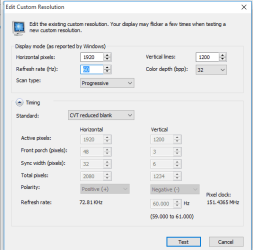
The issue is caused by an issue with the timing. If you use Nvidia drivers you can make a custom resolution to make these monitors show 1080P. When creating the resolution specify 1920 horizontal pixels, 1200 vertical lines, 60Hz refresh rate and a CVT reduced blank timing.
I hope this helps someone out there
 

Attachments

  • MonitorFix.png
    MonitorFix.png
    11.1 KB · Views: 20
Last edited:

My Computer My Computer

At a glance

Windows 10 64 bit
Computer type
PC/Desktop
OS
Windows 10 64 bit
Back
Top