Windows 7 - Default Profile. How can I edit it?

Didn't see that anyone posted this. It's back on sysprep being a solution. This video may help or may not. Windows 7 Deployment Tools Part 1
I'm going to go test it out and see if it either pulls the profile I want as default (I'm going to leave it as the only profile on the machine) or if it fixes the default profile I tried to copy over. Either would be fine with me.
 

My Computer My Computer

OS
Windows 7
It seems as though the proper way to do this is by using GPOs for things like wallpapers, start menu, etc. and "delivered" apps from the domain, nothing to do with profiles although you could have the profile wiped at logout so that everything gets reapplied at the next login.
 

My Computer My Computer

Computer Manufacturer/Model Number
Custom
OS
Windows 7 Ultimate RTM (Technet)
CPU
3.00 gigahertz Intel Core2 Duo E8400
Motherboard
ASUSTeK Computer INC. P5K/EPU Rev 1.xx
Memory
4GB
Graphics Card(s)
ATI Radeon X1950 Pro
Sound Card
Built in HD Audio
Monitor(s) Displays
22" Gateway LCD
Screen Resolution
1920 x 1200
Hard Drives
ST3160023A [Hard drive] (160.04 GB) -- drive 0, rev 8.01, ST3500630AS [Hard drive] (500.11 GB) -- drive 2, rev 3.AAK
ST3500630AS [Hard drive] (500.11 GB) -- drive 1, rev 3.AAK
Keyboard
Logitech G11
Mouse
Microsoft Wireless Laser Mouse 5000
Internet Speed
13.44 Mbps
Didn't see that anyone posted this. It's back on sysprep being a solution. This video may help or may not. Windows 7 Deployment Tools Part 1
I'm going to go test it out and see if it either pulls the profile I want as default (I'm going to leave it as the only profile on the machine) or if it fixes the default profile I tried to copy over. Either would be fine with me.

I'll give this a shot, but I've already tried it 2 or 3 times.

I'm sorry, Windows 7 users, but I can honestly say Microsoft has failed in this department. Not being able to set default profiles with ease is a dramatic set back. We keep copies of the default profiles from each lab on the server, and easily pull them down whenever needed if we set up a computer real quick.

This is definitely failblog material. :(
 

My Computer My Computer

OS
Ubuntu
A computer engineer came to work to help me out with this issue. After 3 hours, we got it working. Before you guys get your hopes up - read on. This story doesn't have a happy ending.

I have two computers on my desk with Windows 7. One we worked on and got the profiles working. What we did was copied the administrator profile and pasted it. Then renamed it to Default (we renamed the original default to default.old before this). Then, set it to be hidden, and opened the permissions to full control for "everyone" and set "everyone" as the owner of the folder, along with everything inside. And this works. Any user I create and log in, I get the default profile. Everything. Printers, desktop background, everything.

So after he left, I tried to duplicate the same thing on my other Windows 7 machine, which is running the exact same copy installed from the same CD. I have well documented instructions from getting it working the first time. I did everything step by step, logged in, and I get everything except printers and desktop backgrounds.

Both computers have default set to full control.
Both computers have everyone as the owner.
Both computers had the profile set up the same way.
Both computers are running the same version of Windows 7.

Why, OH WHY, is this thing not working?

I work with all operating system platforms, Linux, Windows, and Mac alike. I never ever felt "scared" to touch an operating system. But I can honestly say I'm afraid to even power my other (working) computer back on in case it'll undo what myself and the computer engineer spent 3 hours figuring out.

What can I do? I'm desperate to get this working. Maybe service pack 1 will provide some hope? Maybe?
 

My Computer My Computer

OS
Ubuntu

My Computer My Computer

Computer type
PC/Desktop
Computer Manufacturer/Model Number
Alienware Aurora ALX R4
OS
Windows 10 Pro (x64)
CPU
Intel Core i7-3930K (3.2GHz - 4.5GHz)
Motherboard
Alienware Aurora-R4 x79
Memory
4x Samsung 4GB PC3-12800 DDR3 (16GB 1600MHz)
Graphics Card(s)
Nvidia Geforce GTX 690
Sound Card
SteelSeries Siberia Elite
Monitor(s) Displays
Dell UltraSharp U3011
Screen Resolution
2560x1600
Hard Drives
Samsung 850 Pro 256 GB, Seagate 1TB Desktop Hybrid HDD, 2x Western Digital 4TB Green HDD
PSU
875W Some Dell PSU <.<
Case
Alienware Aurora ALX
Cooling
Custom Liquid Cooling (EK CPU & GPU blocks) dual EK 480RAD
Keyboard
Logitech G710+ Mechanical
Mouse
Logitech G700s
Internet Speed
Verizon Fios (50 mbps average)
Other Info
Server: Intel NUC D54250WYK: i5-4250U, 16GB, 256 GB mSATA, Windows Server 2012 R2

My Computer My Computer

OS
Ubuntu
Not having to use third-party imaging to clone and deploy a machine is not a good idea? The problem I am assuming is that you are trying to wedge it into an archaic method used for a 10+ year old OS called Windows XP. It really is not that hard if you forget about the methods you used with Windows XP.
 

My Computer My Computer

Computer type
PC/Desktop
Computer Manufacturer/Model Number
Alienware Aurora ALX R4
OS
Windows 10 Pro (x64)
CPU
Intel Core i7-3930K (3.2GHz - 4.5GHz)
Motherboard
Alienware Aurora-R4 x79
Memory
4x Samsung 4GB PC3-12800 DDR3 (16GB 1600MHz)
Graphics Card(s)
Nvidia Geforce GTX 690
Sound Card
SteelSeries Siberia Elite
Monitor(s) Displays
Dell UltraSharp U3011
Screen Resolution
2560x1600
Hard Drives
Samsung 850 Pro 256 GB, Seagate 1TB Desktop Hybrid HDD, 2x Western Digital 4TB Green HDD
PSU
875W Some Dell PSU <.<
Case
Alienware Aurora ALX
Cooling
Custom Liquid Cooling (EK CPU & GPU blocks) dual EK 480RAD
Keyboard
Logitech G710+ Mechanical
Mouse
Logitech G700s
Internet Speed
Verizon Fios (50 mbps average)
Other Info
Server: Intel NUC D54250WYK: i5-4250U, 16GB, 256 GB mSATA, Windows Server 2012 R2
Not having to use third-party imaging to clone and deploy a machine is not a good idea? The problem I am assuming is that you are trying to wedge it into an archaic method used for a 10+ year old OS called Windows XP. It really is not that hard if you forget about the methods you used with Windows XP.

I don't know what it is about the windows cloning thing that is appealing, but it doesn't really raise an eyebrow for me.

I use FOG - free, open source linux based cloning software that is designed specifically for imaging Windows workstations, although it does have some Linux cloning support built into it as well.

I don't want to get into a big windows vs linux fiasco here, but when you're comparing a free built in windows imaging option versus a free linux based imaging option, I mean... to me at least, the logical choice is obvious.

Moving along, all I need to do is set default profiles. Really. That's it. I don't mean to be pushy but it's been incredibly frustrating because I have a stack of brand new computers here just sitting here waiting for me to dump Windows on them. I've tried very hard to find a solution to my problem, including many different forums, contacting Microsoft directly, etc. It's frustrating from my point of view to be told "This is what you have to do to set default profiles" and I read it to find it's a ton of steps in a very cumbersome application.

If AIK is what I need to do to get default profiles going, fine, I'll do it. But when I'm reading through here about what it can do, I'm not seeing where it says "this is how you set default profiles." All it talks about is imaging and weeee we have it integrated yayyy. That's useless to me. I have an imaging solution. I just need to be able to set the profiles. It's been a very headache infatuated process because everywhere I look, all I see is people with the same issues and nobody getting a solution.

The bottom line is, all I need is to set the local default profiles on Windows 7.

I don't care what it takes, I just need to get it done. I need nothing else. JUST default profiles.
 

My Computer My Computer

OS
Ubuntu

Attachments

  • Untitled.png
    Untitled.png
    37.2 KB · Views: 1,038

My Computer My Computer

Computer type
PC/Desktop
Computer Manufacturer/Model Number
Alienware Aurora ALX R4
OS
Windows 10 Pro (x64)
CPU
Intel Core i7-3930K (3.2GHz - 4.5GHz)
Motherboard
Alienware Aurora-R4 x79
Memory
4x Samsung 4GB PC3-12800 DDR3 (16GB 1600MHz)
Graphics Card(s)
Nvidia Geforce GTX 690
Sound Card
SteelSeries Siberia Elite
Monitor(s) Displays
Dell UltraSharp U3011
Screen Resolution
2560x1600
Hard Drives
Samsung 850 Pro 256 GB, Seagate 1TB Desktop Hybrid HDD, 2x Western Digital 4TB Green HDD
PSU
875W Some Dell PSU <.<
Case
Alienware Aurora ALX
Cooling
Custom Liquid Cooling (EK CPU & GPU blocks) dual EK 480RAD
Keyboard
Logitech G710+ Mechanical
Mouse
Logitech G700s
Internet Speed
Verizon Fios (50 mbps average)
Other Info
Server: Intel NUC D54250WYK: i5-4250U, 16GB, 256 GB mSATA, Windows Server 2012 R2

Okay, so... That still raises some questions. I see in that picture you're in the system image manager. Is that the same as AIK? Or is AIK a completely different application?

Do I run that on the Windows 7 computer? Or can I run this on my XP laptop, generate the appropriate unattend.xml file, and somehow dump it onto the Windows 7 computer and it work accordingly?

When I set that up, is that part of the windows imaging? Or can I set up the Windows 7 machine with the unattend.xml file set up and use my own imaging solution?

I have read a lot of documentation about the unattend.xml file, and despite all of that, it's still very hard to have basic questions answered. So I thank you for your time on this forum helping me.
 

My Computer My Computer

OS
Ubuntu
System Image Manager is part of Windows AIK, it is used to create these unattend.xml files which can be created on Windows XP. On the Windows 7 machine you set it up make the changes you want, then with the unattend.xml file you run "C:\Windows\System32\sysprep\sysprep.exe /audit /generalize /unattend:"C:\path\to\unattend.xml \reboot" (Be logged into the account you want copied) This will restart Windows 7 in audit mode, add any drivers or printers here or additional software. Then running sysprep again with "/oobe /shutdown" Then proceed with imaging. Untested process with the oobe step, you may have to reboot a second time.
 

My Computer My Computer

Computer type
PC/Desktop
Computer Manufacturer/Model Number
Alienware Aurora ALX R4
OS
Windows 10 Pro (x64)
CPU
Intel Core i7-3930K (3.2GHz - 4.5GHz)
Motherboard
Alienware Aurora-R4 x79
Memory
4x Samsung 4GB PC3-12800 DDR3 (16GB 1600MHz)
Graphics Card(s)
Nvidia Geforce GTX 690
Sound Card
SteelSeries Siberia Elite
Monitor(s) Displays
Dell UltraSharp U3011
Screen Resolution
2560x1600
Hard Drives
Samsung 850 Pro 256 GB, Seagate 1TB Desktop Hybrid HDD, 2x Western Digital 4TB Green HDD
PSU
875W Some Dell PSU <.<
Case
Alienware Aurora ALX
Cooling
Custom Liquid Cooling (EK CPU & GPU blocks) dual EK 480RAD
Keyboard
Logitech G710+ Mechanical
Mouse
Logitech G700s
Internet Speed
Verizon Fios (50 mbps average)
Other Info
Server: Intel NUC D54250WYK: i5-4250U, 16GB, 256 GB mSATA, Windows Server 2012 R2
System Image Manager is part of Windows AIK, it is used to create these unattend.xml files which can be created on Windows XP. On the Windows 7 machine you set it up make the changes you want, then with the unattend.xml file you run "C:\Windows\System32\sysprep\sysprep.exe /audit /generalize /unattend:"C:\path\to\unattend.xml \reboot" (Be logged into the account you want copied) This will restart Windows 7 in audit mode, add any drivers or printers here or additional software. Then running sysprep again with "/oobe /shutdown" Then proceed with imaging. Untested process with the oobe step, you may have to reboot a second time.

Hm, okay. So essentially the unattend.xml file is just created on any other Windows machine, but when you run the sysprep.exe, it APPLIES that xml file to the system you're editing (in my case the Windows 7 machine).

Question... on all of our machines, we have a local administrator, and that's where we set up the default profile by adding the printers, desktop icons, start menu, taskbar settings, home page in firefox/ie, etc etc. We always use this method... always. With that being said, if I create one unattend.xml file that is adjusted to use the CopyProfile switch from "Administrator" to "Default", so I ever have to worry about running AIK again?

Because if you think about it, if I run AIK and generate the unattend.xml to point to Administrator for the CopyProfile command, and I keep that on file stored somewhere, any Windows 7 image I create I can just pull that unattend.xml file, run sysprep, and bam - it points to Administrator for the default profile.

Is my thinking on track or am I way off?
 

My Computer My Computer

OS
Ubuntu
Okay. I'm trying here. I really am.

I put the DVD in my laptop. I launched AIK. Okay, fine. Looks familiar to the link you posted me. As instructed, I went to check out the deployment tools which is where the answer file was supposedly located according to the one guide I was reading regarding this procedure.

I run the installer and I get prompted with "You do not have permission to access this file. Contact your system administrator."

...I AM THE SYSTEM ADMINISTRATOR. I have full administrator access. I even tried a local administrator account on my laptop - no dice either.

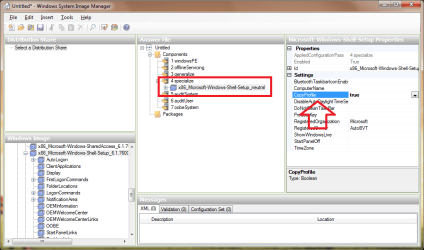
EDIT - So eventually I got it running. Not sure if the guide was wrong or what but I found other guides that had told me to do something different, so I did. I got the system imager program working and I can generate a new answer file, but under specialize I don't have a drop down option like you did in your thumbnail you posted.
 

My Computer My Computer

OS
Ubuntu
You first need to open a Windows Image, either by poping the DVD in or if you have an ISO virtual drive or even extract it. Either way you need to select the install.wim file or one of the install_*.cfg files for the version you are using.

Once you have the Windows Image pane on the far bottom left filled out, look for x86_Microsoft-Windows-Shell-Setup (replace x86 with x64 if you are using 64bit), right-click on it and select the appropriate configuration pass (specialize).
 

My Computer My Computer

Computer type
PC/Desktop
Computer Manufacturer/Model Number
Alienware Aurora ALX R4
OS
Windows 10 Pro (x64)
CPU
Intel Core i7-3930K (3.2GHz - 4.5GHz)
Motherboard
Alienware Aurora-R4 x79
Memory
4x Samsung 4GB PC3-12800 DDR3 (16GB 1600MHz)
Graphics Card(s)
Nvidia Geforce GTX 690
Sound Card
SteelSeries Siberia Elite
Monitor(s) Displays
Dell UltraSharp U3011
Screen Resolution
2560x1600
Hard Drives
Samsung 850 Pro 256 GB, Seagate 1TB Desktop Hybrid HDD, 2x Western Digital 4TB Green HDD
PSU
875W Some Dell PSU <.<
Case
Alienware Aurora ALX
Cooling
Custom Liquid Cooling (EK CPU & GPU blocks) dual EK 480RAD
Keyboard
Logitech G710+ Mechanical
Mouse
Logitech G700s
Internet Speed
Verizon Fios (50 mbps average)
Other Info
Server: Intel NUC D54250WYK: i5-4250U, 16GB, 256 GB mSATA, Windows Server 2012 R2
You first need to open a Windows Image, either by poping the DVD in or if you have an ISO virtual drive or even extract it. Either way you need to select the install.wim file or one of the install_*.cfg files for the version you are using.

Once you have the Windows Image pane on the far bottom left filled out, look for x86_Microsoft-Windows-Shell-Setup (replace x86 with x64 if you are using 64bit), right-click on it and select the appropriate configuration pass (specialize).

I did that. And I get an error. Not compatible with the current version of Windows.

Am I not allowed to run Windows System Imager on an XP Pro SP3 computer??

EDIT - Nevermind. Just ran it on another Windows 7 PC and it still gave me the same error.

Really, Microsoft?
 
Last edited:

My Computer My Computer

OS
Ubuntu
I followed the guide, just as instructed.

I ran sysprep with the unattend.xml set up with the CopyProfile = True switch.

It rebooted automatically and as it booted up said updating registry settings.

Now every time it boots up, I get:

Windows could not finish configuring the system. To attempt to resume configuration, restart the computer.

Each time I restart it, it gives me that error again.

Somebody. Please. Stab me.
 

My Computer My Computer

OS
Ubuntu
I decided to post a through-and-through step by step of what I did in hopes that somebody might be able to notice something I did wrong or something I need to change.

My work laptop is running Windows XP Pro SP3. I installed AIK and from within there I am able to get WSIM rolling.

I create a new answer file by going to file - new answer file. Then in the lower left corner, I navigate to Components / x86_Microsoft-Windows-Shell-Setup_6.1.7100.0_neutral_31bf3856ad364e35_nonSxS

I right click it and send to Pass 4 (specialize). Then I adjust CopyProfile to "True". Then, I save the answer file as unattend.xml.

Then I go to my Windows 7 computer, copy the unattend.xml into the C/Windows/System32/Sysprep folder and I double click Sysprep.exe. I check generalize and hit okay.

It applies the settings, reboots, says it's changing stuff in the registry, and I get that error.

Windows could not finish configuring the system. To attempt to resume configuration, restart the computer.

:(
 

My Computer My Computer

OS
Ubuntu
I decided to post a through-and-through step by step of what I did in hopes that somebody might be able to notice something I did wrong or something I need to change.

My work laptop is running Windows XP Pro SP3. I installed AIK and from within there I am able to get WSIM rolling.

I create a new answer file by going to file - new answer file. Then in the lower left corner, I navigate to Components / x86_Microsoft-Windows-Shell-Setup_6.1.7100.0_neutral_31bf3856ad364e35_nonSxS

I right click it and send to Pass 4 (specialize). Then I adjust CopyProfile to "True". Then, I save the answer file as unattend.xml.

Then I go to my Windows 7 computer, copy the unattend.xml into the C/Windows/System32/Sysprep folder and I double click Sysprep.exe. I check generalize and hit okay.

It applies the settings, reboots, says it's changing stuff in the registry, and I get that error.

Windows could not finish configuring the system. To attempt to resume configuration, restart the computer.

:(

Is this the guide you followed?
How to customize default user profiles in Windows 7

Microsoft states very explicitly:
This is the only supported method of customizing the default user profile for the Windows operating system. If you try to use other methods to customize the default user profile, it may result in extraneous information being included in this new default user profile. Such extraneous information could lead to serious problems with applications and system stability.

Sidenote:
I cannot for the life of me imagine why you would choose not to use roaming profiles, for that many computers.

The way you do it, makes managing such a large network unnecessarily difficult, time consuming and prone to errors.

Good luck.
 

My Computer My Computer

OS
Win7 Build 7600 x86
CPU
Pentium II 300MHz
Motherboard
Asus
Memory
32mb EDO RAM
Graphics Card(s)
Diamond Viper
Sound Card
Soundblaster 16
Monitor(s) Displays
14" AOC CRT 16K color
Screen Resolution
800x600
Hard Drives
300mb Quantum fireball
PSU
110 Watts
Cooling
Passive
Keyboard
Trust Ergonomic
Mouse
Generic
Internet Speed
256K u 128K d
It seems as though the proper way to do this is by using GPOs for things like wallpapers, start menu, etc. and "delivered" apps from the domain, nothing to do with profiles although you could have the profile wiped at logout so that everything gets reapplied at the next login.

The college I work for uses GPOs for our Vista machines, and it works very well for us!
 

My Computer My Computer

Computer Manufacturer/Model Number
Homebrew PC - "Alpha_Dawg"
OS
Windows 7 Ultimate 64 bit Steve Ballmer Signature Edition
CPU
Intel Core 2 Quad - Q9550 - 2.83GHz stock - OC'd to 3.6GHz
Motherboard
Gigabyte EP45-UD3P
Memory
4GB DDR2 800MHz (PC6400) OCZ Reaper
Graphics Card(s)
Nvidia GE Force 8800 GTS
Sound Card
Asus Xonar DX
Monitor(s) Displays
Samsung SyncMaster 2333HD
Screen Resolution
1920 x 1080
Hard Drives
WD Caviar Black 750GB - 7200RPM - 32MB cache
WD Caviar Green 1.5TB - 5400RPM - 64MB cache
WD Caviar Green 2.0TB - 5400RPM - 64MB cache
PSU
PC Power & Cooling Silencer 750
Case
Gigabyte 3D Aurora
Cooling
Case is Air - 5ea. 120mm fans (mix of Arctic and Xigmatec)
Keyboard
MS Natural Wireless KB
Mouse
MS Wireless Mouse
Internet Speed
50 mbps down/5 mbps up
Other Info
AVerMedia - AVerTVHD G2 Dual Tuner Card
I decided to post a through-and-through step by step of what I did in hopes that somebody might be able to notice something I did wrong or something I need to change.

My work laptop is running Windows XP Pro SP3. I installed AIK and from within there I am able to get WSIM rolling.

I create a new answer file by going to file - new answer file. Then in the lower left corner, I navigate to Components / x86_Microsoft-Windows-Shell-Setup_6.1.7100.0_neutral_31bf3856ad364e35_nonSxS

I right click it and send to Pass 4 (specialize). Then I adjust CopyProfile to "True". Then, I save the answer file as unattend.xml.

Then I go to my Windows 7 computer, copy the unattend.xml into the C/Windows/System32/Sysprep folder and I double click Sysprep.exe. I check generalize and hit okay.

It applies the settings, reboots, says it's changing stuff in the registry, and I get that error.

Windows could not finish configuring the system. To attempt to resume configuration, restart the computer.

:(

Is this the guide you followed?
How to customize default user profiles in Windows 7

Microsoft states very explicitly:
This is the only supported method of customizing the default user profile for the Windows operating system. If you try to use other methods to customize the default user profile, it may result in extraneous information being included in this new default user profile. Such extraneous information could lead to serious problems with applications and system stability.

Sidenote:
I cannot for the life of me imagine why you would choose not to use roaming profiles, for that many computers.

The way you do it, makes managing such a large network unnecessarily difficult, time consuming and prone to errors.

Good luck.

That's not my call to make. I'm not the network administrator. Plus, I'm not familiar with roaming profiles, but there's one thing we absolutely need and I'm not sure how roaming profiles would apply it.

In the business lab, we need xyz settings which are very unique. In the photoshop lab, we need abc settings which are very unique. Each printer needs to be set up in a particular manner with certain settings. I don't know if a roaming profile can take care of this, but we have NO issues with local profiles, none at all. It's just a total pain when we get the new OS that's supposed to be easier and Microsoft throws us through a loop. Let's just say, I understand why XP will be around, pretty much... forever.

Anyway, I did follow that guide on the Microsoft web site. I hate to say it, but that guide sucks. It's very vague. Luckily I found other guides taht went into more detail than what Microsoft offered.

One guide in particular said this:

"go to “My Computer” and you are going to rename the Default folder to Default.bak (The CopyProfile setting in Sysprep on Windows7 does not seem to work yet)."

So, let me get this straight.

Microsoft has 3 ways to set the default profile. 2 of which are not supported by Microsoft. Those 2 methods also don't necessarily work. With one of them, I can get SOME settings, but not all that I need. Yet the one they support DOESNT WORK?

And I can confirm it doesn't work. I've been pulling out my hair for the last 8 weeks over this...

I guess I just expected better.
 

My Computer My Computer

OS
Ubuntu
Back
Top