
Win7/Vista Intel Mobile 4 Distortion/Pixelation Issues

trafsta

New member
Local time
10:22 AM
Messages
9
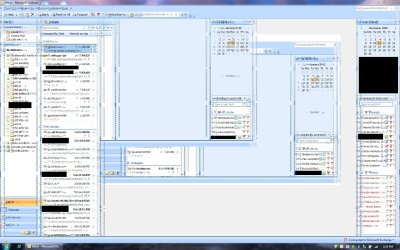
We're having some trouble on one Dell Latitude E6400 laptop w/ a Mobile Intel 4 Series Express video card. Under Vista x86 and a fresh install of Windows 7 x86 the user often gets video card distortion. When I was installing Win7 Professionl x86 on this system at my desk w/o a docking station (port replicator) nor an external monitor I did not experience any issues at all. However, once I connected it to the docking station at the users desk, along with a 1680x1050 Dell 22" monitor, the distortion/pixelation issues immediately starts. This occured under Vista as well, and according to the user when he works from home w/o a docking station or external monitor it also occured under Vista (not sure why I didn't see it, perhaps it hadn't heated up enough yet...?)

Anyways, the problem is the same as this user here:
Vista x64 display distortion/pixelation problem - Vista Forums

Our problem can be seen attached in error.jpg (this is a regular print screen screen capture). It is the same issue as the user above that was never resolved.

My guess is that it is simply a failing internal intel video card (which would require a motherboard replacement) but I want to get some other experts opinions before I try to convince Dell that this is the issue.

I have tried different drivers (from Dell, or a newer version straight from the Microsoft Driver Catalog that is downloaded straight from MS when you right click and update the driver (letting it search online). Neither has helped. It is definitely wayyyyy worse under Win7 than it was under Vista (under Vista it was tolerable, whenever it happened you could just minimize and bring the window back and it would usually fix it).

Disabling Aero fixes the problem completely (the user now has Aero turned off for the past few hours without issues). Of course, Aero stresses the video card quite a bit, which might result in issues, without Aero it would not be stressed so it does not have this problem when Aero is turned off.

What I can't explain is why a regular windows print screen (screen shot) picks up these errors. If it's a video card issue, shouldn't it just APPEAR to be messed up, but Windows should NOT pick up the distortion in a screen shot, right?

Arrrggghhh, definitely a strange problem. I couldn't find any other people with similar or the same issue, although many months ago I recall coming across the same problem for someone else on a forum somewhere... perhaps I'm just searching by the wrong keywords this time around.. if anyone else can find anything in google on this let me know...
 

Attachments
  • error.jpg
    error.jpg
    252.5 KB · Views: 441

My Computer My Computer

OS
Windows 7
Looks like capacitors are failing. They can easily be replaced if you're good with a soldering iron. Get low esr type of caps with same specs (or slightly higher voltage rating if you can't find exact) if you attempt to replace them.

Only do this of course, if it's out of warranty.

The distortion is evident in the screenshot because that is what's being generated to begin with.
 

My Computer My Computer

Computer Manufacturer/Model Number
self built
OS
7600.20510 x86
CPU
P4 550 3.4 GHz HT running at 3.5 GHz
Motherboard
MSI PM8M3-V (MS-7211 v1.x) Micro-ATX mainboard
Memory
OCZ 2 GB(2x1GB) DDR400mHz running @ 414 mHz
Graphics Card(s)
HIS Radeon HD 3850 IceQ 3 Turbo HDMI Dual DL-DVI AGP
Sound Card
MOTU Traveler firewire studio interface 192 kHz 24 bit
Monitor(s) Displays
22" widescreen Acer X223W LCD, 17" Compaq P75 CRT
Screen Resolution
1680x1050 and 1280x1024
Hard Drives
SATA I x2 WD, 400 GB and 120 GB, SATA 2 WD Caviar Black 1 TB
PSU
350W generic
Case
Cybertronpc, it glows blue
Cooling
stock cpu fan, Ice-Q 3 gpu and system, many case fans
Keyboard
Logitch Classical Keyboard 200
Mouse
Logitech Mediaplay cordless
Internet Speed
1792/448 kbits/sec
Other Info
SATA II PCI fake RAID adapter, 1 GB Readyboost, original ATI Remote Wonder (even works with WMC perfectly), Logitech Rumblepad 2 game controller x2
Cool stuff, thanks. I've replaced many-a-capacitor on Dell motherboards in the past, but this laptop is definitely still under warranty, so I shall call it in and have them replace the motherboard.

Thanks for your help!
 

My Computer My Computer

OS
Windows 7
lol, Dell won't even support it since it's a Windows 7 system, and it was purchased with Windows Vista (even though we bought the Win7 upgrade from Dell... there are no 'branded' Windows 7 upgrade DVDs available to this laptop afaik ffs...)

They insist on remote controlling the system to take a look... going to do that later when the user isn't using it, can't wait to see what the heck they are going to do.
 

My Computer My Computer

OS
Windows 7
Out of curiosity, have you installed the latest driver for the video yet?
 

My Computer My Computer

Computer Manufacturer/Model Number
self built
OS
7600.20510 x86
CPU
P4 550 3.4 GHz HT running at 3.5 GHz
Motherboard
MSI PM8M3-V (MS-7211 v1.x) Micro-ATX mainboard
Memory
OCZ 2 GB(2x1GB) DDR400mHz running @ 414 mHz
Graphics Card(s)
HIS Radeon HD 3850 IceQ 3 Turbo HDMI Dual DL-DVI AGP
Sound Card
MOTU Traveler firewire studio interface 192 kHz 24 bit
Monitor(s) Displays
22" widescreen Acer X223W LCD, 17" Compaq P75 CRT
Screen Resolution
1680x1050 and 1280x1024
Hard Drives
SATA I x2 WD, 400 GB and 120 GB, SATA 2 WD Caviar Black 1 TB
PSU
350W generic
Case
Cybertronpc, it glows blue
Cooling
stock cpu fan, Ice-Q 3 gpu and system, many case fans
Keyboard
Logitch Classical Keyboard 200
Mouse
Logitech Mediaplay cordless
Internet Speed
1792/448 kbits/sec
Other Info
SATA II PCI fake RAID adapter, 1 GB Readyboost, original ATI Remote Wonder (even works with WMC perfectly), Logitech Rumblepad 2 game controller x2
I thought I would add more evidence to the Video Card failing or a faulty driver because of the fact that AERO causes the issue. AERO is rendered on the GPU and output to the screen while the lower themes (Vista/7 Basic) are rendered on the CPU.
 

My Computer My Computer

Computer Manufacturer/Model Number
Compal JFT02 (Custom Build Laptop)
OS
Windows 7 Home Premium x64 - Mac OS X 10.6.4 x64
CPU
Intel Core 2 Duo T9300 2.5 GHz
Motherboard
JFT02
Memory
4GB Kingston DDR2-800
Graphics Card(s)
NVIDIA Geforce 8600M GT (512MB Model)
Sound Card
Realtek HD Audio
Monitor(s) Displays
WUXGA Standard Laptop Display
Screen Resolution
1680*1050
Hard Drives
Toshiba 320GB 5400RPM Laptop HD
PSU
Standard Laptop Power Supply
Case
Standard Laptop Case
Cooling
Standard Laptop Cooling
Keyboard
Standard Laptop 105 Key-Keyboard
Mouse
Synaptics Touchpad
Internet Speed
Verizion Online DSL 3360/864 kbs (dl/up)
Out of curiosity, have you installed the latest driver for the video yet?

Yes I've tried 3 Win7 versions (one from RC Win7 (May), the latest from MS's catalog, and one from Dell, no difference. Even tried an older 7.x series driver for Vista, no difference, issue still persists.

On the phone with a different tech at Dell and he has had me on hold for a while. I think he's trying to get a motherboard replacement approval to go through with his management.

If he can't get approval the only other idea I have is to put the hard drive from this E6400 into another and see if the problem persists on different hardware. I'm 99% sure it won't, so that will confirm that it is a problem with this laptop's hardware...

Will report back after the issue has been resolved just in case it helps another user down the road.
 

My Computer My Computer

OS
Windows 7
I thought I would add more evidence to the Video Card failing or a faulty driver because of the fact that AERO causes the issue. AERO is rendered on the GPU and output to the screen while the lower themes (Vista/7 Basic) are rendered on the CPU.

Yes I agree, and I have told Dell that, and this latest tech agrees with me at least. The previous one I spoke to wasn't nearly as good... :)
 

My Computer My Computer

OS
Windows 7
Well I was on hold with the dell rep earlier as he put the 'paper work' through to get a new replacement motherboard sent to me, and while I was on hold something in my good 'ol brain clicked as I tried to think of what this user had setup differently than our other E6400 users did not... and I remember that this user used to use Virtual PC, so I had the 2 virtualization options enabled in the BIOS. Sooo off I went into the BIOS while on hold to disable these options. I then booted into Windows, let it install the latest video drivers from MS Update, and I then rebooted and tried to reproduce the problem with Aero enabled... and guess what??? I could not reproduce it anymore! I have the laptop back in the hands of the user now and so far for the past hour or so it has not happened again. Sooo for those of you who have this problem disable your hardware virtualization bios options to make the issue go away. I had already upgraded from A01 to A17 bios a few days ago as well but that didn't help, so it's not something that was fixed by a newer bios.

When the tech returned from having me on hold he canceled the motherboard replacement and so far so good, no issues once the virtualization options were turned off... yay!
 

My Computer My Computer

OS
Windows 7
Well I was on hold with the dell rep earlier as he put the 'paper work' through to get a new replacement motherboard sent to me, and while I was on hold something in my good 'ol brain clicked as I tried to think of what this user had setup differently than our other E6400 users did not... and I remember that this user used to use Virtual PC, so I had the 2 virtualization options enabled in the BIOS. Sooo off I went into the BIOS while on hold to disable these options. I then booted into Windows, let it install the latest video drivers from MS Update, and I then rebooted and tried to reproduce the problem with Aero enabled... and guess what??? I could not reproduce it anymore! I have the laptop back in the hands of the user now and so far for the past hour or so it has not happened again. Sooo for those of you who have this problem disable your hardware virtualization bios options to make the issue go away. I had already upgraded from A01 to A17 bios a few days ago as well but that didn't help, so it's not something that was fixed by a newer bios.

When the tech returned from having me on hold he canceled the motherboard replacement and so far so good, no issues once the virtualization options were turned off... yay!
Good job! Glad to hear it. That's some awesome thinking on your part. :cool:
 

My Computer My Computer

Computer Manufacturer/Model Number
self built
OS
7600.20510 x86
CPU
P4 550 3.4 GHz HT running at 3.5 GHz
Motherboard
MSI PM8M3-V (MS-7211 v1.x) Micro-ATX mainboard
Memory
OCZ 2 GB(2x1GB) DDR400mHz running @ 414 mHz
Graphics Card(s)
HIS Radeon HD 3850 IceQ 3 Turbo HDMI Dual DL-DVI AGP
Sound Card
MOTU Traveler firewire studio interface 192 kHz 24 bit
Monitor(s) Displays
22" widescreen Acer X223W LCD, 17" Compaq P75 CRT
Screen Resolution
1680x1050 and 1280x1024
Hard Drives
SATA I x2 WD, 400 GB and 120 GB, SATA 2 WD Caviar Black 1 TB
PSU
350W generic
Case
Cybertronpc, it glows blue
Cooling
stock cpu fan, Ice-Q 3 gpu and system, many case fans
Keyboard
Logitch Classical Keyboard 200
Mouse
Logitech Mediaplay cordless
Internet Speed
1792/448 kbits/sec
Other Info
SATA II PCI fake RAID adapter, 1 GB Readyboost, original ATI Remote Wonder (even works with WMC perfectly), Logitech Rumblepad 2 game controller x2
" Sooo for those of you who have this problem disable your hardware virtualization bios options to make the issue go away"

Hi
as a non-techie, how can I do this.. having exact same issue after upgrading from Vista on my Dell 1737..

actually just checked via a MS tool and it says I do not have hardware -assisted virtualisation .. any ideas ?

Thanks
 

My Computer My Computer

OS
Windows 7
I hope that your PC is it okay now.

I want to tell, that my story is the same.

HP dm1, SU2300 CPU with enabled virtualization, win 7, areo, and the distortion like in the error.jpg in the opening post.

How works the XP mode under Win 7 with aero? This problem seems to be lot more commonly than we previously thought.
 

My Computer My Computer

Computer Manufacturer/Model Number
Dell XPS M1530, HP dm1-1020ed
OS
windows 7 home premium, opensuse 11
Identical issues on Lenovo R400 on Win 7 Ultimate X 64 running the very latest (@ July 2011) drivers from Lenovo, Intel as well as Windows 7 Update. The issue is best seen on this laptop by putting the laptop to "sleep" with open graphics windows (e.g. Spider Solitaire). Pixelation is evident upon "wake up". This issue has not been experienced upon fresh boot on this laptop, almost always after "waking up" the laptop as I tend to regularly suspend the laptop during normal use.

The very excellent suggestion on this forum, to disable both virtualization options in the BIOS, also resolves the pixelation issue on the Lenovo R400.
 

My Computer My Computer

Computer Manufacturer/Model Number
Lenovo R400
OS
Windows 7 Ultimate x64
CPU
C2Duo P8400 @ 2.26Ghz
Motherboard
7440CL1
Memory
3 Gb
Graphics Card(s)
Mobile Intel 4 Series Express Integrated Graphics Controller
Sound Card
Conexant 20561 Smartaudio HD
Monitor(s) Displays
LTN141W1-L05 @ 1280 X 800
Hard Drives
ST91604121AS ATA
PSU
Laptop
Case
Laptop
Cooling
Laptop
I found only one virtualization option on my hp 2740p tablet pc -- and it was already disabled... yet this pixelation issue remains -- is this hardware or OS issue, do you guys think? thanks!
 

My Computer My Computer

OS
win 7 64 ultimate
Well I was on hold with the dell rep earlier as he put the 'paper work' through to get a new replacement motherboard sent to me, and while I was on hold something in my good 'ol brain clicked as I tried to think of what this user had setup differently than our other E6400 users did not... and I remember that this user used to use Virtual PC, so I had the 2 virtualization options enabled in the BIOS. Sooo off I went into the BIOS while on hold to disable these options. I then booted into Windows, let it install the latest video drivers from MS Update, and I then rebooted and tried to reproduce the problem with Aero enabled... and guess what??? I could not reproduce it anymore! I have the laptop back in the hands of the user now and so far for the past hour or so it has not happened again. Sooo for those of you who have this problem disable your hardware virtualization bios options to make the issue go away. I had already upgraded from A01 to A17 bios a few days ago as well but that didn't help, so it's not something that was fixed by a newer bios.

When the tech returned from having me on hold he canceled the motherboard replacement and so far so good, no issues once the virtualization options were turned off... yay!

Sorry to jump into this thread... i was facing similar probs since long and i used to log out and log in to set right the distortion (refresh didnt help)

can you explain on where you got the option to disable virtualization ?
my hardware spec :
T 500 Laptop, Core 2 Duo P8400 2.26 Ghz processor, GB DDR3 ram, Intel Series 4 Chipset. Display Resolution : 1280 x 800
I am running Windows 7 Professional 64 bits SP 1. Just for info, i do not have any such problems on the other 2 OS i am using... i even uninstalled the display driver and rebooted so that windows searches for new driver and installs.. still same :cry:

LINK to Screenshot

I would really like to get over this problem...
 

My Computer My Computer

Computer Manufacturer/Model Number
Lenovo T 500 Thinkpad
OS
Triple Booting with Windows 7 Proffessional SP1 64 bit, PCBSD9.1 Isotope 64 bit and ArchLinux 64 bit
CPU
P8400 Core 2 Duo
Memory
3 GB DDR3
Graphics Card(s)
Intel 4 Series Express Chipset
Monitor(s) Displays
Lenovo Laptop Monitor
Screen Resolution
1280 x 800 (16:10 Aspect Ratio)
Hard Drives
500 GB
Browser
Chrome
Other Info
I am using EasyBCD as my bootloader. I love to explore and customize my desktop as often as i can... Playing around in Gimp is my hobby !
As an update... i have now disabled the virtualization from BIOS and then activated aero themes...
unfortunately, the pixelation seems to persist (even after i updated the driver from intel)
one consolation is that the pixelation clears when i hover the mouse over the area... !

i am sure this may not be purely hardware related problem cos for the same laptop and the other 2 OS i use i do not find any such errors... hope this issue will be resolved !
 

My Computer My Computer

Computer Manufacturer/Model Number
Lenovo T 500 Thinkpad
OS
Triple Booting with Windows 7 Proffessional SP1 64 bit, PCBSD9.1 Isotope 64 bit and ArchLinux 64 bit
CPU
P8400 Core 2 Duo
Memory
3 GB DDR3
Graphics Card(s)
Intel 4 Series Express Chipset
Monitor(s) Displays
Lenovo Laptop Monitor
Screen Resolution
1280 x 800 (16:10 Aspect Ratio)
Hard Drives
500 GB
Browser
Chrome
Other Info
I am using EasyBCD as my bootloader. I love to explore and customize my desktop as often as i can... Playing around in Gimp is my hobby !
seems to be much better now..

as an update to my previous post... i followed this change
after disabling the virtualization from bios, i booted to win7 and re-installed the driver....
this time with a change... i unchecked the check box that said re-run windows and activate for aero themes or something like that... the system asked for a reboot and now the distortion seems to have gone... i am almost 15 minutes after booting and the display is stable !

all my previous attempts i noticed that till i went for rebbot, distortion was not there and after reboot i was back to square one ! this behaviour prompted me to uncheck the box and then go for re-install of the driver which seems to have solved the issue....

thanks to all of you guys who have helped me in identifying this problem....
 

My Computer My Computer

Computer Manufacturer/Model Number
Lenovo T 500 Thinkpad
OS
Triple Booting with Windows 7 Proffessional SP1 64 bit, PCBSD9.1 Isotope 64 bit and ArchLinux 64 bit
CPU
P8400 Core 2 Duo
Memory
3 GB DDR3
Graphics Card(s)
Intel 4 Series Express Chipset
Monitor(s) Displays
Lenovo Laptop Monitor
Screen Resolution
1280 x 800 (16:10 Aspect Ratio)
Hard Drives
500 GB
Browser
Chrome
Other Info
I am using EasyBCD as my bootloader. I love to explore and customize my desktop as often as i can... Playing around in Gimp is my hobby !
Back
Top