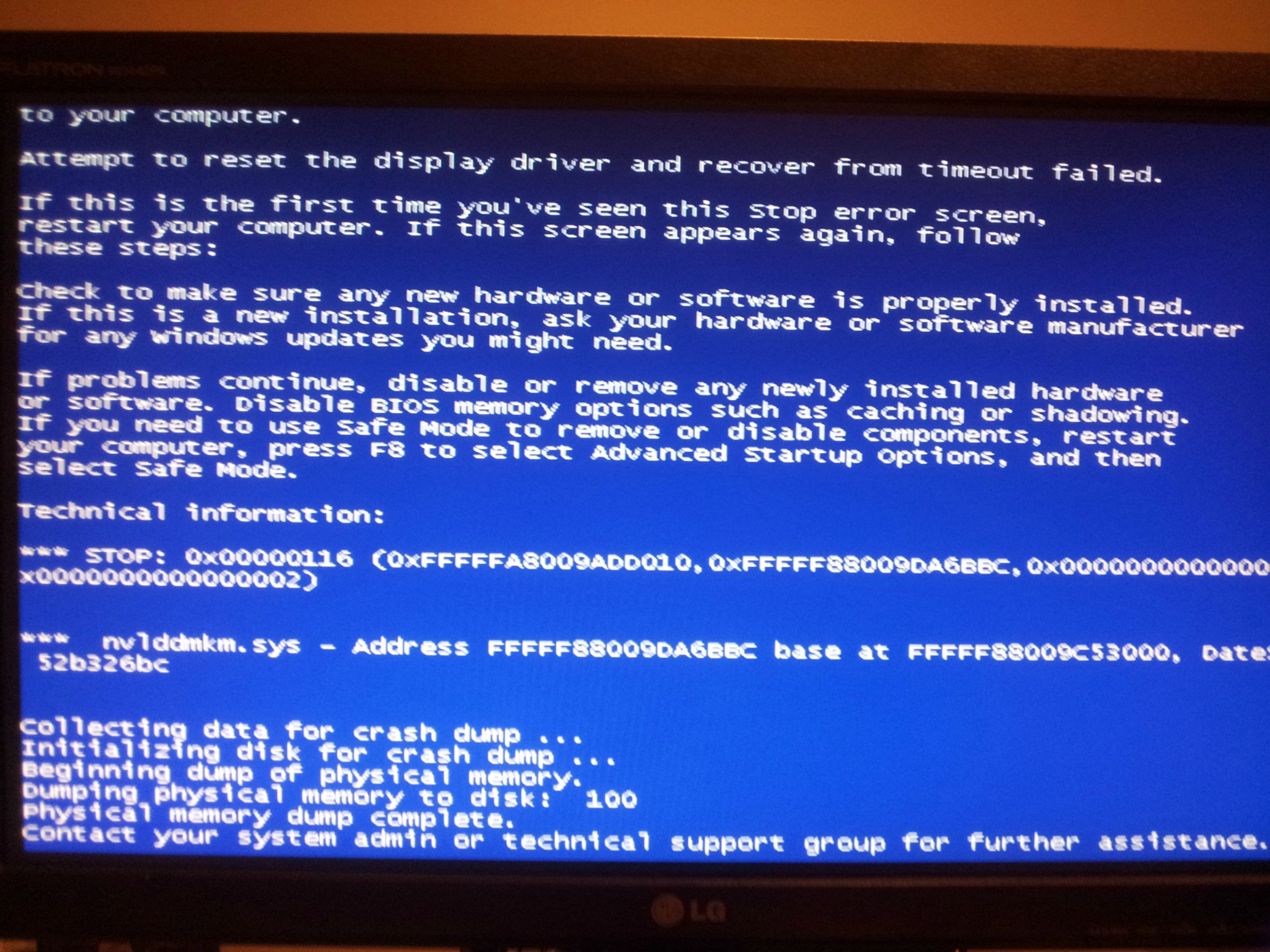
BSOD/pixelation web browsing and gaming

hellzscream

New member
Local time
6:06 AM
Messages
9
Was web browsing earlier on Chrome and randomly had the error "Display Driver NVIDIA Windows Kernel Mode, Version 331.82 stopped responding and has successfully recovered" I've been using this driver since it was released and had no issues until today. 570 gtx hd is my graphics card. I've also had this issue during gaming the screen will pixelate and sometimes it will recover others it will just freeze. Temps are around 31C during idle/web browsing and 50-78C depending on the game I am playing

I've tried updating to the latest driver 332.21 performing a clean install and reseating my graphics driver neither have helped.

Picture of the bsod
72NYQ6d.jpg


Problem signature:
Problem Event Name: BlueScreen
OS Version: 6.1.7601.2.1.0.768.3
Locale ID: 4105

Additional information about the problem:
BCCode: 116
BCP1: FFFFFA80096B7170
BCP2: FFFFF8800F153BBC
BCP3: 0000000000000000
BCP4: 000000000000000D
OS Version: 6_1_7601
Service Pack: 1_0
Product: 768_1

I've uploaded the SF diagnostic folder
 
Last edited:

My Computer

OS
Windows 7 home 64-bit
Hi hellzscream.

A stop 0x116 is a display/graphics related issue.

Are you overclocking?
Code:
CPUID:        "Intel(R) Core(TM) i7-2600K CPU @ 3.40GHz"
MaxSpeed:     3400
[COLOR=Red]CurrentSpeed: 3411[/COLOR]
As you are getting BSODs, you should stop overclocking and run all the hardware components like CPU, GPU and RAM to their default settings.

The age of the computer is more or less a couple of years. Is the computer hot? Report us the heat of the computer after a couple of hours of your normal usage. Upload a screenshot of the summery tab of Speccy. Alternatively, you can publish a Speccy snapshot too: http://www.sevenforums.com/tutorials/311593-speccy-publish-snapshot-your-system-specs.html .

Check if the Power Supply Unit (PSU) supplying adequate power to the computer or not.
eXtreme Power Supply Calculator
Also let us know the wattage of the PSU.

Stress test the Graphics Card using Furmark.
Video Card - Stress Test with Furmark

Install the http://www.nvidia.com/object/win8-win7-winvista-64bit-314.22-whql-driver.html only.

  • Uninstall All nvidia items in Control Panel > Programs and features
    • 3D Vision Control Driver
    • GeForce Experience
    • 3D Vision Driver
    • Graphics Driver
    • HD Audio Driver
    • PhysX
    • nvidia Update
    (Are you using nvidia chipset drivers? If so, dont uninstall anything other than those are listed).
  • Now follow Drivers - Clean Left over Files after Uninstalling
  • Download 314.22 WHQL. While installing, Select Custom (Advanced) install. In the next page, follow this settings:

Let us know the results.
__________________________________________________________________________________________
Code:
*******************************************************************************
*                                                                             *
*                        Bugcheck Analysis                                    *
*                                                                             *
*******************************************************************************

Use !analyze -v to get detailed debugging information.

BugCheck 116, {fffffa80096b7170, fffff8800f153bbc, 0, d}

*** WARNING: Unable to verify timestamp for nvlddmkm.sys
*** ERROR: Module load completed but symbols could not be loaded for nvlddmkm.sys
Probably caused by : nvlddmkm.sys ( nvlddmkm+153bbc )

Followup: MachineOwner
---------

2: kd> !analyze -v
*******************************************************************************
*                                                                             *
*                        Bugcheck Analysis                                    *
*                                                                             *
*******************************************************************************

VIDEO_TDR_FAILURE (116)
Attempt to reset the display driver and recover from timeout failed.
Arguments:
Arg1: fffffa80096b7170, Optional pointer to internal TDR recovery context (TDR_RECOVERY_CONTEXT).
Arg2: fffff8800f153bbc, The pointer into responsible device driver module (e.g. owner tag).
Arg3: 0000000000000000, Optional error code (NTSTATUS) of the last failed operation.
Arg4: 000000000000000d, Optional internal context dependent data.

Debugging Details:
------------------


FAULTING_IP: 
nvlddmkm+153bbc
fffff880`0f153bbc 803d86de730000  cmp     byte ptr [nvlddmkm+0x891a49 (fffff880`0f891a49)],0

DEFAULT_BUCKET_ID:  GRAPHICS_DRIVER_TDR_FAULT

CUSTOMER_CRASH_COUNT:  1

BUGCHECK_STR:  0x116

PROCESS_NAME:  System

CURRENT_IRQL:  0

ANALYSIS_VERSION: 6.3.9600.16384 (debuggers(dbg).130821-1623) amd64fre

STACK_TEXT:  
fffff880`022e94f8 fffff880`0fcdc140 : 00000000`00000116 fffffa80`096b7170 fffff880`0f153bbc 00000000`00000000 : nt!KeBugCheckEx
fffff880`022e9500 fffff880`0fcdbec7 : fffff880`0f153bbc fffffa80`096b7170 fffffa80`0978d810 fffffa80`09771410 : dxgkrnl!TdrBugcheckOnTimeout+0xec
fffff880`022e9540 fffff880`0fd82f13 : fffffa80`096b7170 00000000`00000000 fffffa80`0978d810 fffffa80`09771410 : dxgkrnl!TdrIsRecoveryRequired+0x21f
fffff880`022e9570 fffff880`0fdb0ed6 : fffffa80`ffffffff 00000000`00012529 fffff880`022e96c0 00000000`00000006 : dxgmms1!VidSchiReportHwHang+0x40b
fffff880`022e9650 fffff880`0fd96ce9 : fffffa80`0978f000 ffffffff`ff676980 00000000`00000006 fffffa80`0978f000 : dxgmms1!VidSchWaitForCompletionEvent+0x196
fffff880`022e9690 fffff880`0fd94184 : 00000000`00004c02 fffff8a0`06b7fc90 fffffa80`0978f000 00000000`00000000 : dxgmms1!VIDMM_GLOBAL::xWaitForAllEngines+0x1e9
fffff880`022e9790 fffff880`0fd91927 : 00000000`00000000 fffffa80`0967f000 00000000`00000003 fffff8a0`06b7fc90 : dxgmms1!VIDMM_GLOBAL::ReferenceAllocationForSubmission+0xfc
fffff880`022e97d0 fffff880`0fdab7d9 : fffffa80`00000000 fffff8a0`03ab6660 fffffa80`00000000 fffffa80`07d38220 : dxgmms1!VIDMM_GLOBAL::PrepareDmaBuffer+0xd6f
fffff880`022e99a0 fffff880`0fdab514 : fffff800`00b96080 fffff880`0fdaaf00 fffffa80`00000000 fffffa80`00000000 : dxgmms1!VidSchiSubmitRenderCommand+0x241
fffff880`022e9b90 fffff880`0fdab012 : 00000000`00000000 fffffa80`096e3230 00000000`00000080 fffffa80`09771410 : dxgmms1!VidSchiSubmitQueueCommand+0x50
fffff880`022e9bc0 fffff800`037642ea : 00000000`fffffc32 fffffa80`0978e610 fffffa80`067095f0 fffffa80`0978e610 : dxgmms1!VidSchiWorkerThread+0xd6
fffff880`022e9c00 fffff800`034b88e6 : fffff800`03642e80 fffffa80`0978e610 fffff800`03650cc0 00000000`ffffffff : nt!PspSystemThreadStartup+0x5a
fffff880`022e9c40 00000000`00000000 : 00000000`00000000 00000000`00000000 00000000`00000000 00000000`00000000 : nt!KxStartSystemThread+0x16


STACK_COMMAND:  .bugcheck ; kb

FOLLOWUP_IP: 
nvlddmkm+153bbc
fffff880`0f153bbc 803d86de730000  cmp     byte ptr [nvlddmkm+0x891a49 (fffff880`0f891a49)],0

SYMBOL_NAME:  nvlddmkm+153bbc

FOLLOWUP_NAME:  MachineOwner

MODULE_NAME: nvlddmkm

IMAGE_NAME:  nvlddmkm.sys

DEBUG_FLR_IMAGE_TIMESTAMP:  52b326bc

FAILURE_BUCKET_ID:  X64_0x116_IMAGE_nvlddmkm.sys

BUCKET_ID:  X64_0x116_IMAGE_nvlddmkm.sys

ANALYSIS_SOURCE:  KM

FAILURE_ID_HASH_STRING:  km:x64_0x116_image_nvlddmkm.sys

FAILURE_ID_HASH:  {1f9e0448-3238-5868-3678-c8e526bb1edc}

Followup: MachineOwner
---------

2: kd> lmvm nvlddmkm
start             end                 module name
fffff880`0f000000 fffff880`0fc49000   nvlddmkm T (no symbols)           
    Loaded symbol image file: nvlddmkm.sys
    Image path: \SystemRoot\system32\DRIVERS\nvlddmkm.sys
    Image name: nvlddmkm.sys
    Timestamp:        Thu Dec 19 22:32:52 2013 (52B326BC)
    CheckSum:         00C19112
    ImageSize:        00C49000
    Translations:     0000.04b0 0000.04e4 0409.04b0 0409.04e4

http://pcsupport.about.com/od/fixtheproblem/tp/clearcmos.htm
 

My Computer

Computer type
PC/Desktop
Computer Manufacturer/Model Number
Self Assembled
OS
Microsoft Windows 10 Pro Insider Preview 64-bit
CPU
Intel(R) Core(TM) i3-4130 CPU @ 3.40GHz
Motherboard
Gigabyte Technology Co., Ltd. B85M-D3H
Memory
Corsair Vengence 4GB x2 (8.00GB Dual-Channel DDR3 @ 798MHz)
Graphics Card(s)
2047MB GeForce GTS 450 (ZOTAC International)
Sound Card
Onboard (Realtek High Definition Audio)
Monitor(s) Displays
LG Flatron E2040T
Screen Resolution
1600x900
Hard Drives
Western Digital 1 TB
Seagate 500 GB
PSU
Corsair VS550
Case
Cooler Master K380
Cooling
Cooler Master Seidon 120V Plus
Keyboard
Logitech MK260r
Mouse
Logitech MK260r
Internet Speed
PMPL Broadband
Antivirus
Windows Defender + MBAM
Browser
Firefox
Other Info
Dell Studio 15" Laptop
Thanks for the reply. As far as I know I haven't over clocked anything. My guess as why the cpu is over the max is because of turbo boost. I can't run speccy because earlier on I tried booting in without opening any browsers/games and kept getting the display recovered messages and ended up getting a bsod. I'm posting this through safe mode right now. I used this guide yesterday How to: Remove your Nvidia GPU Drivers.
to uninstall my current drivers and reinstall them it didn't help.

I don't know how I will run furmark as I keep getting crashes and I do not think it can be run in safe mode? I went to eXtreme Outer Vision - eXtreme tools for computer enthusiasts and filled it out came out as 607 w recommended and 557 minimum. My PSU is the corsair hx 750w Professional Series? HX750 ? 80 PLUS® Silver Certified Modular Power Supply

I posted for help on another forum and a user stated he has the same issue and it appeared after installing a windows update which he is still trying to figure out which update caused his issue.

I've had issues in the past where a windows update effected a game I was playing as discussed in this thread here
https://battlelog.battlefield.com/bf3/forum/threadview/2832654625461297397/
 

My Computer

OS
Windows 7 home 64-bit
Disable Turbo boost at first.

With it enabled, no valid decision cannot be taken.

About the driver, you need to follow my directions. Because it is suggested based on data, which is more authentic than the statement.

And, for every suggestion, if the response is "I dont ...." /"I cant" .... troubleshooting will go nowhere.
 

My Computer

Computer type
PC/Desktop
Computer Manufacturer/Model Number
Self Assembled
OS
Microsoft Windows 10 Pro Insider Preview 64-bit
CPU
Intel(R) Core(TM) i3-4130 CPU @ 3.40GHz
Motherboard
Gigabyte Technology Co., Ltd. B85M-D3H
Memory
Corsair Vengence 4GB x2 (8.00GB Dual-Channel DDR3 @ 798MHz)
Graphics Card(s)
2047MB GeForce GTS 450 (ZOTAC International)
Sound Card
Onboard (Realtek High Definition Audio)
Monitor(s) Displays
LG Flatron E2040T
Screen Resolution
1600x900
Hard Drives
Western Digital 1 TB
Seagate 500 GB
PSU
Corsair VS550
Case
Cooler Master K380
Cooling
Cooler Master Seidon 120V Plus
Keyboard
Logitech MK260r
Mouse
Logitech MK260r
Internet Speed
PMPL Broadband
Antivirus
Windows Defender + MBAM
Browser
Firefox
Other Info
Dell Studio 15" Laptop
Back
Top