Windows 7 harddisk index score

I have the same problem. I have a 3.0 score for my Hard drive which in Vista had a nice 5.6

It's a 2005 Maxtor 200GB 7200RPM with 8MB of cache (Maxtor 6B200M0)
 

My Computer

Computer type
PC/Desktop
Computer Manufacturer/Model Number
Custom build
OS
Windows 10 Professional 64-bit
CPU
Ryzen 9 5900X
Motherboard
Gigabyte X570 Aorus Master
Memory
G.Skill 3600Mhz CL16 16GB × 4
Graphics Card(s)
EVGA GeForce RTX 3070 Ti FTW3 Ultra Gaming
Sound Card
On-board
Monitor(s) Displays
Dell Alienware AW3418DW
Screen Resolution
3440x1440
Hard Drives
1×Sabrent Rocket 4 Plus 2TB nvme SSD (System, internal)
2x4TB Western Digital Blue (Internal)
1x4TB HDST 7200RPM (Internal)
PSU
Seasonic Focus Plus 850W Platinum
Case
Corsair 680X
Cooling
Stock fans + 3× Corsair QL120, Corsair H100i Platinum
Keyboard
Logitech K350
Mouse
Logitech M510
Internet Speed
120Mbits dl - 20Mbits up
Antivirus
ESET NOD32 Antivirus
Browser
Firefox (latest version)
Other Info
Headphones : Audio-Technica ATH-M50x
Scanner : Canon Canoscan LiDE 220 + Plustek OptiBook 4800
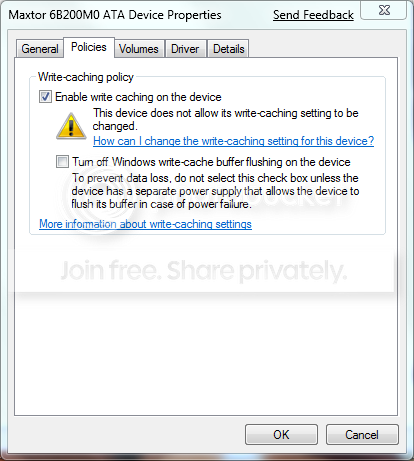
Try disabling 'write-cache buffer flushing' on drive/s, mine went from 3.0 to 6.0 :)
 

Attachments

  • wrtchc.PNG
    wrtchc.PNG
    11.3 KB · Views: 48

My Computer

OS
XP
Try disabling 'write-cache buffer flushing' on drive/s, mine went from 3.0 to 6.0 :)

I don't have RAID.

I have 3 hard drive but wach of them are separate devices.
 

My Computer

Computer type
PC/Desktop
Computer Manufacturer/Model Number
Custom build
OS
Windows 10 Professional 64-bit
CPU
Ryzen 9 5900X
Motherboard
Gigabyte X570 Aorus Master
Memory
G.Skill 3600Mhz CL16 16GB × 4
Graphics Card(s)
EVGA GeForce RTX 3070 Ti FTW3 Ultra Gaming
Sound Card
On-board
Monitor(s) Displays
Dell Alienware AW3418DW
Screen Resolution
3440x1440
Hard Drives
1×Sabrent Rocket 4 Plus 2TB nvme SSD (System, internal)
2x4TB Western Digital Blue (Internal)
1x4TB HDST 7200RPM (Internal)
PSU
Seasonic Focus Plus 850W Platinum
Case
Corsair 680X
Cooling
Stock fans + 3× Corsair QL120, Corsair H100i Platinum
Keyboard
Logitech K350
Mouse
Logitech M510
Internet Speed
120Mbits dl - 20Mbits up
Antivirus
ESET NOD32 Antivirus
Browser
Firefox (latest version)
Other Info
Headphones : Audio-Technica ATH-M50x
Scanner : Canon Canoscan LiDE 220 + Plustek OptiBook 4800
Mine's still not good a score. :cry:
processor 7.1
memory 7.1
areo graphics 5.1
gaming graphics 5.6
hard disk 5.9

500GB Seagate 3.5 Barracuda HDD ... I actually have 2 of these, but I kept having trouble with Raid continually needing to repair itself, so I disconnected the second HDD and reconfigured setup.
ATI Radeon HD 2600 Pro
Intel(R) Core(TM)2 Quad CPU @ 2.40GHz (4 CPUs)
 

My Computer

Computer type
PC/Desktop
Computer Manufacturer/Model Number
Bruce ... somewhere in his 40's
OS
Windows 7 Ultimate 32bit SP1
CPU
Intel(R) Core(TM)2 Quad CPU @ 2.40GHz, 2400 MHz
Motherboard
INTEL/D975XBX2
Memory
4 GB
Graphics Card(s)
ATI Radeon HD 2600 Pro
Monitor(s) Displays
Samsung SyncMaster 914v
Screen Resolution
1280 x 1024
Hard Drives
2/500GB each ... ST3500630AS ATA Device.
One is not connected
PSU
Rocketfish 700 W
Case
G.Skill Gigabyte Chassis
Keyboard
Standard PS/2 Keyboard
Mouse
Microsoft PS/2 Mouse
Internet Speed
DSL
Antivirus
Avira Internet Security
Browser
IE 11
Other Info
ATI HDMI Audio

My Computer

Computer type
PC/Desktop
Computer Manufacturer/Model Number
Custom build
OS
Windows 10 Professional 64-bit
CPU
Ryzen 9 5900X
Motherboard
Gigabyte X570 Aorus Master
Memory
G.Skill 3600Mhz CL16 16GB × 4
Graphics Card(s)
EVGA GeForce RTX 3070 Ti FTW3 Ultra Gaming
Sound Card
On-board
Monitor(s) Displays
Dell Alienware AW3418DW
Screen Resolution
3440x1440
Hard Drives
1×Sabrent Rocket 4 Plus 2TB nvme SSD (System, internal)
2x4TB Western Digital Blue (Internal)
1x4TB HDST 7200RPM (Internal)
PSU
Seasonic Focus Plus 850W Platinum
Case
Corsair 680X
Cooling
Stock fans + 3× Corsair QL120, Corsair H100i Platinum
Keyboard
Logitech K350
Mouse
Logitech M510
Internet Speed
120Mbits dl - 20Mbits up
Antivirus
ESET NOD32 Antivirus
Browser
Firefox (latest version)
Other Info
Headphones : Audio-Technica ATH-M50x
Scanner : Canon Canoscan LiDE 220 + Plustek OptiBook 4800
My SSD scored a 6.3 and I didn't change anything.

Previous 320GB 7200RPM HDD scored a 2.9.
 

My Computer

Computer Manufacturer/Model Number
Gateway P7801
OS
7 x64 + XP Pro x86
CPU
Undervolted T9900 3.06 GHz Core2Duo
Memory
4GB DDR3 1066MHz
Graphics Card(s)
NVIDIA 9800M GTS 1GB DDR3 1066 MHz
Monitor(s) Displays
17" WUXGA
Screen Resolution
1920x1200
Hard Drives
32GB Patriot V2 SSD w/ Hyperfast
PSU
9-cell Lithium Ion
Keyboard
Logitech Classic
Mouse
Logitech MX310
Internet Speed
slow AT&T
Other Info
Nlited XP x86 (540MB C:) locked with EWF

My Computer

Computer type
PC/Desktop
Computer Manufacturer/Model Number
Custom build
OS
Windows 10 Professional 64-bit
CPU
Ryzen 9 5900X
Motherboard
Gigabyte X570 Aorus Master
Memory
G.Skill 3600Mhz CL16 16GB × 4
Graphics Card(s)
EVGA GeForce RTX 3070 Ti FTW3 Ultra Gaming
Sound Card
On-board
Monitor(s) Displays
Dell Alienware AW3418DW
Screen Resolution
3440x1440
Hard Drives
1×Sabrent Rocket 4 Plus 2TB nvme SSD (System, internal)
2x4TB Western Digital Blue (Internal)
1x4TB HDST 7200RPM (Internal)
PSU
Seasonic Focus Plus 850W Platinum
Case
Corsair 680X
Cooling
Stock fans + 3× Corsair QL120, Corsair H100i Platinum
Keyboard
Logitech K350
Mouse
Logitech M510
Internet Speed
120Mbits dl - 20Mbits up
Antivirus
ESET NOD32 Antivirus
Browser
Firefox (latest version)
Other Info
Headphones : Audio-Technica ATH-M50x
Scanner : Canon Canoscan LiDE 220 + Plustek OptiBook 4800
Thanks. I did it again and the score didn't improve at all.

Just disable them both. I did that and my score is now almost twice.
 

My Computer

Computer Manufacturer/Model Number
Acer
OS
Vista/ Windows 7
CPU
AMD Athlon 64 x2 4000+ @2,1GHz
Motherboard
-
Memory
3GB DDR2 @ 667Mhz
Graphics Card(s)
MSI nVidia 8600GT | PCI-e x16 (1.0)
Sound Card
-
Monitor(s) Displays
Acer x223w
Screen Resolution
1680x1050
Hard Drives
One, IDE, 250GB
PSU
Standard 250 watt
Case
Acer Aspire T180.
Cooling
Boxed CPU cooler
Keyboard
Stock
Mouse
Microsoft wireless
Internet Speed
12Mb/s | 2MB/s
Just disable them both. I did that and my score is now almost twice.

I tried disabling both but Windows 7 crashes (it locks complety). I tried twice and both time I had to force reboot.
:\
 

My Computer

Computer type
PC/Desktop
Computer Manufacturer/Model Number
Custom build
OS
Windows 10 Professional 64-bit
CPU
Ryzen 9 5900X
Motherboard
Gigabyte X570 Aorus Master
Memory
G.Skill 3600Mhz CL16 16GB × 4
Graphics Card(s)
EVGA GeForce RTX 3070 Ti FTW3 Ultra Gaming
Sound Card
On-board
Monitor(s) Displays
Dell Alienware AW3418DW
Screen Resolution
3440x1440
Hard Drives
1×Sabrent Rocket 4 Plus 2TB nvme SSD (System, internal)
2x4TB Western Digital Blue (Internal)
1x4TB HDST 7200RPM (Internal)
PSU
Seasonic Focus Plus 850W Platinum
Case
Corsair 680X
Cooling
Stock fans + 3× Corsair QL120, Corsair H100i Platinum
Keyboard
Logitech K350
Mouse
Logitech M510
Internet Speed
120Mbits dl - 20Mbits up
Antivirus
ESET NOD32 Antivirus
Browser
Firefox (latest version)
Other Info
Headphones : Audio-Technica ATH-M50x
Scanner : Canon Canoscan LiDE 220 + Plustek OptiBook 4800
I tried disabling both but Windows 7 crashes (it locks complety). I tried twice and both time I had to force reboot.
:\

My best bet would be some thing is messed up on the drive by something. To make sure, please do error checking on your drive by right-clicking on your drive>Properties>Tools then under Error-checking click on Check now
It will ask to be run upon next restart, accept
After the restart, you can then proceed to disable the caching on your drive and possibly eliminating the lock-up you're encountering

Hope it helps ;)
 

My Computer

Computer Manufacturer/Model Number
Custom Build
OS
Windows 7 Build 7048 x64
CPU
Athlon 64 X2 Dual Core 4600+
Motherboard
EMX-AMD750G-PRO
Memory
4 x 1GB Kingston 400MHz 6-6-6-18 (800MHz)
Graphics Card(s)
ATI Radeon 3650
Sound Card
Realtek HD Audio
Monitor(s) Displays
22" AOC 2216Vw
Screen Resolution
1680x1050
Cooling
Arctic Cooling Freezer 64 Pro PWM
Keyboard
Generic Enhanced Natural Keyboard
Mouse
Logitech VX Nano
Other Info
Edifier M1550
Drive score Caped

From my understanding (what I've read on line) many drives that scored over 3.0 in vista are now caped at 3.0 because, under certain conditions, they exhibit behavior that can lead to an apparent hang like state. Windows 7 tests these conditions when it does the performance tests, drives that exhibit the behavior are caped, those that don’t, get a regular score.

The issue has to do with how the drive handles cached requests and new requests. This is why disabling cache settings in the drive may stop windows form capping the score at 3.0. Without the backlog of cached requests, new requests are not being delayed to in order to process cached ones.

Anecdotally I find this to make sense, before I installed a 9600 GT into my desktop and OC’ed the CPU my laptop had much better specs, but my desktop always seemed much more consistently responsive. After installing windows 7 I see that the hard drive in my laptop is capped at 3.0 while the desktops HD scores in the 5.9 ish range. The cause of the apparent unresponsiveness could, of course, be a dozen other things, but it is in line with what the HD scores would have predicted.

It would be interesting to start a list of caped drives.
HITACHI Travelstar 5K250 (HTS542525K9A300) Score 3.0 (caped)
SAMSUNG SpinPoint T Series HD501LJ 500GB Score 5.9
 

My Computer

Computer Manufacturer/Model Number
Generic
OS
Windows 7
CPU
E2140
Motherboard
Asus P5e-VM HDMI
Memory
G.SKILL F2-6400CL5D-2GBNQ
Graphics Card(s)
Zotac 9600 GT 512MB
Sound Card
Onboard
Hard Drives
SAMSUNG SpinPoint T Series HD501LJ 500GB 7200 RPM SATA 3.0Gb/s Hard Drive
PSU
ENERMAX Liberty ELT400AWT 400W ATX12V
If your happy with the way your PC runs WEI doesn't really mean anything. :)
 

My Computer

Computer Manufacturer/Model Number
Dilithium Computers/Engineering (Myself) Star date 42.739285.5432.9
OS
Win7 Ultimate x64 on Desktop / Win7 Ultimate x86 on laptop / Win7 x86 Starter on Netbook
CPU
AMD Phenom 965 X4 3.4Ghz cpu Black Edition
Motherboard
Gigabyte 790XT
Memory
12 Gb DDR3
Graphics Card(s)
Nvidea Gforce GTX 470
Sound Card
Onboard Realtek hi-fi
Monitor(s) Displays
Lg 3D led 23"
Screen Resolution
1920x1080
Hard Drives
Loads maxstore sata 1 & 2/ loads of partitions + 1Tb Hitachi sata 2. 256Gb Crucial ssd.
PSU
OCZ 700W GameXstream
Case
Artec 10000
Cooling
On board + many case fans
Keyboard
Logitech wireless K350
Mouse
Inferno gaming mouse
Internet Speed
Talk talk. 10Mb
Other Info
My PC was hand built with matchsticks. xbox 360 controller. Printers,fax.........
Scaramonga Thanks for posting the missing reference.

Respecting the idea that WEI scores are meant only for “measuring relative hardware capabilities,” the existence of caps is still useful as it is indicative of “drives which appear to exhibit the problematic behavior (during the scoring).”

The so what of all of this is in response to the original posters question, the most likely reason this persons hard drive is receiving a score of 3 is because it appeared to exhibit problematic behavior during the test and so the performance index was caped.

The second point I wanted to make is that the existence of caps makes hard disk WEI scores interesting and potentially useful to those purchasing new drives. After all one would may want to avoid purchasing a drive which triggers capping rules if using these drives could potentially result in a system that has responsiveness issues.

Of course, Windows 7 is beta, and if your satisfied with your system but your drive happens to trigger a cap, then the cap may not be relevant for your system or usage. However that if you’re having responsiveness issues and your hard drive has a caped score it may be worth trying an alternate drive.
 

My Computer

Computer Manufacturer/Model Number
Generic
OS
Windows 7
CPU
E2140
Motherboard
Asus P5e-VM HDMI
Memory
G.SKILL F2-6400CL5D-2GBNQ
Graphics Card(s)
Zotac 9600 GT 512MB
Sound Card
Onboard
Hard Drives
SAMSUNG SpinPoint T Series HD501LJ 500GB 7200 RPM SATA 3.0Gb/s Hard Drive
PSU
ENERMAX Liberty ELT400AWT 400W ATX12V
My best bet would be some thing is messed up on the drive by something. To make sure, please do error checking on your drive by right-clicking on your drive>Properties>Tools then under Error-checking click on Check now
It will ask to be run upon next restart, accept
After the restart, you can then proceed to disable the caching on your drive and possibly eliminating the lock-up you're encountering

Hope it helps ;)

I did what you said and I even ran a full fledge one...
I tried again and I let Windows 7 make its things. 30min later, when I came back to PC, I was welcomed with those errors :

error.png

and
error2.png


Looks like I'm stuck at 3.0 :(

EDIT

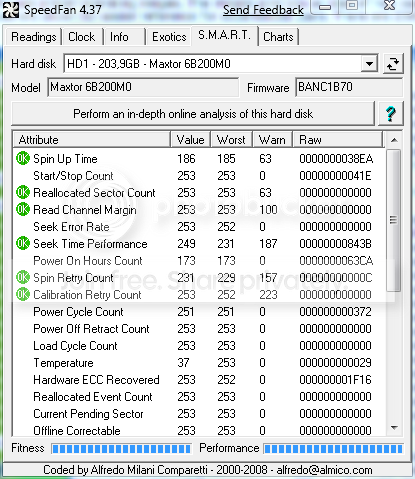
Here are my SMART for my system disk (remember, that's an hard drive from 2005)
smart_2.png

smart_1.png

smart_3.png
 
Last edited:

My Computer

Computer type
PC/Desktop
Computer Manufacturer/Model Number
Custom build
OS
Windows 10 Professional 64-bit
CPU
Ryzen 9 5900X
Motherboard
Gigabyte X570 Aorus Master
Memory
G.Skill 3600Mhz CL16 16GB × 4
Graphics Card(s)
EVGA GeForce RTX 3070 Ti FTW3 Ultra Gaming
Sound Card
On-board
Monitor(s) Displays
Dell Alienware AW3418DW
Screen Resolution
3440x1440
Hard Drives
1×Sabrent Rocket 4 Plus 2TB nvme SSD (System, internal)
2x4TB Western Digital Blue (Internal)
1x4TB HDST 7200RPM (Internal)
PSU
Seasonic Focus Plus 850W Platinum
Case
Corsair 680X
Cooling
Stock fans + 3× Corsair QL120, Corsair H100i Platinum
Keyboard
Logitech K350
Mouse
Logitech M510
Internet Speed
120Mbits dl - 20Mbits up
Antivirus
ESET NOD32 Antivirus
Browser
Firefox (latest version)
Other Info
Headphones : Audio-Technica ATH-M50x
Scanner : Canon Canoscan LiDE 220 + Plustek OptiBook 4800
SATA SATA SATA.... i havent ever seen a score below 3.0 for HD on any pc i have, even a "slow" laptop that i have.... regular ide drives are horrible for 7. if you IDE, best to have all the best of it... like 16mb cache and hopfully 7200+... WD caviar tested pretty good for me.... i'd like to see some barricuda/raptor stats on here.

mine is a 5.5

WD caviar 250 sata II 16mb cache

I failed to recognize a difference in my score tho with cache turned off
 

My Computer

Computer Manufacturer/Model Number
CUSTOM
OS
XP/win7 x86 build 7127
CPU
Athlon64 X2 DUAL 4200+ 2.21ghz
Motherboard
ASUS K8 PRO SLI
Memory
2GB Dual Chan DDR2 Corsair
Graphics Card(s)
Nvidia 6800GT
Sound Card
nvidia
Monitor(s) Displays
19' LCD
Screen Resolution
1280x1024
Hard Drives
WD 250, 2x500, 2x1TB IDE/USB
WD 250 SATA (system)
SEAGATE 120 Sata
PSU
coolermaster 450
Case
SUPERFLOWER
Cooling
1 HDD bay fan, 5x80mm Case Fans, AEROGATE II Fan/Temp
Keyboard
MS wireless
Mouse
MS Wireless
Internet Speed
fassssssssst
Hello. I have a score of 5.7 on my Seagate SATA HDD. Could anyone tell me what the absolute best HDD would be for the highest rating, the BEST Disk data transfer rate? Would it be a Raptor, or perhaps an SDD? thanks in advance!:shock:
 

My Computer

Computer Manufacturer/Model Number
Home Built
OS
Windows 7 Home Premium 64bit
CPU
Core 2 Duo [email protected]
Memory
OCZ PC-6400 2GBx2
Graphics Card(s)
GeForce 7600
Monitor(s) Displays
Acer AL2423
Screen Resolution
1900x1200
Hard Drives
Western Digital 1TB/Seagate 500GB
PSU
Shuttle 300 Watt
Case
SG31G2
Mouse
Logitech G5
To give you an idea of raptor performance this screenshot shows two of my raptors in raid0:

raided_raptors.jpg


Raptors are probably not the fastest hd these days. SSDs are much faster. They typically give you 0.2/0.3 access times.
 

My Computer

Computer Manufacturer/Model Number
self built
OS
Windows 7 Professional 64-bit
CPU
Intel E8400 3GHz
Motherboard
Intel DX48BT2
Memory
Kingston PC3-10700H 4Gb
Graphics Card(s)
XFX Radeon HD 5850 BlackEd.
Sound Card
Asus Xonar DG
Monitor(s) Displays
2x Samsung SM-T220HD 22"
Screen Resolution
1680x1050 on two monitors
Hard Drives
OCZ Vertex 2 120gb 3.5" (OS)
Seagate Momentus XT 500gb
Samsung F3 1Tb (games)
2x Samsung F1 1Tb
PSU
Thermaltake ToughPower 850w
Case
Thermaltake Armor
Cooling
Scythe Mugen II
Keyboard
Microsoft Comfort Curve USB
Mouse
Razer Diamondback 3G
Internet Speed
8128/443
Back
Top