Windows 7 take long time to shut down.

ChiaWei

New member
Local time
10:32 PM
Messages
21
My Windows7 take so long time to shut down when i trying to shut it down after i open my laptop for a long time. I wonder what is the cause of this problem, it takes about 5minute ++ to shut down my laptop completely, anyone know what is the causes of this problem ?
 

My Computer My Computer

Computer Manufacturer/Model Number
NEC Versa P9110
OS
Windows 7 Professional
CPU
Intel Core 2 Duo
Graphics Card(s)
GeForce8400M GS
I can't believe five minutes....my shutdown for a few seconds...do you have some antivirus program?
 

My Computer My Computer

OS
Windows 7,Ubuntu,Fedora,Windows XP
ya i using Avira Antivirus Free edition
 

My Computer My Computer

Computer Manufacturer/Model Number
NEC Versa P9110
OS
Windows 7 Professional
CPU
Intel Core 2 Duo
Graphics Card(s)
GeForce8400M GS
hmmm....avira....i dont like it...:P
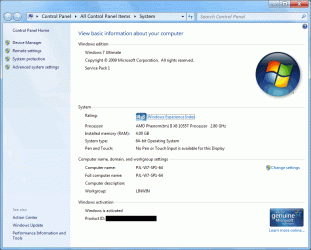
whats your specs?
ram,cpu,processor...?
 

My Computer My Computer

OS
Windows 7,Ubuntu,Fedora,Windows XP
My Windows7 take so long time to shut down when i trying to shut it down after i open my laptop for a long time. I wonder what is the cause of this problem, it takes about 5minute ++ to shut down my laptop completely, anyone know what is the causes of this problem ?

Hi ChiaWei! Zardoc has made a registry entry that should fix it! Check here: http://www.sevenforums.com/tutorials/26476-desktop-shutdown-tweaks-combined.html

Thanks,
ZeshanA
If I helped you please click the scales at the top right of my post and click I Approve!
 
Stop everything running in your system tray, like antivirus or anything else that appear there. Also unplug any peripherals like gaming controllers, webcam or USB sticks.
If Windows shuts down normally you know its one of these programs or devices that is causing the problem.
Another thing to do is to start in Safe mode and see how shutdown behaves from there.
Again, if its quick then the cause is definitely a device or program.
 

My Computer My Computer

OS
XP/7
here the answer for most of you.

What you want to do is go to the registry and change a couple values. Open the registry(go to start type regedit) and locate the key{ \HKEY_LOCAL_MACHINE\SYSTEM\CurrentControlSet\Control\Session Manager\Memory Management}, then change the value of ClearPageFile at Shutdown to a 0 IF the value is 1. If the value is 1, it will take longer for your computer to shutdown..this fix cured it all for me. I also did this :
 
Last edited:

My Computer My Computer

Computer Manufacturer/Model Number
G74Sx
OS
Micorsoft Windows 7 Home Premium 64-bit
CPU
Intel(R) Core(TM) i7-2670QM CPU @ 2.20GHz
Motherboard
ASUSTeK Computer Inc. G74Sx
Memory
16GB of DDR3
Graphics Card(s)
NVIDIA GeForce GTX 560M
Sound Card
NVIDIA High Definition Audio
Screen Resolution
1920×1080
Hard Drives
(1) ST9500423AS (2)ST9500423AS
Mouse
Razer Abyssus

okay, despite replying to a very old post, I would say be very careful (I would also say don't) when you mess with the registry. Try this instead. No need to buy anything and if you don't know how to do something, don't do it (they give red warnings at the top of the tutorials if that is the case): Optimize Windows 7

(This just in case someone sees this post later on)
 
Last edited:

My Computer My Computer

Computer type
PC/Desktop
Computer Manufacturer/Model Number
Custom Asus Build
OS
Microsoft Windows 8.1 Pro 64-bit
CPU
Intel(R) Core(TM) i3-4130 CPU @ 3.40GHz
Motherboard
B85M-E
Memory
8.00 GB
Graphics Card(s)
None
Sound Card
Realtek High Definition Audio
Monitor(s) Displays
Asus 23.6" Monitor
Screen Resolution
1920 x 1080 x 32 bits (4294967296 colors) @ 60 Hz
Hard Drives
INTEL SSDSC2BW180A4
Samsung SSD 840 PRO Series
PSU
Seasonic S12II-380Bronze
Case
Lian Li
Cooling
Fan, Passive
Keyboard
Logitech K120
Mouse
Microsoft Touch Mouse
Internet Speed
4ms Ping, 19.0 Mbps Download, 19.0 Mbps Upload
Antivirus
Eset Endpoint
Browser
Internet Explorer, Chrome
I found this built-in Windows tool

A couple of months ago I discovered this built-in Windows tool, "Performance Information and Tools" (see animated gif below).

Performance Information and Tools (Optimized).gif

AVG caused a startup issue on my PC, on October 13th (as shown in the gif).

If there are shutdown problems, there will be an entry relating to them in "Performance Issues" (see the last 3 frames).
 

My Computer My Computer

Computer type
PC/Desktop
Computer Manufacturer/Model Number
n/a
OS
W7 Ultimate SP1, LM19.2 MATE, W10 Home 1703, W10 Pro 1703 VM, #All 64 bit
CPU
AMD Phenom II x6 1100T, 3.3 GHz
Motherboard
ASUS M4A88T-M/USB3 (AM3)
Memory
12GB DDR3 1333 G-Skill (4GB x 2), G-Skill (2GB x 2)
Graphics Card(s)
NVIDIA GeForce GTX 660
Sound Card
Realtek?
Monitor(s) Displays
Samsung S23B350
Screen Resolution
1920x1080
Hard Drives
WD Green 2TB (SATA), WD Green 3TB (SATA), WD Blue 4TB (SATA), WD Blue 6TB (SATA)
PSU
Cooler Master
Case
Antec GX300 Tower
Cooling
3x Antec TRICOOL 120mm Fans
Mouse
Wired Optical
Internet Speed
DSL
Antivirus
Avast
Browser
Pale Moon (64 bit)
Other Info
2018-12-27 Upgraded HDDs
2015-12-10 Upgraded case, graphics card, storage
2015-08-15 Upgraded motherboard & RAM
2015-07-15 Upgraded LM17.1 to LM17.2
Thanks pepeniva

I could fix my shut down excesive delay in my laptop windows 7 HP Pavilion, old machine, thanks to the very well explained post about that topic by pepeniva, since I was looking unsuccesfully for a while for an answer for me this was a good reason to double appreciate that post. I had a previous 3 to 5 minutes delay since shut down was started. After I fixed with that good tip it takes less than 30 seconds. Thanks again pepeniva.
 

My Computer My Computer

Computer Manufacturer/Model Number
HP Pavilion dv 1000
OS
Windows 7 Ultimate 32 bit SP1
CPU
1.4 gig
Memory
1.25 gig
Hard Drives
80 gb
Back
Top