Custom Themes, Icons and Start Buttons.

Status
Not open for further replies.
Hi JeanLuc71, welcome to the forums.

You could try the 'Background Eraser' tool (click & hold on the 'eraser' tool) and it should then make the background transparent if you created the initial file with transparent background.

Hope it helps :)


OS
 

My Computer My Computer

Computer Manufacturer/Model Number
Compaq Desktop
OS
Windows 7 Ultimate x64
CPU
AMD Sempron Dual Core
Memory
3GB
Graphics Card(s)
NVIDIA GeForce 6150SE nForce 430
Screen Resolution
1024x768
Hard Drives
150GB Sata
thnx O S just tried that but to no avail :(
 

My Computer My Computer

Computer Manufacturer/Model Number
Custom Built
OS
Windows 7 Ultimate Signature Edition x64
CPU
AMD Phenom X3 8450
Motherboard
Gigabyte GA-MA770-UD3
Memory
Patriot Viper 4GB (2 x 2GB) DDR2 1066
Graphics Card(s)
GIGABYTE GV-R485ZL-512H HD 4850 512MB 256-bit GDDR3 P
Monitor(s) Displays
(2) SAMSUNG 2243BWX High Gloss Piano Black 22
Screen Resolution
1680 x 1050
Hard Drives
Western Digital Caviar Blue WD3200AAJS 320GB 7200 RPM 8MB Cache SATA 3.0Gb
PSU
CORSAIR CMPSU-850TX
Keyboard
Sidewinder X6
Mouse
Sidewinder X5
Internet Speed
10meg
Does anyone know how to make the start panel and the windows menu back ground full transparency. I looking for a a glass theme that fit my white icons. ( similar like this http://nittiyh.deviantart.com/art/Kiilki-VS-for-7-142338453)
Ds.jpg
please man, can i download that theme or what is here? please realy need :)
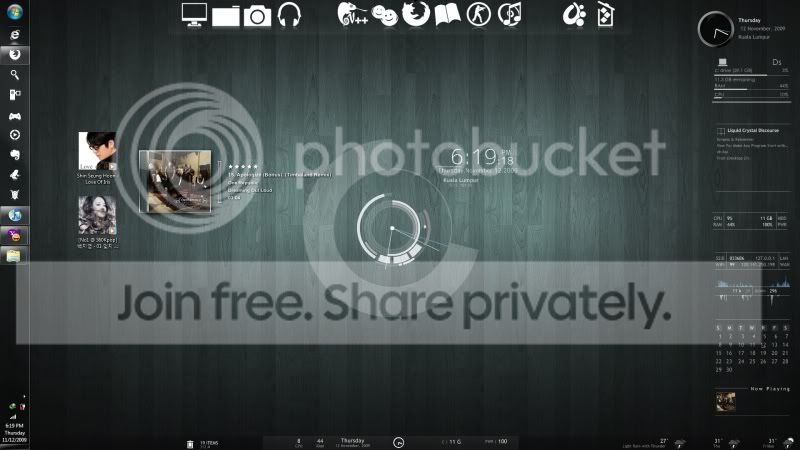
I'm used Rainmeter Enigma Skin (default skin) ,Object Dock (freeware), and Cd Art (default Skin)
Icon Package : "ecqlipse 2" PNG by *chrfb on deviantART
Wallpaper : Wallpapers - Black wooden floor by _Cyanide - Customize.org
 

My Computer My Computer

OS
Windows 7

My Computer My Computer

Computer Manufacturer/Model Number
Homebuild
OS
Windows 7 Ultimate x64 Build 7600
CPU
AMD Athlon 64 X2 Dual Core Processor 3800+ 2.00 GHz
Motherboard
Asus M2N68-VM
Memory
2x2Gb
Graphics Card(s)
Radeon X1600 Series
Sound Card
NVIDIA HDMI Audio
Monitor(s) Displays
HP L1910 19-inch LCD Monitor
Screen Resolution
1280x1024
Hard Drives
1x150Gb, 2x500Gb (External)
Case
Raidmax Scorpio 868
Keyboard
Saitek Eclipse II
Mouse
Logitech MX510

I'm not sure if it's possible to do that.. I think the small icon mode is to make the taskbar look like what it was in vista...

just a suggestion :)
maybe...you could try editting the start orb image and make it smaller in scale.. to fit the small taskbar.. but it might affect the start orb in large icons mode... I havent tried it so don't take my word for it..
 

My Computer My Computer

OS
Windows 7 Home Premium SP1 64-bit
CPU
Intel™ Core™ i7 920 2.66 ghz
Motherboard
Asus P6T Deluxe V2
Memory
OCZ 6gb (triple 2gb) ddr3-1333 (Gold Edition)
Graphics Card(s)
Nvidia 9800 GT 1GB - x2 SLI
Sound Card
On board
Monitor(s) Displays
19" LCD Wide Screen / Built-in TV Tuner
Screen Resolution
1440x900
Hard Drives
250 GB Maxtor
+
1 TB Seagate
PSU
Corsair GX 800 (800watts)
Case
Thermaltake Level 10 GT
Cooling
Antec Kuhler 920
Mouse
CM Storm Sentinel Advanced
Internet Speed
1MBps

I'm not sure if it's possible to do that.. I think the small icon mode is to make the taskbar look like what it was in vista...

just a suggestion :)
maybe...you could try editting the start orb image and make it smaller in scale.. to fit the small taskbar.. but it might affect the start orb in large icons mode... I havent tried it so don't take my word for it..

Yeah I was into that too, but I'll give it a try. Thank u edrik :)
 

My Computer My Computer

Computer Manufacturer/Model Number
Homebuild
OS
Windows 7 Ultimate x64 Build 7600
CPU
AMD Athlon 64 X2 Dual Core Processor 3800+ 2.00 GHz
Motherboard
Asus M2N68-VM
Memory
2x2Gb
Graphics Card(s)
Radeon X1600 Series
Sound Card
NVIDIA HDMI Audio
Monitor(s) Displays
HP L1910 19-inch LCD Monitor
Screen Resolution
1280x1024
Hard Drives
1x150Gb, 2x500Gb (External)
Case
Raidmax Scorpio 868
Keyboard
Saitek Eclipse II
Mouse
Logitech MX510
I really like the ultimate icon package, and the render theme is sweet as well, thanks.
 

My Computer My Computer

OS
Window 7 Ultimate x86
CPU
Intel Core 2 Duo E4400 @ 2.00GHz
Motherboard
Dell Inc. 0RY007 (Socket 775)
Memory
4.0 GB Samsung Dual-Channel DDR @ 333MHz
Graphics Card(s)
1GB GeForce 9400 GT (BFG Tech)
Sound Card
Realtek High Definition Audio
Monitor(s) Displays
22" LG HDTV
Screen Resolution
1680 x 1050
Hard Drives
250GB Seagate
250GB Western Digital
Keyboard
Z-Board
Mouse
OCZ Equalizer
Internet Speed
Depends on what comcast feels like giving me at the time.
sorry for a similar question,but can you tell me the name(and where to download) of this skin:

Ds.jpg


also i noticed that it has similar to mine gadgets but also with an another skin.How can the be done?

And what is in the bottom of the screen?Also a gadget or something else?
Thanks
 

My Computer My Computer

OS
Windows 7 SP 1 x64 Proffesional
CPU
Phenom x64 2.5Ghz
Motherboard
Asus M3A78
Memory
4.0Ghz
Graphics Card(s)
Gigabyte nVidia gForce 9600 GT
Sound Card
Realtec
Monitor(s) Displays
LG
Screen Resolution
1152x768
Hard Drives
Western Digital SATA 500Gb
Case
ASUS
Keyboard
Logitech
Mouse
A4-Tech X755 BK
Internet Speed
30m/bit
getting a tad bit better at photoshop but still havent got the layers down yet. i got my start button without the orb showing but havent figured out how to do layers yet to make just the part i want solid. here is what i have gotten so far but the colors are transparent now :( just have to figure out how to make the icon solid while the outside is transparent
 

Attachments

  • Doctor who 2 copy.jpg
    Doctor who 2 copy.jpg
    34 KB · Views: 1,705

My Computer My Computer

Computer Manufacturer/Model Number
Custom Built
OS
Windows 7 Ultimate Signature Edition x64
CPU
AMD Phenom X3 8450
Motherboard
Gigabyte GA-MA770-UD3
Memory
Patriot Viper 4GB (2 x 2GB) DDR2 1066
Graphics Card(s)
GIGABYTE GV-R485ZL-512H HD 4850 512MB 256-bit GDDR3 P
Monitor(s) Displays
(2) SAMSUNG 2243BWX High Gloss Piano Black 22
Screen Resolution
1680 x 1050
Hard Drives
Western Digital Caviar Blue WD3200AAJS 320GB 7200 RPM 8MB Cache SATA 3.0Gb
PSU
CORSAIR CMPSU-850TX
Keyboard
Sidewinder X6
Mouse
Sidewinder X5
Internet Speed
10meg
i need it.can anyone post it if u have.

hi friends if anyone have all the gadgets present in this and the wallpaper with u just post here.it seems nice i need it.
 

Attachments

  • Ds.jpg
    Ds.jpg
    31.2 KB · Views: 101

My Computer My Computer

OS
WINDOWS 7
Does anybody have the default start button from the first betas (about 7030)?
Its normal state was the same as it is now but the clicked (and hover) state was like it is in the attachment (I found it on the Internet, so it's quite small).
 

Attachments

  • Windows 7 Start Menu.jpg
    Windows 7 Start Menu.jpg
    12.8 KB · Views: 2,623

My Computer My Computer

Computer Manufacturer/Model Number
Irbis
OS
Windows 7 Professional 64-bit
CPU
AMD Athlon 7750 Dual-core 2.71 GHz
Motherboard
ASRock N68-S
Memory
4096 MB
Graphics Card(s)
nVidia GeForce 9600 GT
Sound Card
Xonar D1
Monitor(s) Displays
Philips 170C
Screen Resolution
1280*1024
Hard Drives
Hitachi 320 GB
Keyboard
Genius
Mouse
A4Tech X6-005D
Internet Speed
4 Mb/s
sorry for a similar question,but can you tell me the name(and where to download) of this skin:

Ds.jpg


also i noticed that it has similar to mine gadgets but also with an another skin.How can the be done?

And what is in the bottom of the screen?Also a gadget or something else?
Thanks

Ive been looking for this one too. Looks great, no luck finding it yet
 

My Computer My Computer

Computer Manufacturer/Model Number
Built
OS
Windows 7 RTM
CPU
Intel I7 920 2.67 ghz
Motherboard
EVGA X58
Memory
6GB CORSAIR DOMINATOR
Graphics Card(s)
GeForce GTX 260 Core 216 896MB 448-bit GDDR3 PCI Express 2.0
Soz guys this is my first attempt.... but what am I doing wrong :cry:
 

Attachments

  • cock_up_162x54.jpg
    cock_up_162x54.jpg
    1.9 KB · Views: 1,490
  • cock_up_large.jpg
    cock_up_large.jpg
    7 KB · Views: 288
  • poo_orb.zip
    poo_orb.zip
    26.9 KB · Views: 73
Last edited:

My Computer My Computer

Computer type
PC/Desktop
Computer Manufacturer/Model Number
Self Built
OS
Windows 7 Ultimate 64bit
CPU
AMD Phenom Quad core 9950 black edition
Motherboard
Gigabyte
Memory
16Gb
Graphics Card(s)
2x XFX Radeon 5850
Sound Card
PCI Express X-Fi Titanium / Logitech G35
Monitor(s) Displays
2x HP 2410i
Screen Resolution
1920x1080
Hard Drives
2x 500Gb Seagate
1x 300Gb Seagate
1x 1Tb Seagate
2x 1Tb Hitatchi
PSU
Jean Tech Storm 700W
Case
Cooler Master COSMOS S
Cooling
Akasa Evo Blue Pro
Keyboard
Logitech G15
Mouse
Mad Catz M.M.O. 7
Internet Speed
12mb

Attachments

My Computer My Computer

Computer Manufacturer/Model Number
Home Brew
OS
Windows 7 Ultimate Vista Ultimate x64
CPU
Core 2 Duo E8500 3.16Ghz @ 3.8Ghz
Motherboard
eVGA 750i FTW
Memory
2x2Gigs Patriot PC2-6400 LL
Graphics Card(s)
Inno3D GeForce GTX260 216 SP
Monitor(s) Displays
ASUS VW222U 22" 2ms Response time
Screen Resolution
1680x1050
Hard Drives
SATA 150GB
SATA II 250GB
USB IDE 750GB Ext.
PSU
HYTEC 600W & Thermaltake 650W Toughpower Power Exp
Case
Thermaltake Armor LCS (Liquid Cooling System)
Cooling
Liquid Cooling System
Keyboard
Logitech G15 Gaming Keyboard
Mouse
Logitech G9 Gaming Mouse
OK, I know it's been mentioned in this thread, and I have gone back and forth looking for it, but can't seem to find it.

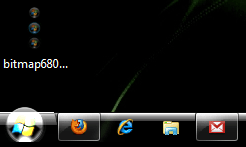
I downloaded the first file below in .png format, converted it to 32-bit .bmp with Photoshop, and then used Restorator to put it into explorer.exe. Did I miss a step? Because it came out like the screenshot. Really, really bright.

Any ideas on what I'm doing wrong?
 

Attachments

  • bitmap6801.png
    bitmap6801.png
    4.1 KB · Views: 1,621
  • SS.png
    SS.png
    5.7 KB · Views: 1,625

My Computer My Computer

Computer type
PC/Desktop
Computer Manufacturer/Model Number
SuperBeast
OS
Windows 10 Tech Preview 9926 x64
CPU
AMD FX-8350
Motherboard
Gigabyte GA-990FXA-UD3
Memory
16GB DDR3 1333
Graphics Card(s)
Asus R9 290 DirectCU II OC, Gigabyte Windforce R9 290 OC
Sound Card
Integrated w/ Creative A250 2.1 speakers
Monitor(s) Displays
Main: Asus VN289H 28" Secondary: Acer G246HL 24"
Screen Resolution
1920x1080
Hard Drives
128 GB SanDisk Ultra Plus (Windows drive)

240 GB Crucial M500 SSD (Games drive)

1 TB WDC WD10EACS 7200RPM HDD (Data drive)

2 TB Seagate Expansion Desktop external HDD (Backup drive)
PSU
900w Antec HCG-900
Case
Raidmax Agusta Full ATX
Cooling
Corsair H80
Keyboard
Cooler Master Devastator MB24
Mouse
Cooler Master Devastator MS2K 1000/1600/2000 DPI
Internet Speed
100Mbps cable
Antivirus
Avast!
Browser
Chrome
OK, I know it's been mentioned in this thread, and I have gone back and forth looking for it, but can't seem to find it.

I downloaded the first file below in .png format, converted it to 32-bit .bmp with Photoshop, and then used Restorator to put it into explorer.exe. Did I miss a step? Because it came out like the screenshot. Really, really bright.

Any ideas on what I'm doing wrong?

Open the image in PS and delete the Alpha channel and it should be better I hope.
 

My Computer My Computer

Computer Manufacturer/Model Number
Home Brew
OS
Windows 7 Ultimate Vista Ultimate x64
CPU
Core 2 Duo E8500 3.16Ghz @ 3.8Ghz
Motherboard
eVGA 750i FTW
Memory
2x2Gigs Patriot PC2-6400 LL
Graphics Card(s)
Inno3D GeForce GTX260 216 SP
Monitor(s) Displays
ASUS VW222U 22" 2ms Response time
Screen Resolution
1680x1050
Hard Drives
SATA 150GB
SATA II 250GB
USB IDE 750GB Ext.
PSU
HYTEC 600W & Thermaltake 650W Toughpower Power Exp
Case
Thermaltake Armor LCS (Liquid Cooling System)
Cooling
Liquid Cooling System
Keyboard
Logitech G15 Gaming Keyboard
Mouse
Logitech G9 Gaming Mouse
Nope...no luck...
 

My Computer My Computer

Computer type
PC/Desktop
Computer Manufacturer/Model Number
SuperBeast
OS
Windows 10 Tech Preview 9926 x64
CPU
AMD FX-8350
Motherboard
Gigabyte GA-990FXA-UD3
Memory
16GB DDR3 1333
Graphics Card(s)
Asus R9 290 DirectCU II OC, Gigabyte Windforce R9 290 OC
Sound Card
Integrated w/ Creative A250 2.1 speakers
Monitor(s) Displays
Main: Asus VN289H 28" Secondary: Acer G246HL 24"
Screen Resolution
1920x1080
Hard Drives
128 GB SanDisk Ultra Plus (Windows drive)

240 GB Crucial M500 SSD (Games drive)

1 TB WDC WD10EACS 7200RPM HDD (Data drive)

2 TB Seagate Expansion Desktop external HDD (Backup drive)
PSU
900w Antec HCG-900
Case
Raidmax Agusta Full ATX
Cooling
Corsair H80
Keyboard
Cooler Master Devastator MB24
Mouse
Cooler Master Devastator MS2K 1000/1600/2000 DPI
Internet Speed
100Mbps cable
Antivirus
Avast!
Browser
Chrome
and that all are not gadgets..its skins of Rainmeter .
 

My Computer My Computer

OS
windows 7
CPU
P4
Motherboard
INTEL 945
Memory
3 GB
Graphics Card(s)
Nvidia 8600
Monitor(s) Displays
Samsung
Screen Resolution
1024x768
Hard Drives
1 TB
Case
CIRCLE
Keyboard
Microsoft
Mouse
SAmsung
Internet Speed
192 KBPS
Thank you
 

My Computer My Computer

Computer Manufacturer/Model Number
HP Pavilion Desktop a6600la
OS
Windows 7
CPU
Intel Dual Core
Memory
3 Gb
Graphics Card(s)
nVidia
Monitor(s) Displays
One 19' Inch Flat
Status
Not open for further replies.
Back
Top