
Epson Perfection 1660 Photo

madman77

New member
Local time
10:16 PM
Messages
7
I recently performed a clean install of Win7 Ultimate x64 on my home PC and cannot seem to get my Epson Perfection 1660 Photo scanner to work anymore. Epson's site only lists 32-bit drivers that install but do not work or even present any error messages when trying to initiate a scan.

I have tried using the (Unofficial) drivers for Epson Perfection 1660 located HERE on your Windows Vista sister site. It does not work either but presents an error that I detailed below. On a side note, I have installed that unofficial driver on my notebook running Vista Home Premium x64 and it works there.

I have attached a screen capture of the error message when I try to initiate a scan with the unofficial drivers. If you select yes it just opens a help file to which I have exhausted all troubleshooting possibilities (check to see if the scanner is powered on and the cable is plugged in). It doesn't matter if I use the included utility, ACDSee, VueScan or an online Java utility with my bank.

Please advise. Thanks ahead of time for any suggestions you guys might have.
 

Attachments
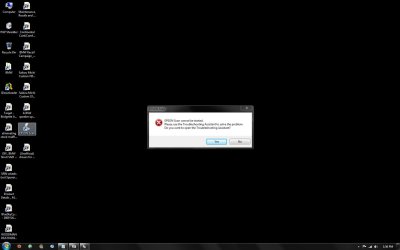
  • Scanner Error.jpg
    Scanner Error.jpg
    47.9 KB · Views: 568
Last edited:

My Computer My Computer

At a glance

Win 7 Ultimate
OS
Win 7 Ultimate
I recently upgraded to Win7 Ultimate x64 on my home PC and cannot seem to get my Epson Perfection 1660 Photo scanner to work anymore. Epson's site only lists 32-bit drivers that install but do not work or even present any error messages when trying to initiate a scan.

I have tried using the (Unofficial) drivers for Epson Perfection 1660 located HERE on your Windows Vista sister site. It does not work either but presents an error that I detailed below. On a side note, I have installed that unofficial driver on my notebook running Vista Home Premium x64 and it works there.

I have attached a screen capture of the error message when I try to initiate a scan with the unofficial drivers. If you select yes it just opens a help file to which I have exhausted all troubleshooting possibilities (check to see if the scanner is powered on and the cable is plugged in). It doesn't matter if I use the included utility, ACDSee, VueScan or an online Java utility with my bank.

Please advise. Thanks ahead of time for any suggestions you guys might have.

Hi and welcome

vista driver should work. Needs to be installed in compatability mode however.
right click the installer?properties>compatibility mode>check vista.

should work


Ken J+
 

My Computer My Computer

At a glance

Win 8 Release candidate 8400[email protected]4 gigsNvidia 9600M
Computer Manufacturer/Model Number
HP Pavillion dv-7 1005 Tx
OS
Win 8 Release candidate 8400
CPU
[email protected]
Memory
4 gigs
Graphics Card(s)
Nvidia 9600M
Sound Card
HD built-in
Monitor(s) Displays
17" Wxga
Screen Resolution
1440x900
Cooling
none
Internet Speed
45Mb down 5Mb up
Thanks and I feel welcome.

I assume you meant to install the unofficial drivers since those are the only 64-bit drivers available? As for installing it in compatability mode, this produces the exact same results. The driver installs seemingly properly, asks for a re-boot. I reboot, plug the USB cable in and Win 7 successfully installs the driver. I then try to scan and it produces the exact same result. I have verified the Epson Scan utility is running in Vista compatibility mode.
 

My Computer My Computer

At a glance

Win 7 Ultimate
OS
Win 7 Ultimate
Any ideas out there?
 

My Computer My Computer

At a glance

Win 7 Ultimate
OS
Win 7 Ultimate
Most all of us agree that an upgrade is not the route to take. It leaves useless files on your system and can cause conflicts,. which you are experiencing.

Save all you Documents, Pictures, contacts, videos, music, etc to a flash drive,

Be aware, you will need to re-install your 3rd party applications.
 

My Computer My Computer

At a glance

Windows 7 Pro & Vista Home PremiumAthlon 64 3800+ (Orleans) 2.40GHz2GB DDR2 RAM DIMMNVIDIA GeForce 8500 GT 512 MB memory HDMI out
Computer Manufacturer/Model Number
Cheap $399.00 E-Machine
OS
Windows 7 Pro & Vista Home Premium
CPU
Athlon 64 3800+ (Orleans) 2.40GHz
Motherboard
Winfast
Memory
2GB DDR2 RAM DIMM
Graphics Card(s)
NVIDIA GeForce 8500 GT 512 MB memory HDMI out
Sound Card
creative X-Fi Exteme 7..1 channel
Monitor(s) Displays
Acer V223W 22" widescreen DVI
Screen Resolution
1680x1050
Hard Drives
WDC WD5 500GB
WDC WD25 250GB
PSU
OCZ 550 watt
Case
Gateway
Cooling
2 fans
Keyboard
Dell
Mouse
Sony Vaio
Internet Speed
18MB/s down - .72MB /s up
Most all of us agree that an upgrade is not the route to take. It leaves useless files on your system and can cause conflicts,. which you are experiencing.

Save all you Documents, Pictures, contacts, videos, music, etc to a flash drive,

Be aware, you will need to re-install your 3rd party applications.

Sorry but WTH are you talking about? I did not upgrade. This was a clean install of the OS.
 

My Computer My Computer

At a glance

Win 7 Ultimate
OS
Win 7 Ultimate
I ran into the same problem with my Epson Perfection 1650. I sorted the problem on Windows 7 - 64bit by installing an independant program called Hamrick Vuescan - I now find it is far superior to the Epson Software/ Drivers I used on Vista 32
 

My Computer My Computer

At a glance

Windows 7 ProfessionalIntel Core 2 Duo 6700Corsair xms2 4Gb DDR2 800NVidia
Computer Manufacturer/Model Number
Custom
OS
Windows 7 Professional
CPU
Intel Core 2 Duo 6700
Motherboard
MSI
Memory
Corsair xms2 4Gb DDR2 800
Graphics Card(s)
NVidia
Sound Card
On Board
Monitor(s) Displays
LG Flatron WideTsunami Dream
Hard Drives
Seagate 500Gb
Seagate 320Gb
Seagate 320Gb
Seagate 160Gb
Case
Tsunami Dream
Sorry,. but I don't believe you mentioned that fact,. unless I'm totally blind
 

My Computer My Computer

At a glance

Windows 7 Pro & Vista Home PremiumAthlon 64 3800+ (Orleans) 2.40GHz2GB DDR2 RAM DIMMNVIDIA GeForce 8500 GT 512 MB memory HDMI out
Computer Manufacturer/Model Number
Cheap $399.00 E-Machine
OS
Windows 7 Pro & Vista Home Premium
CPU
Athlon 64 3800+ (Orleans) 2.40GHz
Motherboard
Winfast
Memory
2GB DDR2 RAM DIMM
Graphics Card(s)
NVIDIA GeForce 8500 GT 512 MB memory HDMI out
Sound Card
creative X-Fi Exteme 7..1 channel
Monitor(s) Displays
Acer V223W 22" widescreen DVI
Screen Resolution
1680x1050
Hard Drives
WDC WD5 500GB
WDC WD25 250GB
PSU
OCZ 550 watt
Case
Gateway
Cooling
2 fans
Keyboard
Dell
Mouse
Sony Vaio
Internet Speed
18MB/s down - .72MB /s up
I ran into the same problem with my Epson Perfection 1650. I sorted the problem on Windows 7 - 64bit by installing an independant program called Hamrick Vuescan - I now find it is far superior to the Epson Software/ Drivers I used on Vista 32

I have tried Vuescan as well but it didn't work for me. I don't remember if I tried it with the Epson drivers uninstalled. I will try this after removing the Epson drivers.
 

My Computer My Computer

At a glance

Win 7 Ultimate
OS
Win 7 Ultimate
Hi madman77 - The instructions I was given were - Delete any Epson Scanner Drivers, Disconnect Scanner USB Cable, Install Vuescan, Reconnect Scanner USB Cable, wait for Windows to Install new drivers. log into Vuescan. It should then find your scanner.
 

My Computer My Computer

At a glance

Windows 7 ProfessionalIntel Core 2 Duo 6700Corsair xms2 4Gb DDR2 800NVidia
Computer Manufacturer/Model Number
Custom
OS
Windows 7 Professional
CPU
Intel Core 2 Duo 6700
Motherboard
MSI
Memory
Corsair xms2 4Gb DDR2 800
Graphics Card(s)
NVidia
Sound Card
On Board
Monitor(s) Displays
LG Flatron WideTsunami Dream
Hard Drives
Seagate 500Gb
Seagate 320Gb
Seagate 320Gb
Seagate 160Gb
Case
Tsunami Dream
I will have to try that when I get home in a couple weeks. Have you tried using any online scanning utilities after getting it to work via Vuescan or does it only work from within Vuescan? Basically I am asking if it installs a TWAIN driver in Win7 or if it has it's own proprietary drivers from with the program only.
 

My Computer My Computer

At a glance

Win 7 Ultimate
OS
Win 7 Ultimate
Well from a retired old Phart's point of view, Hamrick VueScan costs more than my budget will allow.

Did anyone EVER get a sure fire way to use the scanner with tweaks?
The link to the version of an installer that someone had made is gone as it was on the servers closed by the govt.

This is a NEW system I have, reluctantly I had to go to it when my old Windows 2000 system had the Northbridge go South. Miss that old system. There are too many things abt 7 I don't understand yet. It took me a full six months to find out how to use a virtual machine & XP to run my Photoshop 4.x LOL

Any help would be appreciated.

Cordially,
Gerry

EDIT: after two attempts to find the file that was kluged to make the drivers work with Windows 7 64 bit, and having to remove unwanted add ons from Firefox because of it, I bit the bullet and bought Hamrick VueScan. It seems to work pretty good! Now let's see if it also works with the virtual machine XP and Photoshop 4.

The wife is gonna kill me.
 
Last edited:

My Computer My Computer

At a glance

Windows 7 Professional 64-bit Operating SystemIntel Core Duo 2.93 Ghz4-GigNVIDIA GeForce 310
Computer Manufacturer/Model Number
Dell Vostro 230
OS
Windows 7 Professional 64-bit Operating System
CPU
Intel Core Duo 2.93 Ghz
Motherboard
Dell
Memory
4-Gig
Graphics Card(s)
NVIDIA GeForce 310
Sound Card
Internal
Monitor(s) Displays
Dell 19" & Dell 17" flatscreens
Screen Resolution
which one? LOL
Hard Drives
SATA, 288 Gig, & 2x 500 Gig drives
PSU
Dell
Case
Dell
Cooling
Standard
Keyboard
Dell
Mouse
Dell optical
Internet Speed
Verizon DSL. (in other words slow at best) 2.50 meg download
Back
Top