JavaScript is disabled. For a better experience, please enable JavaScript in your browser before proceeding.
You are using an out of date browser. It may not display this or other websites correctly.
You should upgrade or use an
alternative browser .
Can't Access my Desktop Gadgets through Control Panel
When I click on Desktop Gadgets in the Control Panel the window doesn't change over, not only that absolutely nothing happens at all. How can I view all of my Desktop Gadgets so that I can select which ones I want to be shown?
Last edited: Dec 4, 2009
Microsoft Windows 7 Ultimate 64-bit Edition w... Intel Core i7-6950X Extreme Edition OC 4.20GH... Corsair Dominator Platinum 128GB (8×16GB) DDR... EVGA GTX 980 Ti Classified Video Cards in 2-W... PC/Desktop X-Class MKII Microsoft Windows 7 Ultimate 64-bit Edition w/ SP1 RTM build 7601.17514 Intel Core i7-6950X Extreme Edition OC 4.20GHz 10-Core CPU EVGA X99 Classified E-ATX Motherboard Corsair Dominator Platinum 128GB (8×16GB) DDR4 Memory Kit EVGA GTX 980 Ti Classified Video Cards in 2-Way SLI Creative Sound Core3D On-Board Audio Processor Sony KDL32EX400 Bravia EX400 32" Full HD 1080p LCD TV 1920×1200 ×1 Samsung 950 PRO M.2 512GB SSD Corsair Pro Series AX1500i Digital Power Supply Corsair Obsidian Series 800D Black Full-Tower with Window Full Custom Liquid Cooling Loop Logitech G19 Gaming Keyboard Logitech G502 Laser Gaming Mouse
New member
Guru
Gold Member
VIP
Right click on the desktop > Gadgets.
Vista, Windows7, Mint Mate, Zorin, Windows 8 from 1.6GHz Duo to i7 HP, Dell, Gateway, Toshiba - 4 laptops and 2 desktops Vista, Windows7, Mint Mate, Zorin, Windows 8 from 1.6GHz Duo to i7 2x HP w2207 5x HDD, 7x SSD, 12x Externals with trackball - no mices Trackball mice DSL 6000
New member
Thread Starter
Yup, tried that already and still no windows shows up or even anything happens at all.
Microsoft Windows 7 Ultimate 64-bit Edition w... Intel Core i7-6950X Extreme Edition OC 4.20GH... Corsair Dominator Platinum 128GB (8×16GB) DDR... EVGA GTX 980 Ti Classified Video Cards in 2-W... PC/Desktop X-Class MKII Microsoft Windows 7 Ultimate 64-bit Edition w/ SP1 RTM build 7601.17514 Intel Core i7-6950X Extreme Edition OC 4.20GHz 10-Core CPU EVGA X99 Classified E-ATX Motherboard Corsair Dominator Platinum 128GB (8×16GB) DDR4 Memory Kit EVGA GTX 980 Ti Classified Video Cards in 2-Way SLI Creative Sound Core3D On-Board Audio Processor Sony KDL32EX400 Bravia EX400 32" Full HD 1080p LCD TV 1920×1200 ×1 Samsung 950 PRO M.2 512GB SSD Corsair Pro Series AX1500i Digital Power Supply Corsair Obsidian Series 800D Black Full-Tower with Window Full Custom Liquid Cooling Loop Logitech G19 Gaming Keyboard Logitech G502 Laser Gaming Mouse
New member
Guru
Gold Member
VIP
Open C: > Program Files > Windows Sidebar > Gadgets. Maybe you can start them from there.
Vista, Windows7, Mint Mate, Zorin, Windows 8 from 1.6GHz Duo to i7 HP, Dell, Gateway, Toshiba - 4 laptops and 2 desktops Vista, Windows7, Mint Mate, Zorin, Windows 8 from 1.6GHz Duo to i7 2x HP w2207 5x HDD, 7x SSD, 12x Externals with trackball - no mices Trackball mice DSL 6000
New member
Thread Starter
You're not gonna believe this, still nothing happens when I double-click on the sidebar.exe in that location.
Microsoft Windows 7 Ultimate 64-bit Edition w... Intel Core i7-6950X Extreme Edition OC 4.20GH... Corsair Dominator Platinum 128GB (8×16GB) DDR... EVGA GTX 980 Ti Classified Video Cards in 2-W... PC/Desktop X-Class MKII Microsoft Windows 7 Ultimate 64-bit Edition w/ SP1 RTM build 7601.17514 Intel Core i7-6950X Extreme Edition OC 4.20GHz 10-Core CPU EVGA X99 Classified E-ATX Motherboard Corsair Dominator Platinum 128GB (8×16GB) DDR4 Memory Kit EVGA GTX 980 Ti Classified Video Cards in 2-Way SLI Creative Sound Core3D On-Board Audio Processor Sony KDL32EX400 Bravia EX400 32" Full HD 1080p LCD TV 1920×1200 ×1 Samsung 950 PRO M.2 512GB SSD Corsair Pro Series AX1500i Digital Power Supply Corsair Obsidian Series 800D Black Full-Tower with Window Full Custom Liquid Cooling Loop Logitech G19 Gaming Keyboard Logitech G502 Laser Gaming Mouse
Star Wars G33k
Power User
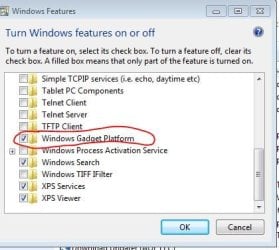
Maybe uninstall that feature then reinstall it? Under control panel
Capture.JPG
34.2 KB
· Views: 128
Windows 7 Professional 64bit AMD Athlon II X2 240 Regor 2.8GHz 4 gigs DDR3 Dual Channel Radeon HD 5770 1gig video RAM Myself Windows 7 Professional 64bit AMD Athlon II X2 240 Regor 2.8GHz GIGABYTE GA-MA785GMT-UD2H 4 gigs DDR3 Dual Channel Radeon HD 5770 1gig video RAM Realtek ALC889A Dell E770s 17in 1024x768 1 x 250gb seagate Rosewill RP600V2-S-SL 600W Antec Nine Hundred Black Steel ATX Mid Tower 4 Fans Micro Inovations Microsoft optical mouse 22 mbps download 1 mbps upload
New member
Thread Starter
Cool, thanks man!
That fixed that issue and also gave me the chance to turn off the stock Widows Games too.
Microsoft Windows 7 Ultimate 64-bit Edition w... Intel Core i7-6950X Extreme Edition OC 4.20GH... Corsair Dominator Platinum 128GB (8×16GB) DDR... EVGA GTX 980 Ti Classified Video Cards in 2-W... PC/Desktop X-Class MKII Microsoft Windows 7 Ultimate 64-bit Edition w/ SP1 RTM build 7601.17514 Intel Core i7-6950X Extreme Edition OC 4.20GHz 10-Core CPU EVGA X99 Classified E-ATX Motherboard Corsair Dominator Platinum 128GB (8×16GB) DDR4 Memory Kit EVGA GTX 980 Ti Classified Video Cards in 2-Way SLI Creative Sound Core3D On-Board Audio Processor Sony KDL32EX400 Bravia EX400 32" Full HD 1080p LCD TV 1920×1200 ×1 Samsung 950 PRO M.2 512GB SSD Corsair Pro Series AX1500i Digital Power Supply Corsair Obsidian Series 800D Black Full-Tower with Window Full Custom Liquid Cooling Loop Logitech G19 Gaming Keyboard Logitech G502 Laser Gaming Mouse
Star Wars G33k
Power User
Cool, thanks man!
That fixed that issue and also gave me the chance to turn off the stock Widows Games too.
Anytime, thanks for choosing SevenForums
Windows 7 Professional 64bit AMD Athlon II X2 240 Regor 2.8GHz 4 gigs DDR3 Dual Channel Radeon HD 5770 1gig video RAM Myself Windows 7 Professional 64bit AMD Athlon II X2 240 Regor 2.8GHz GIGABYTE GA-MA785GMT-UD2H 4 gigs DDR3 Dual Channel Radeon HD 5770 1gig video RAM Realtek ALC889A Dell E770s 17in 1024x768 1 x 250gb seagate Rosewill RP600V2-S-SL 600W Antec Nine Hundred Black Steel ATX Mid Tower 4 Fans Micro Inovations Microsoft optical mouse 22 mbps download 1 mbps upload
New member
Thread Starter
Yeah, I thought I'd register on here because most of the time I have an issue that I can't seem to solve on my own, these forums are always in the first five search results I end up doing of Google.
Microsoft Windows 7 Ultimate 64-bit Edition w... Intel Core i7-6950X Extreme Edition OC 4.20GH... Corsair Dominator Platinum 128GB (8×16GB) DDR... EVGA GTX 980 Ti Classified Video Cards in 2-W... PC/Desktop X-Class MKII Microsoft Windows 7 Ultimate 64-bit Edition w/ SP1 RTM build 7601.17514 Intel Core i7-6950X Extreme Edition OC 4.20GHz 10-Core CPU EVGA X99 Classified E-ATX Motherboard Corsair Dominator Platinum 128GB (8×16GB) DDR4 Memory Kit EVGA GTX 980 Ti Classified Video Cards in 2-Way SLI Creative Sound Core3D On-Board Audio Processor Sony KDL32EX400 Bravia EX400 32" Full HD 1080p LCD TV 1920×1200 ×1 Samsung 950 PRO M.2 512GB SSD Corsair Pro Series AX1500i Digital Power Supply Corsair Obsidian Series 800D Black Full-Tower with Window Full Custom Liquid Cooling Loop Logitech G19 Gaming Keyboard Logitech G502 Laser Gaming Mouse
Welcome to 7 Forums FlavaOne.
Vista Ult 64 bit Seven Ult RTM x64 Intel Core2 Quad Q6600 2.40 gigahertz Crucial Ballistix 4x2GB PC2 6400 NVIDIA GeForce 8600 GTS 256 MB Dell XPS420 Vista Ult 64 bit Seven Ult RTM x64 Intel Core2 Quad Q6600 2.40 gigahertz Crucial Ballistix 4x2GB PC2 6400 NVIDIA GeForce 8600 GTS 256 MB Creative SB X-Fi audio HP w2207 + HPvs15 1680x1050 + 1024x768 2-WD5000AAKS-500 GB Microsoft Comfort Curve MX Revolution Wacom Intuos 2 Graphics Tablet
New member
Thread Starter
Thanks for the warm welcome!!!
Microsoft Windows 7 Ultimate 64-bit Edition w... Intel Core i7-6950X Extreme Edition OC 4.20GH... Corsair Dominator Platinum 128GB (8×16GB) DDR... EVGA GTX 980 Ti Classified Video Cards in 2-W... PC/Desktop X-Class MKII Microsoft Windows 7 Ultimate 64-bit Edition w/ SP1 RTM build 7601.17514 Intel Core i7-6950X Extreme Edition OC 4.20GHz 10-Core CPU EVGA X99 Classified E-ATX Motherboard Corsair Dominator Platinum 128GB (8×16GB) DDR4 Memory Kit EVGA GTX 980 Ti Classified Video Cards in 2-Way SLI Creative Sound Core3D On-Board Audio Processor Sony KDL32EX400 Bravia EX400 32" Full HD 1080p LCD TV 1920×1200 ×1 Samsung 950 PRO M.2 512GB SSD Corsair Pro Series AX1500i Digital Power Supply Corsair Obsidian Series 800D Black Full-Tower with Window Full Custom Liquid Cooling Loop Logitech G19 Gaming Keyboard Logitech G502 Laser Gaming Mouse
New member
Thread Starter
Here's another thing that's got me puzzled...
When I restarted the Windows Gadgets Platform feature in the Control Panel, the stock Windows Gadgets aren't showing up at all, only the ones that I've downloaded and installed. How can I start up the stock Windows Gadgets, if I can't find the .GADGET file for it?
Edit: Okay, I just figured out why they're not showing. I found this link on Google
here and it's because I have UAC disabled and this link shows you how to enable Desktop Gadgets with UAC disabled.
Last edited: Dec 4, 2009
Microsoft Windows 7 Ultimate 64-bit Edition w... Intel Core i7-6950X Extreme Edition OC 4.20GH... Corsair Dominator Platinum 128GB (8×16GB) DDR... EVGA GTX 980 Ti Classified Video Cards in 2-W... PC/Desktop X-Class MKII Microsoft Windows 7 Ultimate 64-bit Edition w/ SP1 RTM build 7601.17514 Intel Core i7-6950X Extreme Edition OC 4.20GHz 10-Core CPU EVGA X99 Classified E-ATX Motherboard Corsair Dominator Platinum 128GB (8×16GB) DDR4 Memory Kit EVGA GTX 980 Ti Classified Video Cards in 2-Way SLI Creative Sound Core3D On-Board Audio Processor Sony KDL32EX400 Bravia EX400 32" Full HD 1080p LCD TV 1920×1200 ×1 Samsung 950 PRO M.2 512GB SSD Corsair Pro Series AX1500i Digital Power Supply Corsair Obsidian Series 800D Black Full-Tower with Window Full Custom Liquid Cooling Loop Logitech G19 Gaming Keyboard Logitech G502 Laser Gaming Mouse
Yeah I was going to ask that question, but it once happened to me that they didn't work even if I had UAC enabled, but a simple restart repaired the bug. I don't know if it's going to happen again though.
Windows 10 Pro / OpenSUSE Intel Core i7 4790K 32GB DDR3 EVGA GTX 1070 PC/Desktop Custom built Desktop(Myself) Specs below - Also Asus G53SW-A1 laptop Windows 10 Pro / OpenSUSE Intel Core i7 4790K Asus Z97-A 32GB DDR3 EVGA GTX 1070 OnBoard 3 X 1080P 24" displays 1280x1050 & 1920x1080 SSD: Crucial M500 128GB Corsair CX650M Corsair Obisidian 450D Noctua NH-D14 Corsair K70 Vengeance (blue switches) Logitech M500 65/10 Kaskersky Internet Securty Opera