Bluetooth not working on Gateway NV44 Windows 7 HELP!

aylmer

New member
Local time
10:39 AM
Messages
21
Hi I have a Gateway NV 44 laptop and I am trying to tether through my iphone using bluetooth, but the bluetooth button on the laptop doesnt even light up. I think windows 7 doesnt recognize bluetooth. I have tried installing windows mobile device and no avail, i tried running broadcoms setup and still not detecting. When I try to search for hardware devices it just keeps looking infinitely.
 

My Computer My Computer

Computer Manufacturer/Model Number
Gateway NV44
OS
Windows 7
CPU
Intel Pentium Dual Core CPU T4300 @ 2.1 hz
Memory
4GB
Hi I have a Gateway NV 44 laptop and I am trying to tether through my iphone using bluetooth, but the bluetooth button on the laptop doesnt even light up. I think windows 7 doesnt recognize bluetooth. I have tried installing windows mobile device and no avail, i tried running broadcoms setup and still not detecting. When I try to search for hardware devices it just keeps looking infinitely.

are you sure you put these devices in discoverable mode?
(this is really important...;))
also did you update any bluetooth drivers to allow for any extra profiles that you might need...


also check if the iphone sees the computer (to make sure the computer is discoverable)
as a last resort you can try bluesoleil BlueSoleil, the most easy-to-use, innovative and interoperable Bluetooth software, Bluetooth driver and see if that fixes your situation...;)
 

My Computer My Computer

Computer Manufacturer/Model Number
Tx2500z Tablet Pc/Homemade Server
OS
Windows 7 Ult x64(x2), HomePrem x32(x4), Server 08 (+VM), 08 R2 (VM) , SuSe 11.2 (VM), XP 32 (VM)
CPU
Turion X2 ultra (oh well came with laptop)/P4 @3.2 (yes P4)
Motherboard
IDK HP Motherboard / Intel DG965SS
Memory
OCZ Dual Channel 4GB kit/ 1gb Dual Channel
Graphics Card(s)
HD 3200 graphics /GMA x3100 (yay for intergrated!!)
Sound Card
Realtek HD Audio(mic working, well sort of)/Siig IC-70012
Monitor(s) Displays
built-in Hp 12" laptop screen/ Acer 19"
Screen Resolution
1280x800 /1440x900
Cooling
All Air Cooled
Mouse
Logi MX Rev. /MS Wheel Optical 1.1A /Logitech Optical Mouse
Internet Speed
College baby but its still routed through vpn to 1536k...
Other Info
love my wacom pen and pressure sensitivity...
wished it worked in 7, SUSE for that matter though
Hi I have a Gateway NV 44 laptop and I am trying to tether through my iphone using bluetooth, but the bluetooth button on the laptop doesnt even light up. I think windows 7 doesnt recognize bluetooth. I have tried installing windows mobile device and no avail, i tried running broadcoms setup and still not detecting. When I try to search for hardware devices it just keeps looking infinitely.

are you sure you put these devices in discoverable mode?
(this is really important...;))
also did you update any bluetooth drivers to allow for any extra profiles that you might need...


also check if the iphone sees the computer (to make sure the computer is discoverable)
as a last resort you can try bluesoleil BlueSoleil, the most easy-to-use, innovative and interoperable Bluetooth software, Bluetooth driver and see if that fixes your situation...;)

Thanks for your response, i checked for driver updates for the NV44 for windows 7 bluetooth and there isnt any. There is a bluetooth icon under the monitor with the other icons but is not lit up. I just downloaded BlueSoleil but I don't believe thats the problem, think its windows 7, drivers missing or laptop :shock:
 

My Computer My Computer

Computer Manufacturer/Model Number
Gateway NV44
OS
Windows 7
CPU
Intel Pentium Dual Core CPU T4300 @ 2.1 hz
Memory
4GB
Hi I have a Gateway NV 44 laptop and I am trying to tether through my iphone using bluetooth, but the bluetooth button on the laptop doesnt even light up. I think windows 7 doesnt recognize bluetooth. I have tried installing windows mobile device and no avail, i tried running broadcoms setup and still not detecting. When I try to search for hardware devices it just keeps looking infinitely.

are you sure you put these devices in discoverable mode?
(this is really important...;))
also did you update any bluetooth drivers to allow for any extra profiles that you might need...


also check if the iphone sees the computer (to make sure the computer is discoverable)
as a last resort you can try bluesoleil BlueSoleil, the most easy-to-use, innovative and interoperable Bluetooth software, Bluetooth driver and see if that fixes your situation...;)

Thanks for your response, i checked for driver updates for the NV44 for windows 7 bluetooth and there isnt any. There is a bluetooth icon under the monitor with the other icons but is not lit up. I just downloaded BlueSoleil but I don't believe thats the problem, think its windows 7, drivers missing or laptop :shock:

so that means that computer can see the phone?
and does that mean that phone can see the computer?
or neither see each other?
also since you installed BS (blueSolei) what color is the icon?
 

My Computer My Computer

Computer Manufacturer/Model Number
Tx2500z Tablet Pc/Homemade Server
OS
Windows 7 Ult x64(x2), HomePrem x32(x4), Server 08 (+VM), 08 R2 (VM) , SuSe 11.2 (VM), XP 32 (VM)
CPU
Turion X2 ultra (oh well came with laptop)/P4 @3.2 (yes P4)
Motherboard
IDK HP Motherboard / Intel DG965SS
Memory
OCZ Dual Channel 4GB kit/ 1gb Dual Channel
Graphics Card(s)
HD 3200 graphics /GMA x3100 (yay for intergrated!!)
Sound Card
Realtek HD Audio(mic working, well sort of)/Siig IC-70012
Monitor(s) Displays
built-in Hp 12" laptop screen/ Acer 19"
Screen Resolution
1280x800 /1440x900
Cooling
All Air Cooled
Mouse
Logi MX Rev. /MS Wheel Optical 1.1A /Logitech Optical Mouse
Internet Speed
College baby but its still routed through vpn to 1536k...
Other Info
love my wacom pen and pressure sensitivity...
wished it worked in 7, SUSE for that matter though
are you sure you put these devices in discoverable mode?
(this is really important...;))
also did you update any bluetooth drivers to allow for any extra profiles that you might need...


also check if the iphone sees the computer (to make sure the computer is discoverable)
as a last resort you can try bluesoleil BlueSoleil, the most easy-to-use, innovative and interoperable Bluetooth software, Bluetooth driver and see if that fixes your situation...;)

Thanks for your response, i checked for driver updates for the NV44 for windows 7 bluetooth and there isnt any. There is a bluetooth icon under the monitor with the other icons but is not lit up. I just downloaded BlueSoleil but I don't believe thats the problem, think its windows 7, drivers missing or laptop :shock:

so that means that computer can see the phone?
and does that mean that phone can see the computer?
or neither see each other?
also since you installed BS (blueSolei) what color is the icon?

Neither of each
I just installed bluesolei and cannot find the device
it says: Bluetooth hardware not found :(
 

My Computer My Computer

Computer Manufacturer/Model Number
Gateway NV44
OS
Windows 7
CPU
Intel Pentium Dual Core CPU T4300 @ 2.1 hz
Memory
4GB
The installed gives me a little bluetooth icon on the task menu but it just cant be found
 

My Computer My Computer

Computer Manufacturer/Model Number
Gateway NV44
OS
Windows 7
CPU
Intel Pentium Dual Core CPU T4300 @ 2.1 hz
Memory
4GB
Don'y know whether this will help, but it;s worth a try

Download BluetoothView v1.35

BluetoothView is a small utility that runs in the background, and monitor the activity of Bluetooth devices around you.

For each detected Bluetooth device, it displays the following information: Device Name, Bluetooth Address, Major Device Type, Minor Device Type, First Detection Time, Last Detection Time, and more.


BluetoothView can also notify you when a new Bluetooth device is detected, by displaying a balloon in your taskbar or by playing a small beep sound.
 

My Computer My Computer

Computer Manufacturer/Model Number
Cheap $399.00 E-Machine
OS
Windows 7 Pro & Vista Home Premium
CPU
Athlon 64 3800+ (Orleans) 2.40GHz
Motherboard
Winfast
Memory
2GB DDR2 RAM DIMM
Graphics Card(s)
NVIDIA GeForce 8500 GT 512 MB memory HDMI out
Sound Card
creative X-Fi Exteme 7..1 channel
Monitor(s) Displays
Acer V223W 22" widescreen DVI
Screen Resolution
1680x1050
Hard Drives
WDC WD5 500GB
WDC WD25 250GB
PSU
OCZ 550 watt
Case
Gateway
Cooling
2 fans
Keyboard
Dell
Mouse
Sony Vaio
Internet Speed
18MB/s down - .72MB /s up
theres a bluetooth icon on the F6 key, when i hold fn+f6 nothing happens
 

My Computer My Computer

Computer Manufacturer/Model Number
Gateway NV44
OS
Windows 7
CPU
Intel Pentium Dual Core CPU T4300 @ 2.1 hz
Memory
4GB
Don'y know whether this will help, but it;s worth a try

Download BluetoothView v1.35

BluetoothView is a small utility that runs in the background, and monitor the activity of Bluetooth devices around you.

For each detected Bluetooth device, it displays the following information: Device Name, Bluetooth Address, Major Device Type, Minor Device Type, First Detection Time, Last Detection Time, and more.


BluetoothView can also notify you when a new Bluetooth device is detected, by displaying a balloon in your taskbar or by playing a small beep sound.

Thanks for the suggestion, but windows is not even recognizing bluetooth on the laptop, can't even get to the detecting phase
 

My Computer My Computer

Computer Manufacturer/Model Number
Gateway NV44
OS
Windows 7
CPU
Intel Pentium Dual Core CPU T4300 @ 2.1 hz
Memory
4GB
Don'y know whether this will help, but it;s worth a try

Download BluetoothView v1.35

BluetoothView is a small utility that runs in the background, and monitor the activity of Bluetooth devices around you.

For each detected Bluetooth device, it displays the following information: Device Name, Bluetooth Address, Major Device Type, Minor Device Type, First Detection Time, Last Detection Time, and more.


BluetoothView can also notify you when a new Bluetooth device is detected, by displaying a balloon in your taskbar or by playing a small beep sound.

Thanks for the suggestion, but windows is not even recognizing bluetooth on the laptop, can't even get to the detecting phase

check on the device manager to see whether there is blutooth driver installed...
goto start and then type device manger
seems like there isnt any installed
so you downloaded and installed this correct?
Foxconn_Bluetooth__Va_6.2.0.8800.zip - Foxconn Bluetooth Driver v6.2.0.8800
 

My Computer My Computer

Computer Manufacturer/Model Number
Tx2500z Tablet Pc/Homemade Server
OS
Windows 7 Ult x64(x2), HomePrem x32(x4), Server 08 (+VM), 08 R2 (VM) , SuSe 11.2 (VM), XP 32 (VM)
CPU
Turion X2 ultra (oh well came with laptop)/P4 @3.2 (yes P4)
Motherboard
IDK HP Motherboard / Intel DG965SS
Memory
OCZ Dual Channel 4GB kit/ 1gb Dual Channel
Graphics Card(s)
HD 3200 graphics /GMA x3100 (yay for intergrated!!)
Sound Card
Realtek HD Audio(mic working, well sort of)/Siig IC-70012
Monitor(s) Displays
built-in Hp 12" laptop screen/ Acer 19"
Screen Resolution
1280x800 /1440x900
Cooling
All Air Cooled
Mouse
Logi MX Rev. /MS Wheel Optical 1.1A /Logitech Optical Mouse
Internet Speed
College baby but its still routed through vpn to 1536k...
Other Info
love my wacom pen and pressure sensitivity...
wished it worked in 7, SUSE for that matter though
Don'y know whether this will help, but it;s worth a try

Download BluetoothView v1.35

BluetoothView is a small utility that runs in the background, and monitor the activity of Bluetooth devices around you.

For each detected Bluetooth device, it displays the following information: Device Name, Bluetooth Address, Major Device Type, Minor Device Type, First Detection Time, Last Detection Time, and more.


BluetoothView can also notify you when a new Bluetooth device is detected, by displaying a balloon in your taskbar or by playing a small beep sound.

Thanks for the suggestion, but windows is not even recognizing bluetooth on the laptop, can't even get to the detecting phase

check on the device manager to see whether there is blutooth driver installed...
goto start and then type device manger
seems like there isnt any installed
so you downloaded and installed this correct?
Foxconn_Bluetooth__Va_6.2.0.8800.zip - Foxconn Bluetooth Driver v6.2.0.8800

I actually saw that driver, but it says for windows vista (32 or 64 bit)
their other drivers actually indicate windows 7 so I am a little weary, should i go ahead and try to install that?
 

My Computer My Computer

Computer Manufacturer/Model Number
Gateway NV44
OS
Windows 7
CPU
Intel Pentium Dual Core CPU T4300 @ 2.1 hz
Memory
4GB
Thanks for the suggestion, but windows is not even recognizing bluetooth on the laptop, can't even get to the detecting phase

check on the device manager to see whether there is blutooth driver installed...
goto start and then type device manger
seems like there isnt any installed
so you downloaded and installed this correct?
Foxconn_Bluetooth__Va_6.2.0.8800.zip - Foxconn Bluetooth Driver v6.2.0.8800

I actually saw that driver, but it says for windows vista (32 or 64 bit)
their other drivers actually indicate windows 7 so I am a little weary, should i go ahead and try to install that?

those vista drivers should still work (vista and 7 driver models are compatible)..
 

My Computer My Computer

Computer Manufacturer/Model Number
Tx2500z Tablet Pc/Homemade Server
OS
Windows 7 Ult x64(x2), HomePrem x32(x4), Server 08 (+VM), 08 R2 (VM) , SuSe 11.2 (VM), XP 32 (VM)
CPU
Turion X2 ultra (oh well came with laptop)/P4 @3.2 (yes P4)
Motherboard
IDK HP Motherboard / Intel DG965SS
Memory
OCZ Dual Channel 4GB kit/ 1gb Dual Channel
Graphics Card(s)
HD 3200 graphics /GMA x3100 (yay for intergrated!!)
Sound Card
Realtek HD Audio(mic working, well sort of)/Siig IC-70012
Monitor(s) Displays
built-in Hp 12" laptop screen/ Acer 19"
Screen Resolution
1280x800 /1440x900
Cooling
All Air Cooled
Mouse
Logi MX Rev. /MS Wheel Optical 1.1A /Logitech Optical Mouse
Internet Speed
College baby but its still routed through vpn to 1536k...
Other Info
love my wacom pen and pressure sensitivity...
wished it worked in 7, SUSE for that matter though
check on the device manager to see whether there is blutooth driver installed...
goto start and then type device manger
seems like there isnt any installed
so you downloaded and installed this correct?
Foxconn_Bluetooth__Va_6.2.0.8800.zip - Foxconn Bluetooth Driver v6.2.0.8800

I actually saw that driver, but it says for windows vista (32 or 64 bit)
their other drivers actually indicate windows 7 so I am a little weary, should i go ahead and try to install that?

those vista drivers should still work (vista and 7 driver models are compatible)..

Just installed driver, doesnt work still. BlueSoleil says Bluetooth Hardware not found still
 

My Computer My Computer

Computer Manufacturer/Model Number
Gateway NV44
OS
Windows 7
CPU
Intel Pentium Dual Core CPU T4300 @ 2.1 hz
Memory
4GB
where am i supposed to see this device on device manager if its installed?
 

My Computer My Computer

Computer Manufacturer/Model Number
Gateway NV44
OS
Windows 7
CPU
Intel Pentium Dual Core CPU T4300 @ 2.1 hz
Memory
4GB
it should be under bluetooth devices (having the Bluetooth sign) or under unknow devices...
we need to check if windows even recognizes the device at all...
 

My Computer My Computer

Computer Manufacturer/Model Number
Tx2500z Tablet Pc/Homemade Server
OS
Windows 7 Ult x64(x2), HomePrem x32(x4), Server 08 (+VM), 08 R2 (VM) , SuSe 11.2 (VM), XP 32 (VM)
CPU
Turion X2 ultra (oh well came with laptop)/P4 @3.2 (yes P4)
Motherboard
IDK HP Motherboard / Intel DG965SS
Memory
OCZ Dual Channel 4GB kit/ 1gb Dual Channel
Graphics Card(s)
HD 3200 graphics /GMA x3100 (yay for intergrated!!)
Sound Card
Realtek HD Audio(mic working, well sort of)/Siig IC-70012
Monitor(s) Displays
built-in Hp 12" laptop screen/ Acer 19"
Screen Resolution
1280x800 /1440x900
Cooling
All Air Cooled
Mouse
Logi MX Rev. /MS Wheel Optical 1.1A /Logitech Optical Mouse
Internet Speed
College baby but its still routed through vpn to 1536k...
Other Info
love my wacom pen and pressure sensitivity...
wished it worked in 7, SUSE for that matter though
it should be under bluetooth devices (having the Bluetooth sign) or under unknow devices...
we need to check if windows even recognizes the device at all...

yeah... not even there
doesn't recognize :(:mad:
 

My Computer My Computer

Computer Manufacturer/Model Number
Gateway NV44
OS
Windows 7
CPU
Intel Pentium Dual Core CPU T4300 @ 2.1 hz
Memory
4GB
Have you tried turning on Bluetooth under services? :zip:

30nj8js.png


It's set to manual startup by default, whereas you would almost
certainly want it set as automatic and to run permanently...
 
Last edited:

My Computer My Computer

Computer Manufacturer/Model Number
Custom built machine
OS
W7 x64
CPU
Intel Q9300 2.5Ghz Quad LGA775 (Would like Q9650)
Motherboard
Gigabyte GA-EP45T-UD3R (F6 Bios)
Memory
4Gb OCZ Gold 1,333Mhz
Graphics Card(s)
Palit HD4850 O/C Sonic 512Mb DDR3, Dual DViD's
Sound Card
Azalia to twin Samson 50w Studio Monitors
Monitor(s) Displays
Twin Dell (E-IPS) U2311H 23.6" Screens
Screen Resolution
1920 x 1080 @ 60Hz
Hard Drives
Crucial M4 SSD, archives on twin Western Digital Caviar Black WD2002FAEX, 2TB, 7200rpm HDD's, Samsung Ritemaster CD/DVD Burner...
PSU
OCZ 600w
Case
Lian-Li PC8 acoustifoamed' aluminium tower
Cooling
Scythe 140mm Zipang
Keyboard
Cherry PS/2 custom model
Mouse
Lenovo USB laser "Thinkpad" Mouse
Internet Speed
ADSL2+ @14Mbps downstream & Cat6 Gigabit Ethernet
Antivirus
NOD32
Browser
Opera
Other Info
Silicon Dust HD Homerun Dual FTA (Ethernet) TV Tuners, Dray Tek Vigor 2850Vn router and 8x HP Gigabit Switch. Lian-Li CR26 Card Reader, Canon MF4430 iSensys laser printer/scanner.
Have you tried turning on Bluetooth under services? :zip:

30nj8js.png


It's set to manual startup by default, whereas you would almost
certainly want it set as automatic and to run permanently...

have it under services and automatic
:(
so.........................
 

My Computer My Computer

Computer Manufacturer/Model Number
Gateway NV44
OS
Windows 7
CPU
Intel Pentium Dual Core CPU T4300 @ 2.1 hz
Memory
4GB
Have you tried turning on Bluetooth under services? :zip:

30nj8js.png


It's set to manual startup by default, whereas you would almost
certainly want it set as automatic and to run permanently...

have it under services and automatic
:(
so.........................
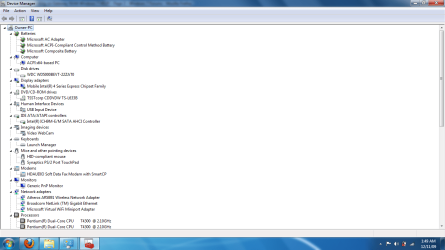
can you use the snipping tool to take a shot of the Device Manager?
 

My Computer My Computer

Computer Manufacturer/Model Number
Tx2500z Tablet Pc/Homemade Server
OS
Windows 7 Ult x64(x2), HomePrem x32(x4), Server 08 (+VM), 08 R2 (VM) , SuSe 11.2 (VM), XP 32 (VM)
CPU
Turion X2 ultra (oh well came with laptop)/P4 @3.2 (yes P4)
Motherboard
IDK HP Motherboard / Intel DG965SS
Memory
OCZ Dual Channel 4GB kit/ 1gb Dual Channel
Graphics Card(s)
HD 3200 graphics /GMA x3100 (yay for intergrated!!)
Sound Card
Realtek HD Audio(mic working, well sort of)/Siig IC-70012
Monitor(s) Displays
built-in Hp 12" laptop screen/ Acer 19"
Screen Resolution
1280x800 /1440x900
Cooling
All Air Cooled
Mouse
Logi MX Rev. /MS Wheel Optical 1.1A /Logitech Optical Mouse
Internet Speed
College baby but its still routed through vpn to 1536k...
Other Info
love my wacom pen and pressure sensitivity...
wished it worked in 7, SUSE for that matter though
heres a screenshot of my device manager which as 2 pages included
 

Attachments

  • help1.png
    help1.png
    47 KB · Views: 243
  • help2.png
    help2.png
    42.8 KB · Views: 180

My Computer My Computer

Computer Manufacturer/Model Number
Gateway NV44
OS
Windows 7
CPU
Intel Pentium Dual Core CPU T4300 @ 2.1 hz
Memory
4GB
Back
Top