CPU usage keeps shooting up to 100% for no reason?

darkizzle

New member
Local time
1:33 PM
Messages
10
My PC has the habit of randomly and suddenly using up CPU to 100% for no apparent reason. My computer slows down to a crawl and I can't even shut down as it stays on the "shutting down..." screen. There's no rhyme or reason to it, though it never happens if I don't have the pc on for at least an hour or two. I checked the processes and there's nothing out of the ordinary running. I don't even know where to look. Help? This never happened when I was on Vista...
 

My Computer My Computer

At a glance

Windows 7 Ultimate x642.2 GHz6 GBGeforce GTS 250 512
OS
Windows 7 Ultimate x64
CPU
2.2 GHz
Motherboard
AMD Phenom 9550 Quad Core
Memory
6 GB
Graphics Card(s)
Geforce GTS 250 512
Hello, Welcome to the forums! :)
Could you please post a screenshot of your task manager during one of these High moments?
Also, what anti-virus are you using? That could be the problem.
~Jonathan
 

My Computer My Computer

At a glance

Windows 7 Professional x64Intel i7 2600K OC'd @ 4620 MHz16GB GSkill Sniper 2133 Mhz (4x4GB)EVGA GeForce GTX 480 SuperClocked+
Computer Manufacturer/Model Number
Custom
OS
Windows 7 Professional x64
CPU
Intel i7 2600K OC'd @ 4620 MHz
Motherboard
Asus P8Z68-V Pro
Memory
16GB GSkill Sniper 2133 Mhz (4x4GB)
Graphics Card(s)
EVGA GeForce GTX 480 SuperClocked+
Sound Card
Realtek High Definition Audio
Monitor(s) Displays
2x Acer S273HLbmii 27"
Screen Resolution
2 x 1920x1080
Hard Drives
64GB Crucial M4 SSD

Storage: Hitachi 1TB 5400RPM, Samsung 1.5TB 5400RPM
PSU
Corsair HW Series 750w (modular)
Case
Cooler Master HAF 932 Advanced Blue Edition
Cooling
CM Hyper 212+ CPU cooler, 3x 230mm + 1x 140mm case fans
Keyboard
Logitech MK320 (wireless)
Mouse
Logitech MK320 (wireless)
Internet Speed
30 Mb/s : 2 Mb/s
Hello to you too! I'll make sure to try to take one the next time it happens, if it will even allow me (even vlc and firefox dies when this happens). I'm pretty sure its not AVG. Nothing at all happens when its doing a scan and such. There's never anything in the task manager that indicates something is sucking the resources dry. Firefox is typically using up the most memory and svchost...
 

My Computer My Computer

At a glance

Windows 7 Ultimate x642.2 GHz6 GBGeforce GTS 250 512
OS
Windows 7 Ultimate x64
CPU
2.2 GHz
Motherboard
AMD Phenom 9550 Quad Core
Memory
6 GB
Graphics Card(s)
Geforce GTS 250 512
It's not usually the scans that bite you. It's memory leaks. AVG has been know to cause problems. It is not just my bias. I used AVG for a long time, till it developed a memory leak on my machine. Try uninstalling it and installing Microsoft Security Essentials. MSE works very nicely on Windows machines.
 

My Computer My Computer

At a glance

Windows 7 Professional x64Intel i7 2600K OC'd @ 4620 MHz16GB GSkill Sniper 2133 Mhz (4x4GB)EVGA GeForce GTX 480 SuperClocked+
Computer Manufacturer/Model Number
Custom
OS
Windows 7 Professional x64
CPU
Intel i7 2600K OC'd @ 4620 MHz
Motherboard
Asus P8Z68-V Pro
Memory
16GB GSkill Sniper 2133 Mhz (4x4GB)
Graphics Card(s)
EVGA GeForce GTX 480 SuperClocked+
Sound Card
Realtek High Definition Audio
Monitor(s) Displays
2x Acer S273HLbmii 27"
Screen Resolution
2 x 1920x1080
Hard Drives
64GB Crucial M4 SSD

Storage: Hitachi 1TB 5400RPM, Samsung 1.5TB 5400RPM
PSU
Corsair HW Series 750w (modular)
Case
Cooler Master HAF 932 Advanced Blue Edition
Cooling
CM Hyper 212+ CPU cooler, 3x 230mm + 1x 140mm case fans
Keyboard
Logitech MK320 (wireless)
Mouse
Logitech MK320 (wireless)
Internet Speed
30 Mb/s : 2 Mb/s
Ah I see. I'll do that right now (install MSE). Should I uninstall AVG too?

Edit: Oh, duh. Stupid question.
 

My Computer My Computer

At a glance

Windows 7 Ultimate x642.2 GHz6 GBGeforce GTS 250 512
OS
Windows 7 Ultimate x64
CPU
2.2 GHz
Motherboard
AMD Phenom 9550 Quad Core
Memory
6 GB
Graphics Card(s)
Geforce GTS 250 512
Yes, certainly. Always uninstall your previous AV before installing a new one. I don't think MSE will even let you install if it detects another AV.
 

My Computer My Computer

At a glance

Windows 7 Professional x64Intel i7 2600K OC'd @ 4620 MHz16GB GSkill Sniper 2133 Mhz (4x4GB)EVGA GeForce GTX 480 SuperClocked+
Computer Manufacturer/Model Number
Custom
OS
Windows 7 Professional x64
CPU
Intel i7 2600K OC'd @ 4620 MHz
Motherboard
Asus P8Z68-V Pro
Memory
16GB GSkill Sniper 2133 Mhz (4x4GB)
Graphics Card(s)
EVGA GeForce GTX 480 SuperClocked+
Sound Card
Realtek High Definition Audio
Monitor(s) Displays
2x Acer S273HLbmii 27"
Screen Resolution
2 x 1920x1080
Hard Drives
64GB Crucial M4 SSD

Storage: Hitachi 1TB 5400RPM, Samsung 1.5TB 5400RPM
PSU
Corsair HW Series 750w (modular)
Case
Cooler Master HAF 932 Advanced Blue Edition
Cooling
CM Hyper 212+ CPU cooler, 3x 230mm + 1x 140mm case fans
Keyboard
Logitech MK320 (wireless)
Mouse
Logitech MK320 (wireless)
Internet Speed
30 Mb/s : 2 Mb/s
I've been having this problem too. Sometimes it happens straight from bootup and the gadget I have that shows processor/RAM use doesn't even come up. I think it's been what's kept my login screen from coming up somtimes too. it just hangs at a black screen.

Sometimes it happens within 30 min or so after boot-up. When I've managed to get a task manager up, there's nothing to indicate a process that's maxing out the system. It might say '100%' at the bottom, but adding up stuff in the CPU column doesn't add up to that, even making sure to show all the processes, not just mine.

Most recently after booting up my Norton was turned off or thought it had expired or something. I downloaded AVG and got it to run a full scan and all it found were cookies.
 

My Computer My Computer

At a glance

Windows 7 Professional x642.0 GHz AMD Turion 64 X2 Dual-Core Mobile Tec...4 GBNVIDIA GeForce 8400M GS
Computer Manufacturer/Model Number
HP Pavillion dv6768se
OS
Windows 7 Professional x64
CPU
2.0 GHz AMD Turion 64 X2 Dual-Core Mobile Technology TL-60
Memory
4 GB
Graphics Card(s)
NVIDIA GeForce 8400M GS
Hard Drives
250 GB (5400 rpm)
To avoid confusion, please start your own thread... Thanks.. ;)
 

My Computer My Computer

At a glance

64-bit Windows 8.1 ProCore(TM) i5 CPU 4330 Haswell @ 3.20GHz12.00 GBIntel(R) HD Graphics
Computer type
PC/Desktop
Computer Manufacturer/Model Number
LENOVO K450 @3.0GHZ
OS
64-bit Windows 8.1 Pro
CPU
Core(TM) i5 CPU 4330 Haswell @ 3.20GHz
Motherboard
LENOVO
Memory
12.00 GB
Graphics Card(s)
Intel(R) HD Graphics
Sound Card
Intel HD integtrated
Monitor(s) Displays
HP 25' ISP Monitor
Screen Resolution
1900/1020
Hard Drives
(1) ST1000DM003-1CH162 (2) Generic STORAGE DEVICE USB Device (3) Generic STORAGE DEVICE USB Device
Internet Speed
100mb down/10mb up
Nope, didn't work. Happened again while I was playing Fallout, 3 hours after start up. I couldn't even take a screenshot, nothing would work. But I tried to look for anything in the processes that could be doing it...nothing. This is getting tiresome...
 

My Computer My Computer

At a glance

Windows 7 Ultimate x642.2 GHz6 GBGeforce GTS 250 512
OS
Windows 7 Ultimate x64
CPU
2.2 GHz
Motherboard
AMD Phenom 9550 Quad Core
Memory
6 GB
Graphics Card(s)
Geforce GTS 250 512
Filll in your hardware specs and use the guide in my sig to update your drivers. Can you also post a screenshot of the msconfig startup tab and your installed programs?
 

My Computer My Computer

At a glance

Windows 7 Ultimate x86-64[email protected] 1066MHz FSB6GB DDR3 1066MHz9300M GS 256MB Dedicated (Speed) + Intel4500M...
Computer Manufacturer/Model Number
Sony Vaio Z46GDU
OS
Windows 7 Ultimate x86-64
CPU
[email protected] 1066MHz FSB
Motherboard
Sony branded
Memory
6GB DDR3 1066MHz
Graphics Card(s)
9300M GS 256MB Dedicated (Speed) + Intel4500MHD (Stamina)
Sound Card
Realtek HD Audio
Monitor(s) Displays
13.1' WXGA
Screen Resolution
1600x900
Hard Drives
320GB 7200RPM w/ 16MB cache
Internet Speed
1MB/s
Ah I see. I'll do that right now (install MSE). Should I uninstall AVG too?

Edit: Oh, duh. Stupid question.

AVG was once as lean and mean as Avast (and now MSE), but has become problematic and unrecommended by tech enthusiasts in recent years.

You'll need to root out the entries in Registry manually after uninstall from Programs and Features. Here's how:


To delete all registry keys with reference to AVG , run Registry Editor (regedit). Navigate to the following registry key branches:

HKEY_LOCAL_MACHINE\SOFTWARE\AVG
HKEY_LOCAL_MACHINE\SOFTWARE\Microsoft\Windows\CurrentVersion\Uninstall\AVG8Uninstall
Right click on AVG and AVG8Uninstall respectively, and select Delete to remove the AVG related registry keys. These are two known registry keys that installed by AVG, and should only be removed if there is no longer any AVG programs installed on the PC. User can also click on Edit menu and use Find command to search for AVG related registry keys, but make sure to use common sense to identify which keys is belonged to AVG and which is not. For example, “AVGeneralNotification” is system added key, and should not be deleted.
 
As Jonathon asked, a screen shot would be of help to use.

Make sure to expand the Task Manager windows so e can see all item clearly, including their path.

Noe kick on the memory tab which wili show you what progan is using the most amount of memory,
 

My Computer My Computer

At a glance

Windows 7 Pro & Vista Home PremiumAthlon 64 3800+ (Orleans) 2.40GHz2GB DDR2 RAM DIMMNVIDIA GeForce 8500 GT 512 MB memory HDMI out
Computer Manufacturer/Model Number
Cheap $399.00 E-Machine
OS
Windows 7 Pro & Vista Home Premium
CPU
Athlon 64 3800+ (Orleans) 2.40GHz
Motherboard
Winfast
Memory
2GB DDR2 RAM DIMM
Graphics Card(s)
NVIDIA GeForce 8500 GT 512 MB memory HDMI out
Sound Card
creative X-Fi Exteme 7..1 channel
Monitor(s) Displays
Acer V223W 22" widescreen DVI
Screen Resolution
1680x1050
Hard Drives
WDC WD5 500GB
WDC WD25 250GB
PSU
OCZ 550 watt
Case
Gateway
Cooling
2 fans
Keyboard
Dell
Mouse
Sony Vaio
Internet Speed
18MB/s down - .72MB /s up
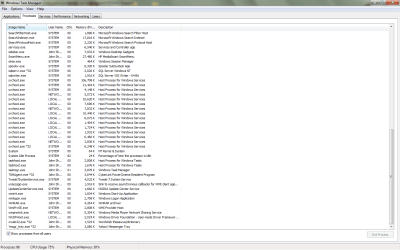
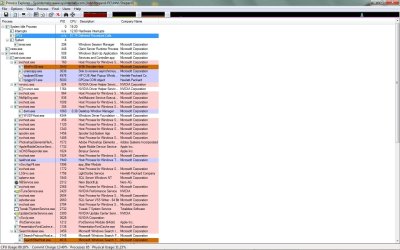
Okay, I had actually thought it had gone for awhile after I uninstalled Ad-aware. But no, its back. With a vengeance. I'm getting lag just from typing this lol. I don't have the first clue where to begin looking for this, so here the shots of the taskmanager and one from process explorer. Hope someone can figure it out...I cant live like this...:cry:

Untitled.jpg
Untitled2.png
Untitled3.jpg
 

My Computer My Computer

At a glance

Windows 7 Ultimate x642.2 GHz6 GBGeforce GTS 250 512
OS
Windows 7 Ultimate x64
CPU
2.2 GHz
Motherboard
AMD Phenom 9550 Quad Core
Memory
6 GB
Graphics Card(s)
Geforce GTS 250 512
I had this problem for a bit, until I found that it was a desktop gadget periodically updating, snagging all my cpu, then releasing. My gadget was one that tracked drive space across all my hard drives, and provided a handy link to them on the desktop. I have since let it go.. Just offering this up as something to check..
 

My Computer My Computer

At a glance

Windows 7 UltimateAmd 5400+ dual core overclocked to 3.0 ghz8gb 5-5-5-5-15 g-skillNvidia 9800gt 512mb
Computer Manufacturer/Model Number
Custom
OS
Windows 7 Ultimate
CPU
Amd 5400+ dual core overclocked to 3.0 ghz
Motherboard
EVGA 590 sli aM2
Memory
8gb 5-5-5-5-15 g-skill
Graphics Card(s)
Nvidia 9800gt 512mb
Sound Card
M-Audio Delta 2496
Monitor(s) Displays
Acer 22 inch lcd
Screen Resolution
1680 x 1050
Hard Drives
Hmm

4.0 terabytes total..
PSU
650 watts
Case
Antec Sonata II
Cooling
Zallmen Xpu cooler
Keyboard
some rubbish I found in my garage
Mouse
logitech
Internet Speed
caps at about 650kb down, 50kb up . Gigabit local network.
A gadget? Can you be more specific please?
 

My Computer My Computer

At a glance

Windows 7 Ultimate x642.2 GHz6 GBGeforce GTS 250 512
OS
Windows 7 Ultimate x64
CPU
2.2 GHz
Motherboard
AMD Phenom 9550 Quad Core
Memory
6 GB
Graphics Card(s)
Geforce GTS 250 512
Hi Darkizzle,

Seems like wmiprvse.exe is taking your memory ... I did a search found that Imon 7.77 used tp cause some problems ... Do you use that ??
 

My Computer My Computer

At a glance

Windows 7 Ultimate - 64-bit | Windows 8 Pro -...Intel® Core™ i7 Processor 3,610QM (2.30Hz, 6M...8 GBNVIDIA® GeForce® GT 650M 2GB Graphics, Optimu...
Computer Manufacturer/Model Number
Samsung NP550P5C-S02IN
OS
Windows 7 Ultimate - 64-bit | Windows 8 Pro - 64-bit
CPU
Intel® Core™ i7 Processor 3,610QM (2.30Hz, 6MB L3 Cach
Memory
8 GB
Graphics Card(s)
NVIDIA® GeForce® GT 650M 2GB Graphics, Optimus™ techno
Sound Card
SoundAlive™ JBL 3 Speakers (With sub-Woofer)
Monitor(s) Displays
39.62cm (15.6) SuperBright 300nit HD+ LED Display
Screen Resolution
1,600 x 900, Anti-Reflective
Hard Drives
1TB S-ATA II Hard Drive (5,400RPM)
A desktop gadget... Do you have any desktop gadgets running.. If so, try closing them one at a time, and see if the problem goes away.. Just something to try..
 

My Computer My Computer

At a glance

Windows 7 UltimateAmd 5400+ dual core overclocked to 3.0 ghz8gb 5-5-5-5-15 g-skillNvidia 9800gt 512mb
Computer Manufacturer/Model Number
Custom
OS
Windows 7 Ultimate
CPU
Amd 5400+ dual core overclocked to 3.0 ghz
Motherboard
EVGA 590 sli aM2
Memory
8gb 5-5-5-5-15 g-skill
Graphics Card(s)
Nvidia 9800gt 512mb
Sound Card
M-Audio Delta 2496
Monitor(s) Displays
Acer 22 inch lcd
Screen Resolution
1680 x 1050
Hard Drives
Hmm

4.0 terabytes total..
PSU
650 watts
Case
Antec Sonata II
Cooling
Zallmen Xpu cooler
Keyboard
some rubbish I found in my garage
Mouse
logitech
Internet Speed
caps at about 650kb down, 50kb up . Gigabit local network.
Imon 7.77? I've never even heard of such a thing let alone use it! I googled it and there are others who are having the same problem with wmiprvse...how do I get rid of it?

EDIT: I can't seem to kill it with the task manager. Figures. So I how to get rid of it permanently?
 

My Computer My Computer

At a glance

Windows 7 Ultimate x642.2 GHz6 GBGeforce GTS 250 512
OS
Windows 7 Ultimate x64
CPU
2.2 GHz
Motherboard
AMD Phenom 9550 Quad Core
Memory
6 GB
Graphics Card(s)
Geforce GTS 250 512
Ok, now its happening about 20 minutes after startup...every time!! This is getting ridiculous...
 

My Computer My Computer

At a glance

Windows 7 Ultimate x642.2 GHz6 GBGeforce GTS 250 512
OS
Windows 7 Ultimate x64
CPU
2.2 GHz
Motherboard
AMD Phenom 9550 Quad Core
Memory
6 GB
Graphics Card(s)
Geforce GTS 250 512
Ok, now its happening about 20 minutes after startup...every time!! This is getting ridiculous...

I truly apologize for inconvenience. I guess we cannot kill that because i saw you Task Manager and you are using SQL Server and WMI(Windows Management Instrumentation) is one of the dependencies. Maybe you could try to rebuild them i will attach a bat file

View attachment WMIfix.bat

Download this bat file then Right Click on it and Run as Administrator

It will ask you whether you need to shutdown the Firewall and you could agree for that. Once it's done reboot the system.

Also run the HijackThis and post the log

Hope that helps
 

My Computer My Computer

At a glance

Windows 7 Ultimate - 64-bit | Windows 8 Pro -...Intel® Core™ i7 Processor 3,610QM (2.30Hz, 6M...8 GBNVIDIA® GeForce® GT 650M 2GB Graphics, Optimu...
Computer Manufacturer/Model Number
Samsung NP550P5C-S02IN
OS
Windows 7 Ultimate - 64-bit | Windows 8 Pro - 64-bit
CPU
Intel® Core™ i7 Processor 3,610QM (2.30Hz, 6MB L3 Cach
Memory
8 GB
Graphics Card(s)
NVIDIA® GeForce® GT 650M 2GB Graphics, Optimus™ techno
Sound Card
SoundAlive™ JBL 3 Speakers (With sub-Woofer)
Monitor(s) Displays
39.62cm (15.6) SuperBright 300nit HD+ LED Display
Screen Resolution
1,600 x 900, Anti-Reflective
Hard Drives
1TB S-ATA II Hard Drive (5,400RPM)
Back
Top