Windows 7 and Outlook 2007 problem (more instances)

inetMark

New member
Local time
4:45 PM
Messages
12
I use Outlook 2007 for my emails. In Windows XP and Windows Vista after all upgrades worked everything ok. But in Windows 7 I have (and my friends too) small problem.

I use the Outlook always minimized in a tray list (right bottom bar). I ussually launching Outlook with a button on my keyboard or by doubleclick to icon on desktop. In all ways are turning on a new instance of outlook. In process list is there only one instance OUTLOOK.EXE, but if I close a new window, then tray icon is still there and after I doubleclick on that icon and close a Outlook 200, then icon disapear.
If I run Outlook 10 times by button on my keybord I need to close 10 times Outlook to definitely turn it off.

I have legal Windows 7, legal Outlook 2007 and all upgrades.
Thanks for help.
 
Last edited:

My Computer My Computer

OS
Windows 7 x64
CPU
INTEL Core 2 Quad Q9400
Motherboard
GIGABYTE EP35-DS3 - P35
Memory
4GB (KIT 2x2GB) DDR2 1066MHz PC8500 A-DATA Extreme Edition
Screen Resolution
1680*1050
Keyboard
Logitech Cordless LX710
Mouse
Logitech Cordless LX710
Internet Speed
40 Mb/s (FiberNet)
Why would you need to run Outlook more than once? Once it's open just leave it open but minimized. Don't keep re-opening it
 

My Computer My Computer

Computer Manufacturer/Model Number
tw33k
OS
Windows 7 Ultimate (x64) SP1
CPU
Intel 3770k 4.6GHz
Motherboard
ASUS Maximus V Formula
Memory
8GB (2x 4GB) Crucial Ballistix
Graphics Card(s)
Sapphire 7950 (1060/1600)
Sound Card
On Board Realtek HD Audio
Monitor(s) Displays
27" Acer B273HU (via HDMI)
Screen Resolution
2048 x 1152
Hard Drives
Crucial M4 128GB
2TB WD Black
1TB Samsung F3 SATA
1TB WD Elite External
2TB WD USB 3.0
PSU
Corsair AX750 Gold
Case
Corsair Obsidian 800DW
Cooling
Corsair H100 (2x AP-121/2x UK-3000 push/pull)
Keyboard
Microsoft Wireless 5000
Mouse
Microsoft Wireless 5000
Internet Speed
5mb/s
Other Info
Logitech z-2300 2.1 speakers
Lamptron FC-5 v2
I no need to open it more than once.
I just want to maximize actually opened (minimized) instance after button on keyboard click, or after click on icon on desktop.

Yes, i can maximize it from tray list, but I want to use a different way (keyboard shortcut is better :) ). And in Windows Vista this worked perfect.

 

My Computer My Computer

OS
Windows 7 x64
CPU
INTEL Core 2 Quad Q9400
Motherboard
GIGABYTE EP35-DS3 - P35
Memory
4GB (KIT 2x2GB) DDR2 1066MHz PC8500 A-DATA Extreme Edition
Screen Resolution
1680*1050
Keyboard
Logitech Cordless LX710
Mouse
Logitech Cordless LX710
Internet Speed
40 Mb/s (FiberNet)
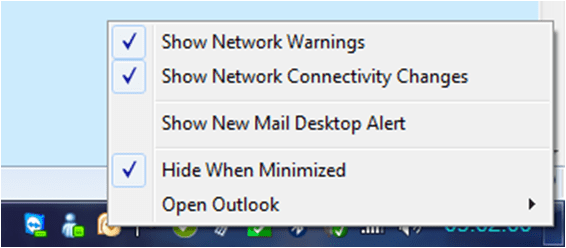
If you open Outlook (just one instance of it!), you should see an Outlook icon in the status bar (bottom right of screen).

If you right-click on that, you can choose the option "Hide When Minimized." Now go ahead and minimise Outlook - there should be no icon in the taskbar, but the icon in the status bar will still be there. If you double-click that, or right-click it and go to "Open Outlook", your one existing Outlook session should re-open, which I think is what you want.

If, however, you click an Outlook icon in your quick launch bar, or on the desktop, you will indeed open another parallel Outlook session. If you use the "Hide When Minimized" option and manage Outlook from the status bar, it should all work normally without loads of Outlooks all running at the same time.

What is the keyboard shortcut you are using?
 

Attachments

  • Capture.PNG
    Capture.PNG
    5.1 KB · Views: 11
  • Picture1.png
    Picture1.png
    24 KB · Views: 13

My Computer My Computer

Computer Manufacturer/Model Number
Custom
OS
Windows 7 Enterprise x64
CPU
Intel i7 920
Motherboard
Asus P6T Deluxe v2
Memory
6 GB
Graphics Card(s)
nVidia GTX260 + nVidia 3D
Sound Card
Onboard
Monitor(s) Displays
Samsung SyncMaster 2233RZ
Screen Resolution
1680 x 1050
Hard Drives
1 x 64GB SSD primary
2 x 1 TB (mirrored)
PSU
700W
Other Info
Edimax 802.11n Wireless PCI Card
Netgear DG834G router
Logitech Cordless LX710 is keyboard what i am using. Button is in the top-middle of keyboard.

That checkbox (Hide when minimized) i have checked. But I need to have checked it. Because I want to hide a icon from taskbar but I want to have icon on tray list.

For explatin: I think that we ment the same things with these words:
quick launch bar = taskbar
status bar = tray list

So the all thing what I want is to launch the same instance of Outlook what I already have launched from quick launch bar/taskbar/desktop/keyboard and I dont wont to open it only from status bar/tray list.

In Windows XP and Windows Vista with all upgrades worked after Office SP2. Now I have Office SP2 ant all others upgrades, and this bug is still here.
 

My Computer My Computer

OS
Windows 7 x64
CPU
INTEL Core 2 Quad Q9400
Motherboard
GIGABYTE EP35-DS3 - P35
Memory
4GB (KIT 2x2GB) DDR2 1066MHz PC8500 A-DATA Extreme Edition
Screen Resolution
1680*1050
Keyboard
Logitech Cordless LX710
Mouse
Logitech Cordless LX710
Internet Speed
40 Mb/s (FiberNet)
I read your post twice and I just don't understand.
 

My Computer My Computer

Computer Manufacturer/Model Number
Asus
OS
Windows 7 x64 Ultimate SP1
CPU
I5 875K Unlocked
Motherboard
P7P55D-E-PRO
Memory
Kingston HyperX Genesis DDR3-1600MHz 9-9-9-27 @ 1.65V XMP
Graphics Card(s)
EVGA GeForce GTX 570 HD 732 MHz GPU 1280 MB, 152 GB Mem
Sound Card
Onboard Via 1828S
Monitor(s) Displays
Samsung T240 HD
Screen Resolution
Dual 1920X1200 1027X768
Hard Drives
OCZ Vertex II Extended Sandforce SSD 60 Gig 2X WD Black Caviar 1 terabyte 6GBS Transer Sata 3 Marvell Chip
PSU
Corsair Gold fully Modular 80 Plus 850
Case
Coolermaster Half X Full Tower
Cooling
Noctua NH-U12P
Keyboard
MS
Mouse
MS
Internet Speed
Fast enough
Other Info
My fridge has a water tap
Logitech Cordless LX710 is keyboard what i am using. Button is in the top-middle of keyboard.

That checkbox (Hide when minimized) i have checked. But I need to have checked it. Because I want to hide a icon from taskbar but I want to have icon on tray list.

For explatin: I think that we ment the same things with these words:
quick launch bar = taskbar
status bar = tray list

So the all thing what I want is to launch the same instance of Outlook what I already have launched from quick launch bar/taskbar/desktop/keyboard and I dont wont to open it only from status bar/tray list.

In Windows XP and Windows Vista with all upgrades worked after Office SP2. Now I have Office SP2 ant all others upgrades, and this bug is still here.

It's harsh to call it a bug - it is an inconvenience to you but suits most people.

We need to get our ducks in a row here. The quick launch bar, disabled by default in 7, lives bottom left; the task bar is in the middle; status bar on the right. They are all doing different jobs. You can use the options I specified to launch your single instance of Outlook from the status bar; using the quick launch bar will always launch a new instance on top of the one already running. Clicking on the task bar will open up the instance that's already running.

Can you re-map the key on your Logitech keyboard to a different command? And do you have the latest software/drivers for it?
 

My Computer My Computer

Computer Manufacturer/Model Number
Custom
OS
Windows 7 Enterprise x64
CPU
Intel i7 920
Motherboard
Asus P6T Deluxe v2
Memory
6 GB
Graphics Card(s)
nVidia GTX260 + nVidia 3D
Sound Card
Onboard
Monitor(s) Displays
Samsung SyncMaster 2233RZ
Screen Resolution
1680 x 1050
Hard Drives
1 x 64GB SSD primary
2 x 1 TB (mirrored)
PSU
700W
Other Info
Edimax 802.11n Wireless PCI Card
Netgear DG834G router
Off Topic: clunkfish, I'm enjoying your user name, it's damn near as weird as mine! :roflmao:
 

My Computer My Computer

Computer Manufacturer/Model Number
Home Grown
OS
Windows 7 Ultimate (64)
CPU
i7-2600K
Motherboard
Asus P8P67-M Pro
Memory
G.SKILL Ripjaws X Series 8GB (2 x 4GB)
Graphics Card(s)
ATI 5750
Sound Card
On-Board
Monitor(s) Displays
LG W2486L
Screen Resolution
1920X1080
Hard Drives
Intel X-25M 80 Gig SSD | Intel X-25M 160 Gig SSD | WD Black 500MB - External eSata
PSU
Zalman ZM770-XT 770 Watts
Case
Antec 180 mini
Cooling
Cooler Master V8
Internet Speed
15MB - Cable
Other Info
Sissy OC - 4.6 @ 1.3175 24/7 | 18' Idle - 55' Load
Of course I can change a command on my Keyboard. But why? What I need to set there?

Sorry for my english... :(

Quick launch is really in W7? :) I didn't know that. So that is reason why I ment that by quick launch you mean new task bar, where can be icons of turned off applications.

But back to the reason of my post.
Why is it harsh to call it bug? In Windows Vista have Outlook same behavior but after SP2 it was fixed. Tell me only one usefull thing what is good for this behavior. Just one. There is no one.

I just want to have only one icon. That icon I need to have in tray list/status bar. This icon i don't use and it is just information for me, that Outlook is running. I don't want to have icon/button in task bar (only when application is maximized - that is reason why I use checkbox "Hide when minimized").

I just don't understand why it is working now by different way like in Windows Vista.
 

My Computer My Computer

OS
Windows 7 x64
CPU
INTEL Core 2 Quad Q9400
Motherboard
GIGABYTE EP35-DS3 - P35
Memory
4GB (KIT 2x2GB) DDR2 1066MHz PC8500 A-DATA Extreme Edition
Screen Resolution
1680*1050
Keyboard
Logitech Cordless LX710
Mouse
Logitech Cordless LX710
Internet Speed
40 Mb/s (FiberNet)
There is an excellent tutorial on this site that will show you how to enable the Quick Launch bar.

Basically, if I understand correctly, everything's working fine and the only problem is that your keyboard shortcut key launches a new instance of Outlook rather than switching focus to an already running instance.

Have you updated your keyboard software to the Windows 7 version, using the link I posted?

According to Logitech, you can assign pretty much anything you want to the keyboard special keys using their Setpoint software. I have a similar thing on my keyboard (a Microsoft jobbie), and when I hit the Mail button it switches focus to Outlook if it's running, launches it if it's not. It doesn't start up further parallel instances of Outlook. Please try updating your Logitech software if you haven't already, then look in the settings and see what the Mail button is set to do - a screenshot of that would be very helpful in diagnosing the problem.
 

My Computer My Computer

Computer Manufacturer/Model Number
Custom
OS
Windows 7 Enterprise x64
CPU
Intel i7 920
Motherboard
Asus P6T Deluxe v2
Memory
6 GB
Graphics Card(s)
nVidia GTX260 + nVidia 3D
Sound Card
Onboard
Monitor(s) Displays
Samsung SyncMaster 2233RZ
Screen Resolution
1680 x 1050
Hard Drives
1 x 64GB SSD primary
2 x 1 TB (mirrored)
PSU
700W
Other Info
Edimax 802.11n Wireless PCI Card
Netgear DG834G router
Thank you for link to quick launch, but I don't need to use it. I think that new task bar is perfect and I use to it.

I have a newvest driver for everything in my PC. I reinstalled OS only few days ago and I have excatly that SetPoint driver for 64bit OS. I am sure that this is not problem of driver.

My english is really not good, so I try to explain again shortly what is going on.
In Windows Vista:
icon of Outlook on desktop
doubleclick to icon on desktop -> launch or open only one instance of Outlook, if one instance is minimized, then doubleckick on that icon show that instance to me

In Windows 7:
icon of Outlook on desktop
every doubleclick on that icon open new Outlook window
 

My Computer My Computer

OS
Windows 7 x64
CPU
INTEL Core 2 Quad Q9400
Motherboard
GIGABYTE EP35-DS3 - P35
Memory
4GB (KIT 2x2GB) DDR2 1066MHz PC8500 A-DATA Extreme Edition
Screen Resolution
1680*1050
Keyboard
Logitech Cordless LX710
Mouse
Logitech Cordless LX710
Internet Speed
40 Mb/s (FiberNet)
I'm sorry old bean, I am more confused than ever :confused:

If you use and like the new task bar, and it deals with Outlook in exactly the way you want it to, and it's visible all the time - why on earth do you want to manage Outlook from a desktop shortcut? What is there to gain? What extra convenience does it afford you? Why, inetMark, why? :)
 

My Computer My Computer

Computer Manufacturer/Model Number
Custom
OS
Windows 7 Enterprise x64
CPU
Intel i7 920
Motherboard
Asus P6T Deluxe v2
Memory
6 GB
Graphics Card(s)
nVidia GTX260 + nVidia 3D
Sound Card
Onboard
Monitor(s) Displays
Samsung SyncMaster 2233RZ
Screen Resolution
1680 x 1050
Hard Drives
1 x 64GB SSD primary
2 x 1 TB (mirrored)
PSU
700W
Other Info
Edimax 802.11n Wireless PCI Card
Netgear DG834G router
I would think he runs it from the desktop because that's how he wants to... What's the problem with that?

inetMark: I'll try to replicate the issue here and post back...
 

My Computer My Computer

Computer Manufacturer/Model Number
Home Grown
OS
Windows 7 Ultimate (64)
CPU
i7-2600K
Motherboard
Asus P8P67-M Pro
Memory
G.SKILL Ripjaws X Series 8GB (2 x 4GB)
Graphics Card(s)
ATI 5750
Sound Card
On-Board
Monitor(s) Displays
LG W2486L
Screen Resolution
1920X1080
Hard Drives
Intel X-25M 80 Gig SSD | Intel X-25M 160 Gig SSD | WD Black 500MB - External eSata
PSU
Zalman ZM770-XT 770 Watts
Case
Antec 180 mini
Cooling
Cooler Master V8
Internet Speed
15MB - Cable
Other Info
Sissy OC - 4.6 @ 1.3175 24/7 | 18' Idle - 55' Load
inetMark: Your right, if I launch Outlook from a desktop shortcut and then minimize and launch again from the shortcut, it opens another occurrence rather than opens up the existing minimized outlook. Not sure why that happens as it doesn't happen with any other apps I've tested, guess a little research is needed...
 

My Computer My Computer

Computer Manufacturer/Model Number
Home Grown
OS
Windows 7 Ultimate (64)
CPU
i7-2600K
Motherboard
Asus P8P67-M Pro
Memory
G.SKILL Ripjaws X Series 8GB (2 x 4GB)
Graphics Card(s)
ATI 5750
Sound Card
On-Board
Monitor(s) Displays
LG W2486L
Screen Resolution
1920X1080
Hard Drives
Intel X-25M 80 Gig SSD | Intel X-25M 160 Gig SSD | WD Black 500MB - External eSata
PSU
Zalman ZM770-XT 770 Watts
Case
Antec 180 mini
Cooling
Cooler Master V8
Internet Speed
15MB - Cable
Other Info
Sissy OC - 4.6 @ 1.3175 24/7 | 18' Idle - 55' Load
inetMark: Your right, if I launch Outlook from a desktop shortcut and then minimize and launch again from the shortcut, it opens another occurrence rather than opens up the existing minimized outlook. Not sure why that happens as it doesn't happen with any other apps I've tested, guess a little research is needed...

The same behaviour occurs with Excel; not with Word or Powerpoint....Word opens a new document each time, in the same instance of Word, and Powerpoint just returns focus to Powerpoint but no multiple documents or multiple instances.
 

My Computer My Computer

Computer Manufacturer/Model Number
Custom
OS
Windows 7 Enterprise x64
CPU
Intel i7 920
Motherboard
Asus P6T Deluxe v2
Memory
6 GB
Graphics Card(s)
nVidia GTX260 + nVidia 3D
Sound Card
Onboard
Monitor(s) Displays
Samsung SyncMaster 2233RZ
Screen Resolution
1680 x 1050
Hard Drives
1 x 64GB SSD primary
2 x 1 TB (mirrored)
PSU
700W
Other Info
Edimax 802.11n Wireless PCI Card
Netgear DG834G router
I would think he runs it from the desktop because that's how he wants to... What's the problem with that?

I have absolutely no problem with that at all. I just don't understand why he runs it from the desktop when it's there in the task bar :huh:
 

My Computer My Computer

Computer Manufacturer/Model Number
Custom
OS
Windows 7 Enterprise x64
CPU
Intel i7 920
Motherboard
Asus P6T Deluxe v2
Memory
6 GB
Graphics Card(s)
nVidia GTX260 + nVidia 3D
Sound Card
Onboard
Monitor(s) Displays
Samsung SyncMaster 2233RZ
Screen Resolution
1680 x 1050
Hard Drives
1 x 64GB SSD primary
2 x 1 TB (mirrored)
PSU
700W
Other Info
Edimax 802.11n Wireless PCI Card
Netgear DG834G router
I don't know why anyone would concern themselves with someone else's choices... Geezzzz
 

My Computer My Computer

Computer Manufacturer/Model Number
Home Grown
OS
Windows 7 Ultimate (64)
CPU
i7-2600K
Motherboard
Asus P8P67-M Pro
Memory
G.SKILL Ripjaws X Series 8GB (2 x 4GB)
Graphics Card(s)
ATI 5750
Sound Card
On-Board
Monitor(s) Displays
LG W2486L
Screen Resolution
1920X1080
Hard Drives
Intel X-25M 80 Gig SSD | Intel X-25M 160 Gig SSD | WD Black 500MB - External eSata
PSU
Zalman ZM770-XT 770 Watts
Case
Antec 180 mini
Cooling
Cooler Master V8
Internet Speed
15MB - Cable
Other Info
Sissy OC - 4.6 @ 1.3175 24/7 | 18' Idle - 55' Load
I don't know why anyone would concern themselves with someone else's choices... Geezzzz

Because I'm trying to help, but I can't do that if I can't get a grip on exactly what the problem is.

I think I must have misunderstood what it is inetMark wants to do, because to insist on using a desktop shortcut to switch to a running instance of a program, when there is a button there in the task bar that does exactly the same job without causing any problems, seems unlikely.

I am assuming I must have got the wrong end of the stick. If I can grasp exactly what it is that's needed, there's a chance I can help with a solution. Another possibility is that inetMark has misdescribed the issue - it is, after all, characterised rather differently now from what was originally posted. Again, if we can get to the bottom of it all then a solution may become apparent.

I thought that helping others was what this forum was all about, and am surprised at your choosing to expend your energies criticising me instead.
 

My Computer My Computer

Computer Manufacturer/Model Number
Custom
OS
Windows 7 Enterprise x64
CPU
Intel i7 920
Motherboard
Asus P6T Deluxe v2
Memory
6 GB
Graphics Card(s)
nVidia GTX260 + nVidia 3D
Sound Card
Onboard
Monitor(s) Displays
Samsung SyncMaster 2233RZ
Screen Resolution
1680 x 1050
Hard Drives
1 x 64GB SSD primary
2 x 1 TB (mirrored)
PSU
700W
Other Info
Edimax 802.11n Wireless PCI Card
Netgear DG834G router
No worries, carry on as you do...
 

My Computer My Computer

Computer Manufacturer/Model Number
Home Grown
OS
Windows 7 Ultimate (64)
CPU
i7-2600K
Motherboard
Asus P8P67-M Pro
Memory
G.SKILL Ripjaws X Series 8GB (2 x 4GB)
Graphics Card(s)
ATI 5750
Sound Card
On-Board
Monitor(s) Displays
LG W2486L
Screen Resolution
1920X1080
Hard Drives
Intel X-25M 80 Gig SSD | Intel X-25M 160 Gig SSD | WD Black 500MB - External eSata
PSU
Zalman ZM770-XT 770 Watts
Case
Antec 180 mini
Cooling
Cooler Master V8
Internet Speed
15MB - Cable
Other Info
Sissy OC - 4.6 @ 1.3175 24/7 | 18' Idle - 55' Load
Thanks all for trying to help.

to clunkfish:
It is not different what I originaly posted. My english is just not good and words what I am choosing are maybe not good too :) .

I don't want to launch Outlook from desktop. I said that because that behavior not depent if you launch Outlook from desktop or from keyboard or from shortcat pinned on taskbar. In Windows Vista I can launch Outlook from everywhere and all the time it open to me only one instance. That is good that in Word, Excel, ... are opened more instances, but in Outlook is no reason for that.

This is my taskbar when Outlook is minimized:
attachment.php


And this is when Outlook is maximized:
attachment.php


I ussualy launch outllok from taskbar (pinned icon) but or from my keyboard. In all way are opened more instances. I don't want to open Outlook just only from icon in tray list (right bottom of screen). It is not comfortable for me.
 

Attachments

  • taskbar_outlook_minimized.png
    taskbar_outlook_minimized.png
    14.9 KB · Views: 440
  • taskbar_outlook_maximized.png
    taskbar_outlook_maximized.png
    16.2 KB · Views: 1,371

My Computer My Computer

OS
Windows 7 x64
CPU
INTEL Core 2 Quad Q9400
Motherboard
GIGABYTE EP35-DS3 - P35
Memory
4GB (KIT 2x2GB) DDR2 1066MHz PC8500 A-DATA Extreme Edition
Screen Resolution
1680*1050
Keyboard
Logitech Cordless LX710
Mouse
Logitech Cordless LX710
Internet Speed
40 Mb/s (FiberNet)
Back
Top