Multi-boot/Dual-Boot Windows XP on Windows 7

When exactly do you get this error?

Have you used this ISO file before so you know it is good?

Have you used just the XP files before so you know they work?

Were they extracted from CD that was used successfully before?

Where did they come from, have they been used successfully by you, and in what form?

Please answer each^
 
I don't know. My friend had the CD, and he lent me it to copy it. That's all as far as I know. Thats was years ago as well.

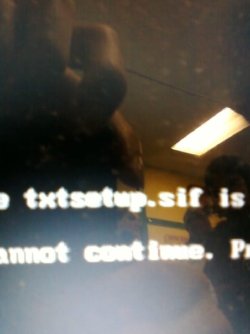
This is the error:
 

Attachments

  • 121209165320.jpg
    121209165320.jpg
    32.4 KB · Views: 15

My Computer My Computer

Computer Manufacturer/Model Number
Gateway KAV60
OS
Windows 7 Home Premium 32-bit
Memory
2 GB
Screen Resolution
1024x600
Hard Drives
250 GB HDD
Internet Speed
Time Warner Cable/Road Runner
Other Info
Intel Atom processor N270
Multi-in-1 card reader
802.11b/g
NO optical drive
NO WWAN
NO Bluetooth
When do you get the error?

It is normally given when attempting to boot into XP with SP2 conflict.

The last I heard you were still making bootable flash stick

can you boot into Windows 7 now?
 
? Your confusing me. I am in Windows 7. >.>

When I try to install Windows XP, that error, which I gave the screenshot, appears.

It says the INF file txtsetup.sif is missing or corrupted. Setup is discontinued/closed.

Press any key to exit, and the laptop restarts.
 

My Computer My Computer

Computer Manufacturer/Model Number
Gateway KAV60
OS
Windows 7 Home Premium 32-bit
Memory
2 GB
Screen Resolution
1024x600
Hard Drives
250 GB HDD
Internet Speed
Time Warner Cable/Road Runner
Other Info
Intel Atom processor N270
Multi-in-1 card reader
802.11b/g
NO optical drive
NO WWAN
NO Bluetooth
When do you get the error?

It is normally given when attempting to boot into XP with SP2 conflict.

The last I heard you were still making bootable flash stick

can you boot into Windows 7 now?

You showed me how to make it bootable with UltraISO or whatever. I already have rebooted, booted up the flash drive, but I still can't install XP because of the error shown above.

And what does this have to do with Windows 7 booting problems?
 

My Computer My Computer

Computer Manufacturer/Model Number
Gateway KAV60
OS
Windows 7 Home Premium 32-bit
Memory
2 GB
Screen Resolution
1024x600
Hard Drives
250 GB HDD
Internet Speed
Time Warner Cable/Road Runner
Other Info
Intel Atom processor N270
Multi-in-1 card reader
802.11b/g
NO optical drive
NO WWAN
NO Bluetooth
Google the error as I am doing.

I was waiting to hear if you got the ISO installed to flash stick when you report this error. Nothing was said about trying to boot into flash yet. That's the confusion.

Did you format the flash first? Can you run the chkdsk on it as given several posts above?

Try formatting the stick FAT32 in Disk Management, then rewrite the ISO to it/
 
I format it to Fat 32? That may be the problem, I have it formatted to NTFS.
 

My Computer My Computer

Computer Manufacturer/Model Number
Gateway KAV60
OS
Windows 7 Home Premium 32-bit
Memory
2 GB
Screen Resolution
1024x600
Hard Drives
250 GB HDD
Internet Speed
Time Warner Cable/Road Runner
Other Info
Intel Atom processor N270
Multi-in-1 card reader
802.11b/g
NO optical drive
NO WWAN
NO Bluetooth
I format it to Fat 32? That may be the problem, I have it formatted to NTFS.

Might not be compatible to XP. Right click on flash in Computer and FAT32 long format.

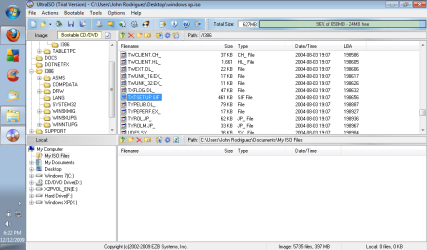
Then rewrite ISO using UltraISO, without formatting. Check verify box.

I got no report on how the Ultra ISO steps went.
 
Rightclick on flash in Computer, select format, FAT32, uncheck quick format.

Rewrite ISO using Ultra ISO without formatting, but check Verify box
 
I format it to Fat 32? That may be the problem, I have it formatted to NTFS.

Might not be compatible to XP. Right click on flash in Computer and FAT32 long format.

Then rewrite ISO using UltraISO, without formatting. Check verify box.

I got no report on how the Ultra ISO steps went.

Wait wait wait... do you mean to format the flash drive or the partition I'm planning to install XP to FAT32?

Then I write ISO with UltraISO without click the format button there with of course, Verify box checked.

And my report on how the steps of UltraISO was a success.
 

My Computer My Computer

Computer Manufacturer/Model Number
Gateway KAV60
OS
Windows 7 Home Premium 32-bit
Memory
2 GB
Screen Resolution
1024x600
Hard Drives
250 GB HDD
Internet Speed
Time Warner Cable/Road Runner
Other Info
Intel Atom processor N270
Multi-in-1 card reader
802.11b/g
NO optical drive
NO WWAN
NO Bluetooth
The XP target partition needs to be long formatted from the XP installer during install.

As stated, rightclick on flash stick in Computer, select format, FAT32, uncheck quick format.

Then rewrite ISO using Ultra without formatting there.
 
Yeah, I got the same error, but I think I am missing the txtsetup.sif file. I didn't want to say this, but your XP disc didn't fail you right? I was wondering if you can upload the file, so that I can replace it. :(

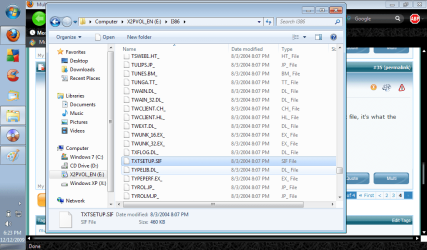
I located the txtsetup.sif file on mine. It's there alright, but how can I check to see if it's corrupted or not?
 

My Computer My Computer

Computer Manufacturer/Model Number
Gateway KAV60
OS
Windows 7 Home Premium 32-bit
Memory
2 GB
Screen Resolution
1024x600
Hard Drives
250 GB HDD
Internet Speed
Time Warner Cable/Road Runner
Other Info
Intel Atom processor N270
Multi-in-1 card reader
802.11b/g
NO optical drive
NO WWAN
NO Bluetooth
Well I searched for it manually. I didn't search with the searchbar.

Man.... what about messages? Use mediafire or something.... I need to replace that file, it's what the error is about. I doubt using any other method can help out.
 

My Computer My Computer

Computer Manufacturer/Model Number
Gateway KAV60
OS
Windows 7 Home Premium 32-bit
Memory
2 GB
Screen Resolution
1024x600
Hard Drives
250 GB HDD
Internet Speed
Time Warner Cable/Road Runner
Other Info
Intel Atom processor N270
Multi-in-1 card reader
802.11b/g
NO optical drive
NO WWAN
NO Bluetooth
pm me your email. I attached it to yahoo

the error seems more complicated though. but worth a try...

Capture.PNG

You are in luck! Smartest dude on SF is in the room (my teacher)

What do you think SIW2?
 
I have the files, but they're probably corrupted.
 

Attachments

  • XP 2.png
    XP 2.png
    36.1 KB · Views: 6
  • XP3.png
    XP3.png
    56.6 KB · Views: 5

My Computer My Computer

Computer Manufacturer/Model Number
Gateway KAV60
OS
Windows 7 Home Premium 32-bit
Memory
2 GB
Screen Resolution
1024x600
Hard Drives
250 GB HDD
Internet Speed
Time Warner Cable/Road Runner
Other Info
Intel Atom processor N270
Multi-in-1 card reader
802.11b/g
NO optical drive
NO WWAN
NO Bluetooth

My Computer My Computer

Computer Manufacturer/Model Number
Gateway KAV60
OS
Windows 7 Home Premium 32-bit
Memory
2 GB
Screen Resolution
1024x600
Hard Drives
250 GB HDD
Internet Speed
Time Warner Cable/Road Runner
Other Info
Intel Atom processor N270
Multi-in-1 card reader
802.11b/g
NO optical drive
NO WWAN
NO Bluetooth
U get the file?

I am referring to one of the top dogs on this forum, who taught me most of what I know here. He is in this thread right now. Prepare to be dazzled with the one and only solution (if there is one).
 
Oh. lol

Well anyways, not even replacing the file helped. >.>

I don't know what to do anymore. How is it not possible installing Windows XP?
 

My Computer My Computer

Computer Manufacturer/Model Number
Gateway KAV60
OS
Windows 7 Home Premium 32-bit
Memory
2 GB
Screen Resolution
1024x600
Hard Drives
250 GB HDD
Internet Speed
Time Warner Cable/Road Runner
Other Info
Intel Atom processor N270
Multi-in-1 card reader
802.11b/g
NO optical drive
NO WWAN
NO Bluetooth
Back
Top