Restoring Dual boot Xp/Win 7 to single boot Xp

destroyme220

New member
Hey Guyz !!
First of all .... Since i'm new in town here, Accept HI to all here @ Sevenforums.

Now, i'm stuck with a problem .
I've a Dual Boot with Xp/Win 7 on my office Desktop workstation. Window7 is the beta version of the Win 7. And like all other companies.... my company also want it's wallpaper and screen-saver on each machine ..... But i somehow manage to install Window 7 on my office Desktop.
Now i want to remove Window 7 partition and restore my Xp MBR and that too without using Windows Xp Bootable CD ( as CDs are not allowed in my company )...

How can i restore my Xp MBR while accessing my Xp Partition as i already have deleted my Windows 7 partition ...

Thanx in advance :)
 

My Computer

Computer Manufacturer/Model Number
Lenovo
OS
Dual Boot ( XP/Win 7 )
CPU
Intel P4 , 3.00 GHz
Memory
1 Gb DDR2 RAM
Graphics Card(s)
NA
Hard Drives
160GB PATA
If you can't have CD's, then how did you install Windows 7 onto your machine?
 

My Computer

OS
XP / Win7 x64 Pro
CPU
Intel Quad-Core Q9450 @ 3.2GHz
Motherboard
Asus P5-E
Memory
2x2GB GSkill DDR2
Graphics Card(s)
NVIDIA GeForce 8600 GTS (EVGA)
Monitor(s) Displays
Dell 2408WFP
Screen Resolution
1920x1200
Thanks @ fligi7 for replying !!

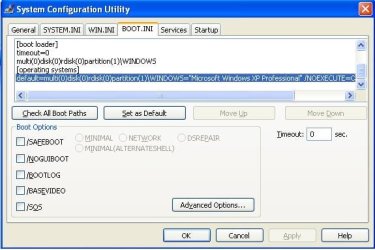
Thanks @ gregrocker for the resolution ..... i've applied it ... it looks fine now But the MBR still contains other OS listings which u can see from my MBR content.

;
;Warning: Boot.ini is used on Windows XP and earlier operating systems.
;Warning: Use BCDEDIT.exe to modify Windows Vista boot options.
;
[boot loader]
timeout=0
multi(0)disk(0)rdisk(0)partition(1)\WINDOWS
[operating systems]
default=multi(0)disk(0)rdisk(0)partition(1)\WINDOWS="Microsoft Windows XP Professional" /NOEXECUTE=OPTIN /FASTDETECT

Can u tell me how to remove the other listing from MBR so that it'll look like a fresh one.

Thanks again for your help gregrocker
 

My Computer

Computer Manufacturer/Model Number
Lenovo
OS
Dual Boot ( XP/Win 7 )
CPU
Intel P4 , 3.00 GHz
Memory
1 Gb DDR2 RAM
Graphics Card(s)
NA
Hard Drives
160GB PATA
First run msconfig and look on the boot tab for any XP listing to delete.

If not, run EasyBCD and see if there is still an XP listing there to Remove.
 
I'm attaching my msconfig window screeshot ..please advise me on the line which doesn't corresponds to Xp as i only want Xp information in boot.ini file and it should automatically boots to Xp ( it is still doing it as timeout = 0 it contains few extra redundant information which i want to clean )

Thanx again my friend !!
 

Attachments

  • msconfig.jpg
    msconfig.jpg
    43.1 KB · Views: 456

My Computer

Computer Manufacturer/Model Number
Lenovo
OS
Dual Boot ( XP/Win 7 )
CPU
Intel P4 , 3.00 GHz
Memory
1 Gb DDR2 RAM
Graphics Card(s)
NA
Hard Drives
160GB PATA
Someone else might see a listing there to delete, I don't.

Are you still getting the dual boot menu when you start up?

Try EasyBCD to see if it is more evident.

SIW2?
 
Hi gregrocker ...
since the timeout is 0 in the boot.ini file ... Dual boot screen is not turning up and my PC is automatically booting to Xp.
Problem looks solved for now ... coz i don't think so anyone would try to see my boot.ini file just out of suspicion.

But yupp ... as i said in my first post ... before making changes in my boot.ini file .. i deleted the Win7 partition .. but i didn't notice that i'm not able to format that partition.
Windows Can't format this drive. Quit any disk or other program that using this drive, and make sure that no window is displaying the content of the drive. Then try formatting again.

Can u tell ... how can i format the partition now.

and Thanks again gregrocker 4 the help.
 

My Computer

Computer Manufacturer/Model Number
Lenovo
OS
Dual Boot ( XP/Win 7 )
CPU
Intel P4 , 3.00 GHz
Memory
1 Gb DDR2 RAM
Graphics Card(s)
NA
Hard Drives
160GB PATA
You can't format the space where WIn7 was most likely because a partition needs to be created there first.

Or you can extend the XP partition into the deleted Win7 space.

This must be done with a 3rd party partitioning software like free Partition Wizard.

If you want to be sure first, post back a screenshot of the Partition Wizard disk map so we can advise you better.

You'll need to use XP Paint adapting the tutorial here: http://www.sevenforums.com/tutorials/9717-screenshot-paint.html
Then attach the file using paper clip in reply box.
 
First run msconfig and look on the boot tab for any XP listing to delete.

If not, run EasyBCD and see if there is still an XP listing there to Remove.

I did this and it removed the annoying boot menu when booting to my XP drive (C:) which was great, however now I can't boot to my Win7 drive (F:). It says the NTLDR is missing.
 

My Computer

OS
XP / Win7 x64 Pro
CPU
Intel Quad-Core Q9450 @ 3.2GHz
Motherboard
Asus P5-E
Memory
2x2GB GSkill DDR2
Graphics Card(s)
NVIDIA GeForce 8600 GTS (EVGA)
Monitor(s) Displays
Dell 2408WFP
Screen Resolution
1920x1200
First run msconfig and look on the boot tab for any XP listing to delete.

If not, run EasyBCD and see if there is still an XP listing there to Remove.

I did this and it removed the annoying boot menu when booting to my XP drive (C:) which was great, however now I can't boot to my Win7 drive (F:). It says the NTLDR is missing.

Please start a new thread .
 
Last edited:
I was simply trying to remove it from the boot process when I boot up my main XP hard drive, as whenever I would boot from my C drive, I would get the option to choose Windows 7 (which was no longer there from a previous install). I then reinstalled Windows 7 on my F: drive (completely independent of C:) and now it no longer boots. Is there a way to fix this?
 

My Computer

OS
XP / Win7 x64 Pro
CPU
Intel Quad-Core Q9450 @ 3.2GHz
Motherboard
Asus P5-E
Memory
2x2GB GSkill DDR2
Graphics Card(s)
NVIDIA GeForce 8600 GTS (EVGA)
Monitor(s) Displays
Dell 2408WFP
Screen Resolution
1920x1200
You are not the original poster here so I do not have the background of your case.

If you reinstalled Win7 it should have reconfigured the dual boot menu correctly. Something must have blocked it.

Boot into the Win7 DVD repair console and run Startup repair repeatedly to get Win7 started.

Post back a screenshot of the EasyBCD listings so we can what needs to be adjusted. If XP is missing after Win7 Startup repair, add it by name, type and correct drive letter.
 
You are not the original poster here so I do not have the background of your case.

If you reinstalled Win7 it should have reconfigured the dual boot menu correctly. Something must have blocked it.

Boot into the Win7 DVD repair console and run Startup repair repeatedly to get Win7 started.

Post back a screenshot of the EasyBCD listings so we can what needs to be adjusted. If XP is missing after Win7 Startup repair, add it by name, type and correct drive letter.

I reinstalled Windows 7 onto a separate drive with only that one connected so as to help prevent it from installing onto other drives. So, the dual boot menu on my C: drive still lingered for a while (with nothing associated with it after dual booting from that drive to Win7 but then blowing Win7 away after deciding to go for a separate dedicated drive for it).
 

My Computer

OS
XP / Win7 x64 Pro
CPU
Intel Quad-Core Q9450 @ 3.2GHz
Motherboard
Asus P5-E
Memory
2x2GB GSkill DDR2
Graphics Card(s)
NVIDIA GeForce 8600 GTS (EVGA)
Monitor(s) Displays
Dell 2408WFP
Screen Resolution
1920x1200
See if you can boot into Win7 by setting it as the HD to boot first in BIOS setup after DVD drive.

Then if you need to boot into XP, you can use the BIOS Boot Menu shortcut F-key given on first bootup screen.

This is actually better because it makes the HD's independent of one another and can come and go as you wish.

If you still want to create a Dual Boot menu then you will need to boot into Win7 with XP plugged in and run a http://www.sevenforums.com/tutorials/3413-repair-install.html?ltr=R to correctly reconfigure a dual boot.
 
That is actually how I have it set up. Both drives are (were) configured to boot independently. At startup, I hit F8 to choose which HDD to boot from. However, after booting into XP and using the Vista bootloader uninstaller, when I tried to boot back into the Win7 HDD via F8, it says it was now missing the NTLDR. I wasn't aware that uninstalling it on my XP/Win7 Drive would remove it from my new dedicated Win7 drive as well.
 

My Computer

OS
XP / Win7 x64 Pro
CPU
Intel Quad-Core Q9450 @ 3.2GHz
Motherboard
Asus P5-E
Memory
2x2GB GSkill DDR2
Graphics Card(s)
NVIDIA GeForce 8600 GTS (EVGA)
Monitor(s) Displays
Dell 2408WFP
Screen Resolution
1920x1200
When you use EasyBCD to uninstall Vista bootloader it finds that bootloader and uninstalls it, which is why you can't boot Win7. If you were trying to delete the ghost listing given at XP startup, it needed to be done in msconfig>boot tab or EasyBCD Add/Remove listing.

Have you booted into the Win7 DVD repair console and run Startup Repair 3 separate times to attempt repair and then rewrite the MBR to Win7? Unplug the XP drive first.

Can you boot into an OS now? Which?

Please boot into that OS and post back a screenshot of the EasyBCD listings AND the full Disk Management drive map. http://www.sevenforums.com/tutorials/9733-how-post-screenshot-seven-forums.html
 
I'm gonna try the Windows 7 Repair Disc tonight with all other drives unplugged. Then, hopefully that fixes the Win7 drive. Then, I'll disconnect the Win 7 drive, boot into XP, and run the Vista bootloader uninstaller again to get rid of it (because it's back now for some reason - i think i was playing with stuff and added it back). Anyway, I'll report back regardless of what happens after this.
 

My Computer

OS
XP / Win7 x64 Pro
CPU
Intel Quad-Core Q9450 @ 3.2GHz
Motherboard
Asus P5-E
Memory
2x2GB GSkill DDR2
Graphics Card(s)
NVIDIA GeForce 8600 GTS (EVGA)
Monitor(s) Displays
Dell 2408WFP
Screen Resolution
1920x1200
Remember to run Startup Repair 3 separate times to get Win7 restarted as it assumes each fix will work until you come back for another, until it finally rewrites the MBR. Many ignore this and then wonder why their computer won't start.

The Vista bootloader is not responsible for the ghost listing at XP boot. As stated earlier, it is removed in XP msconfig>Boot tab, or by removing the listing (not the bootloader) on EasyBCD's Add/Remove tab.

View attachment 44191
 
Hi,

You just need to boot into 7, install Easybcd, click Useful Utilities>Easybcd Power Console.

An elevated command will open at easybcd bin folder, type:

bootsect /nt60 c:

then press enter.
 

My Computers

System One System Two

  • Computer type
    PC/Desktop
    OS
    7 X64
    CPU
    i5 8400
    Motherboard
    gigabyte b365m ds3h
    Memory
    2x8gb 3200mhz
    Hard Drives
    various
    PSU
    pure power 11 400w cm
    Case
    Coolermaster
    Cooling
    cryorig m9i
  • Computer type
    PC/Desktop
    OS
    7x64
    CPU
    g5400
    Motherboard
    ga b365m ds3h
    Memory
    8gb ddr4 2400
    PSU
    xfx pro 450w
Back
Top