Error with Back-Up

AliBong

New member
Local time
1:27 AM
Messages
7
Location
Portsmouth England
Hi There. I have just upgraded from Vista to Win7 ( A few days) and after a look around thought I'd do a Back-up but I received an error message that it couldn't be completed with Error - 0x80070002.
So, please, can someone explain this and how to overcome it.
Thanks. D.
 

My Computer My Computer

At a glance

Windows 7
Computer Manufacturer/Model Number
Acer
OS
Windows 7

My Computer My Computer

At a glance

Windows 10, Home Clean InstallIntel Core2 processsor Q8200(2.33Ghz 1333FSB)...6 gbATI Radeon 256MB HD3650
Computer type
PC/Desktop
Computer Manufacturer/Model Number
Dell XPS 420
OS
Windows 10, Home Clean Install
CPU
Intel Core2 processsor Q8200(2.33Ghz 1333FSB) Quad Core Tech
Motherboard
Dell
Memory
6 gb
Graphics Card(s)
ATI Radeon 256MB HD3650
Sound Card
Intergrated 7.1 Channel Audio
Monitor(s) Displays
Dell SP2009W 20"
Hard Drives
640 GB Serial ATA Hard drive
Cooling
Fan
Keyboard
Dell USB Keyboard
Mouse
Dell Premium Optical USB
Internet Speed
DSL 2.85
What was the error message exactly?
 

My Computer My Computer

At a glance

64-bit Windows 8.1 ProCore(TM) i5 CPU 4330 Haswell @ 3.20GHz12.00 GBIntel(R) HD Graphics
Computer type
PC/Desktop
Computer Manufacturer/Model Number
LENOVO K450 @3.0GHZ
OS
64-bit Windows 8.1 Pro
CPU
Core(TM) i5 CPU 4330 Haswell @ 3.20GHz
Motherboard
LENOVO
Memory
12.00 GB
Graphics Card(s)
Intel(R) HD Graphics
Sound Card
Intel HD integtrated
Monitor(s) Displays
HP 25' ISP Monitor
Screen Resolution
1900/1020
Hard Drives
(1) ST1000DM003-1CH162 (2) Generic STORAGE DEVICE USB Device (3) Generic STORAGE DEVICE USB Device
Internet Speed
100mb down/10mb up
Error with back-up

Hi. This has baffled me :confused: I have an Acer, yet the error message is for an upgrade on a Dell. I've rung the Tech Guys - no idea :sick: I've tried just doing: "Create a system image" on its own as well as a Back-up. I've changed the settings for what to back-up. I get the same messages no matter what I do - And they are:
"The backup did not complete successfully"
"The system cannot find the file specified" But doesn't tell what file:( !!!
"Error code 0x80070002"
To tell you the truth what I am worried about mostly is if my computer has a complete breakdown. I have had so much trouble in getting Win7 to start with. :cry:
My most important filesI do back-up on disk. And I see that Norton is "backing up" but I cant find out what that entails.
So really, how important is the Windows backup?
Thanks for your concern and for any advice you give I shall be most thankful :D.
Thanks, Dave.
 

My Computer My Computer

At a glance

Windows 7
Computer Manufacturer/Model Number
Acer
OS
Windows 7
Hi. This has baffled me :confused: I have an Acer, yet the error message is for an upgrade on a Dell. I've rung the Tech Guys - no idea :sick: I've tried just doing: "Create a system image" on its own as well as a Back-up. I've changed the settings for what to back-up. I get the same messages no matter what I do - And they are:
"The backup did not complete successfully"
"The system cannot find the file specified" But doesn't tell what file:( !!!
"Error code 0x80070002"
To tell you the truth what I am worried about mostly is if my computer has a complete breakdown. I have had so much trouble in getting Win7 to start with. :cry:
My most important filesI do back-up on disk. And I see that Norton is "backing up" but I cant find out what that entails.
So really, how important is the Windows backup?
Thanks for your concern and for any advice you give I shall be most thankful :D.
Thanks, Dave.

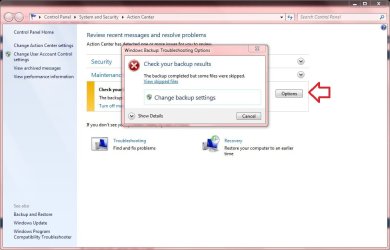
Do you get this window when you click on options? I am getting this same error code but have not been able to figure it out yet. Mine is looking for a file that is not there, why I don't know. But I do know what file it's looking for by clicking on the view skipped files.:huh:
 

Attachments

  • ss1.jpg
    ss1.jpg
    59.9 KB · Views: 81

My Computer My Computer

At a glance

Win 10 Pro x64Intel I5-2500K @3.3GHz16GB G.Skill Ripjaws X (4x4GB)EVGA GeForce 750 Ti SC 2GB
Computer type
PC/Desktop
Computer Manufacturer/Model Number
Self Built
OS
Win 10 Pro x64
CPU
Intel I5-2500K @3.3GHz
Motherboard
Asrock P67 Extreme4
Memory
16GB G.Skill Ripjaws X (4x4GB)
Graphics Card(s)
EVGA GeForce 750 Ti SC 2GB
Sound Card
ASUS Xonar DG 5.1 Channels 24-bit 96KHz PCI Interface Sound
Monitor(s) Displays
auria eq2367
Screen Resolution
1920 x 1080
Hard Drives
250GB Samsung 850 EVO SSD
1TB WD Blue
1TB Hitachi
PSU
SeaSonic X 650W 80 Plus Gold
Case
Corsair Obsidian 750D
Cooling
Corsair H60, Three 140mm case fans
Keyboard
Logitech Wireless Keyboard K520
Mouse
Logitech Wireless Mouse M310
Internet Speed
Wave Broadband ~ 100 dn 5 up
Antivirus
Windows Defender, Malwarebytes Premium
Browser
Edge, IE11, Chrome
Other Info
Laptop specs: HP g7-1365dx /
CPU: AMD A6-3420M APU with Radeon(tm) HD Graphics /
RAM: Crucial 8Gb (2x4Gb) /
SSD: Crucial M4-CT128M4SSD2 ATA Device/ FW 000F /
GFX: AMD Radeon HD 6520G /
OS: Windows 10 Pro x64
Error with back-up

Hi. Thanks for help. I'm not sure if problem resolved? I got a feeling that the trouble is the cause of an external drive I bought specially for backing-up. (Another thing that happened was that I tried copying a file from Documents and pasting it in the drive - it wouldn't let me.) So I used an external drive that my wife had been using on her laptop and doing a back-up - although just doing documents - worked without bother. :D So I shall test the rogue drive. It is powered through a USB, it having 2 of them. Perhaps it is not man enough? What say you? (That is not meant to be sex disciminate).
Cheers. Dave.
 

My Computer My Computer

At a glance

Windows 7
Computer Manufacturer/Model Number
Acer
OS
Windows 7
Back
Top