Connecting my Computer to my HDTV

Kherani

New member
Local time
9:59 AM
Messages
6
I bought a 25ft HDMI cable and I tried to connect my computer and my TV, however my TV always says no signal. My computer sees the TV, but I cannot get anything to display on the TV. I've tried everything, and I cannot get it to work. My TV is a Dynex 42" TV which is a Bestbuy store brand. If anyone can help me, I'd be very happy. I have an XFX 8200 video card integrated into my motherboard which has an HDMI port. When I plug the HDMI cable into my computer, the audio switches to HDMI, which is weird.
 

My Computer My Computer

At a glance

Windows 7 ProAMD 5000+ BEKingston 2BGGeforce 8200 (integrated)
OS
Windows 7 Pro
CPU
AMD 5000+ BE
Motherboard
XFX 8200
Memory
Kingston 2BG
Graphics Card(s)
Geforce 8200 (integrated)
I bought a 25ft HDMI cable and I tried to connect my computer and my TV, however my TV always says no signal. My computer sees the TV, but I cannot get anything to display on the TV. I've tried everything, and I cannot get it to work. My TV is a Dynex 42" TV which is a Bestbuy store brand. If anyone can help me, I'd be very happy. I have an XFX 8200 video card integrated into my motherboard which has an HDMI port. When I plug the HDMI cable into my computer, the audio switches to HDMI, which is weird.


Hi Kherani, Welcome to SF,

I have a Microsoft Knowledge Base that explains you the process
Connect your computer to a TV
 

My Computer My Computer

At a glance

Windows 7 Ultimate - 64-bit | Windows 8 Pro -...Intel® Core™ i7 Processor 3,610QM (2.30Hz, 6M...8 GBNVIDIA® GeForce® GT 650M 2GB Graphics, Optimu...
Computer Manufacturer/Model Number
Samsung NP550P5C-S02IN
OS
Windows 7 Ultimate - 64-bit | Windows 8 Pro - 64-bit
CPU
Intel® Core™ i7 Processor 3,610QM (2.30Hz, 6MB L3 Cach
Memory
8 GB
Graphics Card(s)
NVIDIA® GeForce® GT 650M 2GB Graphics, Optimus™ techno
Sound Card
SoundAlive™ JBL 3 Speakers (With sub-Woofer)
Monitor(s) Displays
39.62cm (15.6) SuperBright 300nit HD+ LED Display
Screen Resolution
1,600 x 900, Anti-Reflective
Hard Drives
1TB S-ATA II Hard Drive (5,400RPM)
I bought a 25ft HDMI cable and I tried to connect my computer and my TV, however my TV always says no signal. My computer sees the TV, but I cannot get anything to display on the TV. I've tried everything, and I cannot get it to work. My TV is a Dynex 42" TV which is a Bestbuy store brand. If anyone can help me, I'd be very happy. I have an XFX 8200 video card integrated into my motherboard which has an HDMI port. When I plug the HDMI cable into my computer, the audio switches to HDMI, which is weird.


Hi Kherani, Welcome to SF,

I have a Microsoft Knowledge Base that explains you the process
Connect your computer to a TV

Thanks, but that didn't work.
 

My Computer My Computer

At a glance

Windows 7 ProAMD 5000+ BEKingston 2BGGeforce 8200 (integrated)
OS
Windows 7 Pro
CPU
AMD 5000+ BE
Motherboard
XFX 8200
Memory
Kingston 2BG
Graphics Card(s)
Geforce 8200 (integrated)
I've tested the TV with and HDMI dvd player and I've tried the cord with another setup and it worked. The only thing that's left is the computer. Can anyone help me?
 

My Computer My Computer

At a glance

Windows 7 ProAMD 5000+ BEKingston 2BGGeforce 8200 (integrated)
OS
Windows 7 Pro
CPU
AMD 5000+ BE
Motherboard
XFX 8200
Memory
Kingston 2BG
Graphics Card(s)
Geforce 8200 (integrated)
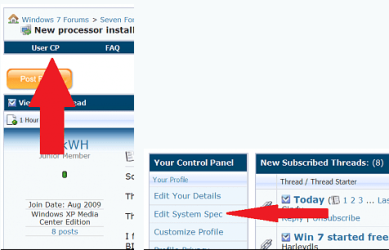
Welcome to seven forums Kherni: Could we get you to fill in you system specs will help others help you. Thanksusercp 1.png
 

My Computer My Computer

At a glance

Windows 7 ultimate 64 bit / XP Home sp3intel Core 2 Duo E8400 3.0ghz8 gigs 1066 OCZ Fata1tyEVGA GTX 580 Call of Duty Black Ops Edition
Computer Manufacturer/Model Number
Self Built
OS
Windows 7 ultimate 64 bit / XP Home sp3
CPU
intel Core 2 Duo E8400 3.0ghz
Motherboard
Asus P5ND bios 1401
Memory
8 gigs 1066 OCZ Fata1ty
Graphics Card(s)
EVGA GTX 580 Call of Duty Black Ops Edition
Sound Card
Creative Soundblaster Audigy 2zs
Monitor(s) Displays
Asus 24in LCD's 2MS X2
Screen Resolution
1920x1080p @60Hz
Hard Drives
WD Caviar 500 Black/ WD Caviar 200 Blue
PSU
OCZ 700W GameXtreme
Case
NZXT Apollo
Cooling
Corsair H50 CPU/120mm x3 /60mm x2 /Corsair Dominator Ram
Keyboard
Logitech Bluetooth Wireless MX5000
Mouse
Logitech Bluetooth Wireless MX1000
Internet Speed
Download 19.83 Upload 0.97
Other Info
Logitech Z2300 Speakers/ Bose Noise Cancelling Headphones/Avermedia PCI-e Hybrid TV Bravo/Epson NX415 all in one/ 4 Port Powered USB Hub/ LG 10x Bluray Burner /TSST Corp DVDRW External
Looks like you signed off was really hoping to find out the MB so i could read throguh the manual and see if it could shed some light on your problem. Fabe
 

My Computer My Computer

At a glance

Windows 7 ultimate 64 bit / XP Home sp3intel Core 2 Duo E8400 3.0ghz8 gigs 1066 OCZ Fata1tyEVGA GTX 580 Call of Duty Black Ops Edition
Computer Manufacturer/Model Number
Self Built
OS
Windows 7 ultimate 64 bit / XP Home sp3
CPU
intel Core 2 Duo E8400 3.0ghz
Motherboard
Asus P5ND bios 1401
Memory
8 gigs 1066 OCZ Fata1ty
Graphics Card(s)
EVGA GTX 580 Call of Duty Black Ops Edition
Sound Card
Creative Soundblaster Audigy 2zs
Monitor(s) Displays
Asus 24in LCD's 2MS X2
Screen Resolution
1920x1080p @60Hz
Hard Drives
WD Caviar 500 Black/ WD Caviar 200 Blue
PSU
OCZ 700W GameXtreme
Case
NZXT Apollo
Cooling
Corsair H50 CPU/120mm x3 /60mm x2 /Corsair Dominator Ram
Keyboard
Logitech Bluetooth Wireless MX5000
Mouse
Logitech Bluetooth Wireless MX1000
Internet Speed
Download 19.83 Upload 0.97
Other Info
Logitech Z2300 Speakers/ Bose Noise Cancelling Headphones/Avermedia PCI-e Hybrid TV Bravo/Epson NX415 all in one/ 4 Port Powered USB Hub/ LG 10x Bluray Burner /TSST Corp DVDRW External
You should be using the VGA style PC input on the TV for that connection. You don't really need to use the HDMI cable.

Usually the HDMI will work but the resolution won't be right unless you either adjust it using the custom resolution settings which doesn't work out so well or use the VGA input in which case the resolution will be just right.
 

My Computer My Computer

At a glance

Windows 7 Ult, Windows 8.1 Pro,Q9650-4.275GHz, E8600 4.5GHz, E6750-3.8GHzG.Skill PC2 9600 1200Mhz 5 5 5 15 2TGTX480
Computer type
PC/Desktop
Computer Manufacturer/Model Number
Home built
OS
Windows 7 Ult, Windows 8.1 Pro,
CPU
Q9650-4.275GHz, E8600 4.5GHz, E6750-3.8GHz
Motherboard
Evga 780i FTW
Memory
G.Skill PC2 9600 1200Mhz 5 5 5 15 2T
Graphics Card(s)
GTX480
Sound Card
Asus Xonar D2
Monitor(s) Displays
HannsG
Screen Resolution
1680X1050
Hard Drives
GSkill Phoenix Pro 120GB SSD
PSU
ThermalTake Toughpower 1000Watt modular
Case
ThermalTake XaserV
Cooling
Xigmatek S1283
Keyboard
Logitech G15
Mouse
Logitech G9
Internet Speed
T1
Sorry for not being so clear. I have an XFX 8200 motherboard.

8200 Motherboard

There is a link to the product page.
 

My Computer My Computer

At a glance

Windows 7 ProAMD 5000+ BEKingston 2BGGeforce 8200 (integrated)
OS
Windows 7 Pro
CPU
AMD 5000+ BE
Motherboard
XFX 8200
Memory
Kingston 2BG
Graphics Card(s)
Geforce 8200 (integrated)
I bought a 25ft HDMI cable and I tried to connect my computer and my TV, however my TV always says no signal. My computer sees the TV, but I cannot get anything to display on the TV. I've tried everything, and I cannot get it to work. My TV is a Dynex 42" TV which is a Bestbuy store brand. If anyone can help me, I'd be very happy. I have an XFX 8200 video card integrated into my motherboard which has an HDMI port. When I plug the HDMI cable into my computer, the audio switches to HDMI, which is weird.

video driver? display driver? type device manager in search. go do diplay. is your card listed? does it have a yellow triangle on it? are there any other "unknown" devices with yellow on them

Do the same with the tv driver


Ken J+
 

My Computer My Computer

At a glance

Win 8 Release candidate 8400[email protected]4 gigsNvidia 9600M
Computer Manufacturer/Model Number
HP Pavillion dv-7 1005 Tx
OS
Win 8 Release candidate 8400
CPU
[email protected]
Memory
4 gigs
Graphics Card(s)
Nvidia 9600M
Sound Card
HD built-in
Monitor(s) Displays
17" Wxga
Screen Resolution
1440x900
Cooling
none
Internet Speed
45Mb down 5Mb up
vxi4px.png


I think the problem may lie in my TV being called "Generic PnP Monitor"
 

My Computer My Computer

At a glance

Windows 7 ProAMD 5000+ BEKingston 2BGGeforce 8200 (integrated)
OS
Windows 7 Pro
CPU
AMD 5000+ BE
Motherboard
XFX 8200
Memory
Kingston 2BG
Graphics Card(s)
Geforce 8200 (integrated)
Well you definitly need to install the display driver, and also make sure the HDMI/DVI is set to auto in your bios. Then see where we are from their. What is your display manufacturer and model #? As well as finding the driver for your coprocessor.Thanks. Fabe
 

My Computer My Computer

At a glance

Windows 7 ultimate 64 bit / XP Home sp3intel Core 2 Duo E8400 3.0ghz8 gigs 1066 OCZ Fata1tyEVGA GTX 580 Call of Duty Black Ops Edition
Computer Manufacturer/Model Number
Self Built
OS
Windows 7 ultimate 64 bit / XP Home sp3
CPU
intel Core 2 Duo E8400 3.0ghz
Motherboard
Asus P5ND bios 1401
Memory
8 gigs 1066 OCZ Fata1ty
Graphics Card(s)
EVGA GTX 580 Call of Duty Black Ops Edition
Sound Card
Creative Soundblaster Audigy 2zs
Monitor(s) Displays
Asus 24in LCD's 2MS X2
Screen Resolution
1920x1080p @60Hz
Hard Drives
WD Caviar 500 Black/ WD Caviar 200 Blue
PSU
OCZ 700W GameXtreme
Case
NZXT Apollo
Cooling
Corsair H50 CPU/120mm x3 /60mm x2 /Corsair Dominator Ram
Keyboard
Logitech Bluetooth Wireless MX5000
Mouse
Logitech Bluetooth Wireless MX1000
Internet Speed
Download 19.83 Upload 0.97
Other Info
Logitech Z2300 Speakers/ Bose Noise Cancelling Headphones/Avermedia PCI-e Hybrid TV Bravo/Epson NX415 all in one/ 4 Port Powered USB Hub/ LG 10x Bluray Burner /TSST Corp DVDRW External
I talked to XFX technical support and they told me to change a jumper. I tried that and it still didn't work. They told me to try DVI and if that doesn't work I need to RMA my board.
 

My Computer My Computer

At a glance

Windows 7 ProAMD 5000+ BEKingston 2BGGeforce 8200 (integrated)
OS
Windows 7 Pro
CPU
AMD 5000+ BE
Motherboard
XFX 8200
Memory
Kingston 2BG
Graphics Card(s)
Geforce 8200 (integrated)
Once you have recieved your new board please post back with the results. Thanks Fabe
 

My Computer My Computer

At a glance

Windows 7 ultimate 64 bit / XP Home sp3intel Core 2 Duo E8400 3.0ghz8 gigs 1066 OCZ Fata1tyEVGA GTX 580 Call of Duty Black Ops Edition
Computer Manufacturer/Model Number
Self Built
OS
Windows 7 ultimate 64 bit / XP Home sp3
CPU
intel Core 2 Duo E8400 3.0ghz
Motherboard
Asus P5ND bios 1401
Memory
8 gigs 1066 OCZ Fata1ty
Graphics Card(s)
EVGA GTX 580 Call of Duty Black Ops Edition
Sound Card
Creative Soundblaster Audigy 2zs
Monitor(s) Displays
Asus 24in LCD's 2MS X2
Screen Resolution
1920x1080p @60Hz
Hard Drives
WD Caviar 500 Black/ WD Caviar 200 Blue
PSU
OCZ 700W GameXtreme
Case
NZXT Apollo
Cooling
Corsair H50 CPU/120mm x3 /60mm x2 /Corsair Dominator Ram
Keyboard
Logitech Bluetooth Wireless MX5000
Mouse
Logitech Bluetooth Wireless MX1000
Internet Speed
Download 19.83 Upload 0.97
Other Info
Logitech Z2300 Speakers/ Bose Noise Cancelling Headphones/Avermedia PCI-e Hybrid TV Bravo/Epson NX415 all in one/ 4 Port Powered USB Hub/ LG 10x Bluray Burner /TSST Corp DVDRW External
I bought a 25ft HDMI cable and I tried to connect my computer and my TV, however my TV always says no signal. My computer sees the TV, but I cannot get anything to display on the TV. I've tried everything, and I cannot get it to work. My TV is a Dynex 42" TV which is a Bestbuy store brand. If anyone can help me, I'd be very happy. I have an XFX 8200 video card integrated into my motherboard which has an HDMI port. When I plug the HDMI cable into my computer, the audio switches to HDMI, which is weird.
The audio switching to HDMI is not weird, and it can be controlled in your sound control options. And the issue isn't that your TV is detected as a generic PnP monitor.
What you might try is to download the latest drivers from Nvidia and after installing, configure the display settings from the Nvidia applet in control panel using some other monitor as the primary display. If no other monitor will work, then the graphic chip may be defective or the HDMI cable is out of spec.
 

My Computer My Computer

At a glance

7 ProfQ95502x2 Mushkin Ascent 85004870X2
Computer Manufacturer/Model Number
SevenForums
OS
7 Prof
CPU
Q9550
Motherboard
Maximus II Formula
Memory
2x2 Mushkin Ascent 8500
Graphics Card(s)
4870X2
Sound Card
X-Fi Xtreme Gamer
Monitor(s) Displays
LN32A550
Screen Resolution
1920x1080
Hard Drives
Intel G2 80GB
5x1TB
PSU
Corsair 1000
Case
Cosmos
Cooling
Yates^13
Keyboard
G15v1
Mouse
MX518
Internet Speed
6Mbps
I bought a 25ft HDMI cable and I tried to connect my computer and my TV, however my TV always says no signal. My computer sees the TV, but I cannot get anything to display on the TV. I've tried everything, and I cannot get it to work. My TV is a Dynex 42" TV which is a Bestbuy store brand. If anyone can help me, I'd be very happy. I have an XFX 8200 video card integrated into my motherboard which has an HDMI port. When I plug the HDMI cable into my computer, the audio switches to HDMI, which is weird.


You don't say if you still have a monitor connected?

Have you looked at Control Panel>Apperance and Personalization>Display>Screen Resolution and see if your TV is displayed?

Try clicking Detect and then in the Multiple Displays drop down, select either 'Duplicate on these displays' or 'Extend these displays'

Regards
UKMedia
 

My Computer My Computer

At a glance

Windows 7 Ultimate 64Bit (SP 1)Intel Core i7 4770K OC32GB 1600Mhz DDR3MSI GTX580 Twin Frozr II/OC and NVIDIA GTX 970
Computer Manufacturer/Model Number
Self Build
OS
Windows 7 Ultimate 64Bit (SP 1)
CPU
Intel Core i7 4770K OC
Motherboard
ASUS Maximus VII Ranger
Memory
32GB 1600Mhz DDR3
Graphics Card(s)
MSI GTX580 Twin Frozr II/OC and NVIDIA GTX 970
Sound Card
On-Board and Soundblaster Recon 3 D headset
Monitor(s) Displays
x2 Flat screen 21" LG displays + x1 LG W2363D (3D)
Hard Drives
5 internal Hard Drives:
1 x WD 120GB Solid State
4 x WD 1TB (CAVIAR BLACK 1TB 32MB 7200 SATA) as Raid 5 array
PSU
Dark Power Pro 10 1200W
Case
CoolerMaster HAF 932 Case - Black
Cooling
Thermaltake Contac21 cooler
Keyboard
Cyborg
Mouse
Razor Mamba
Internet Speed
0.5 Mb - (Benefits of rural location!) & 24 MB Sat
Antivirus
MSE
Other Info
Teaming 2 GB network connection to Wired 1GB switch.
Connected to 37TB (Raid 5) of network storage on a wired 1GB lan.
(Mixture of internal hard drives, 1TB, 2TB, 4TB & 16TB Terastations)
Back
Top