- Local time
- 5:31 PM
- Messages
- 10
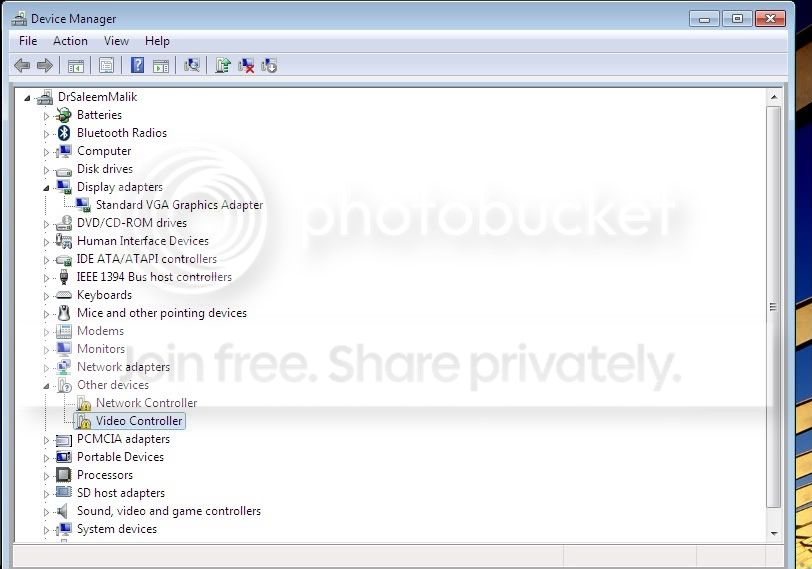
I just upgraded from the release candidate to Home Premium, doing a clean install, so with the installation fresh in my mind, here are instructions for X300 Catalyst installation and also for mkv playback.
Instructions for X300 Catalyst on Inspiron 6000:
1. Go to Graphics Drivers & Software and select Windows 7 32-bit, Radeon, x300 and download the drivers. It will say Vista. That's okay.
2. Go to ATI MobilityModder - DriverHeaven.net and follow the instructions as if you have Vista (so, you don't need the first item, MSXML 6.0.)
3. Enjoy. It should boot right into 1920x1200 or whatever your resolution is. No luck in changing to 60 Hz from 59, though.
Instructions for 720p H.264 mkv playback on Inspiron 6000 under Windows 7:
1. You need every last scrap of speed, so disable all unneeded services, e.g., using the guide at Windows 7 Service Configurations by Black Viper and replace your background with a solid color but do keep Aero.
2. Uninstall any codecs you have already installed.
3. Find the 2008-09-21 version of CCCP somewhere, but it does not seem to be at CCCP - Combined Community Codec Pack (I still had my old download, and the 2009-09-09 version does not work as well for me.) Install.
4. In CCCP's settings, uncheck its H.264 box.
5. Go into Media Player Classic's options (find the program under CCCP), and under Playback->output verify that the DirectShow Video is set to VMR7 (windowed). Under Internal Filters, verify that both H264 boxes are unchecked.
6. Close any open windows as you start the video, and it should now play 720p .mkv files well under Media Player Classic. Some files play perfectly and others drop some frames, but all-in-all it's very watchable. I believe it's using Windows 7's built-in H.264 processor. Adding CoreAVC does not help, because for one thing it's still going to use Windows 7's built-in H.264 codec and for another thing Windows 7's built-in H.264 decoding is faster.
7. Optionally, you can install a newer version of Media Player Classic, but double check those settings in step #5.
I've tried Shark007, I've tried the new CCCP, I've tried using only Haali, but nothing works well for me except the old CCCP. My system is an Inspiron 6000 with 2.27 Ghz Pentium M (Dothan pin modded), 2 GB RAM, and the 64 MB ATI Radeon X300 that pretends it has 128 MB. I previously had a 1.86 Ghz CPU and it played 720p mkv's fine under XP using CCCP+coreavc.
Window Media Center does not work for me. (Black screen when full screen.)
Instructions for X300 Catalyst on Inspiron 6000:
1. Go to Graphics Drivers & Software and select Windows 7 32-bit, Radeon, x300 and download the drivers. It will say Vista. That's okay.
2. Go to ATI MobilityModder - DriverHeaven.net and follow the instructions as if you have Vista (so, you don't need the first item, MSXML 6.0.)
3. Enjoy. It should boot right into 1920x1200 or whatever your resolution is. No luck in changing to 60 Hz from 59, though.
Instructions for 720p H.264 mkv playback on Inspiron 6000 under Windows 7:
1. You need every last scrap of speed, so disable all unneeded services, e.g., using the guide at Windows 7 Service Configurations by Black Viper and replace your background with a solid color but do keep Aero.
2. Uninstall any codecs you have already installed.
3. Find the 2008-09-21 version of CCCP somewhere, but it does not seem to be at CCCP - Combined Community Codec Pack (I still had my old download, and the 2009-09-09 version does not work as well for me.) Install.
4. In CCCP's settings, uncheck its H.264 box.
5. Go into Media Player Classic's options (find the program under CCCP), and under Playback->output verify that the DirectShow Video is set to VMR7 (windowed). Under Internal Filters, verify that both H264 boxes are unchecked.
6. Close any open windows as you start the video, and it should now play 720p .mkv files well under Media Player Classic. Some files play perfectly and others drop some frames, but all-in-all it's very watchable. I believe it's using Windows 7's built-in H.264 processor. Adding CoreAVC does not help, because for one thing it's still going to use Windows 7's built-in H.264 codec and for another thing Windows 7's built-in H.264 decoding is faster.
7. Optionally, you can install a newer version of Media Player Classic, but double check those settings in step #5.
I've tried Shark007, I've tried the new CCCP, I've tried using only Haali, but nothing works well for me except the old CCCP. My system is an Inspiron 6000 with 2.27 Ghz Pentium M (Dothan pin modded), 2 GB RAM, and the 64 MB ATI Radeon X300 that pretends it has 128 MB. I previously had a 1.86 Ghz CPU and it played 720p mkv's fine under XP using CCCP+coreavc.
Window Media Center does not work for me. (Black screen when full screen.)
My Computer
- Computer Manufacturer/Model Number
- Dell Inspiron 6000
- OS
- Windows 7 (7100)
- CPU
- Pentium M 2.27 Ghz (overclocked from 1.7)
- Motherboard
- Intel 915 chipset
- Memory
- 2 GB (ValueSelect)
- Graphics Card(s)
- ATI x300 64MB Mini-PCI
- Sound Card
- SigmaTel C-Major Audio
- Monitor(s) Displays
- 1920x1200 flat panel
- Hard Drives
- Samsung HM160HC