Dell Wireless WLAN 1390 minicard drivers won't install

Oranges12

New member
Local time
8:33 PM
Messages
6
And as a result my wireless will not work.

I just don't get it. The Vista drivers won't work, the optional Windows Update that would install the proper driver won't work, nothing works. What am I to do?
 

My Computer My Computer

At a glance

Windows 7 Professional 64-bit
OS
Windows 7 Professional 64-bit
And as a result my wireless will not work.

I just don't get it. The Vista drivers won't work, the optional Windows Update that would install the proper driver won't work, nothing works. What am I to do?

Have you tried the manufacturer site? They usually have drivers. Did it come with a CD? That one should have the drivers.
 

My Computer My Computer

At a glance

Win 7 pro 64-bit, Ubuntu 9.10 64-bitIntel Core 2 Duo 2.60 Ghz4 gb ddr2 667 MhzNVidia Geforce 9400 GS 1 gb ddr2 550 mhz GPU
Computer Manufacturer/Model Number
Acer Veriton m261 (modded)
OS
Win 7 pro 64-bit, Ubuntu 9.10 64-bit
CPU
Intel Core 2 Duo 2.60 Ghz
Motherboard
Whatever came with the system
Memory
4 gb ddr2 667 Mhz
Graphics Card(s)
NVidia Geforce 9400 GS 1 gb ddr2 550 mhz GPU
Sound Card
Intergrated
Monitor(s) Displays
samsung SyncMaster 2494 24"
Screen Resolution
1080p
Hard Drives
80gb - IDE
750gb - SATA II
PSU
whatever came with the system
Case
whatever came with the system
Cooling
whatever came with the system
Keyboard
Apple Aluminium (Awesome)
Mouse
Some awesome Dell mouse, really good.
Internet Speed
100mbps
And as a result my wireless will not work.

I just don't get it. The Vista drivers won't work, the optional Windows Update that would install the proper driver won't work, nothing works. What am I to do?
Hello Oranges12, and welcome to Windows Seven Forums!

If you are unable to find working drivers at Dell, perhaps you could provide appropriate info about your Dell computer so we could also look?

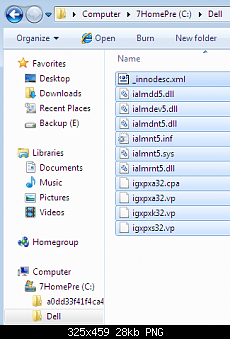
You may need to manually install the driver. To do that, download the driver and put in a folder on your C: drive, like C:\Dell:

dell_d505_01.png

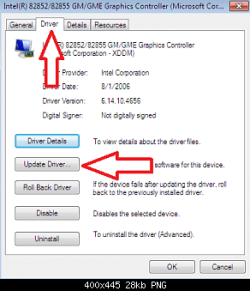
Then click the Start Button and type Device Manager in the search box. Look down the list in Device Manager and find the not working 1390 minicard, right click and open Properties or just Update Driver:

dell_d505_04.png

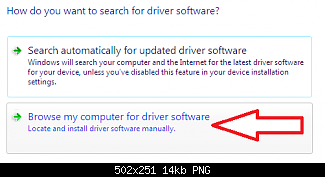
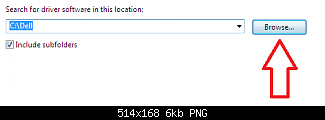
Select Browse my computer, and locate the C:\Dell

dell_d505_05.png

dell_d505_06.png

Find the INF file for your 1390 minicard and double click on it. See if the driver will work now?

Cheers!
Robert
 

My Computer My Computer

At a glance

...
OS
...
And as a result my wireless will not work.

I just don't get it. The Vista drivers won't work, the optional Windows Update that would install the proper driver won't work, nothing works. What am I to do?

Have you tried the manufacturer site? They usually have drivers. Did it come with a CD? That one should have the drivers.

I have tried Dell's site. I've downloaded multiple versions of the driver from there, but they either aren't compatible with Windows 7 or they just stop in the middle of the installation. I'll look for the CD, but it's not gonna be easy finding it as it's been 2 years since I saw it.

isseeu - I have tried what you said, but maybe I'm using the wrong driver.

My computer is a Dell Inspiron 1520 and I'm using Windows 7 Professional 64-bit. I think that's all the info required to look up the proper drivers on their website. If you require any more info just tell me.

Thanks.
 

My Computer My Computer

At a glance

Windows 7 Professional 64-bit
OS
Windows 7 Professional 64-bit
My computer is a Dell Inspiron 1520 and I'm using Windows 7 Professional 64-bit. I think that's all the info required to look up the proper drivers on their website. If you require any more info just tell me.

Thanks.
Ok, help me out here. I believe you when you say you have already tried doing these things, if you don't mind trying again ... and let me know what error messages you get if any?

First a question: did you download and install the chipset driver for your laptop? It is here: Drivers and Downloads
Hopefully it will install and might prove helpful. It is 64 bit Vista, 1520 compatible.

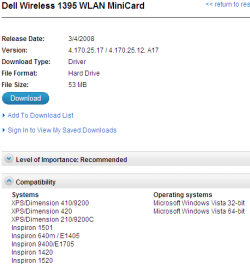
This is the only 64 bit Vista WLAN driver available for dl at this time: Drivers and Downloads
Download it. it is an EXE file so when you click on it, it will auto extract the driver to C:\Dell\drivers\R174292, then start the installation. See if it will install and if not what messages do you get?

dell_1395wlan.png

If it refuses to install, that is OK. Follow the pictures posted earlier for a manual install and browse to C:\Dell\drivers\R174292\DRIVER, and click on bcmwl6.inf. Please let us know if that helps or what messages you get?

It is going Dark here so I will check tomorrow afternoon, my time. Good night and good luck!

Robert
 

My Computer My Computer

At a glance

...
OS
...
Error "Update.cpp 794" has occurred and setup cannot continue

is what I get after attempting to install that driver. The chipset installed just fine though.

And the problem with doing a manual installation is that I removed the card from device manager a few days ago as it said the drivers were corrupted. That's not the reason for this problem though ... it started days before that. Any way to get it back on there? My computer won't recognize it.
 

My Computer My Computer

At a glance

Windows 7 Professional 64-bit
OS
Windows 7 Professional 64-bit
The card might just be dieing, its an older model. I'd suggest spending the $30 and getting an 802.11n card for the laptop. Just search for mini-pcie, you should find tons of them for good prices. Keep to broadcom or atheros chipsets and you'll be happy.
 

My Computer My Computer

At a glance

windows 7 RTM x64Phenom II 965 Quad Core 3.4GhzMushkin Blackline 8GB (4x2gb)XFX Radeon 5970 Black Edition
Computer Manufacturer/Model Number
Black_Box (homebuilt)
OS
windows 7 RTM x64
CPU
Phenom II 965 Quad Core 3.4Ghz
Motherboard
Asus M4A79T Deluxe
Memory
Mushkin Blackline 8GB (4x2gb)
Graphics Card(s)
XFX Radeon 5970 Black Edition
Sound Card
onboard
Monitor(s) Displays
Dell 2408WPF-main Dell E248WFP-secondary
Screen Resolution
1920x1200-main 1920x1200-secondary
Hard Drives
OCZ Vertex Limited Edition 100GB (OS)
x1 WD Black Edition 500GB drive (Storage)
PSU
XFX 850w Black Edition (Modular)
Case
Mountian Mods H2go
Cooling
CoolITSystems ECO A.L.C.
Keyboard
Logitech MX 5500 wireless keyboard
Mouse
Razor Copperhead
Internet Speed
16Mb down/2Mb up Wowway Cable Internet
The card might just be dieing, its an older model. I'd suggest spending the $30 and getting an 802.11n card for the laptop. Just search for mini-pcie, you should find tons of them for good prices. Keep to broadcom or atheros chipsets and you'll be happy.

Thing is, it worked just fine until I installed 7. Had no problems with it ever. I'm not saying you're wrong - I just find it hard to believe at the moment.
 

My Computer My Computer

At a glance

Windows 7 Professional 64-bit
OS
Windows 7 Professional 64-bit
The card might just be dieing, its an older model. I'd suggest spending the $30 and getting an 802.11n card for the laptop. Just search for mini-pcie, you should find tons of them for good prices. Keep to broadcom or atheros chipsets and you'll be happy.

Thing is, it worked just fine until I installed 7. Had no problems with it ever. I'm not saying you're wrong - I just find it hard to believe at the moment.

Youre right, the card didnt just die now, but it was probably made in the age of win 2000, and lets face it: you have to move on.
 

My Computer My Computer

At a glance

Win 7 pro 64-bit, Ubuntu 9.10 64-bitIntel Core 2 Duo 2.60 Ghz4 gb ddr2 667 MhzNVidia Geforce 9400 GS 1 gb ddr2 550 mhz GPU
Computer Manufacturer/Model Number
Acer Veriton m261 (modded)
OS
Win 7 pro 64-bit, Ubuntu 9.10 64-bit
CPU
Intel Core 2 Duo 2.60 Ghz
Motherboard
Whatever came with the system
Memory
4 gb ddr2 667 Mhz
Graphics Card(s)
NVidia Geforce 9400 GS 1 gb ddr2 550 mhz GPU
Sound Card
Intergrated
Monitor(s) Displays
samsung SyncMaster 2494 24"
Screen Resolution
1080p
Hard Drives
80gb - IDE
750gb - SATA II
PSU
whatever came with the system
Case
whatever came with the system
Cooling
whatever came with the system
Keyboard
Apple Aluminium (Awesome)
Mouse
Some awesome Dell mouse, really good.
Internet Speed
100mbps
Error "Update.cpp 794" has occurred and setup cannot continue

is what I get after attempting to install that driver. The chipset installed just fine though.

And the problem with doing a manual installation is that I removed the card from device manager a few days ago as it said the drivers were corrupted. That's not the reason for this problem though ... it started days before that. Any way to get it back on there? My computer won't recognize it.
Well ... I never rule out a defective component, even a brand new one. But I am not ready to go there yet. Even so, this laptop is new enough to be under warranty, right?

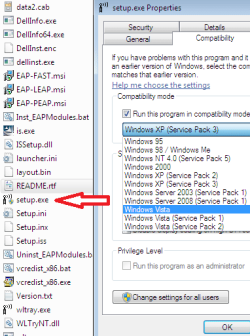
The next think I would have you try is to install the driver in "Compatibility Mode" as explained here: http://www.sevenforums.com/tutorials/316-compatibility-mode.html

Go to C:\Dell\drivers\R174292 and find "setup.exe". Right click on it and select properties at the bottom of the menu. In the "Compatibility" tab, you can try Vista, Vista SP1, and Vista SP2. See if it will install then.

compat_vista.png

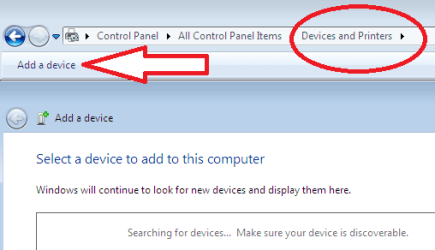
As to your other question, you can still add a device manually like we did in XP. Open Control Panel and find Devices and Printers (or just open Devices and Printers). Click Add a device to get started.

add_device.png

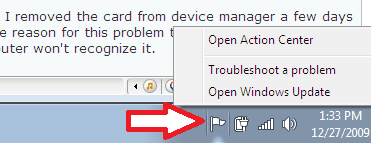
One last thought: Hardware updates are mostly considered "Optional" updates so you may need to open "Windows Update" to find and install the driver or update. Right click on the "Flag" at the bottom right of the taskbar, and select "Open Windows Update".

open_win_update.png

Please let us know how it goes!
 

My Computer My Computer

At a glance

...
OS
...
Ok, so:

The computer is no longer under warranty as far as I know. I think I just got the 1-year warranty for it, and I've had it for over 2 years now.

I have tried it in compatibility mode before, but not directly from that location. So I hit Properties and went to change it, but it's greyed out and set to run in compatibility mode for XP SP2. I can't change it so I don't know what to do there.

When I try to add a device, my computer finds nothing.

And lastly, the appropriate driver is indeed in Windows Update as an optional update. It downloads just fine, but the install fails every time.

Thanks again. I'm fine with getting a new network card. If it is indeed wrecked, could you recommend me a good one? I'm in Canada, and there are Boxing Day sales going on, so now's a better time than any.
 

My Computer My Computer

At a glance

Windows 7 Professional 64-bit
OS
Windows 7 Professional 64-bit
Ok, so:

The computer is no longer under warranty as far as I know. I think I just got the 1-year warranty for it, and I've had it for over 2 years now.

I have tried it in compatibility mode before, but not directly from that location. So I hit Properties and went to change it, but it's greyed out and set to run in compatibility mode for XP SP2. I can't change it so I don't know what to do there.

When I try to add a device, my computer finds nothing.

And lastly, the appropriate driver is indeed in Windows Update as an optional update. It downloads just fine, but the install fails every time.

Thanks again. I'm fine with getting a new network card. If it is indeed wrecked, could you recommend me a good one? I'm in Canada, and there are Boxing Day sales going on, so now's a better time than any.
DOUH!! :mad:

I would suggest the Windows 7 Compatibility site:

Windows 7 Compatibility Center hardware browse results - Networking - Wireless Network Cards

Funny, this member purchased a new wifi card and look what happened!!

http://www.sevenforums.com/drivers/...oard-wifi-adapter-driver-help.html#post455545

Cheers!
Robert
 

My Computer My Computer

At a glance

...
OS
...
Back
Top