
Kristoffach
New member
Quick summary of my issue:
I just bought a new acer (link) and proceeded to install windows 7 (64-bit) straight ahead. I must admit i made a bit of a mistake when i didn't check if the box it got shipped in contained any drivers or such (which it didn't to my surprise!)
Currently got experience with 32-bit win7, but not with 64-bit which I've heard had a rough time with bugs. Because my system is a 64-bit platform i suppose this might be one of the reasons for my problems. On a side note, this system is shipped out with both onboard gfx and an extra card (the ATI 4670 one)
But on to the main issue; Currently my problem with this system is an issue regarding my ATI mobility radeon HD4670 GFX card. (This is the drivers I've tried soo far:

After Installation of Driver software (Driver link #1):
I've just installed the drivers
View attachment 17057
Basicly the whole installation goes smooth, but after that, well, everything goes apeshift*
View attachment 17058
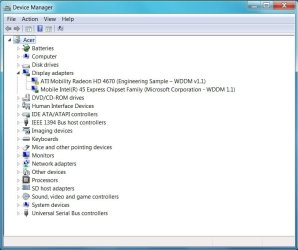
But in Device manager the ATI Radeon Mobility 4670 card actually is enabled, but still the Mobile Intel 45 Chip is the used display adapter.
(which has left me to think about trying to find some new drivers for this hardware, maybe that might help )
)
View attachment 17059
With drivers installed im now getting new options in the "Screen resolution" window if i push the "Detect" button
View attachment 17060
But here everything stops for me, no matter what i do nothing good comes out, currently i've been trying to fix this computer while watching dexter, needless to say after watching trough two seasons this awesome series im getting quite annoyed with the lack of support for this hardware issue, both from ATI's and ACER's side.
Theres probably a handfull posts/treads about this issue, going to link those closest to my issue here (remove them if its against the agreement)
* Acer 8935g - Using Wrong Display Adapter - Notebook Forums and Laptop Discussion
I just bought a new acer (link) and proceeded to install windows 7 (64-bit) straight ahead. I must admit i made a bit of a mistake when i didn't check if the box it got shipped in contained any drivers or such (which it didn't to my surprise!)
Currently got experience with 32-bit win7, but not with 64-bit which I've heard had a rough time with bugs. Because my system is a 64-bit platform i suppose this might be one of the reasons for my problems. On a side note, this system is shipped out with both onboard gfx and an extra card (the ATI 4670 one)
But on to the main issue; Currently my problem with this system is an issue regarding my ATI mobility radeon HD4670 GFX card. (This is the drivers I've tried soo far:
- ATI Catalyst™ Mobility Display Driver - Directly downloaded from the ati.amd.com site (this is by chance also the latest native win 64-bit driver)
- http://www.acer.com - Go to the driver section and select the right system (Acer Aspire 8935G).
Sadly there is no windows 7 drivers atm, only vista ones.
After Installation of Driver software (Driver link #1):
I've just installed the drivers
View attachment 17057
Basicly the whole installation goes smooth, but after that, well, everything goes apeshift*
View attachment 17058
But in Device manager the ATI Radeon Mobility 4670 card actually is enabled, but still the Mobile Intel 45 Chip is the used display adapter.
(which has left me to think about trying to find some new drivers for this hardware, maybe that might help
)View attachment 17059
With drivers installed im now getting new options in the "Screen resolution" window if i push the "Detect" button
View attachment 17060
But here everything stops for me, no matter what i do nothing good comes out, currently i've been trying to fix this computer while watching dexter, needless to say after watching trough two seasons this awesome series im getting quite annoyed with the lack of support for this hardware issue, both from ATI's and ACER's side.
Theres probably a handfull posts/treads about this issue, going to link those closest to my issue here (remove them if its against the agreement)
* Acer 8935g - Using Wrong Display Adapter - Notebook Forums and Laptop Discussion
Last edited:
My Computer
At a glance
Windows 7 (RC:7201 64-bit)Intel Core Due 2.26GHzDDR3 4GB 1066 MHzATI Mobility Radeon™ HD 4670
- Computer Manufacturer/Model Number
- Acer Aspire 8935g
- OS
- Windows 7 (RC:7201 64-bit)
- CPU
- Intel Core Due 2.26GHz
- Motherboard
- Mobile Intel GM45 Express Chipset
- Memory
- DDR3 4GB 1066 MHz
- Graphics Card(s)
- ATI Mobility Radeon™ HD 4670
- Monitor(s) Displays
- 18.4" Full HD 1920 x 1080
- Hard Drives
- Toshiba MT5055GSX (500gb - master)
ST9500325AS (500gb - slave)
- PSU
- the wall
- Case
- my desktop board
- Cooling
- my window

 This issue seems to be related to the ACER 8935G, it is a problem with Windows making the Mobil Intel as the default, the Solution provided by hmoodie works perfectly well, the only thing you have to remember is: in order to download the VGA ATI 8.64.4 from the Acer web site, make sure you select "display all available drivers" otherwise you wont see the only version that actually works.
 pleasse help me, Svar gjerne på norsk om noen kan det


