
Driver issue in windows 7 (ATI Radeon Mobility 4670)

Kristoffach

New member
Local time
4:27 PM
Messages
4
Location
Norway
Quick summary of my issue:
I just bought a new acer (link) and proceeded to install windows 7 (64-bit) straight ahead. I must admit i made a bit of a mistake when i didn't check if the box it got shipped in contained any drivers or such (which it didn't to my surprise!)
Currently got experience with 32-bit win7, but not with 64-bit which I've heard had a rough time with bugs. Because my system is a 64-bit platform i suppose this might be one of the reasons for my problems. On a side note, this system is shipped out with both onboard gfx and an extra card (the ATI 4670 one)
But on to the main issue; Currently my problem with this system is an issue regarding my ATI mobility radeon HD4670 GFX card. (This is the drivers I've tried soo far:

  • ATI Catalyst™ Mobility Display Driver - Directly downloaded from the ati.amd.com site (this is by chance also the latest native win 64-bit driver)
  • http://www.acer.com - Go to the driver section and select the right system (Acer Aspire 8935G).
    Sadly there is no windows 7 drivers atm, only vista ones.
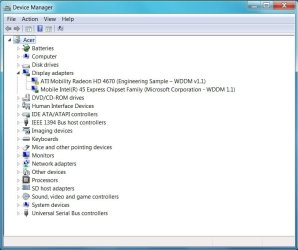
Without any drivers, this is how my Device Manager list my display units. As you will notice windows update have already found some driver for it. But the Device will not start (This device cannot start. (Code 10)):cry:
DeviceMNG-predriverinstall.jpg

After Installation of Driver software (Driver link #1):
I've just installed the drivers
View attachment 17057

Basicly the whole installation goes smooth, but after that, well, everything goes apeshift*
View attachment 17058

But in Device manager the ATI Radeon Mobility 4670 card actually is enabled, but still the Mobile Intel 45 Chip is the used display adapter.
(which has left me to think about trying to find some new drivers for this hardware, maybe that might help :o)
View attachment 17059

With drivers installed im now getting new options in the "Screen resolution" window if i push the "Detect" button
View attachment 17060

But here everything stops for me, no matter what i do nothing good comes out, currently i've been trying to fix this computer while watching dexter, needless to say after watching trough two seasons this awesome series im getting quite annoyed with the lack of support for this hardware issue, both from ATI's and ACER's side.
Theres probably a handfull posts/treads about this issue, going to link those closest to my issue here (remove them if its against the agreement)
* Acer 8935g - Using Wrong Display Adapter - Notebook Forums and Laptop Discussion
 
Last edited:

My Computer My Computer

At a glance

Windows 7 (RC:7201 64-bit)Intel Core Due 2.26GHzDDR3 4GB 1066 MHzATI Mobility Radeon™ HD 4670
Computer Manufacturer/Model Number
Acer Aspire 8935g
OS
Windows 7 (RC:7201 64-bit)
CPU
Intel Core Due 2.26GHz
Motherboard
Mobile Intel GM45 Express Chipset
Memory
DDR3 4GB 1066 MHz
Graphics Card(s)
ATI Mobility Radeon™ HD 4670
Monitor(s) Displays
18.4" Full HD 1920 x 1080
Hard Drives
Toshiba MT5055GSX (500gb - master)
ST9500325AS (500gb - slave)
PSU
the wall
Case
my desktop board
Cooling
my window
9 July - Got a new theory!

"Dual independent display support"

Something i read on the official acer page made me think, so this computer got two units capable of delivering display signals. Maybe theres an option to switch between the two units, but soo far i've yet to find any information on this.
so for now im stuck using the intel 45chipset as a display adapter.

update: Hmmm, horsepoo... the pictures i posted in my previous post is now goone, because i reinstalled win7 the hd got cleaned out soo pictures goone, bortevekk! ;<
 
Last edited:

My Computer My Computer

At a glance

Windows 7 (RC:7201 64-bit)Intel Core Due 2.26GHzDDR3 4GB 1066 MHzATI Mobility Radeon™ HD 4670
Computer Manufacturer/Model Number
Acer Aspire 8935g
OS
Windows 7 (RC:7201 64-bit)
CPU
Intel Core Due 2.26GHz
Motherboard
Mobile Intel GM45 Express Chipset
Memory
DDR3 4GB 1066 MHz
Graphics Card(s)
ATI Mobility Radeon™ HD 4670
Monitor(s) Displays
18.4" Full HD 1920 x 1080
Hard Drives
Toshiba MT5055GSX (500gb - master)
ST9500325AS (500gb - slave)
PSU
the wall
Case
my desktop board
Cooling
my window
This worked for getting the new driver installed, but it doesn't solve the issue. I have successfully installed the new driver at least.

I also have had some problems with ATI drivers in the past with Windows 7. The problem with doing a clean install of drivers is that it requires a reboot but once the computer reboots, the WDDM driver install takes over before I could install any drivers. There were some tutorials out that was supposed to disable this automatic driver installation, but none of them were working for me with a clean installation.

But here is the workaround that I have found to be effective:

   Tip
1. Download and install Driversweeper (and make sure you have the video driver that is to be installed downloaded)
2. Go to Device manager Right click my computer /properties/ device manager / and Disable any under display adapters.
3. Reboot into safe mode (usually F8)
4. Run Driversweeper and select your video drivers ATI (or Nvidia if someone else with Nvidia is reading this)
5. Manually delete any ATI folders that may be located at C:\ ATI and Program files (both X64 and X86)\ATI
6. Reboot again into Windows and install the new drivers then reboot once the installation completes.


By disabling the drivers in device manager instead of uninstalling them, it allows you to reboot without the WDDM installation taking over. You also should use Driversweeper and do a clean driver install any time you install Video drivers instead of just updating them, especially when switching between ATI to Nvidia as any leftover driver remnants from one brand will interfere with the other.

Edit this post has been edited to make it more clear to understand.
 

My Computer My Computer

At a glance

Windows 7 RCintel P87004GB DDR3ATI Radeon 4670
Computer Manufacturer/Model Number
Acer 8935G
OS
Windows 7 RC
CPU
intel P8700
Memory
4GB DDR3
Graphics Card(s)
ATI Radeon 4670
Indeed, this is the same problem I've been experience. I have only just installed Windows 7 (32) but I cannot get my Radeon 4670 to work. I have successfully downloaded and installed the newest catalyst software suit (9.9) from ATI/AMD and have disabled the on-board Intel adapter (in safe mode). However, when restarting there is an error message stating "No ATI graphics driver installed, or the ATI driver is not functioning properly. Please install the ATI driver appropriate for your ATI hardware." Nevertheless, device manager reports that my ATI adapter is functioning properly...
 

My Computer My Computer

At a glance

Windows 7
Computer Manufacturer/Model Number
Acer
OS
Windows 7
Hello I own an Acer 8935G with the ATI mobility radeon HD4670 Windows 7 64bits and I have the exact same issue as Kristoffach... Since I updated to Windows 7 my Games are working slower than on Vista !!! unbeleivable Spore is a lot slower than it used to be on Vista, Further more, Second Life will not start at all, it's telling me my video card is too old or the drivers needs to be updated and it wont start at all...it was working fine with Vista... Tryed every upgrape possible ... I beleive the problem is ...in Device manager the ATI Radeon Mobility 4670 card is enabled, but the Mobile Intel 45 Chip is seen as the default display adapter... I tryed disabling it, rebooting and re-enabling hopping the default would change to the ATI one...well it did not work... I will try Slovak21 solution and if it works or not will post my results
 

My Computer My Computer

At a glance

Windows 7 Premium 64bits2.53GHZ Dual Core P87004 Gig1GB ATI Mobility Radeon™ HD 4670
Computer Manufacturer/Model Number
ACER Aspire 8935G
OS
Windows 7 Premium 64bits
CPU
2.53GHZ Dual Core P8700
Memory
4 Gig
Graphics Card(s)
1GB ATI Mobility Radeon™ HD 4670
Monitor(s) Displays
18.4-inch Full HD Acer CineCrystal ™ LED Display
Screen Resolution
Full 1080P
Hard Drives
500GB
Hi guys, I fixed this tonight. I dont know if it will work for you guys but try this.

1. Download the following file - VGA ATi, make sure its the 173mb file version 8.64.4 Service & Support To find this you must select 'All Drivers' from the top right of the driver list
2. Uninstall both graphics cards through device manager
3. Restart the computer and both graphics cards will attempt to download the drivers automatically, the intel graphics card normally installs and becomes default
4. Restart the computer and check the device manager, the ATi card should now have a conflict showing
5. Install the downloaded Acer driver and restart when asked (the screen may display the windows background for a few mins dont worry be patient)
6. Restart when asked
7. When the computer has successfully booted up your ATi card should be the default thanks to the catalyst control centre.

Let me know how this goes?

Cheers
H:D
 
Last edited:

My Computer My Computer

At a glance

Windows 7 Ultimate 64bitIntel i7 4700HQ (2.4GHz)8GB DDR32GB NVIDIA GeForce GTX 765M
Computer type
Laptop
Computer Manufacturer/Model Number
Asus G750JW
OS
Windows 7 Ultimate 64bit
CPU
Intel i7 4700HQ (2.4GHz)
Memory
8GB DDR3
Graphics Card(s)
2GB NVIDIA GeForce GTX 765M
Monitor(s) Displays
17.3” anti-glare FHD LED backlit (1920 x 1080)
Screen Resolution
1920 x 1080 x 32 bits (4294967296 colors) @ 60 Hz
Hard Drives
120GB SSD + 500GB HDD
Antivirus
BitDefender Total Security 2015
Browser
Google Chrome
Good News, I was able to fix my problem :party: This issue seems to be related to the ACER 8935G, it is a problem with Windows making the Mobil Intel as the default, the Solution provided by hmoodie works perfectly well, the only thing you have to remember is: in order to download the VGA ATI 8.64.4 from the Acer web site, make sure you select "display all available drivers" otherwise you wont see the only version that actually works.
 

My Computer My Computer

At a glance

Windows 7 Premium 64bits2.53GHZ Dual Core P87004 Gig1GB ATI Mobility Radeon™ HD 4670
Computer Manufacturer/Model Number
ACER Aspire 8935G
OS
Windows 7 Premium 64bits
CPU
2.53GHZ Dual Core P8700
Memory
4 Gig
Graphics Card(s)
1GB ATI Mobility Radeon™ HD 4670
Monitor(s) Displays
18.4-inch Full HD Acer CineCrystal ™ LED Display
Screen Resolution
Full 1080P
Hard Drives
500GB
Yes, for some reason the only VGA driver download displayed when the "Latest" filter is selected is the older 8.64.3 version. Thus, you must selected "All" and scroll down to see the 'actual' latest 8.64.4 released on 2009/10/23 as opposed to on 2009/10/16.

I've yet to go through the configuration process that hmoodie has outlined. Hopefully it will work. Thanks!
 

My Computer My Computer

At a glance

Windows 7
Computer Manufacturer/Model Number
Acer
OS
Windows 7
Good News, I was able to fix my problem :party: This issue seems to be related to the ACER 8935G, it is a problem with Windows making the Mobil Intel as the default, the Solution provided by hmoodie works perfectly well, the only thing you have to remember is: in order to download the VGA ATI 8.64.4 from the Acer web site, make sure you select "display all available drivers" otherwise you wont see the only version that actually works.

Excellent, thanks for letting me know this worked. I have updated the process to reflect where to find the driver.

If you think I could or should change anything in the process let me know, I hope this can help some other people.
 

My Computer My Computer

At a glance

Windows 7 Ultimate 64bitIntel i7 4700HQ (2.4GHz)8GB DDR32GB NVIDIA GeForce GTX 765M
Computer type
Laptop
Computer Manufacturer/Model Number
Asus G750JW
OS
Windows 7 Ultimate 64bit
CPU
Intel i7 4700HQ (2.4GHz)
Memory
8GB DDR3
Graphics Card(s)
2GB NVIDIA GeForce GTX 765M
Monitor(s) Displays
17.3” anti-glare FHD LED backlit (1920 x 1080)
Screen Resolution
1920 x 1080 x 32 bits (4294967296 colors) @ 60 Hz
Hard Drives
120GB SSD + 500GB HDD
Antivirus
BitDefender Total Security 2015
Browser
Google Chrome
Hey, thanks for the info all. I have been having this problem and it is the Acer Aspire 8935G. I will update when we have installed the latest (the _real_ latest) driver!

Thanks again...
 

My Computer My Computer

At a glance

Windows 7 - Home Premium 64bitIntel Core 2 Duo Processor T6500 (2.1GHz, 800...4GB (4096MB RAM)ATI Mobility Radeon HD 4670
Computer Manufacturer/Model Number
Acer Aspire 8935G Laptop
OS
Windows 7 - Home Premium 64bit
CPU
Intel Core 2 Duo Processor T6500 (2.1GHz, 800 MHz FSB)
Memory
4GB (4096MB RAM)
Graphics Card(s)
ATI Mobility Radeon HD 4670
Yes, the solution on this thread worked for me :)
 

My Computer My Computer

At a glance

Windows 7 - Home Premium 64bitIntel Core 2 Duo Processor T6500 (2.1GHz, 800...4GB (4096MB RAM)ATI Mobility Radeon HD 4670
Computer Manufacturer/Model Number
Acer Aspire 8935G Laptop
OS
Windows 7 - Home Premium 64bit
CPU
Intel Core 2 Duo Processor T6500 (2.1GHz, 800 MHz FSB)
Memory
4GB (4096MB RAM)
Graphics Card(s)
ATI Mobility Radeon HD 4670
Hi guys,

I followed hmoodie's solution step by step (i have the exact same problem and laptop, i upgraded to windows 7 x64) and when i restarted my computer after uninstalling the two graphics cards on the device manager, the HD 4670 won't show where it was previously, and the intel card installs itself again.
This means that i'm unable to install the drivers from the download (i've also tried with newer versions of drivers and stuff from ati.com)

If you have a solution for this please help!

thanks!

Edit: Nevermind I think i have fixed it, but it means ive either started up via the media powerup button or disabled the intel graphics card (which i never use) But thanks for the help! :)
 
Last edited:

My Computer My Computer

At a glance

Windows 7 Ultimate x64
OS
Windows 7 Ultimate x64
Thank you very much hmoodie, it worked well, but now i have another question.
Since the driver is still from 2009 and its 2011 allready , how is the correct way to update the drivers now, im afraid to mess up again, as i have formated my laptop 3 times allready for messing up with drivers.
So can anyone please give me step-to-step guide to update my HD 4670 drivers.
I would be more than happy.
 

My Computer My Computer

At a glance

Windows 7 Home Premium x64
OS
Windows 7 Home Premium x64
Help

i have a HP Pavilion dv7-6140 17,3" with AMD Radeon HD 6770M card and i cant use it becouse that ****ing mobile intel shit is default or somthing, can anyone please help me fast, i have tryed everything and that answer above diden work for me it just installed the same shit again:( pleasse help me, Svar gjerne på norsk om noen kan det :)
 

My Computer My Computer

At a glance

windows 7 ultimate 64bit.
OS
windows 7 ultimate 64bit.
I am also having similar issues to the rest of you, but the solution provided by hmoodie isn't working for me. I have a home built PC, running the same video card on Windows 7 professional x64. Was running XP x64 previously with no issues at all. Only reason I upgraded was because I couldn't install all the programs I needed and dislike Vista with a passion.
I downloaded and installed the Catalyst drivers from the AMD site, installed it fine but can't run any of my games due to severe video lag. I have an on-board video port that I don't use and also can not get it disabled. Any help would be greatly appreciated.
 

My Computer My Computer

At a glance

Windows 7 Professional x64AMD Phenom II x4 9658gbATI Radeon HD 4670
Computer Manufacturer/Model Number
home build
OS
Windows 7 Professional x64
CPU
AMD Phenom II x4 965
Motherboard
Bigabyte 87A-UD3
Memory
8gb
Graphics Card(s)
ATI Radeon HD 4670
Sound Card
Realtek HD Audio
Monitor(s) Displays
Acer G245HQ
Hard Drives
5tb - WDC
PSU
XFX 800watt
Back
Top