
administrator problem

ok well i do have windows 7 pro.
And I tried your susggestion and tried going to the computer management but the account locked box was never checked(for the user i hid)
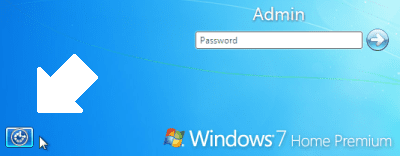
The workaround I linked to uses the icon / link at the bottom left corner of the sign-in screen, meaning you bypass the sign-in. By booting to the Repair CD and navigating to the Command Prompt, you will trade the "Screen Magnifier" exec file for the "Open CMD Prompt" exec file. Then when you reboot, instead of signing in, you click the icon at the bottom left of the screen and select the "Screen Magnifier" from the menu. Your Command Promtp will open allowing you to enable the Default Administrator account. After a reboot, you are able to sign in to the Administrator Account and fix your issue.

cmd_prompt_01.png

cmd_prompt_02.png


Using the System Repair CD

Restoring The Default Administrator Account


Cheers!
Robert
 
Last edited:

My Computer

OS
...
ok i got it using roberts method above.
Thanks alot for your help
 

My Computer

OS
Windows 7
ok well i do have windows 7 pro.
And I tried your susggestion and tried going to the computer management but the account locked box was never checked(for the user i hid)
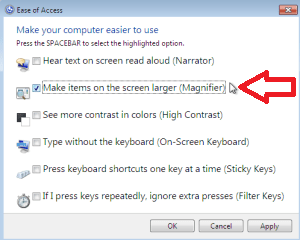
The workaround I linked to uses the icon / link at the bottom left corner of the sign-in screen, meaning you bypass the sign-in. By booting to the Repair CD and navigating to the Command Prompt, you will trade the "Screen Magnifier" exec file for the "Open CMD Prompt" exec file. Then when you reboot, instead of signing in, you click the icon at the bottom left of the screen and select the "Screen Magnifier" from the menu. Your Command Promtp will open allowing you to enable the Default Administrator account. After a reboot, you are able to sign in to the Administrator Account and fix your issue.

Using the System Repair CD

Restoring The Default Administrator Account


Cheers!
Robert
Good one there m8. This info goes straight to my tutorial collection. Wil come in handy to spread it across for other members when u r offline. ;):p
 

My Computer

Computer Manufacturer/Model Number
MacBook Pro
OS
Lion
CPU
i5
Memory
4GB
Graphics Card(s)
Intel
Screen Resolution
1200x800
Hard Drives
Seagate FreeAgent GO 250GB Ext. HDD
Good one there m8. This info goes straight to my tutorial collection. Wil come in handy to spread it across for other members when u r offline. ;):p
Thank you for your kind words! Please feel free to pass this on to anyone you wish, anytime.

BTW, the original Vista tutorial was written by my esteemed friend and fellow Guru, Dinesh. Expect to see an updated tutorial for Windows 7 very soon.

Cheers!
Robert
 

My Computer

OS
...
to use system restore you have to have administrator privilages...
 

My Computer

OS
Windows 7
I had the same problem and was able to fix it.

1.) Login into whichever user you can.
2.) run cmd
3.) type "runas /user:<type useradmin name> cmd
4.) if you hid the user using regedit then run regedit in the new command window and undo any changes
 

My Computer

OS
Windows 7 Enterprise
Back
Top