Aero Issues

sirveight

New member
Local time
11:54 AM
Messages
11
Just installed my Nvidia GTX 260 and Aero doesn't work. I uninstalled the nvidia drivers, let windows uses its own drivers, and reinstalled the latest nvidia drivers and still when I go into the task bar properties the "Use Aero Peek to preview the desktop" is grayed out. All of my windows are just like plain windows 95 theme. I have checked services. I went in to visual settings and told it to set for best appearance so EVERYTHING is checked. Anyone have some magical fix for this?
 

My Computer

OS
Windows 7
CPU
Core 2 2.40 ghz
Memory
4 Gbs
Graphics Card(s)
Nvidia 260 GTX
Sound Card
On-Board
Monitor(s) Displays
Dell and Emachine Monitor
Screen Resolution
1280 x 1024 and 1024 x 768
Hard Drives
300 GB Scsi Cheetah 10k RPM
The bottom right by the clock, you will see the little bar that enables you to see your desktop, right click make sure that peek at desktop is checked.
 

My Computer

Computer type
PC/Desktop
Computer Manufacturer/Model Number
Dell XPS 420
OS
Windows 10, Home Clean Install
CPU
Intel Core2 processsor Q8200(2.33Ghz 1333FSB) Quad Core Tech
Motherboard
Dell
Memory
6 gb
Graphics Card(s)
ATI Radeon 256MB HD3650
Sound Card
Intergrated 7.1 Channel Audio
Monitor(s) Displays
Dell SP2009W 20"
Hard Drives
640 GB Serial ATA Hard drive
Cooling
Fan
Keyboard
Dell USB Keyboard
Mouse
Dell Premium Optical USB
Internet Speed
DSL 2.85
Please enter your machine specs. In the User CP. That way we don't have to ask you a bunch of questions like CPU? Speed? Memory? etc. - Thanks
 

My Computer

Computer type
PC/Desktop
Computer Manufacturer/Model Number
Dell OP7010
OS
Windows 7 Enterprise (x64); Windows Server 2008 R2 (x64)
Memory
16GB
Monitor(s) Displays
4 Dell 24" LCD
Screen Resolution
1280x1024
Keyboard
Dell
Mouse
Dell Optical
Internet Speed
40meg
Updated. Still haven't updated the Motherboard I need to get ahold of a buddy who bought it for me. Can't recall. Lol
 

My Computer

OS
Windows 7
CPU
Core 2 2.40 ghz
Memory
4 Gbs
Graphics Card(s)
Nvidia 260 GTX
Sound Card
On-Board
Monitor(s) Displays
Dell and Emachine Monitor
Screen Resolution
1280 x 1024 and 1024 x 768
Hard Drives
300 GB Scsi Cheetah 10k RPM
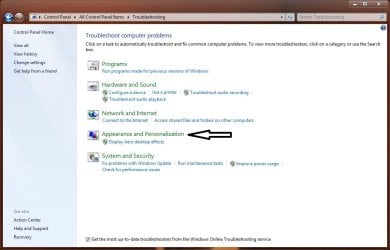
You could try the troubleshooter in control panel.
 

Attachments

  • aero.jpg
    aero.jpg
    60.3 KB · Views: 80

My Computer

Computer type
PC/Desktop
Computer Manufacturer/Model Number
Self Built
OS
Win 10 Pro x64
CPU
Intel I5-2500K @3.3GHz
Motherboard
Asrock P67 Extreme4
Memory
16GB G.Skill Ripjaws X (4x4GB)
Graphics Card(s)
EVGA GeForce 750 Ti SC 2GB
Sound Card
ASUS Xonar DG 5.1 Channels 24-bit 96KHz PCI Interface Sound
Monitor(s) Displays
auria eq2367
Screen Resolution
1920 x 1080
Hard Drives
250GB Samsung 850 EVO SSD
1TB WD Blue
1TB Hitachi
PSU
SeaSonic X 650W 80 Plus Gold
Case
Corsair Obsidian 750D
Cooling
Corsair H60, Three 140mm case fans
Keyboard
Logitech Wireless Keyboard K520
Mouse
Logitech Wireless Mouse M310
Internet Speed
Wave Broadband ~ 100 dn 5 up
Antivirus
Windows Defender, Malwarebytes Premium
Browser
Edge, IE11, Chrome
Other Info
Laptop specs: HP g7-1365dx /
CPU: AMD A6-3420M APU with Radeon(tm) HD Graphics /
RAM: Crucial 8Gb (2x4Gb) /
SSD: Crucial M4-CT128M4SSD2 ATA Device/ FW 000F /
GFX: AMD Radeon HD 6520G /
OS: Windows 10 Pro x64

My Computer

Computer type
PC/Desktop
Computer Manufacturer/Model Number
Alienware Aurora ALX R4
OS
Windows 10 Pro (x64)
CPU
Intel Core i7-3930K (3.2GHz - 4.5GHz)
Motherboard
Alienware Aurora-R4 x79
Memory
4x Samsung 4GB PC3-12800 DDR3 (16GB 1600MHz)
Graphics Card(s)
Nvidia Geforce GTX 690
Sound Card
SteelSeries Siberia Elite
Monitor(s) Displays
Dell UltraSharp U3011
Screen Resolution
2560x1600
Hard Drives
Samsung 850 Pro 256 GB, Seagate 1TB Desktop Hybrid HDD, 2x Western Digital 4TB Green HDD
PSU
875W Some Dell PSU <.<
Case
Alienware Aurora ALX
Cooling
Custom Liquid Cooling (EK CPU & GPU blocks) dual EK 480RAD
Keyboard
Logitech G710+ Mechanical
Mouse
Logitech G700s
Internet Speed
Verizon Fios (50 mbps average)
Other Info
Server: Intel NUC D54250WYK: i5-4250U, 16GB, 256 GB mSATA, Windows Server 2012 R2
Yeah. Thats actually what is selected.


Add: Not only does it say that ALL of my themes (Including the default ones that came with windows 7) don't support aero. It also says that the Desktop Window Manager is disabled when it is currently running. Troubleshooter even said it enabled it. The following time that I ran the troubleshooter it said the same thing.
 
Last edited:

My Computer

OS
Windows 7
CPU
Core 2 2.40 ghz
Memory
4 Gbs
Graphics Card(s)
Nvidia 260 GTX
Sound Card
On-Board
Monitor(s) Displays
Dell and Emachine Monitor
Screen Resolution
1280 x 1024 and 1024 x 768
Hard Drives
300 GB Scsi Cheetah 10k RPM

My Computer

Computer type
PC/Desktop
Computer Manufacturer/Model Number
Dell XPS 420
OS
Windows 10, Home Clean Install
CPU
Intel Core2 processsor Q8200(2.33Ghz 1333FSB) Quad Core Tech
Motherboard
Dell
Memory
6 gb
Graphics Card(s)
ATI Radeon 256MB HD3650
Sound Card
Intergrated 7.1 Channel Audio
Monitor(s) Displays
Dell SP2009W 20"
Hard Drives
640 GB Serial ATA Hard drive
Cooling
Fan
Keyboard
Dell USB Keyboard
Mouse
Dell Premium Optical USB
Internet Speed
DSL 2.85
Yeah, being as I am running windows 7. It is just telling me to use the troubleshooting application. If I am lacking on any info. Please let me know. I want a theme that actually works. Heh.


Being as I am unable to use ANY of my themes with Aero. Think reinstalling might be the best option? I would hate to reinstall but if it will fix it, I might aswell.
 
Last edited:

My Computer

OS
Windows 7
CPU
Core 2 2.40 ghz
Memory
4 Gbs
Graphics Card(s)
Nvidia 260 GTX
Sound Card
On-Board
Monitor(s) Displays
Dell and Emachine Monitor
Screen Resolution
1280 x 1024 and 1024 x 768
Hard Drives
300 GB Scsi Cheetah 10k RPM
Yeah, being as I am running windows 7. It is just telling me to use the troubleshooting application. If I am lacking on any info. Please let me know. I want a theme that actually works. Heh.


Being as I am unable to use ANY of my themes with Aero. Think reinstalling might be the best option? I would hate to reinstall but if it will fix it, I might aswell.

Did you try the troubleshooter in the control panel ?
 

My Computer

Computer type
PC/Desktop
Computer Manufacturer/Model Number
Self Built
OS
Win 10 Pro x64
CPU
Intel I5-2500K @3.3GHz
Motherboard
Asrock P67 Extreme4
Memory
16GB G.Skill Ripjaws X (4x4GB)
Graphics Card(s)
EVGA GeForce 750 Ti SC 2GB
Sound Card
ASUS Xonar DG 5.1 Channels 24-bit 96KHz PCI Interface Sound
Monitor(s) Displays
auria eq2367
Screen Resolution
1920 x 1080
Hard Drives
250GB Samsung 850 EVO SSD
1TB WD Blue
1TB Hitachi
PSU
SeaSonic X 650W 80 Plus Gold
Case
Corsair Obsidian 750D
Cooling
Corsair H60, Three 140mm case fans
Keyboard
Logitech Wireless Keyboard K520
Mouse
Logitech Wireless Mouse M310
Internet Speed
Wave Broadband ~ 100 dn 5 up
Antivirus
Windows Defender, Malwarebytes Premium
Browser
Edge, IE11, Chrome
Other Info
Laptop specs: HP g7-1365dx /
CPU: AMD A6-3420M APU with Radeon(tm) HD Graphics /
RAM: Crucial 8Gb (2x4Gb) /
SSD: Crucial M4-CT128M4SSD2 ATA Device/ FW 000F /
GFX: AMD Radeon HD 6520G /
OS: Windows 10 Pro x64
The "Add:" 2 posts up was what the troubleshooter told me. :(


Add: Not only does it say that ALL of my themes (Including the default ones that came with windows 7) don't support aero. It also says that the Desktop Window Manager is disabled when it is currently running. Troubleshooter even said it enabled it. The following time that I ran the troubleshooter it said the same thing.
 

My Computer

OS
Windows 7
CPU
Core 2 2.40 ghz
Memory
4 Gbs
Graphics Card(s)
Nvidia 260 GTX
Sound Card
On-Board
Monitor(s) Displays
Dell and Emachine Monitor
Screen Resolution
1280 x 1024 and 1024 x 768
Hard Drives
300 GB Scsi Cheetah 10k RPM

My Computer

Computer type
PC/Desktop
Computer Manufacturer/Model Number
Self Built
OS
Win 10 Pro x64
CPU
Intel I5-2500K @3.3GHz
Motherboard
Asrock P67 Extreme4
Memory
16GB G.Skill Ripjaws X (4x4GB)
Graphics Card(s)
EVGA GeForce 750 Ti SC 2GB
Sound Card
ASUS Xonar DG 5.1 Channels 24-bit 96KHz PCI Interface Sound
Monitor(s) Displays
auria eq2367
Screen Resolution
1920 x 1080
Hard Drives
250GB Samsung 850 EVO SSD
1TB WD Blue
1TB Hitachi
PSU
SeaSonic X 650W 80 Plus Gold
Case
Corsair Obsidian 750D
Cooling
Corsair H60, Three 140mm case fans
Keyboard
Logitech Wireless Keyboard K520
Mouse
Logitech Wireless Mouse M310
Internet Speed
Wave Broadband ~ 100 dn 5 up
Antivirus
Windows Defender, Malwarebytes Premium
Browser
Edge, IE11, Chrome
Other Info
Laptop specs: HP g7-1365dx /
CPU: AMD A6-3420M APU with Radeon(tm) HD Graphics /
RAM: Crucial 8Gb (2x4Gb) /
SSD: Crucial M4-CT128M4SSD2 ATA Device/ FW 000F /
GFX: AMD Radeon HD 6520G /
OS: Windows 10 Pro x64
The "Add:" 2 posts up was what the troubleshooter told me. :(

No the one in Your control panel like the screenshot I posted.

iwhdes.png
 

My Computer

OS
Windows 7
CPU
Core 2 2.40 ghz
Memory
4 Gbs
Graphics Card(s)
Nvidia 260 GTX
Sound Card
On-Board
Monitor(s) Displays
Dell and Emachine Monitor
Screen Resolution
1280 x 1024 and 1024 x 768
Hard Drives
300 GB Scsi Cheetah 10k RPM
Somewhere I recall reading a problem with Areo if your screen resolutions are different on the dual monitors.

Quote Your Specs: Screen Resolution 1280 x 1024 and 1024 x 768.

Try setting them both to the same resolution and see if that fixes it. If that does not you might want to try only one monitor and then the other (in other words one at a time by itself no dual mode)

Let us know.
 

My Computer

Computer type
PC/Desktop
Computer Manufacturer/Model Number
Dell OP7010
OS
Windows 7 Enterprise (x64); Windows Server 2008 R2 (x64)
Memory
16GB
Monitor(s) Displays
4 Dell 24" LCD
Screen Resolution
1280x1024
Keyboard
Dell
Mouse
Dell Optical
Internet Speed
40meg
Somewhere I recall reading a problem with Areo if your screen resolutions are different on the dual monitors.

Quote Your Specs: Screen Resolution 1280 x 1024 and 1024 x 768.

Try setting them both to the same resolution and see if that fixes it. If that does not you might want to try only one monitor and then the other (in other words one at a time by itself no dual mode)

Let us know.


Thanks for the advice but I changed it to the same resolution. I also unhooked the second monitor. Still, even after running the troubleshooter and changing themes it still didn't work. I am still running the latest nvidia drivers.
 

My Computer

OS
Windows 7
CPU
Core 2 2.40 ghz
Memory
4 Gbs
Graphics Card(s)
Nvidia 260 GTX
Sound Card
On-Board
Monitor(s) Displays
Dell and Emachine Monitor
Screen Resolution
1280 x 1024 and 1024 x 768
Hard Drives
300 GB Scsi Cheetah 10k RPM
Try update your computer's performance score

1, Open Performance Information and Tools by clicking the Start button
4f6cbd09-148c-4dd8-b1f2-48f232a2fd33.png
, clicking Control Panel, clicking System and Maintenance, and then clicking Performance Information and Tools
2, Click Update my score.


My Computer

Computer Manufacturer/Model Number
Samsung NP550P5C-S02IN
OS
Windows 7 Ultimate - 64-bit | Windows 8 Pro - 64-bit
CPU
Intel® Core™ i7 Processor 3,610QM (2.30Hz, 6MB L3 Cach
Memory
8 GB
Graphics Card(s)
NVIDIA® GeForce® GT 650M 2GB Graphics, Optimus™ techno
Sound Card
SoundAlive™ JBL 3 Speakers (With sub-Woofer)
Monitor(s) Displays
39.62cm (15.6) SuperBright 300nit HD+ LED Display
Screen Resolution
1,600 x 900, Anti-Reflective
Hard Drives
1TB S-ATA II Hard Drive (5,400RPM)
Try update your computer's performance score

1, Open Performance Information and Tools by clicking the Start button
4f6cbd09-148c-4dd8-b1f2-48f232a2fd33.png
, clicking Control Panel, clicking System and Maintenance, and then clicking Performance Information and Tools
2, Click Update my score.

I too also did that. I updated it before I posted this thread when I was looking through my visual settings I noticed performance score and I noticed video card was low. So I updated it and it updated my score. Although, it seems microsoft isn't displaying the full power of scsi hard drives. My hard drive score is rather low. :\
 

My Computer

OS
Windows 7
CPU
Core 2 2.40 ghz
Memory
4 Gbs
Graphics Card(s)
Nvidia 260 GTX
Sound Card
On-Board
Monitor(s) Displays
Dell and Emachine Monitor
Screen Resolution
1280 x 1024 and 1024 x 768
Hard Drives
300 GB Scsi Cheetah 10k RPM

My Computer

Computer Manufacturer/Model Number
Samsung NP550P5C-S02IN
OS
Windows 7 Ultimate - 64-bit | Windows 8 Pro - 64-bit
CPU
Intel® Core™ i7 Processor 3,610QM (2.30Hz, 6MB L3 Cach
Memory
8 GB
Graphics Card(s)
NVIDIA® GeForce® GT 650M 2GB Graphics, Optimus™ techno
Sound Card
SoundAlive™ JBL 3 Speakers (With sub-Woofer)
Monitor(s) Displays
39.62cm (15.6) SuperBright 300nit HD+ LED Display
Screen Resolution
1,600 x 900, Anti-Reflective
Hard Drives
1TB S-ATA II Hard Drive (5,400RPM)

My Computer

OS
Windows 7
CPU
Core 2 2.40 ghz
Memory
4 Gbs
Graphics Card(s)
Nvidia 260 GTX
Sound Card
On-Board
Monitor(s) Displays
Dell and Emachine Monitor
Screen Resolution
1280 x 1024 and 1024 x 768
Hard Drives
300 GB Scsi Cheetah 10k RPM
Here is a long shot:

I did this on my Vista machine when I had all kinds of Video Problems.

1) Uninstall the nVidia drivers. Reboot let the Windows Drivers take over.
2) Remove the Video Card Hardware from Device Manager and before Windows can re-discover it. Turn off your machine.
3) Pull the video card out of the machine.
4) If you have a different video card put it in or a built in video card Power Up the machine. Let the machine discover the video and then shutdown (Power OFF) the machine and put your nVidia card back in.
5) If you don't have a spare video card or a built in one. Pull the cord power from the power supply and wait 60 seconds put the video card back. Pug in the power cord and power the machine up.
6) Re-install the nVidia drivers.
7) Disable the nVidia Service this causes all kinds of problems.

I had to do this and it fixed all kinds of video issues.
 

My Computer

Computer type
PC/Desktop
Computer Manufacturer/Model Number
Dell OP7010
OS
Windows 7 Enterprise (x64); Windows Server 2008 R2 (x64)
Memory
16GB
Monitor(s) Displays
4 Dell 24" LCD
Screen Resolution
1280x1024
Keyboard
Dell
Mouse
Dell Optical
Internet Speed
40meg
Back
Top