unable to connect to internet using lan

userfriendly

New member
Local time
5:26 AM
Messages
2
I just upgraded to windows 7 32bit from vista on my Toshiba satellite a210 and now I cant get my LAN to work, my wifi is working but I don't have a wireless router and strangely my wifi works with the switch in the off position. Can any one help me with this I'm loosing my mind trying to fix the problem.
 

My Computer

Computer Manufacturer/Model Number
Toshiba Satellite A210
OS
Windows 7
CPU
amd 64 athlon x2
Need more info. When you say your LAN is not working what specifically is not working? If its your NIC check device manager and see what shows. You may have to go to the Toshiba site and download a driver to get it working. If your NIC is working but you can't get a connection that is a different matter. Just need more info to sort it out.
 
Last edited:

My Computer

Computer type
PC/Desktop
Computer Manufacturer/Model Number
Home Built
OS
Windows 10 Education 64 bit
CPU
AMD Phenom II X4 980 Black Edition Deneb 3.7GHz
Motherboard
Asus M4N68T-M V2 µATX Motherboard
Memory
8GB 4GBx2 Kingston PC10600 DDR3 1333 Memory
Graphics Card(s)
Zotac NVIDIA Geforce GT640 2 Gig DDR3 PCIe
Sound Card
VIA VT1708s High Definition Audio 8-channel Onboard
Monitor(s) Displays
22" LG E2242 1080p and 2 19" I-INC AG191D
Screen Resolution
1280x1024 - 1920x1080 - 1280x1024
Hard Drives
Crucial M100 256 GB SSD and 500 GB WD Blue SATA
PSU
Thermaltake TR 620
Case
Power Up Black ATX Mid-Tower Case
Cooling
Stock heatsink and fan
Keyboard
Logitech Wireless K350 Wave
Mouse
Logitech Wireless M570 Trackman Wheel
Internet Speed
80 Mbps Down 30 Mbps Up
Antivirus
Windows Defender
Browser
Internet Explorer 11
Other Info
HP DVD1040e Lightscribe - External USB2
I think Iv found the problom I thing its configfree, Iv found a windows 7 compatable verson but it keeps asking me to check if I have sufficient privileges to install it, I have admin privileges so I don't understand why it wont install
 

My Computer

Computer Manufacturer/Model Number
Toshiba Satellite A210
OS
Windows 7
CPU
amd 64 athlon x2
Check if your lan is installed or is enable
 

My Computer

Computer Manufacturer/Model Number
Acer Aspire 4740
OS
Windows 7
CPU
Intel i3 Core
Motherboard
Intel
Memory
3.00Gb
Graphics Card(s)
Intel Graphics Media Accelerator HD
Sound Card
Realtel HD Audio
Monitor(s) Displays
Laptop display
Screen Resolution
1280x800
Hard Drives
350GB
Cooling
Fans
Keyboard
Build in keyboard (laptop)
Mouse
touch pad mouse
Internet Speed
512 Kbps = 64 KBPS
I think Iv found the problom I thing its configfree, Iv found a windows 7 compatable verson but it keeps asking me to check if I have sufficient privileges to install it, I have admin privileges so I don't understand why it wont install
Is it an exe or msi file? then, right click and select run as administrator. It should work.
 

My Computer

Computer Manufacturer/Model Number
MacBook Pro
OS
Lion
CPU
i5
Memory
4GB
Graphics Card(s)
Intel
Screen Resolution
1200x800
Hard Drives
Seagate FreeAgent GO 250GB Ext. HDD
I think Iv found the problom I thing its configfree, Iv found a windows 7 compatable verson but it keeps asking me to check if I have sufficient privileges to install it, I have admin privileges so I don't understand why it wont install

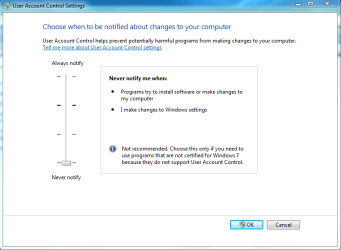
Try turning off UAC for now. What model router are you trying to connect with?
 

Attachments

  • UAC TURNED OFF.PNG
    UAC TURNED OFF.PNG
    17.4 KB · Views: 161
Last edited:

My Computer

Computer type
PC/Desktop
Computer Manufacturer/Model Number
Home built
OS
Windows 7 Ult, Windows 8.1 Pro,
CPU
Q9650-4.275GHz, E8600 4.5GHz, E6750-3.8GHz
Motherboard
Evga 780i FTW
Memory
G.Skill PC2 9600 1200Mhz 5 5 5 15 2T
Graphics Card(s)
GTX480
Sound Card
Asus Xonar D2
Monitor(s) Displays
HannsG
Screen Resolution
1680X1050
Hard Drives
GSkill Phoenix Pro 120GB SSD
PSU
ThermalTake Toughpower 1000Watt modular
Case
ThermalTake XaserV
Cooling
Xigmatek S1283
Keyboard
Logitech G15
Mouse
Logitech G9
Internet Speed
T1
Back
Top