Back up onto partion

I dont really want to download anything :l coz im so closed to reaching my download limt, it would be nice to know that i have a back up if something does go wrong, but can i do :l nothing LOL
 

My Computer My Computer

Computer type
PC/Desktop
Computer Manufacturer/Model Number
Custom Build
OS
Windows 7 Professional 64bit
CPU
Intel Core i5 - 2500K @ 3.30GHz
Motherboard
Gigabyte Z77-HD3
Memory
4GB DDR3
Graphics Card(s)
EVGA Nvidia GeForce GT 740 2GB DDR3
Screen Resolution
1680 x 1050
Hard Drives
1T Samaung HD/ 1T toshiba external drive/ 1T western digital external drive/ 2T seagate external drive/ 250gb samaung SSD
PSU
Antec 430W
Keyboard
Microsoft Wireless Keyboard 800
Mouse
Microsoft Wireless Mouse 1000
Antivirus
AVG
Browser
Internet Explorer
yea i guess but im a bit scared LOL


especially for my internet

also what if something gones wrong Haha

anyway after i do that will you be able to help me get rid of data partion once i transfer everything?

and mayb get rid of the option of me having to choose XP and 7

i really hope this re install fixed my freezing
 

My Computer My Computer

Computer type
PC/Desktop
Computer Manufacturer/Model Number
Custom Build
OS
Windows 7 Professional 64bit
CPU
Intel Core i5 - 2500K @ 3.30GHz
Motherboard
Gigabyte Z77-HD3
Memory
4GB DDR3
Graphics Card(s)
EVGA Nvidia GeForce GT 740 2GB DDR3
Screen Resolution
1680 x 1050
Hard Drives
1T Samaung HD/ 1T toshiba external drive/ 1T western digital external drive/ 2T seagate external drive/ 250gb samaung SSD
PSU
Antec 430W
Keyboard
Microsoft Wireless Keyboard 800
Mouse
Microsoft Wireless Mouse 1000
Antivirus
AVG
Browser
Internet Explorer
Hey, I've got it.

We created the Data partition so you can move your data off and reinstall over both XP and Win7, to get rid of that XP MBR that will screw up the Win7 Dual Boot (trust me).

But why not just install it over the XP, so that you keep Win7 on the second partition in a Dual boot until you know for sure your new Win7 works, then we can just delete it, and the DATA partition if you want.

This is the best way. You've got to get rid of XP partition anyway, there's nothing there, so put Win7 there, it will configure a dual boot with the other Win7 and you'll have a back up all the way until you decide to delete the older Win7!
 
okay, do i have to deleted any files off the XP, coz my brother told me to back up all my stuff there when moving to XP.

So when i re install 7 will it says were i want to save? and do i click XP?
 

My Computer My Computer

Computer type
PC/Desktop
Computer Manufacturer/Model Number
Custom Build
OS
Windows 7 Professional 64bit
CPU
Intel Core i5 - 2500K @ 3.30GHz
Motherboard
Gigabyte Z77-HD3
Memory
4GB DDR3
Graphics Card(s)
EVGA Nvidia GeForce GT 740 2GB DDR3
Screen Resolution
1680 x 1050
Hard Drives
1T Samaung HD/ 1T toshiba external drive/ 1T western digital external drive/ 2T seagate external drive/ 250gb samaung SSD
PSU
Antec 430W
Keyboard
Microsoft Wireless Keyboard 800
Mouse
Microsoft Wireless Mouse 1000
Antivirus
AVG
Browser
Internet Explorer
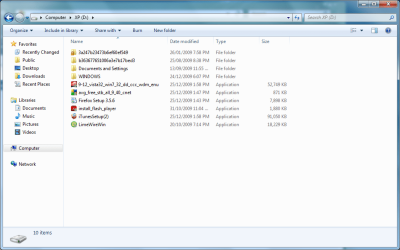
What files are still on XP? I thought you backed up all your files to DATA.
 
yea i did, the files on XP are the same things i back up, plus some randoms thing and instaill stuff

her a screenny

the windows folder contains nothing but backed up files
 

Attachments

  • Untitled.png
    Untitled.png
    39.2 KB · Views: 4

My Computer My Computer

Computer type
PC/Desktop
Computer Manufacturer/Model Number
Custom Build
OS
Windows 7 Professional 64bit
CPU
Intel Core i5 - 2500K @ 3.30GHz
Motherboard
Gigabyte Z77-HD3
Memory
4GB DDR3
Graphics Card(s)
EVGA Nvidia GeForce GT 740 2GB DDR3
Screen Resolution
1680 x 1050
Hard Drives
1T Samaung HD/ 1T toshiba external drive/ 1T western digital external drive/ 2T seagate external drive/ 250gb samaung SSD
PSU
Antec 430W
Keyboard
Microsoft Wireless Keyboard 800
Mouse
Microsoft Wireless Mouse 1000
Antivirus
AVG
Browser
Internet Explorer
Look in Docs and Settings to see what you need to copy from there.

Then highlight all of the 6 bottom files and drag them to data.

Click the expand arrow on the Computer link over to the left and drag to DATA partition there.
 
Done, so do i have to deleted anything from the folder or do i just install and it will give me option to install on XP?
 

My Computer My Computer

Computer type
PC/Desktop
Computer Manufacturer/Model Number
Custom Build
OS
Windows 7 Professional 64bit
CPU
Intel Core i5 - 2500K @ 3.30GHz
Motherboard
Gigabyte Z77-HD3
Memory
4GB DDR3
Graphics Card(s)
EVGA Nvidia GeForce GT 740 2GB DDR3
Screen Resolution
1680 x 1050
Hard Drives
1T Samaung HD/ 1T toshiba external drive/ 1T western digital external drive/ 2T seagate external drive/ 250gb samaung SSD
PSU
Antec 430W
Keyboard
Microsoft Wireless Keyboard 800
Mouse
Microsoft Wireless Mouse 1000
Antivirus
AVG
Browser
Internet Explorer
Pay close attention:

1) boot from the Win7 DVD, select "Connect to internet during install" and keep ethernet plugged.

2) Select Custom Install, Then Drive Tools (Advanced), now highlight XP partition, Format XP partition ONLY.

DO NOT FORMAT VISTA OR DATA!!!

IT IS VERY IMPORTANT TO FORMAT XP TO GET RID OF THE MBR THERE. IT WILL SCREW IT UP OTHERWISE!

Keep XP Partiton highlighted, click install.

When finished, connect to internet and get any drivers from Windows Updates.

Check Device Manager for missing drivers. Click Driver Tab, Update Driver, and Browse to C:Windows/System32/drivers on your Win7 partition to find the drivers. They are all there.


Confirm back you understand all of the steps. Can you print them? Any questions?
 
i can print,

only problem is i dont have my internet connect via Ethernet, i have it wirless, by using netgear wirless adaptor
 

My Computer My Computer

Computer type
PC/Desktop
Computer Manufacturer/Model Number
Custom Build
OS
Windows 7 Professional 64bit
CPU
Intel Core i5 - 2500K @ 3.30GHz
Motherboard
Gigabyte Z77-HD3
Memory
4GB DDR3
Graphics Card(s)
EVGA Nvidia GeForce GT 740 2GB DDR3
Screen Resolution
1680 x 1050
Hard Drives
1T Samaung HD/ 1T toshiba external drive/ 1T western digital external drive/ 2T seagate external drive/ 250gb samaung SSD
PSU
Antec 430W
Keyboard
Microsoft Wireless Keyboard 800
Mouse
Microsoft Wireless Mouse 1000
Antivirus
AVG
Browser
Internet Explorer
i can but like i said, i cant stay connected to the internet, at least i don't think

does it really matter if i cant
 

My Computer My Computer

Computer type
PC/Desktop
Computer Manufacturer/Model Number
Custom Build
OS
Windows 7 Professional 64bit
CPU
Intel Core i5 - 2500K @ 3.30GHz
Motherboard
Gigabyte Z77-HD3
Memory
4GB DDR3
Graphics Card(s)
EVGA Nvidia GeForce GT 740 2GB DDR3
Screen Resolution
1680 x 1050
Hard Drives
1T Samaung HD/ 1T toshiba external drive/ 1T western digital external drive/ 2T seagate external drive/ 250gb samaung SSD
PSU
Antec 430W
Keyboard
Microsoft Wireless Keyboard 800
Mouse
Microsoft Wireless Mouse 1000
Antivirus
AVG
Browser
Internet Explorer
i can print,

only problem is i dont have my internet connect via Ethernet, i have it wirless, by using netgear wirless adaptor

OK, your netgear driver is in the C:windows/system32/drivers folder, unless you have it on disk. Browse there from Network Adapter/Netgear listing in device Manager if it is missing after install.

If the installer doesn't have it then it might not update drivers until you connect to the internet. So expect several important drivers from Windows Updates which might be newer than what you have!
 
i have the disk still...

one last question so it doesnt matter if i dont connect to the internet during installation?

soz for being a pain
 

My Computer My Computer

Computer type
PC/Desktop
Computer Manufacturer/Model Number
Custom Build
OS
Windows 7 Professional 64bit
CPU
Intel Core i5 - 2500K @ 3.30GHz
Motherboard
Gigabyte Z77-HD3
Memory
4GB DDR3
Graphics Card(s)
EVGA Nvidia GeForce GT 740 2GB DDR3
Screen Resolution
1680 x 1050
Hard Drives
1T Samaung HD/ 1T toshiba external drive/ 1T western digital external drive/ 2T seagate external drive/ 250gb samaung SSD
PSU
Antec 430W
Keyboard
Microsoft Wireless Keyboard 800
Mouse
Microsoft Wireless Mouse 1000
Antivirus
AVG
Browser
Internet Explorer
No it doesn't matter if the installer doesn't update during install, because those drivers will be waiting in Windows Updates.

So check Updates as soon as you get online.

Then check Device Manager. For any missing drivers, click on device, then ddriver tab, then Update driver, then Browse to C:Windows/System32/drivers for that driver. Write that down.

I'd print that tutorial so you have pictures of each step I gave you. Look carefully now at the step where you choose where to install Win7. Do you see where you will highlight the XP partition? Do you see the link at the bottom right for Drive Tools, and in the next Step do you see the Format button you will click?

One last thing: Make note of the size of the XP partition, because it might not say XP in the listing, but only give the size. It should be listed first though.

Can you keep in touch with me during install?
 
i think i can while being on ipod
 

My Computer My Computer

Computer type
PC/Desktop
Computer Manufacturer/Model Number
Custom Build
OS
Windows 7 Professional 64bit
CPU
Intel Core i5 - 2500K @ 3.30GHz
Motherboard
Gigabyte Z77-HD3
Memory
4GB DDR3
Graphics Card(s)
EVGA Nvidia GeForce GT 740 2GB DDR3
Screen Resolution
1680 x 1050
Hard Drives
1T Samaung HD/ 1T toshiba external drive/ 1T western digital external drive/ 2T seagate external drive/ 250gb samaung SSD
PSU
Antec 430W
Keyboard
Microsoft Wireless Keyboard 800
Mouse
Microsoft Wireless Mouse 1000
Antivirus
AVG
Browser
Internet Explorer
nah ipod tocuh

anyhoo i think im pretty good to go i will try and post stuff as i go along
 

My Computer My Computer

Computer type
PC/Desktop
Computer Manufacturer/Model Number
Custom Build
OS
Windows 7 Professional 64bit
CPU
Intel Core i5 - 2500K @ 3.30GHz
Motherboard
Gigabyte Z77-HD3
Memory
4GB DDR3
Graphics Card(s)
EVGA Nvidia GeForce GT 740 2GB DDR3
Screen Resolution
1680 x 1050
Hard Drives
1T Samaung HD/ 1T toshiba external drive/ 1T western digital external drive/ 2T seagate external drive/ 250gb samaung SSD
PSU
Antec 430W
Keyboard
Microsoft Wireless Keyboard 800
Mouse
Microsoft Wireless Mouse 1000
Antivirus
AVG
Browser
Internet Explorer
Back
Top