How do I change my Chinese Windows 7 to english?

MaxBao

New member
Local time
9:28 AM
Messages
5
Hello guys! I'm new to this forum, so if I make a mistake, please tell me. So here's the question, I had just installed Windows 7, but it's the Chinese version so I can't read a thing! Does anyone know how to change it to english with out reinstalling?
 

My Computer My Computer

At a glance

Windows 7
OS
Windows 7
Hello guys! I'm new to this forum, so if I make a mistake, please tell me. So here's the question, I had just installed Windows 7, but it's the Chinese version so I can't read a thing! Does anyone know how to change it to english with out reinstalling?


Hi and welcome

what version do you have (ultimate, pro, etc)
 

My Computer My Computer

At a glance

Win 8 Release candidate 8400[email protected]4 gigsNvidia 9600M
Computer Manufacturer/Model Number
HP Pavillion dv-7 1005 Tx
OS
Win 8 Release candidate 8400
CPU
[email protected]
Memory
4 gigs
Graphics Card(s)
Nvidia 9600M
Sound Card
HD built-in
Monitor(s) Displays
17" Wxga
Screen Resolution
1440x900
Cooling
none
Internet Speed
45Mb down 5Mb up
To tell you the truth, I don't no. Sorry. Is there any way I can check?
 

My Computer My Computer

At a glance

Windows 7
OS
Windows 7
This will work if you have Ultimate.

Go to the task bar, where clock is diplayed and click flag as shown in the pic.
And then Click first link in the bottom.
1.JPG
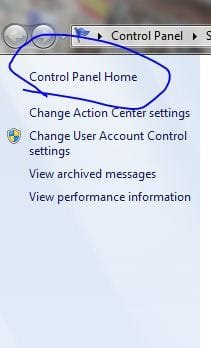
It will open Action centre.
Press Control Panel Home.
First link at the top left. (I know yours in Chinese, but I hope they are arranged the same as English)
5.JPG
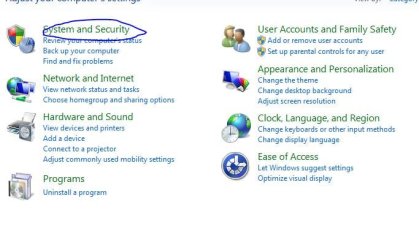
Press System Security.
You see first title link after image of Shield.
2.JPG
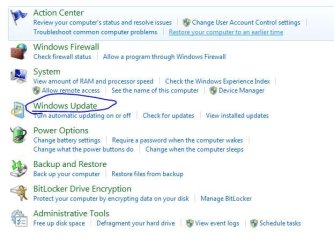
Press Windows Update
title link after the Icon of Win Update.
Or even better click Check for updates (middle link)
3.JPG

And try to find Similar page to the image below:
6.JPG

According to google translate English will look like one of this:
英国人
英文
英语

lol :roflmao:
I can't imagine, how you will recognise them
 

My Computer My Computer

At a glance

Windows 7 Ultimate x86 SP1
OS
Windows 7 Ultimate x86 SP1
This will work if you have Ultimate.

Go to the task bar, where clock is diplayed and click flag as shown in the pic.
And then Click first link in the bottom.
View attachment 46858
It will open Action centre.
Press Control Panel Home.
First link at the top left. (I know yours in Chinese, but I hope they are arranged the same as English)
View attachment 46862
Press System Security.
You see first title link after image of Shield.
View attachment 46859
Press Windows Update
title link after the Icon of Win Update.
Or even better click Check for updates (middle link)
View attachment 46860

And try to find Similar page to the image below:
View attachment 46863

According to google translate English will look like one of this:
英国人
英文
英语

lol :roflmao:
I can't imagine, how you will recognize them

I followed your steps but there is no option to chose the language, I think I will just have to use the chinese version! Thanks for your help.

MaxBao
 

My Computer My Computer

At a glance

Windows 7
OS
Windows 7
Download the correct torrent -__-
 

My Computer My Computer

At a glance

Windows 7 Home Premium x64Intel Core i5 2500K8GB DDR3nVidia GeForce GTX650 Ti BOOST
Computer type
Laptop
Computer Manufacturer/Model Number
Custom
OS
Windows 7 Home Premium x64
CPU
Intel Core i5 2500K
Motherboard
MSI MS-7750
Memory
8GB DDR3
Graphics Card(s)
nVidia GeForce GTX650 Ti BOOST
Sound Card
Realtek
Monitor(s) Displays
21' Philips
Screen Resolution
Full HD
Hard Drives
1TB
PSU
500W
If you do not have Ultimate, you have to do a complete low level reinstall to get to a screen that offers the choice of selecting English or Chinese. I have done this on a Toshiba NB250 with W7 Starter. W7 Ultimate is a special case as it provides multiple languages with change over at anytime.
 

My Computer My Computer

At a glance

32bit Vista Chinese; 32bit W7 starter; 32bit ...IntelNvidia
Computer Manufacturer/Model Number
Primarily ASUS
OS
32bit Vista Chinese; 32bit W7 starter; 32bit XP Pro
CPU
Intel
Motherboard
Asus
Graphics Card(s)
Nvidia
Back
Top