Windows 7 stuck on "starting windows" after drivers

sammytweekZ

New member
Local time
2:51 PM
Messages
22
Okay i am having a really frustrating issue..Everytime i figure something out wrong with my PC. Something comes up. But then again it wouldnt be a PC if it was perfect. To be honest i dont even know what the heck im talkin about right now..so let me go straight to the topic. Before i was having a problem when i was installing windows 7 it would get stuck at "completing installation" phase. It would do the first restart, and then when it was finalizing the screen would go black with a blinking cursor on the top left. The reason why this happened was because of my video card.

Because the solution to that problem was i had to go to device manager after the first restart and disable the video card. After that the setup would complete. By this stage i was shootin fireworks in my house happy as all i can be.

But thennnnnnnn another problem came up, and this is why i brought this whole deal up because it has to have something to do with it for a solution. Okay so i boot into a fresh install of windows. I have an GeForce EVGA 9800 gx2. When i installed the drivers for it and restarted i get stuck on "Starting windows" screen. It has to be the graphics card again causing this. To be honestly i dont even know what i have and havnt tried anymore. My brain is currently at swiss cheese status. I also thought maybe the SATA mode had something to do with it like the IDE/SATA/AHCI. My last format was done in ACHI. I also tried to install the AHCI driver and then install graphics card driver but i still get stuck when it restarts. I tried the other modes and nothing worked to boot into windows. One of them actually gives me the BSOD at the start. I forgot which one. The pathetic thing about this whole problem is back then when i had my windows 7 installed i never had any issues with nothing, everything was working perfectly until one day i wokeup to turn my computer on and i had a black screen with blinking cursor after doing a hard shutdown. Thats the very very beginning of all my issues when they started.

I hope i am not getting you guys confused. But yeah i know for a fact all my hardware parts are working correctly. Ive tried a different monitor. Nothing worked. I just think it has to be some kind of setting maybe in the BIOS..I have a new MB right now along with a new CPU. When i had my older MB and CPU the windows 7 installation going black at completing installtion was already taking place. So it cant be because of that. My very little computer knowledge hasnt had any luck with whats going on. Someone please help.

PS: i tried old driver versions and still had no luck. Also tried googling and it seems like i dont see anyone else with this problem
 

My Computer My Computer

OS
Win7 x64
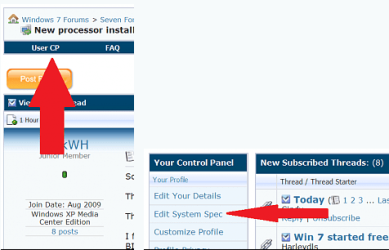
Welcome sammytweak2: Can we start with getting you to fillin your system specs? Thanks usercp 1.png
 

My Computer My Computer

Computer Manufacturer/Model Number
Self Built
OS
Windows 7 ultimate 64 bit / XP Home sp3
CPU
intel Core 2 Duo E8400 3.0ghz
Motherboard
Asus P5ND bios 1401
Memory
8 gigs 1066 OCZ Fata1ty
Graphics Card(s)
EVGA GTX 580 Call of Duty Black Ops Edition
Sound Card
Creative Soundblaster Audigy 2zs
Monitor(s) Displays
Asus 24in LCD's 2MS X2
Screen Resolution
1920x1080p @60Hz
Hard Drives
WD Caviar 500 Black/ WD Caviar 200 Blue
PSU
OCZ 700W GameXtreme
Case
NZXT Apollo
Cooling
Corsair H50 CPU/120mm x3 /60mm x2 /Corsair Dominator Ram
Keyboard
Logitech Bluetooth Wireless MX5000
Mouse
Logitech Bluetooth Wireless MX1000
Internet Speed
Download 19.83 Upload 0.97
Other Info
Logitech Z2300 Speakers/ Bose Noise Cancelling Headphones/Avermedia PCI-e Hybrid TV Bravo/Epson NX415 all in one/ 4 Port Powered USB Hub/ LG 10x Bluray Burner /TSST Corp DVDRW External
Power Supply

what are you using for a power supply that card has some pretty heavy requirements like 600 watts minimum and a minimum of at least 28 amps on the +12 volt rail
 

My Computer My Computer

Computer Manufacturer/Model Number
Custom Built
OS
Windows 7 Ultimate 32 bit
CPU
AMD Athlon 64 X2 4200+ Overclocked to 3.0Ghz
Motherboard
Biostar TF560 A2+
Memory
2 Gigs of G.Skill DDR2 800
Graphics Card(s)
HIS ATI Radeon HD 2600 Pro With IceQ cooler
Sound Card
6.1 Channel Sound Blaster Live 24 Bit
Monitor(s) Displays
Dual 20.5 " LG Flatrons W2052TO
Screen Resolution
1152x864
Hard Drives
Dual 36 Gig 10,000 RPM Raptors
PSU
430 watt Seasonic 80%+ Dual 12v Rails 2x80mm fans
Case
CHIEFMAX YA-5X
Cooling
4-80mm case fans 1-140mm case fan freezer 64 Pro CPU cooler
Keyboard
Saitek Eclipse II
Mouse
A4Tech wireless battery free optical scroll mouse
Internet Speed
1.5 meg down 384 up
Other Info
Logisys LED fan/light controller and dual 16" LED sticks mounted inside top of case all fans are LED all lighting is blue
DVD RW and CD RW both and Memory card reader
what are you using for a power supply that card has some pretty heavy requirements like 600 watts minimum and a minimum of at least 28 amps on the +12 volt rail

I dont believe PSU is the problem considering i have a 1100watt one. but thank you though
 

My Computer My Computer

OS
Win7 x64
Welcome sammytweak2: Can we start with getting you to fillin your system specs? Thanks View attachment 46901

Specs are as follows:
MB: Asus P6tD Deluxe
Gfx Card: GeForce 9800 gx2
HD: WD Caviar Black 1tb
Ram: OCZ ddr3 2000mhz 2gb
CPU: i7 920
-displaying on an Olevia 226t 26' hdtv
 

My Computer My Computer

OS
Win7 x64
Power Supply

Ok that's good there are way to many folks around here trying to run cards like these with a power supply not designed to do so normal answer I have a 550 watt power supply dual +12 volt rail 18 amps each that should be enough right
 

My Computer My Computer

Computer Manufacturer/Model Number
Custom Built
OS
Windows 7 Ultimate 32 bit
CPU
AMD Athlon 64 X2 4200+ Overclocked to 3.0Ghz
Motherboard
Biostar TF560 A2+
Memory
2 Gigs of G.Skill DDR2 800
Graphics Card(s)
HIS ATI Radeon HD 2600 Pro With IceQ cooler
Sound Card
6.1 Channel Sound Blaster Live 24 Bit
Monitor(s) Displays
Dual 20.5 " LG Flatrons W2052TO
Screen Resolution
1152x864
Hard Drives
Dual 36 Gig 10,000 RPM Raptors
PSU
430 watt Seasonic 80%+ Dual 12v Rails 2x80mm fans
Case
CHIEFMAX YA-5X
Cooling
4-80mm case fans 1-140mm case fan freezer 64 Pro CPU cooler
Keyboard
Saitek Eclipse II
Mouse
A4Tech wireless battery free optical scroll mouse
Internet Speed
1.5 meg down 384 up
Other Info
Logisys LED fan/light controller and dual 16" LED sticks mounted inside top of case all fans are LED all lighting is blue
DVD RW and CD RW both and Memory card reader
Ok that's good there are way to many folks around here trying to run cards like these with a power supply not designed to do so normal answer I have a 550 watt power supply dual +12 volt rail 18 amps each that should be enough right

If thats a question i believe so, lol.
 

My Computer My Computer

OS
Win7 x64
Ram

have you ran diagnostics on the ram sounds like it's a common link between things based on your first post
 

My Computer My Computer

Computer Manufacturer/Model Number
Custom Built
OS
Windows 7 Ultimate 32 bit
CPU
AMD Athlon 64 X2 4200+ Overclocked to 3.0Ghz
Motherboard
Biostar TF560 A2+
Memory
2 Gigs of G.Skill DDR2 800
Graphics Card(s)
HIS ATI Radeon HD 2600 Pro With IceQ cooler
Sound Card
6.1 Channel Sound Blaster Live 24 Bit
Monitor(s) Displays
Dual 20.5 " LG Flatrons W2052TO
Screen Resolution
1152x864
Hard Drives
Dual 36 Gig 10,000 RPM Raptors
PSU
430 watt Seasonic 80%+ Dual 12v Rails 2x80mm fans
Case
CHIEFMAX YA-5X
Cooling
4-80mm case fans 1-140mm case fan freezer 64 Pro CPU cooler
Keyboard
Saitek Eclipse II
Mouse
A4Tech wireless battery free optical scroll mouse
Internet Speed
1.5 meg down 384 up
Other Info
Logisys LED fan/light controller and dual 16" LED sticks mounted inside top of case all fans are LED all lighting is blue
DVD RW and CD RW both and Memory card reader
Video Card

have you tried another video card and also make sure the card is in the right pci-e slot
 

My Computer My Computer

Computer Manufacturer/Model Number
Custom Built
OS
Windows 7 Ultimate 32 bit
CPU
AMD Athlon 64 X2 4200+ Overclocked to 3.0Ghz
Motherboard
Biostar TF560 A2+
Memory
2 Gigs of G.Skill DDR2 800
Graphics Card(s)
HIS ATI Radeon HD 2600 Pro With IceQ cooler
Sound Card
6.1 Channel Sound Blaster Live 24 Bit
Monitor(s) Displays
Dual 20.5 " LG Flatrons W2052TO
Screen Resolution
1152x864
Hard Drives
Dual 36 Gig 10,000 RPM Raptors
PSU
430 watt Seasonic 80%+ Dual 12v Rails 2x80mm fans
Case
CHIEFMAX YA-5X
Cooling
4-80mm case fans 1-140mm case fan freezer 64 Pro CPU cooler
Keyboard
Saitek Eclipse II
Mouse
A4Tech wireless battery free optical scroll mouse
Internet Speed
1.5 meg down 384 up
Other Info
Logisys LED fan/light controller and dual 16" LED sticks mounted inside top of case all fans are LED all lighting is blue
DVD RW and CD RW both and Memory card reader
have you tried another video card and also make sure the card is in the right pci-e slot


im gonna go run out tomorrow and buy one and then return it just to test it out..well see wat happens. the thing about it is..everything works fine for me on xp..its pretty damn weird man.
 

My Computer My Computer

OS
Win7 x64
Drivers

there has been lots of trouble with video card drivers and windows 7 I am having little issues with mine as well nothing major but still like you said it was fine prior to 7 i am hoping when SP1 comes out it will kill a lot of the bugs we have been seeing
 

My Computer My Computer

Computer Manufacturer/Model Number
Custom Built
OS
Windows 7 Ultimate 32 bit
CPU
AMD Athlon 64 X2 4200+ Overclocked to 3.0Ghz
Motherboard
Biostar TF560 A2+
Memory
2 Gigs of G.Skill DDR2 800
Graphics Card(s)
HIS ATI Radeon HD 2600 Pro With IceQ cooler
Sound Card
6.1 Channel Sound Blaster Live 24 Bit
Monitor(s) Displays
Dual 20.5 " LG Flatrons W2052TO
Screen Resolution
1152x864
Hard Drives
Dual 36 Gig 10,000 RPM Raptors
PSU
430 watt Seasonic 80%+ Dual 12v Rails 2x80mm fans
Case
CHIEFMAX YA-5X
Cooling
4-80mm case fans 1-140mm case fan freezer 64 Pro CPU cooler
Keyboard
Saitek Eclipse II
Mouse
A4Tech wireless battery free optical scroll mouse
Internet Speed
1.5 meg down 384 up
Other Info
Logisys LED fan/light controller and dual 16" LED sticks mounted inside top of case all fans are LED all lighting is blue
DVD RW and CD RW both and Memory card reader
there has been lots of trouble with video card drivers and windows 7 I am having little issues with mine as well nothing major but still like you said it was fine prior to 7 i am hoping when SP1 comes out it will kill a lot of the bugs we have been seeing


YEah but even something funnier was i had windows 7 working fine for awhile until one day i booted it up after a hard shutdown and the next morning i had a black screen with blinking cursor..so idk if somehow maybe i damaged my card? idk.
 

My Computer My Computer

OS
Win7 x64
hardware

any piece of hardware can go south anytime
 

My Computer My Computer

Computer Manufacturer/Model Number
Custom Built
OS
Windows 7 Ultimate 32 bit
CPU
AMD Athlon 64 X2 4200+ Overclocked to 3.0Ghz
Motherboard
Biostar TF560 A2+
Memory
2 Gigs of G.Skill DDR2 800
Graphics Card(s)
HIS ATI Radeon HD 2600 Pro With IceQ cooler
Sound Card
6.1 Channel Sound Blaster Live 24 Bit
Monitor(s) Displays
Dual 20.5 " LG Flatrons W2052TO
Screen Resolution
1152x864
Hard Drives
Dual 36 Gig 10,000 RPM Raptors
PSU
430 watt Seasonic 80%+ Dual 12v Rails 2x80mm fans
Case
CHIEFMAX YA-5X
Cooling
4-80mm case fans 1-140mm case fan freezer 64 Pro CPU cooler
Keyboard
Saitek Eclipse II
Mouse
A4Tech wireless battery free optical scroll mouse
Internet Speed
1.5 meg down 384 up
Other Info
Logisys LED fan/light controller and dual 16" LED sticks mounted inside top of case all fans are LED all lighting is blue
DVD RW and CD RW both and Memory card reader
The card may be defective - buy a cheap replacement, uninstall your drivers first, and try it. If it works, the slot is fine, if it doesn't your motherboard may have issues.

As an aside, does your Asus motherboard have an Plug 'N Play option somewhere? If it does disable it. Also disable legacy USB storage detect and set the startup slot to PEG or PCI Express 16x. Try this first.
 

My Computer My Computer

Computer Manufacturer/Model Number
Sony Vaio Z46GDU
OS
Windows 7 Ultimate x86-64
CPU
[email protected] 1066MHz FSB
Motherboard
Sony branded
Memory
6GB DDR3 1066MHz
Graphics Card(s)
9300M GS 256MB Dedicated (Speed) + Intel4500MHD (Stamina)
Sound Card
Realtek HD Audio
Monitor(s) Displays
13.1' WXGA
Screen Resolution
1600x900
Hard Drives
320GB 7200RPM w/ 16MB cache
Internet Speed
1MB/s
The card may be defective - buy a cheap replacement, uninstall your drivers first, and try it. If it works, the slot is fine, if it doesn't your motherboard may have issues.

As an aside, does your Asus motherboard have an Plug 'N Play option somewhere? If it does disable it. Also disable legacy USB storage detect and set the startup slot to PEG or PCI Express 16x. Try this first.


this problem with black screen blinking cursors was happening with my old MB aswell..i actually ordered teh MB and new CPU just for the heck of the upgrade and also to see if i can get past that black screen wen i was installing Win7..and now that im thinking about it the only reason i got past the installation was cuz i disabled the video card after the 1st restart..so i come to think it really might be my MB..and now that im thinkin about it even harder. This all started one day wen i was asleep and i wokeup in the middle of the night and did a hard shutdown with the button and who knows maybe thats what messed up the card..because the next day is wen i started getting the graphic symptoms..i also tried installing with a dif HD and was still happening..and also tried a real monitor instead of my hdtv and still..its really coming down to my graphics card. But im pretty sure it was working before with windows xp the graphic drivers..but im about to install XP again (as im talking its installing) and i will see if it lets me install nvidia drivers. Ill keep yall posted. THanks man
 

My Computer My Computer

OS
Win7 x64
Try out the BIOS options though - update your other drivers too, use the drivers guide in my sig.

Also, that card may be defective now.
 

My Computer My Computer

Computer Manufacturer/Model Number
Sony Vaio Z46GDU
OS
Windows 7 Ultimate x86-64
CPU
[email protected] 1066MHz FSB
Motherboard
Sony branded
Memory
6GB DDR3 1066MHz
Graphics Card(s)
9300M GS 256MB Dedicated (Speed) + Intel4500MHD (Stamina)
Sound Card
Realtek HD Audio
Monitor(s) Displays
13.1' WXGA
Screen Resolution
1600x900
Hard Drives
320GB 7200RPM w/ 16MB cache
Internet Speed
1MB/s
Try out the BIOS options though - update your other drivers too, use the drivers guide in my sig.

Also, that card may be defective now.


Ill give the BIOs ideas a shot man, good looks. I just installed XP and it seems like after the first restart for the video card driver setup i get the black screen with blinking cursor..Looks like my graphics card might be shot =[ but i guess ill try out those options in the bios
 

My Computer My Computer

OS
Win7 x64
If you are going for a new card, how much amps do you have on the 12V rail and is it for gaming? I'd recommend the 4890 if you want to spend less or the 5870 if you want to spend more - the 5850 for me is stuck in a gray area.
 

My Computer My Computer

Computer Manufacturer/Model Number
Sony Vaio Z46GDU
OS
Windows 7 Ultimate x86-64
CPU
[email protected] 1066MHz FSB
Motherboard
Sony branded
Memory
6GB DDR3 1066MHz
Graphics Card(s)
9300M GS 256MB Dedicated (Speed) + Intel4500MHD (Stamina)
Sound Card
Realtek HD Audio
Monitor(s) Displays
13.1' WXGA
Screen Resolution
1600x900
Hard Drives
320GB 7200RPM w/ 16MB cache
Internet Speed
1MB/s
Try out the BIOS options though - update your other drivers too, use the drivers guide in my sig.

Also, that card may be defective now.


Ill give the BIOs ideas a shot man, good looks. I just installed XP and it seems like after the first restart for the video card driver setup i get the black screen with blinking cursor..Looks like my graphics card might be shot =[ but i guess ill try out those options in the bios


wait nvm..it actually booted on through. on xp that is..and its reading the graphics card. i also did those settings in the bios. and i had my USB flash drive booting up i think thats y i got the black screen. I guess im going to reinstall 7 one moire time with the legacy disabled and give it 1 last shot..im so scared im going to fry my new MB doin so many restarts and wat not. it feels like my pc has been taking a beating i feel scared that something else is gonna mess up. THe problem is clearly on windows 7. Even though i had it working before. Some kind of file had to get changed. I dont know what. Its really weird considering its doing this both motherboards i tried. jeez
 

My Computer My Computer

OS
Win7 x64
Back
Top