Safely Remove Hardware - Eject Device

How to Use Safely Remove Hardware to Eject a Device in Windows 7 and Windows 8

   Information
This tutorial will show you how to use Safely Remove Hardware in Windows 7, Windows 8/8.1, and Windows RT to safely shutdown and eject a storage device before just unplugging or disconnecting it to help prevent accidental data loss if data were still being copied or saved to or from the device. For example, if you have write caching enable on the device.

   Tip
To have access to an external drive (ex: USB key) again after you have already ejected it using Safely Remove Hardware, you will just need to unplug it and plug it back in, or restart the PC.


Available Hotfix:
   Warning
It is not recommended to eject an internal drive. If you do, then restarting the computer will allow you to have access to it again.


Here's How:
1. Make sure that anything that is being copied or saved to or from the storage device that you want to eject has finished.

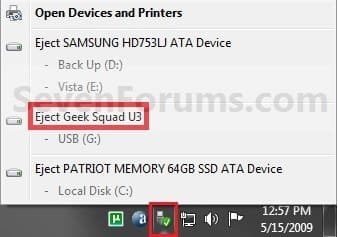
2. Click/tap on the Safely Remove Hardware notification area icon, and click/tap on the Eject drive option for the listed drive that you want to eject, and go to step 4 below. (see screenshot below)
Step1.jpg
OR

3. Open Devices and Printers.
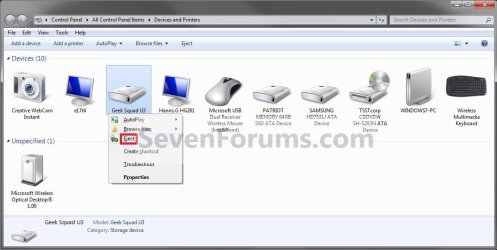
A) Right click or press and hold on the storage device that you want to eject, then click/tap on Eject. (see screenshot below)

OR

B) Right click or press and hold on your computer device (ex: WINDOWS7-PC), select Eject, then click/tap on a listed storage device that you want to eject. (see screenshot below)
Step1A.jpg
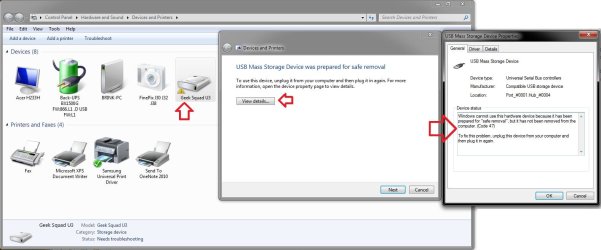
C) You will notice that your device will have a warning/alert overlay icon it now. This only indicates that you will not be able to use this device again unless you unplug it and then plug it in again. (see screenshot below)
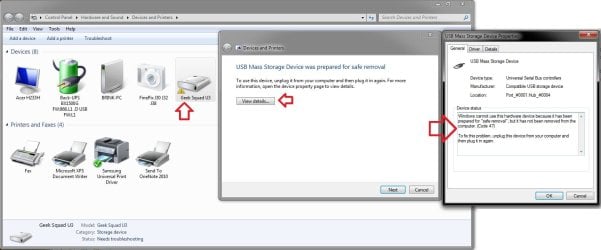
Troubleshoot.jpg
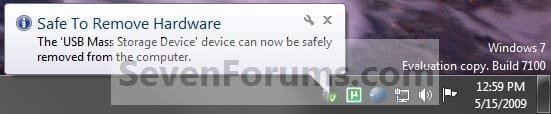
4. When you see this notification message below, you can now safely remove the device from the computer. (see screenshot below)
NOTE: Some devices (ex: USB flash drives) may still have their light on even after you ejected it. As long as you got this Safe to remove hardware message below, it will be safe to disconnect your device even though the light is still on.
Step2.jpg
   Tip
If you do not get the Safe to remove hardware notification message above, then for next time uncheck Always show all icons and notifications on the taskbar (click on link) box and click on OK. Afterwards check the Always show all icons and notifications on the taskbar box and click on OK. This will toggle these settings off an on to have it work again.


That's it,
Shawn


Last edited:
Hello Nate,

Could you post a screenshot of this?

Strange, are you using a Aero theme, or a classic theme?

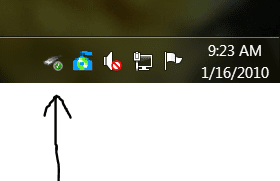
Brink, here is that screenshot. I still don't know why it's like this. It's the same with ALL removable devices.
removehardware.PNG
 

My Computer

Computer Manufacturer/Model Number
Keeps changing - (Custom)
OS
Windows 7 Professional x64
CPU
Intel Core i7 860
Motherboard
Gigabyte GA-P55-UD4P
Memory
4GB DDR3 Mushkin 1600Mhz @ 7-8-7-20
Graphics Card(s)
MSI GTS250 1GB DDR3 Twin Frozr
Sound Card
Onboard realtek
Monitor(s) Displays
Samsung SyncMaster 24" P2450 + Samsung 20" 2033
Screen Resolution
1920 X 1080 and 1600 X 900 (#2 system 1440 X 900)
Hard Drives
Patriot Inferno 120GB SSD + 3 WD Blue 640GB drives
PSU
Corsair 750 HX Modular
Case
Lancool PC-K62
Cooling
Cooler Master TX3 CPU cooler and 4-140mm and 1-120mm case
Keyboard
Gigabyte USB keyboard
Mouse
Microsoft wireless laser mouse 5000
Internet Speed
7 Mb down 1.5 up
Other Info
System #2: AMD Phenom II X6 1055T (Freezer 7 Pro cooler) - Gigabyte 880GMA-UD2H - WD 500GB Black - 9500GT (1GB) 500W OCZ modular PSU - Antec 200 case. System #3 (LapTop) Core 2 Duo T6670 - 320GB 7200RPM HD - 4GB DDR3 RAM.
Hi Nate,

Strange, I'm not sure why you have the old style icon for this instead. Especially since it's a clean install and you have a Aero theme selected. :confused:
 

My Computer

Computer type
PC/Desktop
Computer Manufacturer/Model Number
Self built custom
OS
64-bit Windows 11 Pro for Workstations
CPU
Intel i7-8700K OC'd to 5 GHz
Motherboard
ASUS ROG Maximus XI Formula Z390
Memory
64 GB (4x16GB) G.SKILL TridentZ RGB DDR4 3600 MHz
Graphics Card(s)
ASUS ROG-STRIX-GTX1080TI-O11G-GAMING
Sound Card
Integrated
Monitor(s) Displays
2 x Samsung Odyssey G7 27"
Screen Resolution
2560x1440
Hard Drives
1TB Samsung 990 PRO M.2,
4TB Samsung 990 PRO PRO M.2,
TerraMaster F8 SSD Plus NAS
PSU
Seasonic Prime Titanium 850W
Case
Thermaltake Core P3
Cooling
Corsair Hydro H115i
Keyboard
Logitech wireless K800
Mouse
Logitech MX Master 4
Internet Speed
2 Gb/s Download and 100 Mb/s Upload
Antivirus
Malwarebyte Anti-Malware Premium
Browser
Google Chrome
Other Info
Logitech Z625 speaker system,
Logitech BRIO 4K Pro webcam,
HP Color LaserJet Pro MFP M477fdn,
APC SMART-UPS RT 1000 XL - SURT1000XLI,
Galaxy S23 Plus phone
Hi Nate,

Strange, I'm not sure why you have the old style icon for this instead. Especially since it's a clean install and you have a Aero theme selected. :confused:

Yes, all that is true. I will post back if I find the answer. Thanks for your time Brink.
 

My Computer

Computer Manufacturer/Model Number
Keeps changing - (Custom)
OS
Windows 7 Professional x64
CPU
Intel Core i7 860
Motherboard
Gigabyte GA-P55-UD4P
Memory
4GB DDR3 Mushkin 1600Mhz @ 7-8-7-20
Graphics Card(s)
MSI GTS250 1GB DDR3 Twin Frozr
Sound Card
Onboard realtek
Monitor(s) Displays
Samsung SyncMaster 24" P2450 + Samsung 20" 2033
Screen Resolution
1920 X 1080 and 1600 X 900 (#2 system 1440 X 900)
Hard Drives
Patriot Inferno 120GB SSD + 3 WD Blue 640GB drives
PSU
Corsair 750 HX Modular
Case
Lancool PC-K62
Cooling
Cooler Master TX3 CPU cooler and 4-140mm and 1-120mm case
Keyboard
Gigabyte USB keyboard
Mouse
Microsoft wireless laser mouse 5000
Internet Speed
7 Mb down 1.5 up
Other Info
System #2: AMD Phenom II X6 1055T (Freezer 7 Pro cooler) - Gigabyte 880GMA-UD2H - WD 500GB Black - 9500GT (1GB) 500W OCZ modular PSU - Antec 200 case. System #3 (LapTop) Core 2 Duo T6670 - 320GB 7200RPM HD - 4GB DDR3 RAM.
Hey Sunil!

Try seeing in Devices and Printers.

The problem is that the data cards contain a small amount of flash memory that hold the drivers and they are set to be emulated as CD drives.

Since they emulate CD drive, they autorun the driver installation without user input.

That is the reason why Sunil's screenie shows The CD Drive under his mobile.

Hope this helps.

P.S.: Post the screen of devices and printers and also take a screen shot with right click menu of your mobile.

Hi Dragor1,

I am not using mobile. I am using datacard in my desktop and laptop. The screenshot I have already posted in this forum.

Regards,

Sunil
 
Last edited by a moderator:

My Computer

OS
Windows 7
can't eject External HD hooked up via USB

Hi,

This problem existed already on XP, so its a embarrasing that MS haven't solved it yet.

Wonder how much time and value is lost in the world by people waiting to be allowed to eject usb stick and similar, or in terms of data loss when people can't wait any longer and just disconnecting it anyway and it goes wrong.

In my case, I have a external HD via USB that I use for backups and even though everything is closed down, it says that "The device is curretnly in use. Close down....and try again.".. Doesn't matter how long I wait.

- What to do?

The most embarrasing thing is that this specific action, that most people do several times a day (USB sticks) works perfectly on Mac OS.
 

My Computer

OS
Windows 7 64-bit Pro
I still have the ejecting problem too.
 

My Computer

OS
Windows 7
Memory
4gb
Graphics Card(s)
ati
Monitor(s) Displays
2
Hard Drives
2 internal
5 external
Just a possible solution for anyone having this problem.

HotSwap - Friendly user interface equivalent to the "Safely Remove Hardware" icon in the notification area.

It does the same thing as you can remove device from Device Manager but it provides much friendly user interface as you remove the removable device from the "Safely Remove Hardware" icon in the notification area. It also ensures that all data are written and flushed to the disk before the device to be hot-swapped, so you can use SATA/eSATA drive as a removable device much alike USB/IEEE1394 drive.

It's worth a try.
I have used it for years for my eSATA external HDD.
Let us know if it works for you.
 

My Computer

Computer type
PC/Desktop
Computer Manufacturer/Model Number
76~2.0
OS
Windows 7 Ult x64 - SP1/ Windows 8 Pro x64
CPU
Intel Core i5-3570K 4.6GHz
Motherboard
Gigabyte GA-Z77X UD3H, f18
Memory
8GB (2X4GB) DDR3 1600 Corsair Vengeance CL8 1.5v
Graphics Card(s)
Sapphire HD 7770 Vapor-X OC 1GB DDR5
Sound Card
Onboard VIA VT2021
Monitor(s) Displays
22" LCD Dell
Screen Resolution
1680x1050
Hard Drives
Samsung 840Pro 128GB SSD,
Seagate Barracuda 500GB SATA2 7200rpm 32MB cache, Seagate Barracuda 1TB SATA2 7200rpm 32MB cache,
PSU
Corsair HX650W
Case
Cooler Master Storm Scout
Cooling
Corsair H80 2x12cm Noctua NF P12 , 2x14cm case fans
Keyboard
Logitech Wave
Mouse
CM Sentinel
Internet Speed
Dismal
Antivirus
Avast
Browser
Opera Next
Other Info
Haswell laptop: HP Envy 17t-j, i7-4700MQ, GeForce 740M 2GB DDR3, 17.3" Full HD 1920x1080, 16GB RAM, Samsung 840 Pro 128GB, 1TB Hitachi 7200 HDD,
Desktop: eSATA ports,
External eSATA Seagate 500GB SATA2 7200rpm,
External WD USB 500GB
hi everyone,

im been reading through this thread and i noticed that Manoj and i have a similar problem.

i just purchased an msi u123 netbook and installed windows 7 ultimate through my WD external hard drive. after i finished a clean install (and do all the updates), i realized that whenever i plug in my external hard drive, i cannot access the "safely remove hardware" icon. for some reason this icon appears for my mini sd and when i use daemon tools, it doesnt show up for my kingston DTvault flash drive and my WD 2.5 external hard drive. i dont want to improperly remove the hard drive as i heard this is risky....

Please let me know if anyone can help....if you need more details, please let me know so that i can provide them.

Cheers!!
 

My Computer

Computer Manufacturer/Model Number
MSI u123
OS
windows 7
CPU
intel atom n280
Memory
1 GB
Just a possible solution for anyone having this problem.

HotSwap - Friendly user interface equivalent to the "Safely Remove Hardware" icon in the notification area.

It does the same thing as you can remove device from Device Manager but it provides much friendly user interface as you remove the removable device from the "Safely Remove Hardware" icon in the notification area. It also ensures that all data are written and flushed to the disk before the device to be hot-swapped, so you can use SATA/eSATA drive as a removable device much alike USB/IEEE1394 drive.
It's worth a try.
I have used it for years for my eSATA external HDD.
Let us know if it works for you.

Thanks a lot Dave!
HotSwap worked perfectly for me! Now I can remove my 3g usb modem!
 

My Computer

OS
Windows XP/ Windows 7
Glad that it worked for you Rocv.

When I updated the BIOS on my laptop, the windows Safely Remove Hardware started working.

This might help in some cases.
 

My Computer

Computer type
PC/Desktop
Computer Manufacturer/Model Number
76~2.0
OS
Windows 7 Ult x64 - SP1/ Windows 8 Pro x64
CPU
Intel Core i5-3570K 4.6GHz
Motherboard
Gigabyte GA-Z77X UD3H, f18
Memory
8GB (2X4GB) DDR3 1600 Corsair Vengeance CL8 1.5v
Graphics Card(s)
Sapphire HD 7770 Vapor-X OC 1GB DDR5
Sound Card
Onboard VIA VT2021
Monitor(s) Displays
22" LCD Dell
Screen Resolution
1680x1050
Hard Drives
Samsung 840Pro 128GB SSD,
Seagate Barracuda 500GB SATA2 7200rpm 32MB cache, Seagate Barracuda 1TB SATA2 7200rpm 32MB cache,
PSU
Corsair HX650W
Case
Cooler Master Storm Scout
Cooling
Corsair H80 2x12cm Noctua NF P12 , 2x14cm case fans
Keyboard
Logitech Wave
Mouse
CM Sentinel
Internet Speed
Dismal
Antivirus
Avast
Browser
Opera Next
Other Info
Haswell laptop: HP Envy 17t-j, i7-4700MQ, GeForce 740M 2GB DDR3, 17.3" Full HD 1920x1080, 16GB RAM, Samsung 840 Pro 128GB, 1TB Hitachi 7200 HDD,
Desktop: eSATA ports,
External eSATA Seagate 500GB SATA2 7200rpm,
External WD USB 500GB
Hi all,

I realised my cruzer micro 4GB thumbdrive could not do safety remove using U3 as well as the safety remove icon. But strangely, I can go to "My Computer" and rightclick both my U3 drive and thumbdrive to do a Eject, the U3 and safety remove icon are still in my notication area.

I tried to update my U3 lanchpad version, it doesnt help at all.. any idea to help me fix this problem please? I have other thumbdrive without U3, I am able to eject them using the safety remove at notication area. I have dual boot of windows 7(default boot) as well as windows XP
 

My Computer

OS
Dual boot: Windows 7 Professional 32bit and Windows XP Service Pack 3
Safely ejecting a device not working

There is no notification after I click on safely remove the device. The device won't eject properly. I hope you could help.
 

My Computer

Computer Manufacturer/Model Number
HP G62-105Sa
OS
Windows 7
CPU
Intel core I3
Memory
3G
Hello Hugga, and welcome to Seven Forums.

What is the device, and is it still listed in Safely Remove Hardware after you eject it? Does it give you any type of message (ex: error)?
 

My Computer

Computer type
PC/Desktop
Computer Manufacturer/Model Number
Self built custom
OS
64-bit Windows 11 Pro for Workstations
CPU
Intel i7-8700K OC'd to 5 GHz
Motherboard
ASUS ROG Maximus XI Formula Z390
Memory
64 GB (4x16GB) G.SKILL TridentZ RGB DDR4 3600 MHz
Graphics Card(s)
ASUS ROG-STRIX-GTX1080TI-O11G-GAMING
Sound Card
Integrated
Monitor(s) Displays
2 x Samsung Odyssey G7 27"
Screen Resolution
2560x1440
Hard Drives
1TB Samsung 990 PRO M.2,
4TB Samsung 990 PRO PRO M.2,
TerraMaster F8 SSD Plus NAS
PSU
Seasonic Prime Titanium 850W
Case
Thermaltake Core P3
Cooling
Corsair Hydro H115i
Keyboard
Logitech wireless K800
Mouse
Logitech MX Master 4
Internet Speed
2 Gb/s Download and 100 Mb/s Upload
Antivirus
Malwarebyte Anti-Malware Premium
Browser
Google Chrome
Other Info
Logitech Z625 speaker system,
Logitech BRIO 4K Pro webcam,
HP Color LaserJet Pro MFP M477fdn,
APC SMART-UPS RT 1000 XL - SURT1000XLI,
Galaxy S23 Plus phone
Safely removing device not working

It is a Vodafone USB dongle. Yes, it is still listed in the safely remove device and there is no error message showing up.
 

My Computer

Computer Manufacturer/Model Number
HP G62-105Sa
OS
Windows 7
CPU
Intel core I3
Memory
3G
Since it is a USB modem and not a storage device, you can always safely remove the device by just unplugging it. :)
 

My Computer

Computer type
PC/Desktop
Computer Manufacturer/Model Number
Self built custom
OS
64-bit Windows 11 Pro for Workstations
CPU
Intel i7-8700K OC'd to 5 GHz
Motherboard
ASUS ROG Maximus XI Formula Z390
Memory
64 GB (4x16GB) G.SKILL TridentZ RGB DDR4 3600 MHz
Graphics Card(s)
ASUS ROG-STRIX-GTX1080TI-O11G-GAMING
Sound Card
Integrated
Monitor(s) Displays
2 x Samsung Odyssey G7 27"
Screen Resolution
2560x1440
Hard Drives
1TB Samsung 990 PRO M.2,
4TB Samsung 990 PRO PRO M.2,
TerraMaster F8 SSD Plus NAS
PSU
Seasonic Prime Titanium 850W
Case
Thermaltake Core P3
Cooling
Corsair Hydro H115i
Keyboard
Logitech wireless K800
Mouse
Logitech MX Master 4
Internet Speed
2 Gb/s Download and 100 Mb/s Upload
Antivirus
Malwarebyte Anti-Malware Premium
Browser
Google Chrome
Other Info
Logitech Z625 speaker system,
Logitech BRIO 4K Pro webcam,
HP Color LaserJet Pro MFP M477fdn,
APC SMART-UPS RT 1000 XL - SURT1000XLI,
Galaxy S23 Plus phone
Am I just plain thick, or did they remove the Eject and that other option from the device's explorer context menus? If not, why don't see it? If so, how do I get it back?
 

My Computer

Computer type
PC/Desktop
Computer Manufacturer/Model Number
Lenovo/2757CTO Thinkpad W700
OS
Microsoft Windows 7 Professional 64-bit 7601 Multiprocessor Free Service Pack 1
CPU
AMD A6-5350M APU with Radeon(tm) HD Graphics
Motherboard
LENOVO 20B20011US
Memory
16.00 GB
Graphics Card(s)
AMD Radeon HD 8450G
Sound Card
(1) AMD High Definition Audio Device (2) Conexant 20671 Sm
Monitor(s) Displays
??
Screen Resolution
1366 x 768 x 32 bits (4294967296 colors) @ 60 Hz
Hard Drives
HGST HTS 545032A7E380 SATA Disk Device
Mouse
Microsoft Optical Wheel Mouse
Other Info
BIOS: Ver 1.00PARTTBLX
Hello StupidUser, and welcome to Seven Forums.

The "Eject" option is still available in "Devices and Printers" for listed storage devices only.
 

My Computer

Computer type
PC/Desktop
Computer Manufacturer/Model Number
Self built custom
OS
64-bit Windows 11 Pro for Workstations
CPU
Intel i7-8700K OC'd to 5 GHz
Motherboard
ASUS ROG Maximus XI Formula Z390
Memory
64 GB (4x16GB) G.SKILL TridentZ RGB DDR4 3600 MHz
Graphics Card(s)
ASUS ROG-STRIX-GTX1080TI-O11G-GAMING
Sound Card
Integrated
Monitor(s) Displays
2 x Samsung Odyssey G7 27"
Screen Resolution
2560x1440
Hard Drives
1TB Samsung 990 PRO M.2,
4TB Samsung 990 PRO PRO M.2,
TerraMaster F8 SSD Plus NAS
PSU
Seasonic Prime Titanium 850W
Case
Thermaltake Core P3
Cooling
Corsair Hydro H115i
Keyboard
Logitech wireless K800
Mouse
Logitech MX Master 4
Internet Speed
2 Gb/s Download and 100 Mb/s Upload
Antivirus
Malwarebyte Anti-Malware Premium
Browser
Google Chrome
Other Info
Logitech Z625 speaker system,
Logitech BRIO 4K Pro webcam,
HP Color LaserJet Pro MFP M477fdn,
APC SMART-UPS RT 1000 XL - SURT1000XLI,
Galaxy S23 Plus phone
Hi,
I'm having problem on my cruzer micro (8gb) flash drive. It seems that when I safely remove it, the light on the flash drive doesn't stop. On other pc it does when safely remove.

I've tried the different ways to safely remove as on the 1st page. I noticed on "Devices and Printers", when I eject the flash drive, a warning appears on the icon that means "It needs troubleshooting".
 

My Computer

Computer Manufacturer/Model Number
Toshiba Satellite L850-A937
OS
Windows 7 Home Premium 64-bit
CPU
Intel(R) Core(TM) i5-3210M CPU @ 2.50Ghz
Memory
6GB DDR3 (800Mhz)
Graphics Card(s)
AMD Radeon HD 7670M
Sound Card
Realtek High Definition Audio
Hello Iksyaj,

This happens with various USB drive sometimes. If you get the Safe to Remove Hardware notification pop-up message after ejecting the USB drive, then it will be safe to disconnect the USB drive even with it's light still on.

In "Devices and Printers", the warning icon just indicates that you will not be able to use this USB drive again unless you unplug it and then plug it in again. That's all. This is the troubleshoot report for mine with the same thing.

Troubleshoot.jpg

Hope this helps,
Shawn
 

My Computer

Computer type
PC/Desktop
Computer Manufacturer/Model Number
Self built custom
OS
64-bit Windows 11 Pro for Workstations
CPU
Intel i7-8700K OC'd to 5 GHz
Motherboard
ASUS ROG Maximus XI Formula Z390
Memory
64 GB (4x16GB) G.SKILL TridentZ RGB DDR4 3600 MHz
Graphics Card(s)
ASUS ROG-STRIX-GTX1080TI-O11G-GAMING
Sound Card
Integrated
Monitor(s) Displays
2 x Samsung Odyssey G7 27"
Screen Resolution
2560x1440
Hard Drives
1TB Samsung 990 PRO M.2,
4TB Samsung 990 PRO PRO M.2,
TerraMaster F8 SSD Plus NAS
PSU
Seasonic Prime Titanium 850W
Case
Thermaltake Core P3
Cooling
Corsair Hydro H115i
Keyboard
Logitech wireless K800
Mouse
Logitech MX Master 4
Internet Speed
2 Gb/s Download and 100 Mb/s Upload
Antivirus
Malwarebyte Anti-Malware Premium
Browser
Google Chrome
Other Info
Logitech Z625 speaker system,
Logitech BRIO 4K Pro webcam,
HP Color LaserJet Pro MFP M477fdn,
APC SMART-UPS RT 1000 XL - SURT1000XLI,
Galaxy S23 Plus phone
Back
Top