Pls Help me with my Windows7 start up delay..

greens6x

New member
Local time
5:35 AM
Messages
38
hi.. I need a help on my windows 7.. I succesfully installed my windows 7 Ultimate 64-bit, got a the latest update, and anything on it from microsoft...

Heres the Problem, It takes 13mins to start to windows log on page... after I switch it ON... it stay on the page "Starting Windows".... at that page it takes 13mins before going to log on page.. thats the only problem i encounter in my windows 7..

pls help me on this.. what am i gonna do with this... before installing windows 7 ultimate 64-bit, I first installed the 32-bit of the same OS.. same problem occurs (13mins on the page "Starting Windows" before going to "log on" page)..... then i switched on 64-bit.... still same problem occurs, i dont think the installer cause this problem, because I used it on my Friends Desktop and it RUNS SMOOTHLY and normally.... no delay... my DESKTOP SPECS is way better than his..

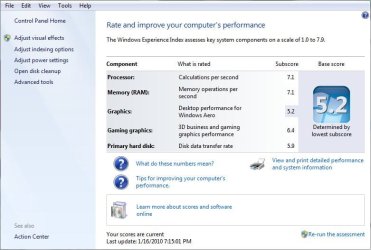
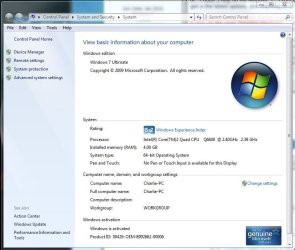
I attached my pc specs on this.. Plss help me on this guys.. Thanks in advance..
 

Attachments

  • specsHw.JPG
    specsHw.JPG
    53.6 KB · Views: 61
  • ret.JPG
    ret.JPG
    54.4 KB · Views: 60
  • ep.JPG
    ep.JPG
    69.4 KB · Views: 71

My Computer My Computer

OS
Windows 7 Ultimate 64-bit
CPU
Intel core 2 quad (Q6600)
Motherboard
Intel G31
Memory
4 GB
Graphics Card(s)
ATI RADEON 4650
Monitor(s) Displays
LG 22inch
Hard Drives
250 GB SATA seagate
PSU
500watts
Internet Speed
2MBPS

My Computer My Computer

Computer type
PC/Desktop
Computer Manufacturer/Model Number
Dell XPS 420
OS
Windows 10, Home Clean Install
CPU
Intel Core2 processsor Q8200(2.33Ghz 1333FSB) Quad Core Tech
Motherboard
Dell
Memory
6 gb
Graphics Card(s)
ATI Radeon 256MB HD3650
Sound Card
Intergrated 7.1 Channel Audio
Monitor(s) Displays
Dell SP2009W 20"
Hard Drives
640 GB Serial ATA Hard drive
Cooling
Fan
Keyboard
Dell USB Keyboard
Mouse
Dell Premium Optical USB
Internet Speed
DSL 2.85
this is almost certainly Bios misconfiguration or bad hardware
 

My Computer My Computer

Computer Manufacturer/Model Number
Custom Built
OS
Windows 7 Ultimate 32 bit
CPU
AMD Athlon 64 X2 4200+ Overclocked to 3.0Ghz
Motherboard
Biostar TF560 A2+
Memory
2 Gigs of G.Skill DDR2 800
Graphics Card(s)
HIS ATI Radeon HD 2600 Pro With IceQ cooler
Sound Card
6.1 Channel Sound Blaster Live 24 Bit
Monitor(s) Displays
Dual 20.5 " LG Flatrons W2052TO
Screen Resolution
1152x864
Hard Drives
Dual 36 Gig 10,000 RPM Raptors
PSU
430 watt Seasonic 80%+ Dual 12v Rails 2x80mm fans
Case
CHIEFMAX YA-5X
Cooling
4-80mm case fans 1-140mm case fan freezer 64 Pro CPU cooler
Keyboard
Saitek Eclipse II
Mouse
A4Tech wireless battery free optical scroll mouse
Internet Speed
1.5 meg down 384 up
Other Info
Logisys LED fan/light controller and dual 16" LED sticks mounted inside top of case all fans are LED all lighting is blue
DVD RW and CD RW both and Memory card reader
This is the best place to start, with a problem like the one that you are experiencing. It may also be hardware related.

How to troubleshoot a problem by performing a clean boot in Windows Vista or in Windows 7


Thnx for the quick REPLY, but I recently installed the same OS with the same INSTALLER on my friends PC and it didnt have any problem on start up.. it RUN so smooth.. I think it is on my mother board.. im using a Intel G31..

I try the prcedure on the link that u gave... and the problem still occur.. i even try install this OS 3times.. same problem occurs.. i wonder why.. :(
 

My Computer My Computer

OS
Windows 7 Ultimate 64-bit
CPU
Intel core 2 quad (Q6600)
Motherboard
Intel G31
Memory
4 GB
Graphics Card(s)
ATI RADEON 4650
Monitor(s) Displays
LG 22inch
Hard Drives
250 GB SATA seagate
PSU
500watts
Internet Speed
2MBPS
Try removing one of your Video cards.
 

My Computer My Computer

OS
ME/XP/Vista/Win7
same problem occur.. :cry: i think in the BIOS.. can anyone help me with the BIOS?
 

My Computer My Computer

OS
Windows 7 Ultimate 64-bit
CPU
Intel core 2 quad (Q6600)
Motherboard
Intel G31
Memory
4 GB
Graphics Card(s)
ATI RADEON 4650
Monitor(s) Displays
LG 22inch
Hard Drives
250 GB SATA seagate
PSU
500watts
Internet Speed
2MBPS
go into your Bios and disable on board graphics not just uninstall from device manager it will reinstall upon reboot
 

My Computer My Computer

Computer Manufacturer/Model Number
Custom Built
OS
Windows 7 Ultimate 32 bit
CPU
AMD Athlon 64 X2 4200+ Overclocked to 3.0Ghz
Motherboard
Biostar TF560 A2+
Memory
2 Gigs of G.Skill DDR2 800
Graphics Card(s)
HIS ATI Radeon HD 2600 Pro With IceQ cooler
Sound Card
6.1 Channel Sound Blaster Live 24 Bit
Monitor(s) Displays
Dual 20.5 " LG Flatrons W2052TO
Screen Resolution
1152x864
Hard Drives
Dual 36 Gig 10,000 RPM Raptors
PSU
430 watt Seasonic 80%+ Dual 12v Rails 2x80mm fans
Case
CHIEFMAX YA-5X
Cooling
4-80mm case fans 1-140mm case fan freezer 64 Pro CPU cooler
Keyboard
Saitek Eclipse II
Mouse
A4Tech wireless battery free optical scroll mouse
Internet Speed
1.5 meg down 384 up
Other Info
Logisys LED fan/light controller and dual 16" LED sticks mounted inside top of case all fans are LED all lighting is blue
DVD RW and CD RW both and Memory card reader
same problem occur.. :cry: i think in the BIOS.. can anyone help me with the BIOS?


Try rebooting in safe mode (F8) does the problem still occur?
 

My Computer My Computer

Computer Manufacturer/Model Number
HP Pavillion dv-7 1005 Tx
OS
Win 8 Release candidate 8400
CPU
[email protected]
Memory
4 gigs
Graphics Card(s)
Nvidia 9600M
Sound Card
HD built-in
Monitor(s) Displays
17" Wxga
Screen Resolution
1440x900
Cooling
none
Internet Speed
45Mb down 5Mb up
check your event viewer logs for errors flagged in red look at the system directory first
 

My Computer My Computer

Computer Manufacturer/Model Number
Custom Built
OS
Windows 7 Ultimate 32 bit
CPU
AMD Athlon 64 X2 4200+ Overclocked to 3.0Ghz
Motherboard
Biostar TF560 A2+
Memory
2 Gigs of G.Skill DDR2 800
Graphics Card(s)
HIS ATI Radeon HD 2600 Pro With IceQ cooler
Sound Card
6.1 Channel Sound Blaster Live 24 Bit
Monitor(s) Displays
Dual 20.5 " LG Flatrons W2052TO
Screen Resolution
1152x864
Hard Drives
Dual 36 Gig 10,000 RPM Raptors
PSU
430 watt Seasonic 80%+ Dual 12v Rails 2x80mm fans
Case
CHIEFMAX YA-5X
Cooling
4-80mm case fans 1-140mm case fan freezer 64 Pro CPU cooler
Keyboard
Saitek Eclipse II
Mouse
A4Tech wireless battery free optical scroll mouse
Internet Speed
1.5 meg down 384 up
Other Info
Logisys LED fan/light controller and dual 16" LED sticks mounted inside top of case all fans are LED all lighting is blue
DVD RW and CD RW both and Memory card reader
same problem occur.. :cry: i think in the BIOS.. can anyone help me with the BIOS?


Try rebooting in safe mode (F8) does the problem still occur?


I tried rebooting in Safe Mode, and yes, it BOOTED so fast.. and then what? then i Booted it again in normal.. problem still occurs..:(


go into your Bios and disable on board graphics not just uninstall from device manager it will reinstall upon reboot

I did go to my Bios, but, I cant see where this "on board video card" located and how can I disable this.. :(
 

My Computer My Computer

OS
Windows 7 Ultimate 64-bit
CPU
Intel core 2 quad (Q6600)
Motherboard
Intel G31
Memory
4 GB
Graphics Card(s)
ATI RADEON 4650
Monitor(s) Displays
LG 22inch
Hard Drives
250 GB SATA seagate
PSU
500watts
Internet Speed
2MBPS
same problem occur.. :cry: i think in the BIOS.. can anyone help me with the BIOS?


Try rebooting in safe mode (F8) does the problem still occur?


I tried rebooting in Safe Mode, and yes, it BOOTED so fast.. and then what? then i Booted it again in normal.. problem still occurs..:(


If I understand you, it BOOTED FAST in Safe Mode? That would indicate it is a startup program or service. Go to the link in RICHC46 post above and isolate the startup program/service that is causing the problem.
 

My Computer My Computer

OS
XP Pro & Vista Home Premium (x86); Windows Ultimate 7600 x64 Retail
Try rebooting in safe mode (F8) does the problem still occur?


I tried rebooting in Safe Mode, and yes, it BOOTED so fast.. and then what? then i Booted it again in normal.. problem still occurs..:(


If I understand you, it BOOTED FAST in Safe Mode? That would indicate it is a startup program or service. Go to the link in RICHC46 post above and isolate the startup program/service that is causing the problem.

Of course I agree. If you want to correct the problem, it may be a slow pain, but it will be worth the effort.
 

My Computer My Computer

Computer type
PC/Desktop
Computer Manufacturer/Model Number
Dell XPS 420
OS
Windows 10, Home Clean Install
CPU
Intel Core2 processsor Q8200(2.33Ghz 1333FSB) Quad Core Tech
Motherboard
Dell
Memory
6 gb
Graphics Card(s)
ATI Radeon 256MB HD3650
Sound Card
Intergrated 7.1 Channel Audio
Monitor(s) Displays
Dell SP2009W 20"
Hard Drives
640 GB Serial ATA Hard drive
Cooling
Fan
Keyboard
Dell USB Keyboard
Mouse
Dell Premium Optical USB
Internet Speed
DSL 2.85
same problem occur.. :cry: i think in the BIOS.. can anyone help me with the BIOS?


Try rebooting in safe mode (F8) does the problem still occur?


I tried rebooting in Safe Mode, and yes, it BOOTED so fast.. and then what? then i Booted it again in normal.. problem still occurs..:(


go into your Bios and disable on board graphics not just uninstall from device manager it will reinstall upon reboot

I did go to my Bios, but, I cant see where this "on board video card" located and how can I disable this.. :(


If it boot fast in safe mode you can use msconfig to narrow down what is in conflict. Are you running a RAID? are you overclocking?

I would use msconfi to not load the antivirus and firewalls first

Ken J
 

My Computer My Computer

Computer Manufacturer/Model Number
HP Pavillion dv-7 1005 Tx
OS
Win 8 Release candidate 8400
CPU
[email protected]
Memory
4 gigs
Graphics Card(s)
Nvidia 9600M
Sound Card
HD built-in
Monitor(s) Displays
17" Wxga
Screen Resolution
1440x900
Cooling
none
Internet Speed
45Mb down 5Mb up
If I understand you, it BOOTED FAST in Safe Mode? That would indicate it is a startup program or service. Go to the link in RICHC46 post above and isolate the startup program/service that is causing the problem.


I tried rebooting in Safe Mode, and yes, it BOOTED so fast.. and then what? then i Booted it again in normal.. problem still occurs..:(


Of course I agree. If you want to correct the problem, it may be a slow pain, but it will be worth the effort.


Guys.. Thnx a Lot;)... ill try this tomorrow.. for now i need to sleep.. its almost 3am here:cry:.. Thnx again..;)
 

My Computer My Computer

OS
Windows 7 Ultimate 64-bit
CPU
Intel core 2 quad (Q6600)
Motherboard
Intel G31
Memory
4 GB
Graphics Card(s)
ATI RADEON 4650
Monitor(s) Displays
LG 22inch
Hard Drives
250 GB SATA seagate
PSU
500watts
Internet Speed
2MBPS
Have a good night and I hope you can get things working again tomorrow.
 

My Computer My Computer

Computer type
PC/Desktop
Computer Manufacturer/Model Number
Dell XPS 420
OS
Windows 10, Home Clean Install
CPU
Intel Core2 processsor Q8200(2.33Ghz 1333FSB) Quad Core Tech
Motherboard
Dell
Memory
6 gb
Graphics Card(s)
ATI Radeon 256MB HD3650
Sound Card
Intergrated 7.1 Channel Audio
Monitor(s) Displays
Dell SP2009W 20"
Hard Drives
640 GB Serial ATA Hard drive
Cooling
Fan
Keyboard
Dell USB Keyboard
Mouse
Dell Premium Optical USB
Internet Speed
DSL 2.85
I would use msconfi to not load the antivirus and firewalls first

Ken J

Agreed, anything that touches the network and/or maps drives....
 

My Computer My Computer

OS
XP Pro & Vista Home Premium (x86); Windows Ultimate 7600 x64 Retail
This is the best place to start, with a problem like the one that you are experiencing. It may also be hardware related.

How to troubleshoot a problem by performing a clean boot in Windows Vista or in Windows 7


I did this ISOLATION method,
1st, I unchecked 1st half of the "services" then restart... Problem still occur ( Freezes at "Windows Starting" page, after the windows7 animation logo then it takes 13minutes to proceed to the "log on" page),

then, 2nd, I checked the 1st Half and unchecked the 2nd half of "service" tab.. and still, same result... nothing change on the boot time.. Problem still occur ( Freezes at "Windows Starting" page, after the windows7 animation logo then it takes 13minutes to proceed to the "log on" page)...

i also thought this method can resolve this... :( but it didnt.. btw.. Thnx for the effort guys.. I hope this can be resolved..
 

My Computer My Computer

OS
Windows 7 Ultimate 64-bit
CPU
Intel core 2 quad (Q6600)
Motherboard
Intel G31
Memory
4 GB
Graphics Card(s)
ATI RADEON 4650
Monitor(s) Displays
LG 22inch
Hard Drives
250 GB SATA seagate
PSU
500watts
Internet Speed
2MBPS
This is the best place to start, with a problem like the one that you are experiencing. It may also be hardware related.

How to troubleshoot a problem by performing a clean boot in Windows Vista or in Windows 7


I did this ISOLATION method,
1st, I unchecked 1st half of the "services" then restart... Problem still occur ( Freezes at "Windows Starting" page, after the windows7 animation logo then it takes 13minutes to proceed to the "log on" page),

then, 2nd, I checked the 1st Half and unchecked the 2nd half of "service" tab.. and still, same result... nothing change on the boot time.. Problem still occur ( Freezes at "Windows Starting" page, after the windows7 animation logo then it takes 13minutes to proceed to the "log on" page)...

i also thought this method can resolve this... :( but it didnt.. btw.. Thnx for the effort guys.. I hope this can be resolved..


Did you Install anything else after Win7? or is it a clean install +updates? Check what you installed then see if thats the problem.
 

My Computer My Computer

Computer type
PC/Desktop
OS
Win7 Home Premium x64 SP1, Archlinux x86_64. Elementary Luna
Were you looking at the services tab in msconfig? That can be helpful at times, but if you shut off the wrong services, you can cause more issues.

I would:

go back to the services tab and choose enable all.

go to the startup tab and select disable all.

restart.

does it boot quickly??


If it does, you know that it is something on that startup tab that slowed you down.

Then do the same type of "isolation method" that you did on the services tab to narrow down what the problem might be.

If disabling everything in the startup tab does not help, post back.
 

My Computer My Computer

Computer type
PC/Desktop
Computer Manufacturer/Model Number
Ignatz Special; 4 speed manual gearbox; factory air conditioning; one of one
OS
Windows 7 Home Premium SP1, 64-bit
CPU
Intel Skylake i5-6600K, not overclocked
Motherboard
AsRock Z170M Extreme 4, micro ATX
Memory
8 GB HyperX DDR4-2666 (2 x 4 GB)
Graphics Card(s)
none; graphics are integrated on CPU
Sound Card
onboard: Realtek ALC1150; external: USB Behringer UF0-202
Monitor(s) Displays
Dell S2340M 23 inch IPS
Screen Resolution
1600 x 900
Hard Drives
System: Crucial MX100 series SSD, 128 GB;
Data: Samsung Spinpoint 103SJ, 1 TB;
Backup: WD Caviar Green WD30EZRX-00D8PB0, 3 TB
PSU
Rosewill SilentNight 500 watt fanless, semi-modular
Case
Antec Solo II
Cooling
Noctua NH-U12S; Noctua F12 intake, Noctua S12A exhaust
Keyboard
Microsoft 200 6JH-00001 USB
Mouse
Dell or Microsoft optical wired; USB
Antivirus
Microsoft Security Essentials and Malwarebytes Premium
Browser
Pale Moon
Other Info
All fans PWM; speeds at idle: CPU circa 500 rpm; intake circa 600 rpm; exhaust circa 600 rpm; CPU temps 27 idle and 47 C load in a warm room (27 C/81 F) when running Intel Extreme Tuning Utility stress test.
try to load defaults for Bios settings and see what happens disconnect any unneeded external devices also if you have another mouse and keyboard you can plug in for a test I would do that also I have seen alot of keyboards over the years cause very strange issues like this
 

My Computer My Computer

Computer Manufacturer/Model Number
Custom Built
OS
Windows 7 Ultimate 32 bit
CPU
AMD Athlon 64 X2 4200+ Overclocked to 3.0Ghz
Motherboard
Biostar TF560 A2+
Memory
2 Gigs of G.Skill DDR2 800
Graphics Card(s)
HIS ATI Radeon HD 2600 Pro With IceQ cooler
Sound Card
6.1 Channel Sound Blaster Live 24 Bit
Monitor(s) Displays
Dual 20.5 " LG Flatrons W2052TO
Screen Resolution
1152x864
Hard Drives
Dual 36 Gig 10,000 RPM Raptors
PSU
430 watt Seasonic 80%+ Dual 12v Rails 2x80mm fans
Case
CHIEFMAX YA-5X
Cooling
4-80mm case fans 1-140mm case fan freezer 64 Pro CPU cooler
Keyboard
Saitek Eclipse II
Mouse
A4Tech wireless battery free optical scroll mouse
Internet Speed
1.5 meg down 384 up
Other Info
Logisys LED fan/light controller and dual 16" LED sticks mounted inside top of case all fans are LED all lighting is blue
DVD RW and CD RW both and Memory card reader
Back
Top