
ANN: Classic Shell 0.9.8 -now with skinnable start menu

Can you provide more details, please? Stops working how? Doesn't show any text, shows the wrong text?

Did you try the simple things, like reboot, uninstall + install, etc?
I would recommend getting the latest version 0.9.8. It has many fixes, and one of them might be what you are looking for.
 

My Computer My Computer

At a glance

Windows 7 Home 64, Vista Ultimate 64
Computer Manufacturer/Model Number
Me :) I build all my PCs
OS
Windows 7 Home 64, Vista Ultimate 64
Can you provide more details, please? Stops working how? Doesn't show any text, shows the wrong text?

Did you try the simple things, like reboot, uninstall + install, etc?
I would recommend getting the latest version 0.9.8. It has many fixes, and one of them might be what you are looking for.
I'm losing the text and icon in the statusbar
 

My Computer My Computer

At a glance

Windows 7 Professional 32-bit (6.1, Build 7600)Intel(R) Pentium(R) 4 3.00 GHz HT2.0 GBATI Mobility Radeon 9600 64MB
Computer Manufacturer/Model Number
Averatec 6130HS-20
OS
Windows 7 Professional 32-bit (6.1, Build 7600)
CPU
Intel(R) Pentium(R) 4 3.00 GHz HT
Memory
2.0 GB
Graphics Card(s)
ATI Mobility Radeon 9600 64MB
Sound Card
Realtek AC'97 Audio
Screen Resolution
1280 x 800
Hard Drives
Seagate 96023A 60GB 7200RPM -
Seagate FreeAgentDesktop 250GB
Cooling
20 Inch Box Fan
Mouse
Targus PAWM10 Wireless Optical Laptop Mouse
Is that when you open an Explorer window for the first time? Does refreshing (press F5) fix the problem? Do you not even see the "5 items selected" text?

If so, you may be experiencing what is described here: http://classicshell.sourceforge.net/faq.html#explorer_status_blank
A workaround for that is coming in the next version 0.9.9. Hopefully it will be available for download this weekend.
 

My Computer My Computer

At a glance

Windows 7 Home 64, Vista Ultimate 64
Computer Manufacturer/Model Number
Me :) I build all my PCs
OS
Windows 7 Home 64, Vista Ultimate 64
Is that when you open an Explorer window for the first time? Does refreshing (press F5) fix the problem? Do you not even see the "5 items selected" text?

If so, you may be experiencing what is described here: http://classicshell.sourceforge.net/faq.html#explorer_status_blank
A workaround for that is coming in the next version 0.9.9. Hopefully it will be available for download this weekend.
Yea, that's my problem but the refresh doesn't work. Closing the window, forgetting about it, opening another window later on will show it again. Another window later and the cycle starts over. But, yea I feel like that's my problem. Thanks and I wish you well on the fix.
 

My Computer My Computer

At a glance

Windows 7 Professional 32-bit (6.1, Build 7600)Intel(R) Pentium(R) 4 3.00 GHz HT2.0 GBATI Mobility Radeon 9600 64MB
Computer Manufacturer/Model Number
Averatec 6130HS-20
OS
Windows 7 Professional 32-bit (6.1, Build 7600)
CPU
Intel(R) Pentium(R) 4 3.00 GHz HT
Memory
2.0 GB
Graphics Card(s)
ATI Mobility Radeon 9600 64MB
Sound Card
Realtek AC'97 Audio
Screen Resolution
1280 x 800
Hard Drives
Seagate 96023A 60GB 7200RPM -
Seagate FreeAgentDesktop 250GB
Cooling
20 Inch Box Fan
Mouse
Targus PAWM10 Wireless Optical Laptop Mouse
A new verison 0.9.9 is available for download: http://classicshell.sourceforge.net/


It has many new features and bugfixes. The most notable are:
  • skins can have variations (for example Aero but with small icons)
  • many options for the start menu and Explorer are exposed through ini files. for example you can change the menu delay, expand the user's pictures folder, etc
  • the structure of the start menu is customizable in a text file. you want Shutdown to restart instead, no problem. you don't want Help and Support, gone. you want to change the icon for Favorites, as you wish. anything you like
  • new Email button in the toolbar
  • "New Folder" command for the start menu to organize it more easily. "Auto Arrange" command to keep the folder always sorted
Enjoy
Ivo
 

My Computer My Computer

At a glance

Windows 7 Home 64, Vista Ultimate 64
Computer Manufacturer/Model Number
Me :) I build all my PCs
OS
Windows 7 Home 64, Vista Ultimate 64
A new verison 0.9.9 is available for download: Welcome to Classic Shell


It has many new features and bugfixes. The most notable are:
  • skins can have variations (for example Aero but with small icons)
  • many options for the start menu and Explorer are exposed through ini files. for example you can change the menu delay, expand the user's pictures folder, etc
  • the structure of the start menu is customizable in a text file. you want Shutdown to restart instead, no problem. you don't want Help and Support, gone. you want to change the icon for Favorites, as you wish. anything you like
  • new Email button in the toolbar
  • "New Folder" command for the start menu to organize it more easily. "Auto Arrange" command to keep the folder always sorted
Enjoy
Ivo

Uninstall previous or over the top?
 

My Computer My Computer

At a glance

Windows 7 Professional 32-bit (6.1, Build 7600)Intel(R) Pentium(R) 4 3.00 GHz HT2.0 GBATI Mobility Radeon 9600 64MB
Computer Manufacturer/Model Number
Averatec 6130HS-20
OS
Windows 7 Professional 32-bit (6.1, Build 7600)
CPU
Intel(R) Pentium(R) 4 3.00 GHz HT
Memory
2.0 GB
Graphics Card(s)
ATI Mobility Radeon 9600 64MB
Sound Card
Realtek AC'97 Audio
Screen Resolution
1280 x 800
Hard Drives
Seagate 96023A 60GB 7200RPM -
Seagate FreeAgentDesktop 250GB
Cooling
20 Inch Box Fan
Mouse
Targus PAWM10 Wireless Optical Laptop Mouse
You can install this one on top of the previous, but still it is recommended to log off or reboot after that.
For cleanest upgrade you should uninstall the old version, log off, install new version.
 

My Computer My Computer

At a glance

Windows 7 Home 64, Vista Ultimate 64
Computer Manufacturer/Model Number
Me :) I build all my PCs
OS
Windows 7 Home 64, Vista Ultimate 64
You can install this one on top of the previous, but still it is recommended to log off or reboot after that.
For cleanest upgrade you should uninstall the old version, log off, install new version.
Thanks for the heads up Ivo!
 

My Computer My Computer

At a glance

Windows 7 Professional 32-bit (6.1, Build 7600)Intel(R) Pentium(R) 4 3.00 GHz HT2.0 GBATI Mobility Radeon 9600 64MB
Computer Manufacturer/Model Number
Averatec 6130HS-20
OS
Windows 7 Professional 32-bit (6.1, Build 7600)
CPU
Intel(R) Pentium(R) 4 3.00 GHz HT
Memory
2.0 GB
Graphics Card(s)
ATI Mobility Radeon 9600 64MB
Sound Card
Realtek AC'97 Audio
Screen Resolution
1280 x 800
Hard Drives
Seagate 96023A 60GB 7200RPM -
Seagate FreeAgentDesktop 250GB
Cooling
20 Inch Box Fan
Mouse
Targus PAWM10 Wireless Optical Laptop Mouse
Great new release!

Would it be possible to provide more detailed instructions as to how to add Restart to the start menu, using the startmenu.ini file? Thanks very much.
 

My Computer My Computer

At a glance

win 7
OS
win 7
Restart in Start Menu

Thank you for the very clear instructions which allowed for successfully adding a Restart button. However, now, when I try to restart or shut down, I get an explorer.exe - Application Error. The full message reads: The exception Privileged instruction (0xc0000096) occurred in the application at location 0x04600ff7. Click on OK to terminate the program. Any idea what is causing this?
 

My Computer My Computer

At a glance

win 7
OS
win 7
Restart in Start Menu #2

It took a few cycles of starting and restarting the computer, but now it is working fine - no more errors. I'm not sure how to explain this.
 

My Computer My Computer

At a glance

win 7
OS
win 7
I'll try to reproduce this when I have time. I need a few details. Are you using 32 or 64-bit OS? Are you an admin user? What are your UAC settings?
 

My Computer My Computer

At a glance

Windows 7 Home 64, Vista Ultimate 64
Computer Manufacturer/Model Number
Me :) I build all my PCs
OS
Windows 7 Home 64, Vista Ultimate 64
Restart in Start Menu

I've been able to reproduce the error. From what I can tell, it appears if a Firefox window is left open when pressing the restart button (also some other programs, but not all).

I have a 32 bit OS. I'm an admin user. My UAC setting is the default - Notify only when programs try to make changes but not when I make changes.
 

My Computer My Computer

At a glance

win 7
OS
win 7
Interesting... and what if you restart by going through the Shutdown box or the Win7 start menu? Do you still get the crash if Firefox is open?
 

My Computer My Computer

At a glance

Windows 7 Home 64, Vista Ultimate 64
Computer Manufacturer/Model Number
Me :) I build all my PCs
OS
Windows 7 Home 64, Vista Ultimate 64
Restart in Start Menu

It only happens when using the new restart button from ClassicShell. Using the other methods, I can restart without any errors regardless of what's open. Thanks.
 

My Computer My Computer

At a glance

win 7
OS
win 7
Correction

I'm sorry. I was just able to get an error when restarting from the Win7 Start Menu (thankfully, I don't use that menu too often anymore, thanks to you:)). It seems that sometimes it causes an error, sometimes not. From the shutdown box, I haven't gotten any errors in many restarts. Presumably, since it occurs from the Win 7 Start Menu also, this isn't a Classic Shell issue. Thanks.
 

My Computer My Computer

At a glance

win 7
OS
win 7
Phew! Not my problem then :D. It is not a critical issue though, right? You can still restart after the crash?
BTW, crashes during restart/shutdown are not that uncommon. Vista and Win7 leave very little time for the apps to shut down, and some programs don't behave correctly in such situations.
 

My Computer My Computer

At a glance

Windows 7 Home 64, Vista Ultimate 64
Computer Manufacturer/Model Number
Me :) I build all my PCs
OS
Windows 7 Home 64, Vista Ultimate 64
I'm also happy that it's not a bug in your program which I think is wonderful. Yes, one can still restart after the error, or one can simply close one's windows before restarting and avoid the crash. Thanks again and much appreciation of your efforts and professionalism.
 

My Computer My Computer

At a glance

win 7
OS
win 7
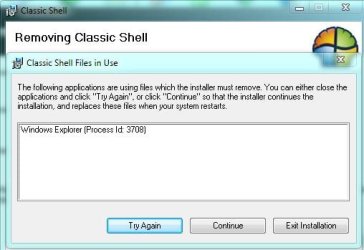
For cleanest upgrade you should uninstall the old version, log off, install new version.
Want let me uninstallCapture.JPG
 

My Computer My Computer

At a glance

Windows 7 Professional 32-bit (6.1, Build 7600)Intel(R) Pentium(R) 4 3.00 GHz HT2.0 GBATI Mobility Radeon 9600 64MB
Computer Manufacturer/Model Number
Averatec 6130HS-20
OS
Windows 7 Professional 32-bit (6.1, Build 7600)
CPU
Intel(R) Pentium(R) 4 3.00 GHz HT
Memory
2.0 GB
Graphics Card(s)
ATI Mobility Radeon 9600 64MB
Sound Card
Realtek AC'97 Audio
Screen Resolution
1280 x 800
Hard Drives
Seagate 96023A 60GB 7200RPM -
Seagate FreeAgentDesktop 250GB
Cooling
20 Inch Box Fan
Mouse
Targus PAWM10 Wireless Optical Laptop Mouse
Back
Top