HELP! Windows Experience Index not working at ALL.

danzo337

New member
Local time
2:52 AM
Messages
9
Hi all,

Tried searching the forums but could not seem to find anyone with the same kind of problem I've ran in to.

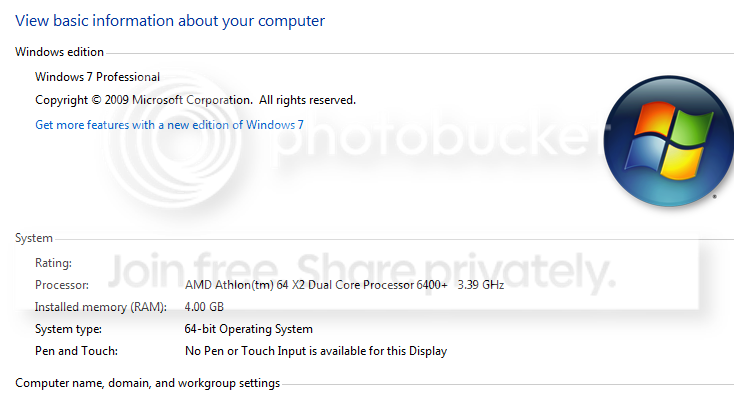
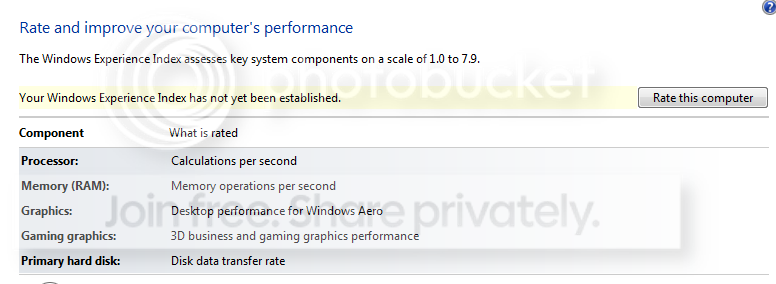
For whatever reason, I can't get a Windows Experience Index rating. When I open my Computer properties, it's just blank and when I go through the control panel to try and rate my computer, it does nothing when I click the button "Rate this computer."

Now, I recently been going through some hardware changes and it appears that perhaps something glitched in the process.

Anyone have an idea of what may have caused this? Maybe I need to delete a log of some sort and let it redetect my hardware?

Any input would be appreciated; thanks~! :cool:

Here are some screens:

wiecomputer.png

wiecontrolpanel.png
 

My Computer My Computer

OS
Windows 7 Professional 64bit
Run Winsat - ? at an elevated command prompt and choose the tests or the whole set that you want to run.
 

My Computer My Computer

Computer Manufacturer/Model Number
Sony Vaio Z46GDU
OS
Windows 7 Ultimate x86-64
CPU
[email protected] 1066MHz FSB
Motherboard
Sony branded
Memory
6GB DDR3 1066MHz
Graphics Card(s)
9300M GS 256MB Dedicated (Speed) + Intel4500MHD (Stamina)
Sound Card
Realtek HD Audio
Monitor(s) Displays
13.1' WXGA
Screen Resolution
1600x900
Hard Drives
320GB 7200RPM w/ 16MB cache
Internet Speed
1MB/s
Run Winsat - ? at an elevated command prompt and choose the tests or the whole set that you want to run.

Ran the Winsat but still nothing showing up.. :mad:
 

My Computer My Computer

OS
Windows 7 Professional 64bit
What onscreen error message did you get when you could not run Winstat?
 

My Computer My Computer

Computer type
PC/Desktop
Computer Manufacturer/Model Number
Ignatz Special; 4 speed manual gearbox; factory air conditioning; one of one
OS
Windows 7 Home Premium SP1, 64-bit
CPU
Intel Skylake i5-6600K, not overclocked
Motherboard
AsRock Z170M Extreme 4, micro ATX
Memory
8 GB HyperX DDR4-2666 (2 x 4 GB)
Graphics Card(s)
none; graphics are integrated on CPU
Sound Card
onboard: Realtek ALC1150; external: USB Behringer UF0-202
Monitor(s) Displays
Dell S2340M 23 inch IPS
Screen Resolution
1600 x 900
Hard Drives
System: Crucial MX100 series SSD, 128 GB;
Data: Samsung Spinpoint 103SJ, 1 TB;
Backup: WD Caviar Green WD30EZRX-00D8PB0, 3 TB
PSU
Rosewill SilentNight 500 watt fanless, semi-modular
Case
Antec Solo II
Cooling
Noctua NH-U12S; Noctua F12 intake, Noctua S12A exhaust
Keyboard
Microsoft 200 6JH-00001 USB
Mouse
Dell or Microsoft optical wired; USB
Antivirus
Microsoft Security Essentials and Malwarebytes Premium
Browser
Pale Moon
Other Info
All fans PWM; speeds at idle: CPU circa 500 rpm; intake circa 600 rpm; exhaust circa 600 rpm; CPU temps 27 idle and 47 C load in a warm room (27 C/81 F) when running Intel Extreme Tuning Utility stress test.
Didn't give me an error message, closed quickly at the end before I could read if there were any errors, no popups.

I deleted the DataStore files in the Performance folder and am now able to run the WEI rating normally but have another problem now.

weierror.png


Happens right at the end after all the tests are done..
 

My Computer My Computer

OS
Windows 7 Professional 64bit

My Computer My Computer

Computer Manufacturer/Model Number
Dell Vostro 1000
OS
Windows 7 Ultimate x86
CPU
AMD Sempron 3600+
Graphics Card(s)
ATI Radeon Xpress 1150
Monitor(s) Displays
Generic PnP Monitor
Screen Resolution
1200 x 800
Hard Drives
WD Scorpio Blue 500 GB (WD5000BEVT)
Mouse
Logitech V320 Cordless Optical Mouse
Currently running an SFC scan... will post results shortly.


Results:

"Windows Resource Protection did not find any integrity violations."

Sounds good?
 

My Computer My Computer

OS
Windows 7 Professional 64bit

My Computer My Computer

Computer Manufacturer/Model Number
Dell Vostro 1000
OS
Windows 7 Ultimate x86
CPU
AMD Sempron 3600+
Graphics Card(s)
ATI Radeon Xpress 1150
Monitor(s) Displays
Generic PnP Monitor
Screen Resolution
1200 x 800
Hard Drives
WD Scorpio Blue 500 GB (WD5000BEVT)
Mouse
Logitech V320 Cordless Optical Mouse
Any one know a fix to this?
 

My Computer My Computer

OS
Windows 7 Professional 64bit
And you actually ran

winsat formal

from an elevated command prompt?

You ran sfc /scannow

Check the permissions of the DataStore folder?
 

My Computer My Computer

Computer Manufacturer/Model Number
Self Built
OS
Win 7 Ultimate 32bit
CPU
C2D E6600 2.4Ghz
Motherboard
Intel D965WH
Memory
4G Kingston KHX5400D2
Graphics Card(s)
EVGA GTX 570 HD SC (012-P3-1573-KR)
Sound Card
On-Board
Monitor(s) Displays
Samsung 226BW
Screen Resolution
1680 x 1050
Hard Drives
2 x 250 Seagate Barracuda
2 x 500 Seagate Barracuda (Raid1)
PSU
Corsair TX750W
Case
In-Win C589
Cooling
Stock Intel Cooling
Checked out the permissions, gave full access to all, clean-booted, re-did WinSAT..

Error still exists. It would appear that all the scans are fine, but the problems is that it is stuck while trying to save and apply to WEI?
 

My Computer My Computer

OS
Windows 7 Professional 64bit
if you look in the datastore folder,, does it appear to be recreating all the xml files?
Do you remember how many were in there?

Also,, did you ever have Kaspersky installed on that system?

What AV are you running? Have you ever had any AV installed on that system at all at any time?

What were they specifically?

Every post or page I am finding relates back to KAV. But this may be a problem with other AV as well.
 

My Computer My Computer

Computer Manufacturer/Model Number
Self Built
OS
Win 7 Ultimate 32bit
CPU
C2D E6600 2.4Ghz
Motherboard
Intel D965WH
Memory
4G Kingston KHX5400D2
Graphics Card(s)
EVGA GTX 570 HD SC (012-P3-1573-KR)
Sound Card
On-Board
Monitor(s) Displays
Samsung 226BW
Screen Resolution
1680 x 1050
Hard Drives
2 x 250 Seagate Barracuda
2 x 500 Seagate Barracuda (Raid1)
PSU
Corsair TX750W
Case
In-Win C589
Cooling
Stock Intel Cooling
I had the same problem with wei but that was my graphics card and ram
 

My Computer My Computer

Computer Manufacturer/Model Number
home built
OS
windows 7 64 bit
CPU
i5 750 quad core
Motherboard
boistar tp55
Memory
CORSAIR ddr3 1666 8 gigs
Graphics Card(s)
XFX ATI RADEON 5750
Sound Card
on board
PSU
corsair tx650w
I am using Avast + I am on a clean-boot right now. My WEI worked fine before through many hardware changes until now; after I overclocked my CPU, I wanted to check out my WEI but it had stopped working properly.

I just tried reinstalling my GPU drivers, double checked my CPU drives through device manager, and yes, the XML files are recreating themselves.

I am trying to allow full control through the properties but Windows isn't allowing me.

The tests run fine, it's just at the end, something is not letting the .cpp file write into the windows folder I believe.
 

My Computer My Computer

OS
Windows 7 Professional 64bit
I don't know,, I would uninstall Avast and try again

Then I would stop overclocking and try that.

There could be a number of reasons for this issue, with all the changes you have made, something broke it, narrowing it down, won't be easy.
 

My Computer My Computer

Computer Manufacturer/Model Number
Self Built
OS
Win 7 Ultimate 32bit
CPU
C2D E6600 2.4Ghz
Motherboard
Intel D965WH
Memory
4G Kingston KHX5400D2
Graphics Card(s)
EVGA GTX 570 HD SC (012-P3-1573-KR)
Sound Card
On-Board
Monitor(s) Displays
Samsung 226BW
Screen Resolution
1680 x 1050
Hard Drives
2 x 250 Seagate Barracuda
2 x 500 Seagate Barracuda (Raid1)
PSU
Corsair TX750W
Case
In-Win C589
Cooling
Stock Intel Cooling
Well the overclock is where I want it to be now and stable.

As for uninstalling Avast, no reason for that as WEI was working fine before and I've tried doing WEI with cleanboot (only MS programs running.)

Oh well, this is why it's just easier to go with MAC.

Windows still persistant in giving people headaches.
 

My Computer My Computer

OS
Windows 7 Professional 64bit
So far every post out there in regards to this error is caused by KAV.
It only stands to reason that it is Avast possibly causing the issue, and not Win7.
However, it is also possible that with all the changes you made and the Overclocking that something corrupted... again,, not a win7 issue.

I say,, have fun with your Mac.. see ya.
 

My Computer My Computer

Computer Manufacturer/Model Number
Self Built
OS
Win 7 Ultimate 32bit
CPU
C2D E6600 2.4Ghz
Motherboard
Intel D965WH
Memory
4G Kingston KHX5400D2
Graphics Card(s)
EVGA GTX 570 HD SC (012-P3-1573-KR)
Sound Card
On-Board
Monitor(s) Displays
Samsung 226BW
Screen Resolution
1680 x 1050
Hard Drives
2 x 250 Seagate Barracuda
2 x 500 Seagate Barracuda (Raid1)
PSU
Corsair TX750W
Case
In-Win C589
Cooling
Stock Intel Cooling
danzo, i have problem same with you, windows can't experience index, so iam running in prompt model to cek problem hardware . end sure its not problem with hardware . when i see error in saving , its mean experience indeks is running but cannot save for file , so i was runing disk properti on c: where my system windows , than tab tool than run defragment disk
and the problem was end . your Kaspersky is'not guilty
 

My Computer My Computer

OS
windows 7 pro 32
I know this is an old thread but if anyone still has this issue and not sure what to do, i just wanted to add this to try incase your despirate for help. I found out that it was the Virtu iGPU software that was causing this issue for me. The WEI test would always stop during the directx 10 tests. If you have the Virtu MVP software installed and you see it on your list of hidden icons (near the clock) then right click it and temporarily disable it with the option that appears. Then re-run the WEI test and it should hopefully work for you. It did for me (im using win7 64bit)

Good luck
 

My Computer My Computer

OS
Windows 7 Professional 64bit
Back
Top