Latest Realtek HD Audio Driver Version

I have only one HIGH DEFINITION AUDIO Device option :sick:


Guess it won't help you then, my system had both the Realtek HD device and a second generic (MS) High Definition Audio Device. Disabling the second device cleared up my low volume problems even though the Realtek was set as default audio.

Ap
I seem to be having the same problem as Aphelion (noticeably lower sound quality in speakers, lack of bass in speakers, and quieter speakers speakers after upgrade from Vista to 7). I also don't have MS High Definition Audio listed in the device manager (only Realtek High Definition Audio). However, I have noticed that if you go to the start menu > devices and printers > my pc > hardware only "High Definition Audio Controller" (manufactured by Microsoft) was listed. But after I reinstalled the Realtek HD driver in compatibility mode they were both listed (High Definition Audio controller and Realtek HD Audio Device). I don't know how insightful that information is, but I'd really appreciate some help with this also.

Everyone has the quiet issue and theres not a lot you can to be honest, either wait for a good set of drivers or go back i guess. Nobody ive asked even knows if its the drivers or just windows 7 so we will see. If someone tells me the sound will always be crap its back to vista for me!
 

My Computer My Computer

At a glance

Windows 7 Ultimate 64-bitCore 2 duo T6400 2.0ghz3GB DDR3Nvidia geforce 9600m (1791mb)
Computer Manufacturer/Model Number
Acer 6935G
OS
Windows 7 Ultimate 64-bit
CPU
Core 2 duo T6400 2.0ghz
Memory
3GB DDR3
Graphics Card(s)
Nvidia geforce 9600m (1791mb)
Sound Card
Realtek onboard
Internet Speed
10MB
Everyone has the quiet issue and theres not a lot you can to be honest, either wait for a good set of drivers or go back i guess. Nobody ive asked even knows if its the drivers or just windows 7 so we will see. If someone tells me the sound will always be crap its back to vista for me!

My guess is it's a Win7 issue and probably has to do with leaving overhead for (new?) system plugins available to the HD Audio Device. I skipped Vista so I don't know if the low volume problem existed there.

One workaround with the Realtek drivers is using "Enhancements/Equalizer" and raising all of the values the same amount. Not a perfect solution but does get the volume up.

My M-Audio AudioPhile 24/96 PCI card does not have the volume problem and checks out the same in XP as in Win7.

Ap
 

My Computer My Computer

At a glance

Windows 7 Home PremiumIntel Core 2 Duo @ 3.00gHz4 GBATI Radeon HD 2600 XT
Computer Manufacturer/Model Number
Assembled in my workshop
OS
Windows 7 Home Premium
CPU
Intel Core 2 Duo @ 3.00gHz
Motherboard
Gigabyte GA-P35-S3G
Memory
4 GB
Graphics Card(s)
ATI Radeon HD 2600 XT
Sound Card
RME 24/96 Card, Realtek Internal Audio PreSonus FireStudio
Monitor(s) Displays
Acer 1917 (x2)
Screen Resolution
1280 x 1024 on both monitors
Hard Drives
Three 250GB Seagate SATA Barracuda 7200rpm
PSU
Rosewill 500-watt
Case
Rosewill mid-tower
Cooling
Noctua NH-U9B (CPU), PwrSupply fan + single large case Fan
Keyboard
Macally w/2/USB ports.
Mouse
Trackman Wheel
Other Info
Event 20/20 bas studio monitors, Yamaha sub.
Rackmount Korg/Roland/Yamaha synthesizers,
Cubase MIDI/audio recording. Sony Soundforge audio/mastering software. CD Architect Mastering. RME & Presonus audio interfaces.
Call me lucky I guess, but I have had none of the sound volume issues or crackly pops reported by others on my Supermicro C2SBX board with Realtek ALC883 chip. In the BIOS I have "Azalia Audio" set to "AUTO" (only other choice is "DISABLED"), which causes the use of the onboard Realtek audio.

I also only have a single "sound device", shown as "Realtek High Definition Audio" with the Realtek 12/25/2009 6.0.1.6013 driver.

After my first mistaken upgrade method a few driver releases ago which amazingly enough failed to see the instructions calling for "run this installer file TWICE... once to uninstall current drivers, followed by re-boot, and then run the installer file a second time to actually install the new upgraded driver version", I've not made that mistake again.

So, when I failed to follow the instructions, the effect of running the presumed upgrader was actually just to uninstall the existing Realtek drivers. Following the reboot I had some kind of generic MS audio device recognized with some generic MS driver installed I guess. Don't recall exactly (nor whether it even produced sound), because it was only there temporarily until I finally ran the Realtek installer for the second time and realized that was what I was supposed to do all along.

Anyway, my "playback devices" actually show THREE choices: (1) Realtek HDMI Output, presumably from my ATI HD4850 video card, (2) Speakers, corresponding to the Realtek High Definition Audio device and which is green-checked as the default, and (3) Speakers, corresponding to a USB Audio DAC which I think must be coming from my outboard Pinnacle 710-USB hardware that supports importing external analog and digital video to Pinnacle Studio software.

I have an Altec-Lansing 641 speaker system (four satellites plus sub-woofer) that is sitting at "default volume" (i.e. the way it comes on right after plugging it in). "Quadrophonic" specified in Configuration. In Properties, I have Realtek HD Audio Output at 60, Microphone and FrontMic muted, CD Audio at 0 and Line In at 0. Under Enhancements I have Environment, Equalizer, speaker Fill, and Loudness Equalization checked... with "None" for sound effects. Default format is 24-bit, 48K Hz (studio quality).

And if anything I find apparent volume under Win7 with the Realtek drivers to be LOUDER than how things work under WinXP Pro. In fact, I have to TURN DOWN the various Mixer sliders from their 100% setting, both the master Volume (which I have at 60%) and the sliders for individual applications (e.g. System Sounds is at 24%). Otherwise, its TOO LOUD!

This is all fine, by me. Winamp playing MP3 of Otis Redding's "White Christmas" sounds stunning... clear, loud, noise-free. No complaints.
 

My Computer My Computer

At a glance

Windows 7 Pro x64 (1), Win7 Pro X64 (2)i5-3350p 3.1Ghz/6MB-cache (1); E8400 3.0Ghz/6...8GB PC3-12800 DDR3 (1); 4GB PC3-10600 DDR3 (2)ATI HD7750 (1), (see TV cards); ATI R7 250 (2)
Computer type
PC/Desktop
Computer Manufacturer/Model Number
Home-built, two systems (1) and (2)
OS
Windows 7 Pro x64 (1), Win7 Pro X64 (2)
CPU
i5-3350p 3.1Ghz/6MB-cache (1); E8400 3.0Ghz/6MB-cache (2)
Motherboard
ASUS P8Z77-V Pro (1); ASUS P5Q3 (2)
Memory
8GB PC3-12800 DDR3 (1); 4GB PC3-10600 DDR3 (2)
Graphics Card(s)
ATI HD7750 (1), (see TV cards); ATI R7 250 (2)
Sound Card
Realtek ALC892 HD Audio (1); Realtek ALC1200 HD Audio (2)
Monitor(s) Displays
Eizo HD2441W LCD, Eizo S2433W (1); Eizo 24" S2433W (2)
Screen Resolution
1920x1200, 1920x1200 (1); 1920x1200 (2)
Hard Drives
(1) 1TB SATA-II (7200RPM), 2x2TB SATA-III (7200RPM), 250GB SATA-III (10000RPM) for OS; 2x2TB external USB 3.0

(2) 320GB SATA-II (7200RPM), 750GB SATA-II (7200RPM), 150GB SATA-II (10000RPM) for OS; 2TB external USB 3.0
PSU
Nesteq ECS-6001 600W (1); Nesteq ECS-5001 500W (2)
Case
Acousti-Case 360 (1) and (2)
Cooling
Noctua NH-U12P SE2 for CPU, 2x120mm case fans (1) and (2)
Keyboard
IBM PS/2 (1) and (2)
Mouse
Logitech MX Revolution wireless (1); Microsoft wired (2)
Internet Speed
100mbps down / 10mbps up
Antivirus
Microsoft Security Essentials; Malwarebyte Anti-Malware Pro
Browser
Firefox
Other Info
Ceton InfiniTV 4-tuner cablecard-enabled TV card as well as Hauppauge HVR-2250 OTA/ATSC 2-tuner TV card in (1), running under Win7 WMC
Sound not low in Windows 7, analog output. If anything its loud. Headphone jack super loud.

Strange so many have issues.

MSI p55-cd53
Win 7 X64
 

My Computer My Computer

At a glance

windows 7 64bit
OS
windows 7 64bit
Hey guys,

I have been following this form for awhile reading ppls issues and such as well as googling.

I have an issue where i have both my front audio and mic jacks plugged in as well as my back 5.1 system. When using Windows XP i was able to set the audio to come out of both devices at the same time. When i upgraded to Windows 7 i was shocked to see that the Defult Audio seems to limit the output of the sound and does not allow me to have the output going to both devices (2 defult outputs). I have the setting "Make front and rear output devices playback two diffrent audio streams simultaneously" selected and at times if i dont change the settings over i can have the audio from 1 application coming out of the speakers and 1 coming out of the head phones.

Is there a way, as i had it running in windows xp, to have all the audio coming out of both the headphones andthe speakers?
 

My Computer My Computer

At a glance

Windows 7 x64 Ultimate
Computer Manufacturer/Model Number
Antec
OS
Windows 7 x64 Ultimate
Hi,

I've just joined the site to find a solution to 5.1 surround sound with acl662 realtek soundcard in win 7

It has always given me surround sound since installing win7, but with some distortion like a badly tuned radio.

The best I could find is to get a stereo sound from the PC to the amp, which has the option of filling is 5.1 surround. and in the sound enhancements set it for virtual 5.1
This sends a 5.1 signal over stereo that my amp will decode back to full 5.1

any other fiddling with settings just keeps the speakers giving 'badly tuned in' kinda static with the sounds

Hope this will help anyone
 

My Computer My Computer

At a glance

win7Intel 2.5Ghz DualCore2GbGeforce 8500
Computer Manufacturer/Model Number
self upgrade (used to be a p? running 800Mhz with 512kb from fujitsu siemens)
OS
win7
CPU
Intel 2.5Ghz DualCore
Motherboard
Asus p5s.....
Memory
2Gb
Graphics Card(s)
Geforce 8500
Sound Card
acl662 5.1 surround
Monitor(s) Displays
scaleo C772 (still to be upgraded to flat widescreen)
Screen Resolution
1280*1024
Hard Drives
250GB int
500 GB ext usb2.0 Mediafire
1.5Tb ext usb2.0 Verbatim
Case
midi tower oem
Keyboard
wireless qwerty full media
Mouse
To hell with mouses, use a TRACKBALL!!! Logitech trackman
Internet Speed
3Mbit
Other Info
better at hardware then software, former IT specialist in the good old days of i80x86 processors, MS-DOS, CGA -EGA graphics and memory still counted in KB and MB.

Now just keeping up some skill for the house and friends, but live life on the road on 18wheels!!!!!!!!!
What I hear is a sort of 'ambience' signal from the LR and RR speakers. The middle speaker is more of a mix of the LR. I would not describe it as 'static'.

Is true 5.1 supposed to just copy L & R to the rear speakers ?
 

My Computer My Computer

At a glance

windows 7 64bit
OS
windows 7 64bit
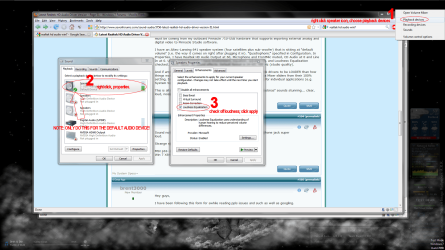
dunno if anyones mentioned it, or whatever, as xp seems to have this enabled by default (not sure about vista, never bothered with it much :P)

step 1: right click speaker in taskbar tray, choose plaback devices

step 2: right click default audio device, choose properties

step 3: navigate to enhancements tab, make sure only the loudness equalization is checked, click apply. click okay.


quiet sound should be gone.


only problem is, on low end chips this can cause sound degradation. pity ms or realtek or whoever doesn't make a way to adjust how much of a boost you get from the loudness option. sigh, oh well.
 

Attachments

  • hdaudio.png
    hdaudio.png
    236.3 KB · Views: 1,137

My Computer My Computer

At a glance

Windows 7 Enterprise (Build# 7600) x64Intel e5400 [email protected]OCZ 2x1g@800, Corsair 2x512@800 / 5-6-6-15EVGA 9800 GT 512
Computer Manufacturer/Model Number
My Own Worst Enemy
OS
Windows 7 Enterprise (Build# 7600) x64
CPU
Intel e5400 [email protected]
Motherboard
EVGA 730i/9300
Memory
OCZ 2x1g@800, Corsair 2x512@800 / 5-6-6-15
Graphics Card(s)
EVGA 9800 GT 512
Sound Card
Realtek HD Audio
Monitor(s) Displays
LG M237WD-PM 23" LCD
Screen Resolution
1920x1080@32bit
Hard Drives
320x1, 750x1, 1TBx1
PSU
Antec Earthwatts 500w
Case
Antec Sonata III
Cooling
Xigmatek Dark Knight
Keyboard
cheap
Mouse
cheap ms optical
Internet Speed
cable
dunno if anyones mentioned it, or whatever, as xp seems to have this enabled by default (not sure about vista, never bothered with it much :P)

step 1: right click speaker in taskbar tray, choose plaback devices

step 2: right click default audio device, choose properties

step 3: navigate to enhancements tab, make sure only the loudness equalization is checked, click apply. click okay.


quiet sound should be gone.


only problem is, on low end chips this can cause sound degradation. pity ms or realtek or whoever doesn't make a way to adjust how much of a boost you get from the loudness option. sigh, oh well.

That actually makes mine quieter...
 

My Computer My Computer

At a glance

Windows 7 Ultimate 64-bitCore 2 duo T6400 2.0ghz3GB DDR3Nvidia geforce 9600m (1791mb)
Computer Manufacturer/Model Number
Acer 6935G
OS
Windows 7 Ultimate 64-bit
CPU
Core 2 duo T6400 2.0ghz
Memory
3GB DDR3
Graphics Card(s)
Nvidia geforce 9600m (1791mb)
Sound Card
Realtek onboard
Internet Speed
10MB
People! Why you dont buy separated sound card like Asus Xonar whos dont have problem with the drivers like Creative or craping Realtek?

Because some people upgrade and find they don't have room for the their awesome PCI soundcard and have to make do with the nasty 2 ch stereo S/PDIF digital out put....
 

My Computer My Computer

At a glance

8 Pro x64i7 3770K 4.6GHz16GB G.Skill Trident X 2666mhzx2 EVGA 780 Ti Superclocked SLI
Computer type
PC/Desktop
Computer Manufacturer/Model Number
Systems by SmartEyeball
OS
8 Pro x64
CPU
i7 3770K 4.6GHz
Motherboard
ASUS P8Z77 WS
Memory
16GB G.Skill Trident X 2666mhz
Graphics Card(s)
x2 EVGA 780 Ti Superclocked SLI
Sound Card
SB X-FI Surround 5.1 PRO USB / ATH-AD900 Headphones
Monitor(s) Displays
x3 Dell U2410 / 58" Samsung
Screen Resolution
5760*1200/ 1920*1200
Hard Drives
2x Intel 520 240GB (RAID 0) * 2x WD Caviar Blacks 2TB (RAID 0) * 2TB WD Caviar Black * Sony Optirac DVD
PSU
Silverstone Strider Evolution 1200W
Case
Thermaltake Level 10 GT Snow Edition
Cooling
Noctua NH-D14
Keyboard
Topre Realforce // Ducky Shine MX Black // Filco Ninja TKL
Mouse
Thermaltake Theron (Highly Recommended) + Razer Imperator
Antivirus
MSE
Browser
IE, FF, WaterFox
Other Info
GT Extreme V2 Sim Racing Cockpit + 40" LCD and K/B Mouse stand ▼
Fanatec CSR Elite Wheel + Clubsport V1 Pedals + CSR shifter/7G-H ▼Saitek X52 Pro ▼ TrackIR 5 Pro
Buttkicker v2 Seat Rumbler with Dedicated 5.1 and Sub Woofer attached to frame ▼
=
Bloody Big Grin
New driver released.

RELEASE DATE: January 22th 2010
DRIVER VERSION: R 2.41

Driver Version In Device Manager: 6.0.1.6029

Add/Fix
1.) Driver :
Customizations.
 

My Computer My Computer

At a glance

Windows7 7600-RTM x64 | Win XP x32
OS
Windows7 7600-RTM x64 | Win XP x32
New driver released.

RELEASE DATE: January 22th 2010
DRIVER VERSION: R 2.41

Driver Version In Device Manager: 6.0.1.6029

Add/Fix
1.) Driver :
Customizations.

Cheers mate....
 

My Computer My Computer

At a glance

Windows 7 Ultimate x64.i5 760 @ 4.2Ghz. 1.18v4g Corsair xms3 ddr3, 1600Mhz.Gigabyte GTX-560Ti soc edition
Computer Manufacturer/Model Number
Custom Build.
OS
Windows 7 Ultimate x64.
CPU
i5 760 @ 4.2Ghz. 1.18v
Motherboard
Gigabyte - H55M-USB3
Memory
4g Corsair xms3 ddr3, 1600Mhz.
Graphics Card(s)
Gigabyte GTX-560Ti soc edition
Sound Card
Asus Xonar Dx - Logitech Z5500.
Monitor(s) Displays
Acer 22" LCD Wide screen 1680-1050 -Samsung 42" Plasma....
Screen Resolution
1680/1050 -----1920/1080p.
Hard Drives
2x 2TB Seagate Go Flex,
1x 1TB Seagate,
1x 640WD Black,
x16 Gig sandisc flash drive,
1x8Gig sandisc flash drive.
PSU
XigmaTek 80plus NRP-PC702 - 700w dual 30a.
Case
Venus Gamers Midi Tower Case with LED Display
Cooling
Arctic Freezer 7 Pro Rev 2... x2 Arctic F8 case fans........
Keyboard
Logitech G15-v2 Gaming.
Mouse
Microsoft Sidewinder X8.
Internet Speed
Virgin Media - 50mb down- 8mb up.
Other Info
x2 Xbox 360 wireless controllers...

Dual layer optical disc drive...

Chrome 79million

A.V = MSE
Thank you Wargollo. First post updated. :)
 

My Computer My Computer

At a glance

64-bit Windows 11 Pro for WorkstationsIntel i7-8700K OC'd to 5 GHz64 GB (4x16GB) G.SKILL TridentZ RGB DDR4 3600...ASUS ROG-STRIX-GTX1080TI-O11G-GAMING
Computer type
PC/Desktop
Computer Manufacturer/Model Number
Self built custom
OS
64-bit Windows 11 Pro for Workstations
CPU
Intel i7-8700K OC'd to 5 GHz
Motherboard
ASUS ROG Maximus XI Formula Z390
Memory
64 GB (4x16GB) G.SKILL TridentZ RGB DDR4 3600 MHz
Graphics Card(s)
ASUS ROG-STRIX-GTX1080TI-O11G-GAMING
Sound Card
Integrated
Monitor(s) Displays
2 x Samsung Odyssey G7 27"
Screen Resolution
2560x1440
Hard Drives
1TB Samsung 990 PRO M.2,
4TB Samsung 990 PRO PRO M.2,
TerraMaster F8 SSD Plus NAS
PSU
Seasonic Prime Titanium 850W
Case
Thermaltake Core P3
Cooling
Corsair Hydro H115i
Keyboard
Logitech wireless K800
Mouse
Logitech MX Master 4
Internet Speed
2 Gb/s Download and 100 Mb/s Upload
Antivirus
Malwarebyte Anti-Malware Premium
Browser
Google Chrome
Other Info
Logitech Z625 speaker system,
Logitech BRIO 4K Pro webcam,
HP Color LaserJet Pro MFP M477fdn,
APC SMART-UPS RT 1000 XL - SURT1000XLI,
Galaxy S23 Plus phone
Thanks. Downloaded, installed and working. :)
 

My Computer My Computer

At a glance

Windows 8.1 Pro RTM x64Intel Core-i5-3570K 4-core @ 3.4GHz (Ivy Brid...4 x 4GB DDR3-1600 Corsair Vengeance CMZ8GX3M2...MSI GeForce GTX770 Gaming OC 2GB
Computer type
PC/Desktop
Computer Manufacturer/Model Number
Dwarf Dwf/11/2012 r09/2013
OS
Windows 8.1 Pro RTM x64
CPU
Intel Core-i5-3570K 4-core @ 3.4GHz (Ivy Bridge) (OC 4.4GHz)
Motherboard
ASRock Z77 Extreme4-M
Memory
4 x 4GB DDR3-1600 Corsair Vengeance CMZ8GX3M2A1600C9B (16GB)
Graphics Card(s)
MSI GeForce GTX770 Gaming OC 2GB
Sound Card
Realtek High Definition on board solution (ALC 898)
Monitor(s) Displays
ViewSonic VA1912w Widescreen (VGA)
Screen Resolution
1440x900
Hard Drives
OCZ Agility 3 SSD 120GB SATA III x2 (RAID 0)
Samsung HD501LJ 500GB SATA II x2
Hitachi HDS721010CLA332 1TB SATA II
Iomega 1.5TB Ext USB 2.0
WD 2.0TB Ext USB 3.0
PSU
XFX Pro Series 850W Semi-Modular
Case
Gigabyte IF233
Cooling
1 x 120mm Front Inlet 1 x 120mm Rear Exhaust
Keyboard
Microsoft Comfort Curve Keyboard 3000 (USB)
Mouse
Microsoft Comfort Mouse 3000 for Business (USB)
Internet Speed
NetGear DG834Gv3 ADSL Modem/Router (Ethernet) ~4.0 Mb/s (O2)
Antivirus
Avast! 8.0.1497
Browser
IE 11
Other Info
Optical Drive: HL-DT-ST BD-RE BH10LS30 SATA Bluray
Lexmark S305 Printer/Scanner/Copier (USB)
WEI Score: 8.1/8.1/8.5/8.5/8.25
Asus Eee PC 1011PX Netbook (Windows 7 x86 Starter)
Any better than the last? Otherwise i wont bother.
 

My Computer My Computer

At a glance

Windows 7 Ultimate 64-bitCore 2 duo T6400 2.0ghz3GB DDR3Nvidia geforce 9600m (1791mb)
Computer Manufacturer/Model Number
Acer 6935G
OS
Windows 7 Ultimate 64-bit
CPU
Core 2 duo T6400 2.0ghz
Memory
3GB DDR3
Graphics Card(s)
Nvidia geforce 9600m (1791mb)
Sound Card
Realtek onboard
Internet Speed
10MB
Tried it last night. Still the same for me.
 

My Computer My Computer

At a glance

windows 7:)core2duo 68002gb ddr1nvidia 6800
Computer Manufacturer/Model Number
Myself
OS
windows 7:)
CPU
core2duo 6800
Motherboard
asrock vsta
Memory
2gb ddr1
Graphics Card(s)
nvidia 6800
Monitor(s) Displays
iiyama E2407HDSV
Hard Drives
1*250 gb
1*125 gb
1*125 gb
PSU
coolermaster 500watt
Case
thermaltake soproano
Cooling
arctic cooler
Any better than the last? Otherwise i wont bother.
:mad:doesn't matter if I bring my surround back to stereo or not, still got the same crackling noise........... Having hard time using my computer as a full entertainment center:cry:
 

My Computer My Computer

At a glance

win7Intel 2.5Ghz DualCore2GbGeforce 8500
Computer Manufacturer/Model Number
self upgrade (used to be a p? running 800Mhz with 512kb from fujitsu siemens)
OS
win7
CPU
Intel 2.5Ghz DualCore
Motherboard
Asus p5s.....
Memory
2Gb
Graphics Card(s)
Geforce 8500
Sound Card
acl662 5.1 surround
Monitor(s) Displays
scaleo C772 (still to be upgraded to flat widescreen)
Screen Resolution
1280*1024
Hard Drives
250GB int
500 GB ext usb2.0 Mediafire
1.5Tb ext usb2.0 Verbatim
Case
midi tower oem
Keyboard
wireless qwerty full media
Mouse
To hell with mouses, use a TRACKBALL!!! Logitech trackman
Internet Speed
3Mbit
Other Info
better at hardware then software, former IT specialist in the good old days of i80x86 processors, MS-DOS, CGA -EGA graphics and memory still counted in KB and MB.

Now just keeping up some skill for the house and friends, but live life on the road on 18wheels!!!!!!!!!
ive rolled back to windows default drivers after not bein able to solve the crackin problem...i havent had even one crackin sound since swithin...i dont think i will ever install any of the RT drivers again...
 

My Computer My Computer

At a glance

win7c2d 22g8600m gt
Computer Manufacturer/Model Number
MSI GX700
OS
win7
CPU
c2d 2
Memory
2g
Graphics Card(s)
8600m gt
Sound Card
realtek hd
Screen Resolution
1680x1050
Internet Speed
20/1
I too have experienced this cracking/static sound and have also found that R2.41 does not help.
What DOES help eliminate the sound is to use VISTA Realtek drivers. This has solved the issue for me so far. I am using 6.0.1.5667 and have an Asus Pro61SL notebook.
Hope this is of some help to you.
 

My Computer My Computer

At a glance

Win 7 Premium 32 bitT65004GBATI 4570
Computer Manufacturer/Model Number
Asus Pro61SL notebook
OS
Win 7 Premium 32 bit
CPU
T6500
Motherboard
Asus
Memory
4GB
Graphics Card(s)
ATI 4570
Hard Drives
500GB
Guys, when will you realize that the crackling/popping is NOT caused by the Realtek drivers but is caused by DPC Latency?!?!?
 

My Computer My Computer

At a glance

Windows 7 64bitIntel Core 2 Duo E8400 Wolfdale 3.0GHz LGA 775G.SKILL 4GB (2 x 2GB) 240-Pin DDR2 SDRAM DDR2...EVGA 320-P2-N811-AR GeForce 8800 GTS 320MB
OS
Windows 7 64bit
CPU
Intel Core 2 Duo E8400 Wolfdale 3.0GHz LGA 775
Motherboard
GIGABYTE GA-EP45C-UD3R LGA 775 Intel P45
Memory
G.SKILL 4GB (2 x 2GB) 240-Pin DDR2 SDRAM DDR2 1066
Graphics Card(s)
EVGA 320-P2-N811-AR GeForce 8800 GTS 320MB
Sound Card
Onboard Realtek
Back
Top