
AMDbrando
New member
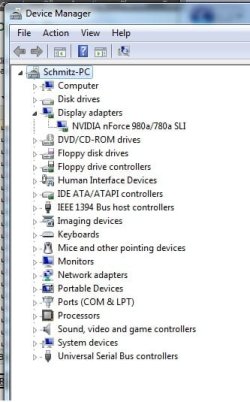
Sorry for starting another one of these threads guys, but I've read through ALL the others, and the fixes offered up there just simply aren't working for me. When I boot up, it does not recognize my video card, and turns on the onboard graphics. If I disconnect from onboard, and boot from the card only, the screen never comes out of sleep mode. Nothing in my device manager (and no yellow exclamations, etc.) except the onboard. Here's my setup:
Windows 7 Home Premium 64-Bit
Asus M3N-HT Deluxe MB w/ onboard graphics
PNY 9800 GT Graphics Card
AMD Phenom II 955
I have gone through all the BIOS settings to make sure the primary video is set to PCI-E, and that the onboard is disabled (auto). After the initial boot, and it not working, I updated Mobo Bios and Chipset. No go.
I then upgraded to the latest Nvidia driver set for the card, from the installed version that came on the CD with the card, no go. I found though, that the INF file in the newest driver didn't contain the right DEV settings, so I cleaned all drivers using DriverSweeper and then re-installed using a modified INF file, still no go. I also tried an older driver set that does have the right DEV list, still nothing. I have an older ATI card that works in this setup no problem, so I know it's not the BIOS or Mobo, and this Nvidia card works fine on my other Intel setup, so the card is not bad either. Lastly I resorted to calling the tech support for both ASUS and PNY, which yielded...drumroll...nothing.
So I turn to the experts, HELP! I have tried everything I could dig up over the past 4 days on this (and many other) forums, and nothing seems to be working. I appreciate the help, thanks!
Device Manager and DxDiag in case it helps:
Windows 7 Home Premium 64-Bit
Asus M3N-HT Deluxe MB w/ onboard graphics
PNY 9800 GT Graphics Card
AMD Phenom II 955
I have gone through all the BIOS settings to make sure the primary video is set to PCI-E, and that the onboard is disabled (auto). After the initial boot, and it not working, I updated Mobo Bios and Chipset. No go.
I then upgraded to the latest Nvidia driver set for the card, from the installed version that came on the CD with the card, no go. I found though, that the INF file in the newest driver didn't contain the right DEV settings, so I cleaned all drivers using DriverSweeper and then re-installed using a modified INF file, still no go. I also tried an older driver set that does have the right DEV list, still nothing. I have an older ATI card that works in this setup no problem, so I know it's not the BIOS or Mobo, and this Nvidia card works fine on my other Intel setup, so the card is not bad either. Lastly I resorted to calling the tech support for both ASUS and PNY, which yielded...drumroll...nothing.
So I turn to the experts, HELP! I have tried everything I could dig up over the past 4 days on this (and many other) forums, and nothing seems to be working. I appreciate the help, thanks!
Device Manager and DxDiag in case it helps:
Attachments
My Computer
At a glance
Windows 7 x64AMD Phenom II 9556GBASUS 9800GT 1GB
- Computer Manufacturer/Model Number
- Custom
- OS
- Windows 7 x64
- CPU
- AMD Phenom II 955
- Motherboard
- ASUS M3N-HT Deluxe
- Memory
- 6GB
- Graphics Card(s)
- ASUS 9800GT 1GB
- Sound Card
- onboard
- Monitor(s) Displays
- 24" Dell HD
- Screen Resolution
- 1920x1080
- Hard Drives
- WD2500
WD800
- PSU
- OCZ 700W Game Xtreme
- Case
- Cooler Master 332 Elite
- Cooling
- OCZ Vendetta
- Internet Speed
- cable


