
Card not found in Device Manager

AMDbrando

New member
Local time
8:35 AM
Messages
25
Location
Seattle, WA
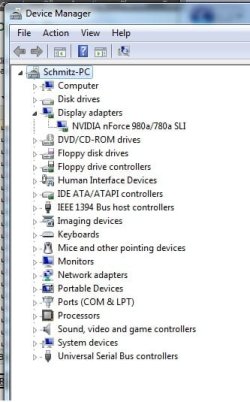
Sorry for starting another one of these threads guys, but I've read through ALL the others, and the fixes offered up there just simply aren't working for me. When I boot up, it does not recognize my video card, and turns on the onboard graphics. If I disconnect from onboard, and boot from the card only, the screen never comes out of sleep mode. Nothing in my device manager (and no yellow exclamations, etc.) except the onboard. Here's my setup:

Windows 7 Home Premium 64-Bit
Asus M3N-HT Deluxe MB w/ onboard graphics
PNY 9800 GT Graphics Card
AMD Phenom II 955

I have gone through all the BIOS settings to make sure the primary video is set to PCI-E, and that the onboard is disabled (auto). After the initial boot, and it not working, I updated Mobo Bios and Chipset. No go.

I then upgraded to the latest Nvidia driver set for the card, from the installed version that came on the CD with the card, no go. I found though, that the INF file in the newest driver didn't contain the right DEV settings, so I cleaned all drivers using DriverSweeper and then re-installed using a modified INF file, still no go. I also tried an older driver set that does have the right DEV list, still nothing. I have an older ATI card that works in this setup no problem, so I know it's not the BIOS or Mobo, and this Nvidia card works fine on my other Intel setup, so the card is not bad either. Lastly I resorted to calling the tech support for both ASUS and PNY, which yielded...drumroll...nothing.

So I turn to the experts, HELP! I have tried everything I could dig up over the past 4 days on this (and many other) forums, and nothing seems to be working. I appreciate the help, thanks!

Device Manager and DxDiag in case it helps:
 

Attachments
  • DxDiag.txt
    DxDiag.txt
    37.4 KB · Views: 65
  • DeviceManager.jpg
    DeviceManager.jpg
    29.1 KB · Views: 126

My Computer My Computer

At a glance

Windows 7 x64AMD Phenom II 9556GBASUS 9800GT 1GB
Computer Manufacturer/Model Number
Custom
OS
Windows 7 x64
CPU
AMD Phenom II 955
Motherboard
ASUS M3N-HT Deluxe
Memory
6GB
Graphics Card(s)
ASUS 9800GT 1GB
Sound Card
onboard
Monitor(s) Displays
24" Dell HD
Screen Resolution
1920x1080
Hard Drives
WD2500
WD800
PSU
OCZ 700W Game Xtreme
Case
Cooler Master 332 Elite
Cooling
OCZ Vendetta
Internet Speed
cable
Hate to say it, but it sounds like you have a bad video card.
 

My Computer My Computer

At a glance

windows 7 RTM x64Phenom II 965 Quad Core 3.4GhzMushkin Blackline 8GB (4x2gb)XFX Radeon 5970 Black Edition
Computer Manufacturer/Model Number
Black_Box (homebuilt)
OS
windows 7 RTM x64
CPU
Phenom II 965 Quad Core 3.4Ghz
Motherboard
Asus M4A79T Deluxe
Memory
Mushkin Blackline 8GB (4x2gb)
Graphics Card(s)
XFX Radeon 5970 Black Edition
Sound Card
onboard
Monitor(s) Displays
Dell 2408WPF-main Dell E248WFP-secondary
Screen Resolution
1920x1200-main 1920x1200-secondary
Hard Drives
OCZ Vertex Limited Edition 100GB (OS)
x1 WD Black Edition 500GB drive (Storage)
PSU
XFX 850w Black Edition (Modular)
Case
Mountian Mods H2go
Cooling
CoolITSystems ECO A.L.C.
Keyboard
Logitech MX 5500 wireless keyboard
Mouse
Razor Copperhead
Internet Speed
16Mb down/2Mb up Wowway Cable Internet
I plug it into my Dell, and it works like a charm :confused:
 

My Computer My Computer

At a glance

Windows 7 x64AMD Phenom II 9556GBASUS 9800GT 1GB
Computer Manufacturer/Model Number
Custom
OS
Windows 7 x64
CPU
AMD Phenom II 955
Motherboard
ASUS M3N-HT Deluxe
Memory
6GB
Graphics Card(s)
ASUS 9800GT 1GB
Sound Card
onboard
Monitor(s) Displays
24" Dell HD
Screen Resolution
1920x1080
Hard Drives
WD2500
WD800
PSU
OCZ 700W Game Xtreme
Case
Cooler Master 332 Elite
Cooling
OCZ Vendetta
Internet Speed
cable

My Computer My Computer

At a glance

windows 7 RTM x64Phenom II 965 Quad Core 3.4GhzMushkin Blackline 8GB (4x2gb)XFX Radeon 5970 Black Edition
Computer Manufacturer/Model Number
Black_Box (homebuilt)
OS
windows 7 RTM x64
CPU
Phenom II 965 Quad Core 3.4Ghz
Motherboard
Asus M4A79T Deluxe
Memory
Mushkin Blackline 8GB (4x2gb)
Graphics Card(s)
XFX Radeon 5970 Black Edition
Sound Card
onboard
Monitor(s) Displays
Dell 2408WPF-main Dell E248WFP-secondary
Screen Resolution
1920x1200-main 1920x1200-secondary
Hard Drives
OCZ Vertex Limited Edition 100GB (OS)
x1 WD Black Edition 500GB drive (Storage)
PSU
XFX 850w Black Edition (Modular)
Case
Mountian Mods H2go
Cooling
CoolITSystems ECO A.L.C.
Keyboard
Logitech MX 5500 wireless keyboard
Mouse
Razor Copperhead
Internet Speed
16Mb down/2Mb up Wowway Cable Internet
... I have gone through all the BIOS settings to make sure the primary video is set to PCI-E, and that the onboard is disabled (auto). After the initial boot, and it not working, I updated Mobo Bios and Chipset. No go.

What, exactly, are the bios options you're given with respect to the onboard video? Is there no "disable"?

If you know the card works just fine, then it's got to be a bios setting preventing it from showing up and functioning properly.

I'd try re-seating the card (yeah, i know you've prolly already done it, so once more won't hurt), boot up select disable for onboard video, then saving changes and reboot into the bios to make sure your changes stuck... then try and boot Windows.
 

My Computer My Computer

At a glance

7 Ultimate x64i5-2500k8GB G.Skill Ripjaws X F3-12800CL7D-8GBXH 1866...EVGA GTX 570 SC
OS
7 Ultimate x64
CPU
i5-2500k
Motherboard
Asus P8P67 Pro
Memory
8GB G.Skill Ripjaws X F3-12800CL7D-8GBXH 1866MHz 8-9-8-24
Graphics Card(s)
EVGA GTX 570 SC
Sound Card
X-Fi Titanium Fatality
Monitor(s) Displays
Samsung S27A550H 27" LED
Screen Resolution
1920x1080
Hard Drives
OCZ Vertex 3 120GB.
1TB Samsung F3.
2TB Samsung F4.
PSU
PC Power & Cooling Silencer 760
Case
Lian Li Lancool K62
Cooling
Thermalright Venomous X Black/Scythe S-Flex/Shin-Etsu X23
Keyboard
MS Natural Elite 4000 Ergonomic
Mouse
Logitech G500
Internet Speed
6MB/768
Other Info
Logitech Z-5500 505 watts.
D-Link DGL-4500.
Tripp-Lite Smart Pro 1500.
Fyi most computer bios's only set the "default" video card, the other will still function, but be secondary. When you boot the system with the card hooked up, do you get the bios screen showing up on your monitor?
 

My Computer My Computer

At a glance

windows 7 RTM x64Phenom II 965 Quad Core 3.4GhzMushkin Blackline 8GB (4x2gb)XFX Radeon 5970 Black Edition
Computer Manufacturer/Model Number
Black_Box (homebuilt)
OS
windows 7 RTM x64
CPU
Phenom II 965 Quad Core 3.4Ghz
Motherboard
Asus M4A79T Deluxe
Memory
Mushkin Blackline 8GB (4x2gb)
Graphics Card(s)
XFX Radeon 5970 Black Edition
Sound Card
onboard
Monitor(s) Displays
Dell 2408WPF-main Dell E248WFP-secondary
Screen Resolution
1920x1200-main 1920x1200-secondary
Hard Drives
OCZ Vertex Limited Edition 100GB (OS)
x1 WD Black Edition 500GB drive (Storage)
PSU
XFX 850w Black Edition (Modular)
Case
Mountian Mods H2go
Cooling
CoolITSystems ECO A.L.C.
Keyboard
Logitech MX 5500 wireless keyboard
Mouse
Razor Copperhead
Internet Speed
16Mb down/2Mb up Wowway Cable Internet

My Computer My Computer

At a glance

Windows 7 x64AMD Phenom II 9556GBASUS 9800GT 1GB
Computer Manufacturer/Model Number
Custom
OS
Windows 7 x64
CPU
AMD Phenom II 955
Motherboard
ASUS M3N-HT Deluxe
Memory
6GB
Graphics Card(s)
ASUS 9800GT 1GB
Sound Card
onboard
Monitor(s) Displays
24" Dell HD
Screen Resolution
1920x1080
Hard Drives
WD2500
WD800
PSU
OCZ 700W Game Xtreme
Case
Cooler Master 332 Elite
Cooling
OCZ Vendetta
Internet Speed
cable
... I have gone through all the BIOS settings to make sure the primary video is set to PCI-E, and that the onboard is disabled (auto). After the initial boot, and it not working, I updated Mobo Bios and Chipset. No go.

What, exactly, are the bios options you're given with respect to the onboard video? Is there no "disable"?

If you know the card works just fine, then it's got to be a bios setting preventing it from showing up and functioning properly.

I'd try re-seating the card (yeah, i know you've prolly already done it, so once more won't hurt), boot up select disable for onboard video, then saving changes and reboot into the bios to make sure your changes stuck... then try and boot Windows.

BIOS settings for the onboard are "Always on" or "Auto". When I popped in the ATI card with the BIOS settings in Auto, it defaults to the PCIe card. Only with the Nvidia does it kick back to the onboard.

Fyi most computer bios's only set the "default" video card, the other will still function, but be secondary. When you boot the system with the card hooked up, do you get the bios screen showing up on your monitor?

The monitor never turns on...stays in stand-by.
 
Last edited:

My Computer My Computer

At a glance

Windows 7 x64AMD Phenom II 9556GBASUS 9800GT 1GB
Computer Manufacturer/Model Number
Custom
OS
Windows 7 x64
CPU
AMD Phenom II 955
Motherboard
ASUS M3N-HT Deluxe
Memory
6GB
Graphics Card(s)
ASUS 9800GT 1GB
Sound Card
onboard
Monitor(s) Displays
24" Dell HD
Screen Resolution
1920x1080
Hard Drives
WD2500
WD800
PSU
OCZ 700W Game Xtreme
Case
Cooler Master 332 Elite
Cooling
OCZ Vendetta
Internet Speed
cable
Is this one of the new 9800GT's that don't require external power? If so then maybe your mobo is not putting out enough power through the PCI-e slot.
 

My Computer My Computer

At a glance

Windows 7 Ultimate 64bitIntel i7 3770K16GB DDR3 1333 Corsair XMS3XFX HD6950 2GB EyeFinity
Computer Manufacturer/Model Number
HAL-9000
OS
Windows 7 Ultimate 64bit
CPU
Intel i7 3770K
Motherboard
Asus Sabertooth Z77
Memory
16GB DDR3 1333 Corsair XMS3
Graphics Card(s)
XFX HD6950 2GB EyeFinity
Sound Card
Logitech G35 & Sennheiser PC135 & VIA HD
Monitor(s) Displays
23" HP 2310e, 23" Samsung B2230, 21.5" Viewsonic
Screen Resolution
5760x1080
Hard Drives
16TB of Storage
128GB & 256GB Crucial M4 SSD's, 2X 1TB WD Black, 3x 2TB WD, 3x 2TB Samsung F4, 1.5TB Seagate, WD 500GB,
PSU
Antec True Power New 650watt
Case
Cooler Master HAF-932
Cooling
Corsair H60 Hydro Cooler, 3x 230mm Fans, 2x120mm Fan
Keyboard
Logitech G15 and G13
Mouse
Logitech G700 Gaming Mouse
Internet Speed
50/10 Mbit
Other Info
Speakers : Alesis M1 Active Mk2 Studio Monitors , APC RS 1200 UPS, HP 4500DN Color Laser, HP P1006 mono Laser, Kodak 8500 Dye-Sub, Epson 1280 inkjet, Epson Worforce 610 MFC
I would uninstall the drivers "if they installed" then shut down and remove the card. Reboot and then shut down again and reinstall the card into the PCI-e slot making sure that it's seated correctly, sometimes it helps to clean the contacts. Restart and see if Windows see's the card, it should install the VGA drivers if it see's the card. Repeat the procedure until the card is recognized.
 

My Computer My Computer

At a glance

Windows 7 Ult, Windows 8.1 Pro,Q9650-4.275GHz, E8600 4.5GHz, E6750-3.8GHzG.Skill PC2 9600 1200Mhz 5 5 5 15 2TGTX480
Computer type
PC/Desktop
Computer Manufacturer/Model Number
Home built
OS
Windows 7 Ult, Windows 8.1 Pro,
CPU
Q9650-4.275GHz, E8600 4.5GHz, E6750-3.8GHz
Motherboard
Evga 780i FTW
Memory
G.Skill PC2 9600 1200Mhz 5 5 5 15 2T
Graphics Card(s)
GTX480
Sound Card
Asus Xonar D2
Monitor(s) Displays
HannsG
Screen Resolution
1680X1050
Hard Drives
GSkill Phoenix Pro 120GB SSD
PSU
ThermalTake Toughpower 1000Watt modular
Case
ThermalTake XaserV
Cooling
Xigmatek S1283
Keyboard
Logitech G15
Mouse
Logitech G9
Internet Speed
T1
Is this one of the new 9800GT's that don't require external power? If so then maybe your mobo is not putting out enough power through the PCI-e slot.

Sure is. I'm digging through my BIOS settings looking for a voltage option...any ideas where it might be?
 

My Computer My Computer

At a glance

Windows 7 x64AMD Phenom II 9556GBASUS 9800GT 1GB
Computer Manufacturer/Model Number
Custom
OS
Windows 7 x64
CPU
AMD Phenom II 955
Motherboard
ASUS M3N-HT Deluxe
Memory
6GB
Graphics Card(s)
ASUS 9800GT 1GB
Sound Card
onboard
Monitor(s) Displays
24" Dell HD
Screen Resolution
1920x1080
Hard Drives
WD2500
WD800
PSU
OCZ 700W Game Xtreme
Case
Cooler Master 332 Elite
Cooling
OCZ Vendetta
Internet Speed
cable
That won't keep the card from being picked up by Windows. I'd follow my advice if I was you. I have been through this procedure many times at the EVGA forum.
 

My Computer My Computer

At a glance

Windows 7 Ult, Windows 8.1 Pro,Q9650-4.275GHz, E8600 4.5GHz, E6750-3.8GHzG.Skill PC2 9600 1200Mhz 5 5 5 15 2TGTX480
Computer type
PC/Desktop
Computer Manufacturer/Model Number
Home built
OS
Windows 7 Ult, Windows 8.1 Pro,
CPU
Q9650-4.275GHz, E8600 4.5GHz, E6750-3.8GHz
Motherboard
Evga 780i FTW
Memory
G.Skill PC2 9600 1200Mhz 5 5 5 15 2T
Graphics Card(s)
GTX480
Sound Card
Asus Xonar D2
Monitor(s) Displays
HannsG
Screen Resolution
1680X1050
Hard Drives
GSkill Phoenix Pro 120GB SSD
PSU
ThermalTake Toughpower 1000Watt modular
Case
ThermalTake XaserV
Cooling
Xigmatek S1283
Keyboard
Logitech G15
Mouse
Logitech G9
Internet Speed
T1
I would uninstall the drivers "if they installed" then shut down and remove the card. Reboot and then shut down again and reinstall the card into the PCI-e slot making sure that it's seated correctly, sometimes it helps to clean the contacts. Restart and see if Windows see's the card, it should install the VGA drivers if it see's the card. Repeat the procedure until the card is recognized.

So I uninstalled all drivers and rebooted. Then shutdown, removed the card, and restarted. Shutdown, installed card, not found. Shutdown, removed card, reboot...shutdown, install card, reboot, not found. Did this about ten cycles with no luck.

Among all this, Windows 7 like to "help" by auto-installing the drivers for the onboard device. I dual booted XP and tried on that too with no luck.

I think tomorrow I'm gonna go get another brand of the same card, and see if it will recognize that one, and maybe this on in the SLI slot...who knows. I'm getting very frustrated at this point.
 

My Computer My Computer

At a glance

Windows 7 x64AMD Phenom II 9556GBASUS 9800GT 1GB
Computer Manufacturer/Model Number
Custom
OS
Windows 7 x64
CPU
AMD Phenom II 955
Motherboard
ASUS M3N-HT Deluxe
Memory
6GB
Graphics Card(s)
ASUS 9800GT 1GB
Sound Card
onboard
Monitor(s) Displays
24" Dell HD
Screen Resolution
1920x1080
Hard Drives
WD2500
WD800
PSU
OCZ 700W Game Xtreme
Case
Cooler Master 332 Elite
Cooling
OCZ Vendetta
Internet Speed
cable
Did you ever find a solution? I'm having the same problem and nothing has worked for me.
 

My Computer My Computer

At a glance

Windows 7 Professional x64AMD Athlon 64 X2 4600+ 2.4 Ghz4Gb DDR2nVidia GeForce 7950gt
Computer Manufacturer/Model Number
HP Pavilion a1630n
OS
Windows 7 Professional x64
CPU
AMD Athlon 64 X2 4600+ 2.4 Ghz
Motherboard
ASUS A8M2N-LA
Memory
4Gb DDR2
Graphics Card(s)
nVidia GeForce 7950gt
PSU
Antec Earthwatts 750-Watt
Nope. Periodically get it to SLI for a couple days, then disappears again. Ended up buying an ASUS card, and it has no problems. I think that the PCY drivers are not working well with W7.
 

My Computer My Computer

At a glance

Windows 7 x64AMD Phenom II 9556GBASUS 9800GT 1GB
Computer Manufacturer/Model Number
Custom
OS
Windows 7 x64
CPU
AMD Phenom II 955
Motherboard
ASUS M3N-HT Deluxe
Memory
6GB
Graphics Card(s)
ASUS 9800GT 1GB
Sound Card
onboard
Monitor(s) Displays
24" Dell HD
Screen Resolution
1920x1080
Hard Drives
WD2500
WD800
PSU
OCZ 700W Game Xtreme
Case
Cooler Master 332 Elite
Cooling
OCZ Vendetta
Internet Speed
cable
nvidia

Heres a manual I MADE for this kind of problem , i had the same problem so
i wanna share this manual , its a powerpoint with solutions and programs

i hope this helps :)

NVIDIA Solucion Manual DRIVER [EN] (46 Mb)
https://mega.co.nz/#!MpZAQJyZ!MySJLk3RELaahbMhx1mSz3qqDc0oPxZ__WZPx65SuLY
 

My Computer My Computer

At a glance

Windows 7 Home Premium X64Intel i7 4 core6 GBGT 335M
Computer type
Laptop
Computer Manufacturer/Model Number
DELL Alienware Mx11 R2
OS
Windows 7 Home Premium X64
CPU
Intel i7 4 core
Motherboard
ALIENWARE BASE SYSTEMS
Memory
6 GB
Graphics Card(s)
GT 335M
Hard Drives
C
Antivirus
AVAST 5
Browser
MOZILLA

My Computer My Computer

At a glance

Windows 7 Home Premium X64Intel i7 4 core6 GBGT 335M
Computer type
Laptop
Computer Manufacturer/Model Number
DELL Alienware Mx11 R2
OS
Windows 7 Home Premium X64
CPU
Intel i7 4 core
Motherboard
ALIENWARE BASE SYSTEMS
Memory
6 GB
Graphics Card(s)
GT 335M
Hard Drives
C
Antivirus
AVAST 5
Browser
MOZILLA
Once again. Please start a New Thread and post your problem. This thread is very old and might be passed up by many.
 

My Computer My Computer

At a glance

Windows 10 Pro. 64/ version 1709 Windows 7 Pr...Intel i7-6800K @ 4.3Corsair Platinum 16 gig @2400EVGA GTX 1070 OC
Computer type
PC/Desktop
Computer Manufacturer/Model Number
Home made Desktop
OS
Windows 10 Pro. 64/ version 1709 Windows 7 Pro/64
CPU
Intel i7-6800K @ 4.3
Motherboard
ASUS X-99 Deluxe II
Memory
Corsair Platinum 16 gig @2400
Graphics Card(s)
EVGA GTX 1070 OC
Monitor(s) Displays
Asus 27" LED LCD/VE278Q
Screen Resolution
1920-1080 or 1280-720 HDMI
Hard Drives
INTEL SSD 730-240 Gb Sata 3.0/
PSU
EVGA Platium 1200W
Case
Phanteks Luxe Tempered Glass 8 fans/ one radiator
Cooling
XSPC/ Water Cooled CPU
Keyboard
Das 4 Professional
Mouse
Logitech M705/MX Anywhere 2-S
Internet Speed
100 mbits
Antivirus
Microsoft Security Essentials/ Malwarebytes Premium 3.0/ SAS
Browser
I.E. 11 default/Firefox/ ISP Time Warner Cable/Spectrum
Other Info
LG BluRay Burner/
Sound system-KLipsch-THX/
Icy Dock ssd Hot Swap bays.
Back
Top