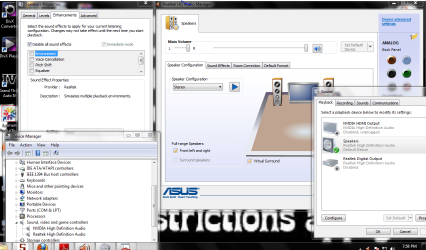
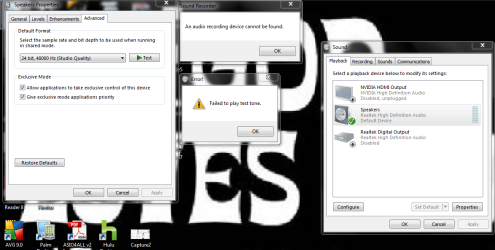
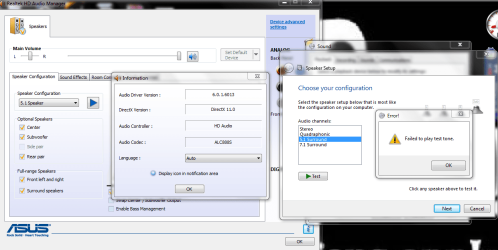
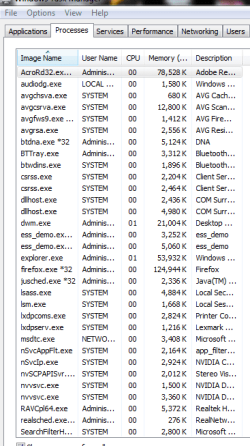
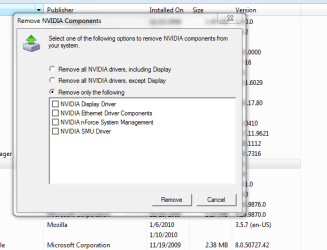
Edit 1/22/2010 9pm. Post #9 is snap shots of all I have tinkered with or looked at. You might be able to read this and skip to post #9
Now back to the original message:
I have no sound. My cpu is 3 months old. I have had extremely limited issues with the cpu since date of purchase. I was watching a movie on Windows media player, I never watched it before. Windows Media Center crashed. I rebooted and tried again. WMC refused to play any videos or movies now. My sound stopped working at this point. Below is relevant information, too much possibly. It is almost as if the sound produced by 'software' has been muted, blocked or turned off. This cpu is the only media device in the home. Windows media center crashed on 1/17 about 9pm and we have been without sound since. Please feel my pain!
The first 3 categories might be the most relevant. I am a computer noob. Although I am a competent human.
**What I have done:
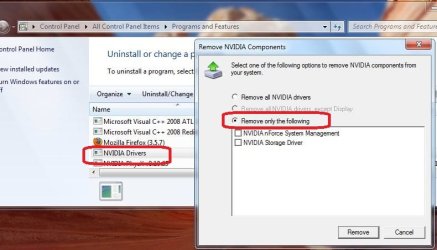
Update drivers using the link for my ASUS motherboard. I uninstalled drivers first
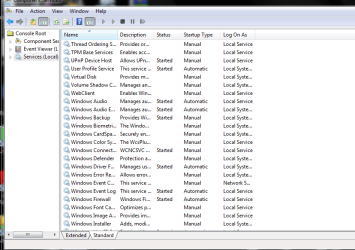
Turned off and on Audio services - they are running
Tried EVERY STINKING PORT, why are there so many damn ports?!?!?!?
Verified speakers are turned on
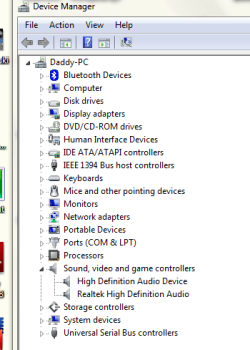
Checked in obvious locations for errors / Checked devices
Verified ALL wires are SNUG
Restored to previous restore point
Verified speakers are functional using MP3 player
Cleaned cpu & speakers
Did my best to verify wires and stuff inside were working
SPOKE with ASUS who said it was not the MoBo - said might be software?
CRIED! SCREAMED KICKED
Tried Realtek drivers
Prayed
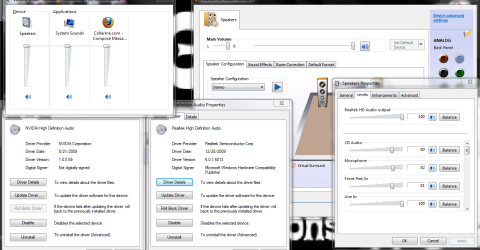
Fiddled with the realtek HD audio manager settings - I do not understand many of them: Changed play back quality, filled sound, turned effects off.
**What is odd:
If I plug in a mic I can sing a tune through the speakers.
Windows Media Player will not run ANY DVDS or MP3s. However, it will play 2 streaming videos I captured from youtube.
If I use another player such as VLC or DIVx the movie plays perfect with NO SOUND!
**When I attempt to play a test tone I receive the error, "Failed to play Test tone" with the yellow exclamation point
When I mute the speakers(on off) by pressing mute quickly I can hear that tiny click/muffle you would expect to hear when you mute speakers.
The above must somehow be relevant, no? My computer is working 100%. WELL CEPT FOR DARN SOUND
Realtek HD Manager:
Tower Speakers Checked Volume cranked
Tried 5.1 - all settings
SOUND:
Speakers Realtek Hi Def Audio -Green Check
Realtek 2nd Audio(Headphones) - Not Plugged in
Nvidia HDMI - Not Plugged In
Realtek Digitial OutPut(Realtek Digital Audio) - Ready
MotherBoard:
Asus: M3n72-d
ASUSTeK Computer Inc.
System Information:
OS Name Microsoft Windows 7 Home Premium
Version 6.1.7600 Build 7600
Other OS Description Not Available
OS Manufacturer Microsoft Corporation
System Name DADDY-PC
System Manufacturer System manufacturer
System Model System Product Name
System Type x64-based PC
Processor AMD Phenom(tm) II X4 955 Processor, 3200 Mhz, 4 Core(s), 4 Logical Processor(s)
BIOS Version/Date Phoenix Technologies, LTD ASUS M3N72-D ACPI BIOS Revision 1102, 6/30/2009
SMBIOS Version 2.5
Windows Directory C:\Windows
System Directory C:\Windows\system32
Boot Device \Device\HarddiskVolume1
Locale United States
Hardware Abstraction Layer Version = "6.1.7600.16385"
User Name Daddy-PC\Administrator
Time Zone US Eastern Standard Time
Installed Physical Memory (RAM) 4.00 GB
Total Physical Memory 4.00 GB
Available Physical Memory 2.48 GB
Total Virtual Memory 8.00 GB
Available Virtual Memory 6.23 GB
Component Services:
Windows Audio Started Automatic Local Service
Windows Audio Endpoint Builder Started Automatic Local System
Information I do not Understand but might be relevant
[Audio Codecs]
CODEC Manufacturer Description Status File Version Size Creation Date
c:\windows\system32\msg711.acm Microsoft Corporation OK C:\Windows\system32\MSG711.ACM 6.1.7600.16385 14.50 KB (14,848 bytes) 7/13/2009 7:18 PM
c:\windows\system32\imaadp32.acm Microsoft Corporation OK C:\Windows\system32\IMAADP32.ACM 6.1.7600.16385 21.50 KB (22,016 bytes) 7/13/2009 7:18 PM
c:\windows\system32\msgsm32.acm Microsoft Corporation OK C:\Windows\system32\MSGSM32.ACM 6.1.7600.16385 28.50 KB (29,184 bytes) 7/13/2009 7:18 PM
c:\windows\system32\msadp32.acm Microsoft Corporation OK C:\Windows\system32\MSADP32.ACM 6.1.7600.16385 23.50 KB (24,064 bytes) 7/13/2009 7:18 PM
c:\windows\system32\l3codeca.acm Fraunhofer Institut Integrierte Schaltungen IIS Fraunhofer IIS MPEG Layer-3 Codec OK C:\Windows\system32\L3CODECA.ACM 1.9.0.401 79.50 KB (81,408 bytes) 7/13/2009 7:22 PM
[Video Codecs]
CODEC Manufacturer Description Status File Version Size Creation Date
c:\windows\system32\msvidc32.dll Microsoft Corporation OK C:\Windows\system32\MSVIDC32.DLL 6.1.7600.16385 37.50 KB (38,400 bytes) 7/13/2009 7:18 PM
c:\windows\system32\msrle32.dll Microsoft Corporation OK C:\Windows\system32\MSRLE32.DLL 6.1.7600.16385 15.50 KB (15,872 bytes) 7/13/2009 7:18 PM
c:\windows\system32\msyuv.dll Microsoft Corporation OK C:\Windows\system32\MSYUV.DLL 6.1.7600.16385 24.00 KB (24,576 bytes) 7/13/2009 7:06 PM
c:\windows\system32\iyuv_32.dll Microsoft Corporation OK C:\Windows\system32\IYUV_32.DLL 6.1.7600.16385 52.50 KB (53,760 bytes) 7/13/2009 7:06 PM
c:\windows\system32\tsbyuv.dll Microsoft Corporation OK C:\Windows\system32\TSBYUV.DLL 6.1.7600.16385 14.00 KB (14,336 bytes) 7/13/2009 7:06 PM
c:\windows\system32\frapsv64.dll Beepa P/L Fraps Video Decompressor OK C:\Windows\system32\FRAPSV64.DLL 2.9.9.8086 83.00 KB
Approx time of CRASH:
Log Name: Microsoft-Windows-Diagnostics-Performance/Operational
Source: Microsoft-Windows-Diagnostics-Performance
Date: 1/17/2010 9:00:21 PM
Event ID: 101
Task Category: Boot Performance Monitoring
Level: Warning
Keywords: Event Log
User: LOCAL SERVICE
Computer: Daddy-PC
Description:
This application took longer than usual to start up, resulting in a performance degradation in the system startup process:
File Name : ehshell.exe
Friendly Name : Windows Media Center
Version : 6.1.7600.16385 (win7_rtm.090713-1255)
Total Time : 12002ms
Degradation Time : 7002ms
Incident Time (UTC) : 2010-01-18T01:57:57.656000000Z
Event Xml:
<Event xmlns="http://schemas.microsoft.com/win/2004/08/events/event">
<System>
<Provider Name="Microsoft-Windows-Diagnostics-Performance" Guid="{CFC18EC0-96B1-4EBA-961B-622CAEE05B0A}" />
<EventID>101</EventID>
<Version>1</Version>
<Level>3</Level>
<Task>4002</Task>
<Opcode>33</Opcode>
<Keywords>0x8000000000010000</Keywords>
<TimeCreated SystemTime="2010-01-18T02:00:21.868800000Z" />
<EventRecordID>1183</EventRecordID>
<Correlation ActivityID="{00000100-0000-0002-8859-10A8E197CA01}" />
<Execution ProcessID="1420" ThreadID="1312" />
<Channel>Microsoft-Windows-Diagnostics-Performance/Operational</Channel>
<Computer>Daddy-PC</Computer>
<Security UserID="S-1-5-19" />
</System>
<EventData>
<Data Name="StartTime">2010-01-18T01:57:57.656000000Z</Data>
<Data Name="NameLength">12</Data>
<Data Name="Name">ehshell.exe</Data>
<Data Name="FriendlyNameLength">21</Data>
<Data Name="FriendlyName">Windows Media Center</Data>
<Data Name="VersionLength">38</Data>
<Data Name="Version">6.1.7600.16385 (win7_rtm.090713-1255)</Data>
<Data Name="TotalTime">12002</Data>
<Data Name="DegradationTime">7002</Data>
<Data Name="PathLength">29</Data>
<Data Name="Path">C:\Windows\ehome\ehshell.exe</Data>
<Data Name="ProductNameLength">37</Data>
<Data Name="ProductName">Microsoft® Windows® Operating System</Data>
<Data Name="CompanyNameLength">22</Data>
<Data Name="CompanyName">Microsoft Corporation</Data>
</EventData>
</Event>
Now back to the original message:
I have no sound. My cpu is 3 months old. I have had extremely limited issues with the cpu since date of purchase. I was watching a movie on Windows media player, I never watched it before. Windows Media Center crashed. I rebooted and tried again. WMC refused to play any videos or movies now. My sound stopped working at this point. Below is relevant information, too much possibly. It is almost as if the sound produced by 'software' has been muted, blocked or turned off. This cpu is the only media device in the home. Windows media center crashed on 1/17 about 9pm and we have been without sound since. Please feel my pain!
The first 3 categories might be the most relevant. I am a computer noob. Although I am a competent human.
**What I have done:
Update drivers using the link for my ASUS motherboard. I uninstalled drivers first
Turned off and on Audio services - they are running
Tried EVERY STINKING PORT, why are there so many damn ports?!?!?!?
Verified speakers are turned on
Checked in obvious locations for errors / Checked devices
Verified ALL wires are SNUG
Restored to previous restore point
Verified speakers are functional using MP3 player
Cleaned cpu & speakers
Did my best to verify wires and stuff inside were working
SPOKE with ASUS who said it was not the MoBo - said might be software?
CRIED! SCREAMED KICKED
Tried Realtek drivers
Prayed
Fiddled with the realtek HD audio manager settings - I do not understand many of them: Changed play back quality, filled sound, turned effects off.
**What is odd:
If I plug in a mic I can sing a tune through the speakers.
Windows Media Player will not run ANY DVDS or MP3s. However, it will play 2 streaming videos I captured from youtube.
If I use another player such as VLC or DIVx the movie plays perfect with NO SOUND!
**When I attempt to play a test tone I receive the error, "Failed to play Test tone" with the yellow exclamation point
When I mute the speakers(on off) by pressing mute quickly I can hear that tiny click/muffle you would expect to hear when you mute speakers.
The above must somehow be relevant, no? My computer is working 100%. WELL CEPT FOR DARN SOUND
Realtek HD Manager:
Tower Speakers Checked Volume cranked
Tried 5.1 - all settings
SOUND:
Speakers Realtek Hi Def Audio -Green Check
Realtek 2nd Audio(Headphones) - Not Plugged in
Nvidia HDMI - Not Plugged In
Realtek Digitial OutPut(Realtek Digital Audio) - Ready
MotherBoard:
Asus: M3n72-d
ASUSTeK Computer Inc.
System Information:
OS Name Microsoft Windows 7 Home Premium
Version 6.1.7600 Build 7600
Other OS Description Not Available
OS Manufacturer Microsoft Corporation
System Name DADDY-PC
System Manufacturer System manufacturer
System Model System Product Name
System Type x64-based PC
Processor AMD Phenom(tm) II X4 955 Processor, 3200 Mhz, 4 Core(s), 4 Logical Processor(s)
BIOS Version/Date Phoenix Technologies, LTD ASUS M3N72-D ACPI BIOS Revision 1102, 6/30/2009
SMBIOS Version 2.5
Windows Directory C:\Windows
System Directory C:\Windows\system32
Boot Device \Device\HarddiskVolume1
Locale United States
Hardware Abstraction Layer Version = "6.1.7600.16385"
User Name Daddy-PC\Administrator
Time Zone US Eastern Standard Time
Installed Physical Memory (RAM) 4.00 GB
Total Physical Memory 4.00 GB
Available Physical Memory 2.48 GB
Total Virtual Memory 8.00 GB
Available Virtual Memory 6.23 GB
Component Services:
Windows Audio Started Automatic Local Service
Windows Audio Endpoint Builder Started Automatic Local System
Information I do not Understand but might be relevant
[Audio Codecs]
CODEC Manufacturer Description Status File Version Size Creation Date
c:\windows\system32\msg711.acm Microsoft Corporation OK C:\Windows\system32\MSG711.ACM 6.1.7600.16385 14.50 KB (14,848 bytes) 7/13/2009 7:18 PM
c:\windows\system32\imaadp32.acm Microsoft Corporation OK C:\Windows\system32\IMAADP32.ACM 6.1.7600.16385 21.50 KB (22,016 bytes) 7/13/2009 7:18 PM
c:\windows\system32\msgsm32.acm Microsoft Corporation OK C:\Windows\system32\MSGSM32.ACM 6.1.7600.16385 28.50 KB (29,184 bytes) 7/13/2009 7:18 PM
c:\windows\system32\msadp32.acm Microsoft Corporation OK C:\Windows\system32\MSADP32.ACM 6.1.7600.16385 23.50 KB (24,064 bytes) 7/13/2009 7:18 PM
c:\windows\system32\l3codeca.acm Fraunhofer Institut Integrierte Schaltungen IIS Fraunhofer IIS MPEG Layer-3 Codec OK C:\Windows\system32\L3CODECA.ACM 1.9.0.401 79.50 KB (81,408 bytes) 7/13/2009 7:22 PM
[Video Codecs]
CODEC Manufacturer Description Status File Version Size Creation Date
c:\windows\system32\msvidc32.dll Microsoft Corporation OK C:\Windows\system32\MSVIDC32.DLL 6.1.7600.16385 37.50 KB (38,400 bytes) 7/13/2009 7:18 PM
c:\windows\system32\msrle32.dll Microsoft Corporation OK C:\Windows\system32\MSRLE32.DLL 6.1.7600.16385 15.50 KB (15,872 bytes) 7/13/2009 7:18 PM
c:\windows\system32\msyuv.dll Microsoft Corporation OK C:\Windows\system32\MSYUV.DLL 6.1.7600.16385 24.00 KB (24,576 bytes) 7/13/2009 7:06 PM
c:\windows\system32\iyuv_32.dll Microsoft Corporation OK C:\Windows\system32\IYUV_32.DLL 6.1.7600.16385 52.50 KB (53,760 bytes) 7/13/2009 7:06 PM
c:\windows\system32\tsbyuv.dll Microsoft Corporation OK C:\Windows\system32\TSBYUV.DLL 6.1.7600.16385 14.00 KB (14,336 bytes) 7/13/2009 7:06 PM
c:\windows\system32\frapsv64.dll Beepa P/L Fraps Video Decompressor OK C:\Windows\system32\FRAPSV64.DLL 2.9.9.8086 83.00 KB
Approx time of CRASH:
Log Name: Microsoft-Windows-Diagnostics-Performance/Operational
Source: Microsoft-Windows-Diagnostics-Performance
Date: 1/17/2010 9:00:21 PM
Event ID: 101
Task Category: Boot Performance Monitoring
Level: Warning
Keywords: Event Log
User: LOCAL SERVICE
Computer: Daddy-PC
Description:
This application took longer than usual to start up, resulting in a performance degradation in the system startup process:
File Name : ehshell.exe
Friendly Name : Windows Media Center
Version : 6.1.7600.16385 (win7_rtm.090713-1255)
Total Time : 12002ms
Degradation Time : 7002ms
Incident Time (UTC) : 2010-01-18T01:57:57.656000000Z
Event Xml:
<Event xmlns="http://schemas.microsoft.com/win/2004/08/events/event">
<System>
<Provider Name="Microsoft-Windows-Diagnostics-Performance" Guid="{CFC18EC0-96B1-4EBA-961B-622CAEE05B0A}" />
<EventID>101</EventID>
<Version>1</Version>
<Level>3</Level>
<Task>4002</Task>
<Opcode>33</Opcode>
<Keywords>0x8000000000010000</Keywords>
<TimeCreated SystemTime="2010-01-18T02:00:21.868800000Z" />
<EventRecordID>1183</EventRecordID>
<Correlation ActivityID="{00000100-0000-0002-8859-10A8E197CA01}" />
<Execution ProcessID="1420" ThreadID="1312" />
<Channel>Microsoft-Windows-Diagnostics-Performance/Operational</Channel>
<Computer>Daddy-PC</Computer>
<Security UserID="S-1-5-19" />
</System>
<EventData>
<Data Name="StartTime">2010-01-18T01:57:57.656000000Z</Data>
<Data Name="NameLength">12</Data>
<Data Name="Name">ehshell.exe</Data>
<Data Name="FriendlyNameLength">21</Data>
<Data Name="FriendlyName">Windows Media Center</Data>
<Data Name="VersionLength">38</Data>
<Data Name="Version">6.1.7600.16385 (win7_rtm.090713-1255)</Data>
<Data Name="TotalTime">12002</Data>
<Data Name="DegradationTime">7002</Data>
<Data Name="PathLength">29</Data>
<Data Name="Path">C:\Windows\ehome\ehshell.exe</Data>
<Data Name="ProductNameLength">37</Data>
<Data Name="ProductName">Microsoft® Windows® Operating System</Data>
<Data Name="CompanyNameLength">22</Data>
<Data Name="CompanyName">Microsoft Corporation</Data>
</EventData>
</Event>
Last edited:
My Computer
At a glance
Win 7Phen 965 AMD4gig ddr kingstonNvidia 9800 something or other - good card
- OS
- Win 7
- CPU
- Phen 965 AMD
- Motherboard
- Asus m3n72-d
- Memory
- 4gig ddr kingston
- Graphics Card(s)
- Nvidia 9800 something or other - good card
- Sound Card
- On MoBo
- Monitor(s) Displays
- Acer standard 19 ' / Sony Bravia 42'
- Screen Resolution
- I change it sometimes
- Hard Drives
- 500gb
500gb
Western Digital