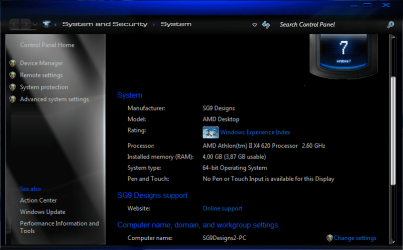
4 GB Ram Installed. Only 3.78 gb usable

sergiogarcia9

︻┳テ=一
Guru
Local time
4:12 PM
Messages
4,755
Hi guys i was wondering why does my PC show this? (see the attachment)
I'm running Windows 7 Ultimate x64, on the specs in my 'system specs' ;)

How can i make all 4 gb usable? :confused:
 

Attachments

  • Capture.PNG
    Capture.PNG
    45.4 KB · Views: 426
Hi guys i was wondering why does my PC show this? (see the attachment)
I'm running Windows 7 Ultimate x64, on the specs in my 'system specs' ;)

How can i make all 4 gb usable? :confused:
Sergio, I think the remaining RAM is possibly being used by your graphics card.

I say possibly because looking at my own computer's specs seems to contradict that theory.:confused:
 

Attachments

  • Capture.JPG
    Capture.JPG
    32.5 KB · Views: 196

My Computer My Computer

At a glance

Win 7 Ultimate 64-bit SP1 (desktop)Intel Core 2 Duo E84002x 2GB OCZ DDR II SDRAM PC2-6400NVIDIA GeForce 9400GT
Computer type
PC/Desktop
Computer Manufacturer/Model Number
Gigabyte Technology Co., Ltd.
OS
Win 7 Ultimate 64-bit SP1 (desktop)
CPU
Intel Core 2 Duo E8400
Motherboard
Gigabyte GA-EP35-DS3R
Memory
2x 2GB OCZ DDR II SDRAM PC2-6400
Graphics Card(s)
NVIDIA GeForce 9400GT
Monitor(s) Displays
HP 2009m(primary), Acer P191W
Screen Resolution
1600x900, 1440x900
Hard Drives
Internal:WD Caviar Black 640GB 32MB cache 7200RPM
External:Samsung Story Station 1TB HDD desktop drive
500GB Toshiba portable drive
PSU
Antec Earthwatts EA500D
Case
Antec Sonata III
Cooling
4 fans
Keyboard
Logitech Wave
Mouse
Logitech M-SBF90
Internet Speed
Slow due to home Wireless-G router
Antivirus
MSE, Hitman Pro, Malwarebytes
Browser
Chrome and Palemoon
Other Info
Laptop....Acer 5750Z-4835
15.6" HD Widescreen CineCrystal™ LED-backlit LCD Display: (1366x768 resolution, 16:9 aspect ratio)
Intel® Pentium® Processor B940 (2.0GHz, 2MB L3 cache)
Windows® 7 Home Premium,500GB Hard Drive,4GB DDR3 RAM, Intel® HD Graphics,8X DVD-Super Multi Double-Layer Drive
Multi-in-1 Digital Media Card Reader,802.11b/g/n Wi-Fi
Chrome and Palemoon, MSE, Hitman Pro
Sergio, I think the remaining RAM is possibly being used by your graphics card.

I say possibly because looking at my own computer's specs seems to contradict that theory.:confused:

You got it right. He is using onboard video, where yours is a dedicated video card. It probably also has dynamic memory use for it, from the base 128 MB to whatever the max supported by it is. If that is what it is it would explain why the total is less than 4096 MB minus the 128 MB for the video memory.
 

My Computer My Computer

At a glance

Win 7 Ultimate x64FX-8350 @ 4.6 GHz so farADATA XPG V1 Series Black 8GB DDR3 1600Sapphire R9 270x Dual-X
Computer type
PC/Desktop
Computer Manufacturer/Model Number
Me
OS
Win 7 Ultimate x64
CPU
FX-8350 @ 4.6 GHz so far
Motherboard
Asus M5A97 EVO
Memory
ADATA XPG V1 Series Black 8GB DDR3 1600
Graphics Card(s)
Sapphire R9 270x Dual-X
Sound Card
Xonar DGX w/ Corsair Vengence 1300
Monitor(s) Displays
Acer S232HL Abid
Screen Resolution
1920x1080
Hard Drives
120 GB OCZ Vertex 3
500 GB Seagate 7200.12
PSU
Antec Earthwatts 650W Green
Case
Antec Three Hundred
Cooling
Cooler Master 212 EVO
Keyboard
Logitech G510
Mouse
Logitech G500s
Internet Speed
35000/3000
Even when you have a separate graphics card, memory will be set aside for graphics if you also have integrated graphics on your motherboard and/or you are missing the correct driver. If you disable the integrated graphics from the bios, you can get that memory back
 
Be happy, I can only use 3GB out of 4GB on my setup in both 32/64 Bit with 256MB onboard graphics.

:p
 

My Computer My Computer

At a glance

Windows 7 ProfessionalIntel Core i7-2670QMSamsung 8GBNVIDIA GT 555M
OS
Windows 7 Professional
CPU
Intel Core i7-2670QM
Memory
Samsung 8GB
Graphics Card(s)
NVIDIA GT 555M
Hard Drives
Intel 525 120GB | HGST Travelstar 1TB
Mouse
CM Storm Xornet | Microsoft Sculpt Comfort
Internet Speed
25 Mbps | 600 Kbps
Other Info
Centrino 6205 | Seagate Backup Plus 1TB
Hmm so what you are saying is, that when i get my GT220 later this month, i will be able to get all my ram back? By turning off the onboard graphics?
 
Hmm so what you are saying is, that when i get my GT220 later this month, i will be able to get all my ram back? By turning off the onboard graphics?


I'm no expert but it sounds right, have fun using the extra 256MB.

:p
 

My Computer My Computer

At a glance

Windows 7 ProfessionalIntel Core i7-2670QMSamsung 8GBNVIDIA GT 555M
OS
Windows 7 Professional
CPU
Intel Core i7-2670QM
Memory
Samsung 8GB
Graphics Card(s)
NVIDIA GT 555M
Hard Drives
Intel 525 120GB | HGST Travelstar 1TB
Mouse
CM Storm Xornet | Microsoft Sculpt Comfort
Internet Speed
25 Mbps | 600 Kbps
Other Info
Centrino 6205 | Seagate Backup Plus 1TB
lol The GT220 i'm getting is a 1024mb ;)

Pure marketing BS, that card isn't anywhere near powerful enough to make use of it. It is a nice step up from your current onboard, but hope you don't plan on any serious gaming with it.
 

My Computer My Computer

At a glance

Win 7 Ultimate x64FX-8350 @ 4.6 GHz so farADATA XPG V1 Series Black 8GB DDR3 1600Sapphire R9 270x Dual-X
Computer type
PC/Desktop
Computer Manufacturer/Model Number
Me
OS
Win 7 Ultimate x64
CPU
FX-8350 @ 4.6 GHz so far
Motherboard
Asus M5A97 EVO
Memory
ADATA XPG V1 Series Black 8GB DDR3 1600
Graphics Card(s)
Sapphire R9 270x Dual-X
Sound Card
Xonar DGX w/ Corsair Vengence 1300
Monitor(s) Displays
Acer S232HL Abid
Screen Resolution
1920x1080
Hard Drives
120 GB OCZ Vertex 3
500 GB Seagate 7200.12
PSU
Antec Earthwatts 650W Green
Case
Antec Three Hundred
Cooling
Cooler Master 212 EVO
Keyboard
Logitech G510
Mouse
Logitech G500s
Internet Speed
35000/3000
lol The GT220 i'm getting is a 1024mb ;)

Pure marketing BS, that card isn't anywhere near powerful enough to make use of it. It is a nice step up from your current onboard, but hope you don't plan on any serious gaming with it.

Agreed, 1080p gaming would kill that card.
 

My Computer My Computer

At a glance

Windows 7 Ultimate x86-64[email protected] 1066MHz FSB6GB DDR3 1066MHz9300M GS 256MB Dedicated (Speed) + Intel4500M...
Computer Manufacturer/Model Number
Sony Vaio Z46GDU
OS
Windows 7 Ultimate x86-64
CPU
[email protected] 1066MHz FSB
Motherboard
Sony branded
Memory
6GB DDR3 1066MHz
Graphics Card(s)
9300M GS 256MB Dedicated (Speed) + Intel4500MHD (Stamina)
Sound Card
Realtek HD Audio
Monitor(s) Displays
13.1' WXGA
Screen Resolution
1600x900
Hard Drives
320GB 7200RPM w/ 16MB cache
Internet Speed
1MB/s
Um , 4GB - 3.78GB...=256MB extra. :sarc:

:p
 

My Computer My Computer

At a glance

Windows 7 ProfessionalIntel Core i7-2670QMSamsung 8GBNVIDIA GT 555M
OS
Windows 7 Professional
CPU
Intel Core i7-2670QM
Memory
Samsung 8GB
Graphics Card(s)
NVIDIA GT 555M
Hard Drives
Intel 525 120GB | HGST Travelstar 1TB
Mouse
CM Storm Xornet | Microsoft Sculpt Comfort
Internet Speed
25 Mbps | 600 Kbps
Other Info
Centrino 6205 | Seagate Backup Plus 1TB
Hi guys i was wondering why does my PC show this? (see the attachment)
I'm running Windows 7 Ultimate x64, on the specs in my 'system specs' ;)

How can i make all 4 gb usable? :confused:

Did you check the:

System Properties tab=>Advanced tab=>Performances tab=>Advanced tab=>Modify tab.

You can set it to automatic or decide the amount of the swap ram set to 4098....

I've got 4Gb Ram. Mine says 4098 actual and 5997 recommended.

It is set to 4098 as i decide no automatic setting!:)

Edit:
i have by now set approx 1,5 more at 5997Gb because i've noticed some latency.
Looks it have boosted a little the write cache into the hard drive.
 
Last edited:

My Computer My Computer

At a glance

Windows 7 Professional SP1 - x64 [Non-UEFI Boot]Ivy Bridge Core i5 3570K (Delidded)G.Skill "Ares" DDR3 PC3-12800 - 1600MHz (16Gb)Asus Dual-RX480-O4G
Computer type
PC/Desktop
Computer Manufacturer/Model Number
Custom Build
OS
Windows 7 Professional SP1 - x64 [Non-UEFI Boot]
CPU
Ivy Bridge Core i5 3570K (Delidded)
Motherboard
Asus P8Z77-V LE PLUS
Memory
G.Skill "Ares" DDR3 PC3-12800 - 1600MHz (16Gb)
Graphics Card(s)
Asus Dual-RX480-O4G
Sound Card
Creative Sound Blaster Z w/5.1 sound system
Monitor(s) Displays
Asus IPS 23"
Screen Resolution
16/9
Hard Drives
Internal:
500Go Sata 6Gb/s (x2)
500Go Sata 3Gb/s (x2)
SSD 60Go Sata 6Gb/s
PSU
In Win C 900W Series 80+ Platinum
Case
Thermaltake Chaser A71
Cooling
Custom Water Cooling Loop
Keyboard
Cooler Master QuickFire XTi
Mouse
Razer Imperator 2012 (4G)
Antivirus
MSE
Browser
IE 11.0.xxx Rtm
Other Info
"Raid0" with Intel Smart Response Technology (HDD/SSD)
The optimal setting for the pagefile is 1.5x the installed RAM. If you have 8gb or more of memory, you can run 64 bit windows 7 without a pagefile, but I think most people who really know what they're doing would advise against it.
 
lol The GT220 i'm getting is a 1024mb ;)

Pure marketing BS, that card isn't anywhere near powerful enough to make use of it. It is a nice step up from your current onboard, but hope you don't plan on any serious gaming with it.
If "serious gaming" includes 1360x768 GTA IV, GRID, NFS, Saints Row, Fallout etc, then yes. ;)
 

My Computer My Computer

At a glance

Win 7 Ultimate x64FX-8350 @ 4.6 GHz so farADATA XPG V1 Series Black 8GB DDR3 1600Sapphire R9 270x Dual-X
Computer type
PC/Desktop
Computer Manufacturer/Model Number
Me
OS
Win 7 Ultimate x64
CPU
FX-8350 @ 4.6 GHz so far
Motherboard
Asus M5A97 EVO
Memory
ADATA XPG V1 Series Black 8GB DDR3 1600
Graphics Card(s)
Sapphire R9 270x Dual-X
Sound Card
Xonar DGX w/ Corsair Vengence 1300
Monitor(s) Displays
Acer S232HL Abid
Screen Resolution
1920x1080
Hard Drives
120 GB OCZ Vertex 3
500 GB Seagate 7200.12
PSU
Antec Earthwatts 650W Green
Case
Antec Three Hundred
Cooling
Cooler Master 212 EVO
Keyboard
Logitech G510
Mouse
Logitech G500s
Internet Speed
35000/3000
Back
Top