Homegroup probs, can't access C on Win 7 comps.

Keeper Dave

New member
Local time
1:12 PM
Messages
5
Location
San Diego
I have a total of six computers on my home network. Four (two wired, two wireless) run XP, two (both wired) run Win 7. I have a new D-link DIR615 router replacing an older Linksys with which I had the same problems.

All of the XP machines connect with each other and share files to all drives perfectly. All six machines connect and share files with the secondary drives but NOT the C drives of the Win 7 machines. I can't get the Win 7 machines to see each other in the homegroup.

Each 7 machine says that it's joined to a homegroup, but that there's no other computer in the homegroup. Both are on.

Passwords are the same and I have password access disabled anyway.

All permissions I can find are enabled.

Network discovery is enabled.

All sharing is enabled, including all settings I could find for the C drives of the Win 7 machines.

One thing I found is that IPv6 shows "No internet connectivity" on both 7 machines. IPv4 shows internet connectivity. I really don't know what that means.

I've tried everything I've found on every tutorial I've found and can't make this work. Any help would be very much appreciated.

Thanks in advance.
 

My Computer My Computer

At a glance

Win 7 Home PremiumIntel Q95504gb Kingston
Computer Manufacturer/Model Number
Self Built
OS
Win 7 Home Premium
CPU
Intel Q9550
Motherboard
Asus P5B Deluxe
Memory
4gb Kingston
Homegroups is not made to work in a mixed Op system network, it's only made to function correctly with all Windows 7 machines. You need to set up a Workgroup for a mixed Op system network.

IPv6 only connects on the LAN and is used locally for the Homegroup network. That is why it says disconnected which is in reference to the WAN.

You should leave the Homegroup on all of the Windows 7 machines and create a Workgroup.
http://www.sevenforums.com/tutorials/43980-homegroup-leave.html?filter

Networking home computers running different versions of Windows

Sharing files and printers with different versions of Windows - Help & How-to - Microsoft Windows
 

My Computer My Computer

At a glance

Windows 7 Ult, Windows 8.1 Pro,Q9650-4.275GHz, E8600 4.5GHz, E6750-3.8GHzG.Skill PC2 9600 1200Mhz 5 5 5 15 2TGTX480
Computer type
PC/Desktop
Computer Manufacturer/Model Number
Home built
OS
Windows 7 Ult, Windows 8.1 Pro,
CPU
Q9650-4.275GHz, E8600 4.5GHz, E6750-3.8GHz
Motherboard
Evga 780i FTW
Memory
G.Skill PC2 9600 1200Mhz 5 5 5 15 2T
Graphics Card(s)
GTX480
Sound Card
Asus Xonar D2
Monitor(s) Displays
HannsG
Screen Resolution
1680X1050
Hard Drives
GSkill Phoenix Pro 120GB SSD
PSU
ThermalTake Toughpower 1000Watt modular
Case
ThermalTake XaserV
Cooling
Xigmatek S1283
Keyboard
Logitech G15
Mouse
Logitech G9
Internet Speed
T1
I have a total of six computers on my home network. Four (two wired, two wireless) run XP, two (both wired) run Win 7. I have a new D-link DIR615 router replacing an older Linksys with which I had the same problems.

All of the XP machines connect with each other and share files to all drives perfectly. All six machines connect and share files with the secondary drives but NOT the C drives of the Win 7 machines. I can't get the Win 7 machines to see each other in the homegroup.

Each 7 machine says that it's joined to a homegroup, but that there's no other computer in the homegroup. Both are on.

Passwords are the same and I have password access disabled anyway.

All permissions I can find are enabled.

Network discovery is enabled.

All sharing is enabled, including all settings I could find for the C drives of the Win 7 machines.

One thing I found is that IPv6 shows "No internet connectivity" on both 7 machines. IPv4 shows internet connectivity. I really don't know what that means.

I've tried everything I've found on every tutorial I've found and can't make this work. Any help would be very much appreciated.

Thanks in advance.


KD

Ho and welcome

Homegroup is for win 7 machines only. Mixed environments need "workgroup". Homegrooup uses IPv6, workgroup IPv4. Instructions for leaving homegroup can be found here. http://www.sevenforums.com/tutorials/43980-homegroup-leave.html?ltr=H

Then just make a new network connection using workgroup

Let us know if you need help

Ken
 

My Computer My Computer

At a glance

Win 8 Release candidate 8400[email protected]4 gigsNvidia 9600M
Computer Manufacturer/Model Number
HP Pavillion dv-7 1005 Tx
OS
Win 8 Release candidate 8400
CPU
[email protected]
Memory
4 gigs
Graphics Card(s)
Nvidia 9600M
Sound Card
HD built-in
Monitor(s) Displays
17" Wxga
Screen Resolution
1440x900
Cooling
none
Internet Speed
45Mb down 5Mb up
I have a total of six computers on my home network. Four (two wired, two wireless) run XP, two (both wired) run Win 7. I have a new D-link DIR615 router replacing an older Linksys with which I had the same problems.

All of the XP machines connect with each other and share files to all drives perfectly. All six machines connect and share files with the secondary drives but NOT the C drives of the Win 7 machines. I can't get the Win 7 machines to see each other in the homegroup.

Each 7 machine says that it's joined to a homegroup, but that there's no other computer in the homegroup. Both are on.

Passwords are the same and I have password access disabled anyway.

All permissions I can find are enabled.

Network discovery is enabled.

All sharing is enabled, including all settings I could find for the C drives of the Win 7 machines.

One thing I found is that IPv6 shows "No internet connectivity" on both 7 machines. IPv4 shows internet connectivity. I really don't know what that means.

I've tried everything I've found on every tutorial I've found and can't make this work. Any help would be very much appreciated.

Thanks in advance.


KD

Ho and welcome

Homegroup is for win 7 machines only. Mixed environments need "workgroup". Homegrooup uses IPv6, workgroup IPv4. Instructions for leaving homegroup can be found here. http://www.sevenforums.com/tutorials/43980-homegroup-leave.html?ltr=H

Then just make a new network connection using workgroup

Let us know if you need help

Ken

OK. Thanks very much to both of you.

I thought I could create a Homegroup with just the two Win 7 comps but I guess not and that's fine.

I did change the workgroup names on both Win 7 comps from "Workgroup" to "Home" to match the four XP machines. I still can't write files to the C drive on either Win 7 machine from any other including the other Win 7 comp. I can write to any drive including C on the XP machines just fine and also to the D drives on both Win 7 machines. I think I have Advanced Sharing for C on both Win 7 machines set as wide open as possible, but maybe I'm missing something.

Thanks again.

Dave
 

My Computer My Computer

At a glance

Win 7 Home PremiumIntel Q95504gb Kingston
Computer Manufacturer/Model Number
Self Built
OS
Win 7 Home Premium
CPU
Intel Q9550
Motherboard
Asus P5B Deluxe
Memory
4gb Kingston
It might help to run the network set up wizard on all the XP machines and rejoin the new workgroup with them all.

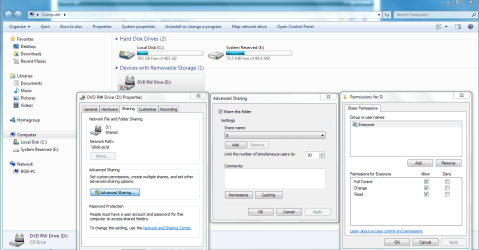
As for sharing the entire C drive, this is not advised for security reasons but can be done. I'm just using the D drive as an example here. I can't say for sure how well sharing the entire C drive will work in a mixed Op system "Work" type network. You have to right click the drive and choose Advanced sharing then Advanced sharing again, put in the check marks then hit apply and reboot all machines.

It also seems to help with sharing if you use the same user names and passwords on all of the Workgroup machines.

The Public files work pretty well for sharing in a mixed OP system network. If you are running any type of A/V software or third party firewalls they can and will cause sharing problems for you also.
 

Attachments

  • Sharing D  drive and permissions.PNG
    Sharing D drive and permissions.PNG
    65.4 KB · Views: 168
Last edited:

My Computer My Computer

At a glance

Windows 7 Ult, Windows 8.1 Pro,Q9650-4.275GHz, E8600 4.5GHz, E6750-3.8GHzG.Skill PC2 9600 1200Mhz 5 5 5 15 2TGTX480
Computer type
PC/Desktop
Computer Manufacturer/Model Number
Home built
OS
Windows 7 Ult, Windows 8.1 Pro,
CPU
Q9650-4.275GHz, E8600 4.5GHz, E6750-3.8GHz
Motherboard
Evga 780i FTW
Memory
G.Skill PC2 9600 1200Mhz 5 5 5 15 2T
Graphics Card(s)
GTX480
Sound Card
Asus Xonar D2
Monitor(s) Displays
HannsG
Screen Resolution
1680X1050
Hard Drives
GSkill Phoenix Pro 120GB SSD
PSU
ThermalTake Toughpower 1000Watt modular
Case
ThermalTake XaserV
Cooling
Xigmatek S1283
Keyboard
Logitech G15
Mouse
Logitech G9
Internet Speed
T1
My friend who is opening his internet cafe tmr is having a similar problem. He is saying that he has the C drive on each machine share ( i advised otherwise ) but whether homegroup or workgroup, he keeps getting access denied.

He says his permissions are set to full on everything. Going to head down there and check it out for him later

He says file and printer sharing and network discovery is on. I even had him disable firewalls. Not sure what the problem is by I'm sure I can get it out when I reach down there.

Meanwhile, anyone have anything of the top of their head with a similar problem and a solution? ( Will make my work easier if I know what I'm looking for ;) )
 

My Computer My Computer

At a glance

Windows 8.1 PRO3rd Generation Intel Core i7‐3612QM CPU @ 2.1...8GB DDR3NVIDIA GeForce GT 525M (128 bit), 1GB Grpahics
Computer type
PC/Desktop
Computer Manufacturer/Model Number
DELL VOSTRO 3650
OS
Windows 8.1 PRO
CPU
3rd Generation Intel Core i7‐3612QM CPU @ 2.10GHZ
Memory
8GB DDR3
Graphics Card(s)
NVIDIA GeForce GT 525M (128 bit), 1GB Grpahics
Screen Resolution
1920X1080
Hard Drives
750GB 5400RPM
My friend who is opening his internet cafe tmr is having a similar problem. He is saying that he has the C drive on each machine share ( i advised otherwise ) but whether homegroup or workgroup, he keeps getting access denied.

He says his permissions are set to full on everything. Going to head down there and check it out for him later

He says file and printer sharing and network discovery is on. I even had him disable firewalls. Not sure what the problem is by I'm sure I can get it out when I reach down there.

Meanwhile, anyone have anything of the top of their head with a similar problem and a solution? ( Will make my work easier if I know what I'm looking for ;) )

OK. First off, thanks very much to the previous responders. I learned much from all of you.

Now, what I finally ended up doing was creating a folder called "Files" in the C:/Users/Public folder of each computer. Then I created a desktop shortcut to each, the local and the remote folders. That way I can just drop files into the remote folder of each computer and retrieve them VIA the shortcut to the local folder. Really simple and I might do it for all six comps though I don't share with the others as much.

Thanks to all. This is a very valuable forum.

Dave
 

My Computer My Computer

At a glance

Win 7 Home PremiumIntel Q95504gb Kingston
Computer Manufacturer/Model Number
Self Built
OS
Win 7 Home Premium
CPU
Intel Q9550
Motherboard
Asus P5B Deluxe
Memory
4gb Kingston
Sounds good Dave, those public folders are useful and seem to work well for everyone in a mixed Op system network. It's nice to see a fellow San Diegian in here.

It sounds like you have the shares working well so I'll mark as solved. :)
 

My Computer My Computer

At a glance

Windows 7 Ult, Windows 8.1 Pro,Q9650-4.275GHz, E8600 4.5GHz, E6750-3.8GHzG.Skill PC2 9600 1200Mhz 5 5 5 15 2TGTX480
Computer type
PC/Desktop
Computer Manufacturer/Model Number
Home built
OS
Windows 7 Ult, Windows 8.1 Pro,
CPU
Q9650-4.275GHz, E8600 4.5GHz, E6750-3.8GHz
Motherboard
Evga 780i FTW
Memory
G.Skill PC2 9600 1200Mhz 5 5 5 15 2T
Graphics Card(s)
GTX480
Sound Card
Asus Xonar D2
Monitor(s) Displays
HannsG
Screen Resolution
1680X1050
Hard Drives
GSkill Phoenix Pro 120GB SSD
PSU
ThermalTake Toughpower 1000Watt modular
Case
ThermalTake XaserV
Cooling
Xigmatek S1283
Keyboard
Logitech G15
Mouse
Logitech G9
Internet Speed
T1
Back
Top