Vista Windows Sidebar - Reinstate on Windows 7

Sidebar - Vista Sidebar on Windows 7

How to Reinstate the Vista Sidebar on Windows 7

   Information
This will show you how to reinstate the Vista Windows Sidebar on Windows 7.


METHOD ONE

Reinstate Vista Windows Sidebar on Windows 7

1. First Close all running Gadgets and Check Task Manager to Make sure it is not running and then go to C:\Program Files\Windows Sidebar. 2008-11-18_202259.jpg
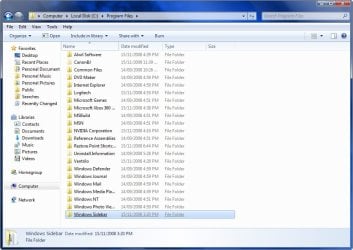
2. Download the Take Ownership shortcut to add it to the right click context menu by going here http://www.sevenforums.com/tutorials/1911-take-ownership-shortcut.html

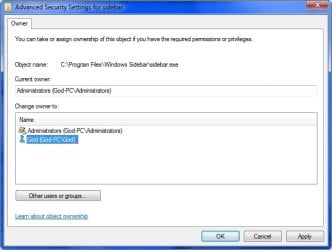
3. Right click on the Sidebar folder and select Take Ownership

4. Rename the Original Folder to Windows Sidebar (2)

5. Go to the Windows Sidebar Programs folder in Vista and copy it.

6. Now just paste the Vista folder in the Programs folder on your Windows 7 partition.

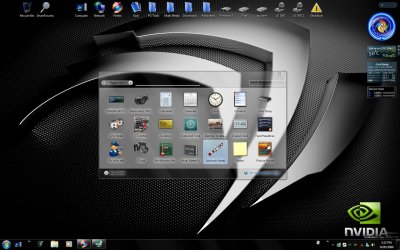
7. Right Click on the screen and select Gadgets and now you should have the Vista sidebar. Vista Sidebar .jpg
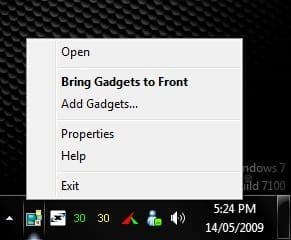
8. To close the sidebar just go to the icon in the system tray, right click and select exit. Close Sidebar.jpg


METHOD TWO

Reinstate Vista Windows Sidebar on Windows 7

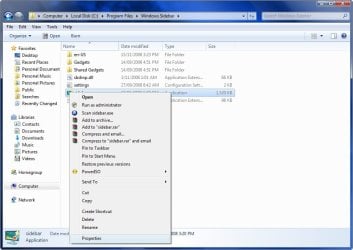
1. First Close all running Gadgets and Check Task Manager to Make sure it is not running and then go to C:\Program Files\Windows Sidebar. 2008-11-18_202259.jpg
2. Right click on a file and select Properties. 2008-11-18_202335.jpg
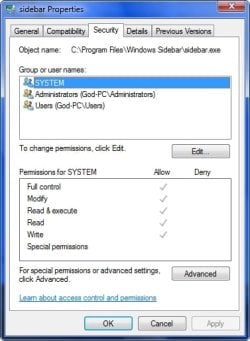
3. Go to the Security Tab and click on Advanced. 2008-11-18_202357.jpg
4. Go to the Owner Tab and select Edit. 2008-11-18_202425.jpg
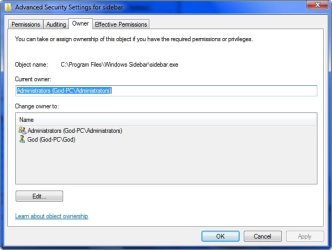
5. Select your user name and hit OK. 2008-11-18_202458.jpg
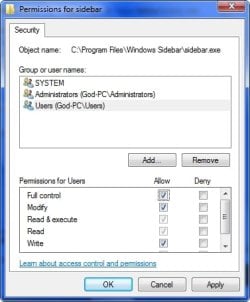
6. Go back to step 3 now and instead of Advanced select Edit.

7. Select your user name and tick the box with Full control and hit OK. 2008-11-18_204230.jpg
  • OK now you have done that for every file in the Windows sidebar folder except the Gadgets Folder, you can now delete or replace the files.
8. Copy the Windows Sidebar Folder and Paste it somewhere for a backup if you want to Revert your changes.

9. Go to the Sidebar Folder in Vista and copy all the files except the Gadgets Folder and Paste it in the Windows 7 Sidebar folder and overwrite the existing files and folders.

10. Right Click on the screen and select Gadgets and now you should have the Vista sidebar.


STEP TWO

Add Vista Sidebar Gadgets to Windows 7


   Note
This is an optional extra for getting all of your Gadgets from Vista to use in Windows 7
1. First close your sidebar and check Task Manager to make sure it is not running.

2. Go to folder options and select Show Hidden Files.

3. Now go to your Vista Drive and go to folder Users\your user name\AppData\Local\Microsoft\Windows Sidebar\Gadgets and copy all of the folders in that folder. 2008-11-18_213546.jpg
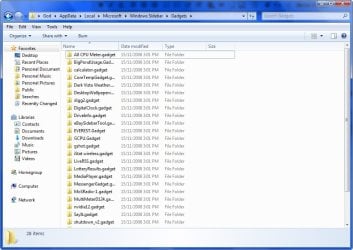
4. Now go to the same folder on your Windows 7 drive and Paste the files in that folder.

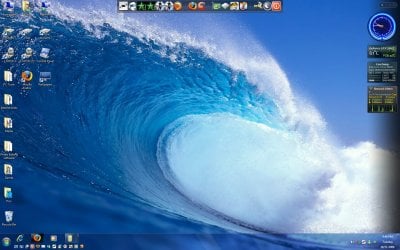
5. Start your sidebar again by Right Clicking on the Desktop and selecting Gadgets and now you should have all the gadgets you were using on Vista, Enjoy! 2008-11-18_214623.jpg


STEP THREE

Add NEW Gadgets to the Vista Sidebar


There is a problem installing new gadgets when using the Vista sidebar and you will need to follow this workaround to be able.

1. Download new Gadget

2. Download 7-Zip and install

3. Right click on the Gadget.exe and go to the 7-Zip tab and Extract Files. 2009-05-29_041521.jpg
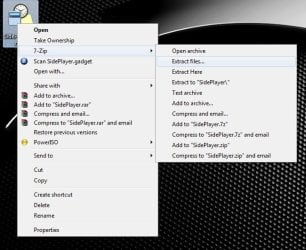
4. Now you have the folder on your desktop you will need to add .Gadget to the folder name and move it to the Gadgets folder as mentioned in Step Two.


TO UNDO CHANGES FOLLOW THESE INSTRUCTIONS

1. Opening the Start Menu and then type: cmd and Open as Administrator

2. Type: sfc /scannow

3. Let it complete and restart and all changes will undone.

For more information on scf /scannow look here.

 
Last edited by a moderator:
OK, that is easy.

1. Go to COMPUTER in Vista.
2. double click on C partition
3. go to PROGRAM FILES
4. there go to WINDOWS SIDEBAR folder
5. now copy that to a place where you can access it from your Win7 system. That could be an external disk, a USB stick, an SD card or a shared folder (I don't know what your setup is). For copying it, you can use Copy/Paste or Copy to Folder... ( Add Copy To / Move To on Windows 7 or Vista Right-Click Menu - the How-To Geek )

Now you take the same path to your Win7 Program Files (Computer > double click on C > Program files) and again double click on Program Files.

1. Rename the Windows Sidebar folder in there Windows Sidebar (2). You first have to take ownership as described.
2. Then Copy the Vista Sidebar folder from the device (or whatever) where you have saved it and Paste it into the Win7 Program files folder. You can also put the "device" folder and the Win7 Program Files folder side by side and drag it over.

Now you should have 2 folders in your Program Files: Windows Sidebar (2) and Windows Sidebar. Now follow the rest of the instructions.
 

My Computer My Computer

At a glance

Vista, Windows7, Mint Mate, Zorin, Windows 8from 1.6GHz Duo to i7
Computer Manufacturer/Model Number
HP, Dell, Gateway, Toshiba - 4 laptops and 2 desktops
OS
Vista, Windows7, Mint Mate, Zorin, Windows 8
CPU
from 1.6GHz Duo to i7
Monitor(s) Displays
2x HP w2207
Hard Drives
5x HDD, 7x SSD, 12x Externals
Keyboard
with trackball - no mices
Mouse
Trackball mice
Internet Speed
DSL 6000
OK, that is easy.

1. Go to COMPUTER in Vista.
2. double click on C partition
3. go to PROGRAM FILES
4. there go to WINDOWS SIDEBAR folder
5. now copy that to a place where you can access it from your Win7 system. That could be an external disk, a USB stick, an SD card or a shared folder (I don't know what your setup is). For copying it, you can use Copy/Paste or Copy to Folder... ( Add Copy To / Move To on Windows 7 or Vista Right-Click Menu - the How-To Geek )

Now you take the same path to your Win7 Program Files (Computer > double click on C > Program files) and again double click on Program Files.

1. Rename the Windows Sidebar folder in there Windows Sidebar (2). You first have to take ownership as described.
2. Then Copy the Vista Sidebar folder from the device (or whatever) where you have saved it and Paste it into the Win7 Program files folder. You can also put the "device" folder and the Win7 Program Files folder side by side and drag it over.

Now you should have 2 folders in your Program Files: Windows Sidebar (2) and Windows Sidebar. Now follow the rest of the instructions.

Thank you so much for your patience. I have one more stupid question to ask....:o Does this assume that I am running both Vista and Windows 7? I originally had Vista, then did the Windows 7 upgrade. So I'm still not 100% sure of where the "Vista" part of my computer is vs. the Windows 7 part, if that makes any sense. Everything else seems straightforward. Thanks again!
 

My Computer My Computer

At a glance

Windows 7
OS
Windows 7
There is no need to run Vista. But you have to have access to a Vista system in order to "steal" the Vista sidebar folder - and that is pretty big (7MB). If you have Vista on another computer or from a friend, you can copy the folder to a USB stick or an SD card and "import" it from there into Win7.
 

My Computer My Computer

At a glance

Vista, Windows7, Mint Mate, Zorin, Windows 8from 1.6GHz Duo to i7
Computer Manufacturer/Model Number
HP, Dell, Gateway, Toshiba - 4 laptops and 2 desktops
OS
Vista, Windows7, Mint Mate, Zorin, Windows 8
CPU
from 1.6GHz Duo to i7
Monitor(s) Displays
2x HP w2207
Hard Drives
5x HDD, 7x SSD, 12x Externals
Keyboard
with trackball - no mices
Mouse
Trackball mice
Internet Speed
DSL 6000
HAHA

Ok! I finally get it! Will try and do in the morning and post back how it goes. Thanks!
 

My Computer My Computer

At a glance

Windows 7
OS
Windows 7
OK, I'll look for your success posting tomorrow. It should be no problem. And the sidebar works really well in Win7. My best gadget there is the Application Launcher. It is not easy to find on the web, but if you like to install it, you can download it from my Skydrive.
 

My Computer My Computer

At a glance

Vista, Windows7, Mint Mate, Zorin, Windows 8from 1.6GHz Duo to i7
Computer Manufacturer/Model Number
HP, Dell, Gateway, Toshiba - 4 laptops and 2 desktops
OS
Vista, Windows7, Mint Mate, Zorin, Windows 8
CPU
from 1.6GHz Duo to i7
Monitor(s) Displays
2x HP w2207
Hard Drives
5x HDD, 7x SSD, 12x Externals
Keyboard
with trackball - no mices
Mouse
Trackball mice
Internet Speed
DSL 6000
Ok....still working on it!

I think I know what to do, but I need to get the Vista sidebar. Is there a place on the web that might have it??
 

My Computer My Computer

At a glance

Windows 7
OS
Windows 7
I think I know what to do, but I need to get the Vista sidebar. Is there a place on the web that might have it??

I uploaded my Vista sidebar folder for you (see link below). Just download it and unzip the .zip folder and you find the folder that you need to drag into the Win7 Program files. Make sure you first renamed the one that is in your Win7 program files folder now.

Windows Sidebar.zip - Windows Live
 

My Computer My Computer

At a glance

Vista, Windows7, Mint Mate, Zorin, Windows 8from 1.6GHz Duo to i7
Computer Manufacturer/Model Number
HP, Dell, Gateway, Toshiba - 4 laptops and 2 desktops
OS
Vista, Windows7, Mint Mate, Zorin, Windows 8
CPU
from 1.6GHz Duo to i7
Monitor(s) Displays
2x HP w2207
Hard Drives
5x HDD, 7x SSD, 12x Externals
Keyboard
with trackball - no mices
Mouse
Trackball mice
Internet Speed
DSL 6000
I did it!

Thank you so much! It worked! One wierd thing....the weather and the calendar icons both have a funky pink border....any ideas why/how to fix?
 

My Computer My Computer

At a glance

Windows 7
OS
Windows 7
I am glad you got it working. Piece of cake - was'nt it?

I have "weather bug" and that is normal - no border. And calendar I don't use. Being retired, I don't need it - LOL. If it bothers you, look for another gadget doing the same. Especially for those two you have a vast selection. Sometimes it also helps if you jut pull them out of the sidebar and stick them back in. Or if you click on the little wrench on the side and then say "cancel".
 

My Computer My Computer

At a glance

Vista, Windows7, Mint Mate, Zorin, Windows 8from 1.6GHz Duo to i7
Computer Manufacturer/Model Number
HP, Dell, Gateway, Toshiba - 4 laptops and 2 desktops
OS
Vista, Windows7, Mint Mate, Zorin, Windows 8
CPU
from 1.6GHz Duo to i7
Monitor(s) Displays
2x HP w2207
Hard Drives
5x HDD, 7x SSD, 12x Externals
Keyboard
with trackball - no mices
Mouse
Trackball mice
Internet Speed
DSL 6000
Sometimes deleting the gadgets, rebooting and then reinstating them helps.
 

My Computer My Computer

At a glance

Win 7 Ult SP1/Win 10 Pro (all x64)Intel® Core™ i7-975 Extreme O/C to 4.02 GHz, ...24GB Corsair Vengeance DDR3 SDRAM at 1600MHz ...1792 MB NVIDIA® GeForce® GTX 295 Dual Core
Computer type
PC/Desktop
Computer Manufacturer/Model Number
Alienware® ALX X58
OS
Win 7 Ult SP1/Win 10 Pro (all x64)
CPU
Intel® Core™ i7-975 Extreme O/C to 4.02 GHz, 8MB Cache
Motherboard
Asus® P6T Deluxe V2 X58 LGA1366
Memory
24GB Corsair Vengeance DDR3 SDRAM at 1600MHz - 6 x 4096MB
Graphics Card(s)
1792 MB NVIDIA® GeForce® GTX 295 Dual Core
Sound Card
Onboard Soundmax® High-Definition 7.1 Performance Audio
Monitor(s) Displays
Samsung XL2370 LED backlit 23" W/S 2ms response time
Screen Resolution
1920 X 1080
Hard Drives
2 x 500gb SATA II
1 x 1TB SATA II
1 external eSATA LaCie 3TB
(Non-RAID)
PSU
Alienware® 1200 Watt Multi-GPU
Case
Alienware® P2 ALX Chassis with AlienIce™ 3.0 Video Cooling
Cooling
Alienware® High-Perf. Liquid Cooling + Acoustic Dampening
Keyboard
Microsoft® Wireless Entertainment 8000 + Logitech® G15 Wired
Mouse
Microsoft® Wireless Laser 8000 + Logitech® G9 Wired
Internet Speed
1Gb/s
Antivirus
McAfee LiveSafe
Browser
Firefox - latest
Other Info
Using non-RAID on purpose as I find RAID to be too temperamental.
Now set to AHCI
sorry i might be reading the tutorial wrong, but it seems to imply you need an install of VIsta first? any way of getting it back without one?
 

My Computer My Computer

At a glance

Windows 10 Pro x64Intel Core i5 7400 @ 3.00GHz8GB 2133Mhz DDR4 (OEM supplied)Gygabyte Windforce GTX 1050Ti (Factory Overcl...
Computer type
PC/Desktop
Computer Manufacturer/Model Number
Medion Erazer (note to self: insert model number) - with custom additions
OS
Windows 10 Pro x64
CPU
Intel Core i5 7400 @ 3.00GHz
Motherboard
OEM supllied with PC
Memory
8GB 2133Mhz DDR4 (OEM supplied)
Graphics Card(s)
Gygabyte Windforce GTX 1050Ti (Factory Overclocked)
Sound Card
Realtek
Monitor(s) Displays
Acer Al1980 + HKC
Screen Resolution
1360*768(HKC) / 1280*1024(Acer)
Hard Drives
1TB Toshiba
1TB WD Caviar Green
120GB Samsung Evo 840
PSU
OEM supplied (no power rating on case)
Case
OEM Supplied
Cooling
Stock
Keyboard
Logitech Wireless
Mouse
Logitect Wireless
Internet Speed
40Mb/s Down 10Mb/s Up
Antivirus
Defender
Browser
Firefox

My Computer My Computer

At a glance

Vista, Windows7, Mint Mate, Zorin, Windows 8from 1.6GHz Duo to i7
Computer Manufacturer/Model Number
HP, Dell, Gateway, Toshiba - 4 laptops and 2 desktops
OS
Vista, Windows7, Mint Mate, Zorin, Windows 8
CPU
from 1.6GHz Duo to i7
Monitor(s) Displays
2x HP w2207
Hard Drives
5x HDD, 7x SSD, 12x Externals
Keyboard
with trackball - no mices
Mouse
Trackball mice
Internet Speed
DSL 6000
sorry i might be reading the tutorial wrong, but it seems to imply you need an install of VIsta first? any way of getting it back without one?

You can download my copy from here: Windows Sidebar.zip - Windows Live Unzip the Zip folder and then you have to use the complete Sidebar folder as explained.

thank you, otherwise i would have had to grab a dodgy copy of vista from the inernet just to get the sidebar folder
 

My Computer My Computer

At a glance

Windows 10 Pro x64Intel Core i5 7400 @ 3.00GHz8GB 2133Mhz DDR4 (OEM supplied)Gygabyte Windforce GTX 1050Ti (Factory Overcl...
Computer type
PC/Desktop
Computer Manufacturer/Model Number
Medion Erazer (note to self: insert model number) - with custom additions
OS
Windows 10 Pro x64
CPU
Intel Core i5 7400 @ 3.00GHz
Motherboard
OEM supllied with PC
Memory
8GB 2133Mhz DDR4 (OEM supplied)
Graphics Card(s)
Gygabyte Windforce GTX 1050Ti (Factory Overclocked)
Sound Card
Realtek
Monitor(s) Displays
Acer Al1980 + HKC
Screen Resolution
1360*768(HKC) / 1280*1024(Acer)
Hard Drives
1TB Toshiba
1TB WD Caviar Green
120GB Samsung Evo 840
PSU
OEM supplied (no power rating on case)
Case
OEM Supplied
Cooling
Stock
Keyboard
Logitech Wireless
Mouse
Logitect Wireless
Internet Speed
40Mb/s Down 10Mb/s Up
Antivirus
Defender
Browser
Firefox
No problem, any time.
 

My Computer My Computer

At a glance

Vista, Windows7, Mint Mate, Zorin, Windows 8from 1.6GHz Duo to i7
Computer Manufacturer/Model Number
HP, Dell, Gateway, Toshiba - 4 laptops and 2 desktops
OS
Vista, Windows7, Mint Mate, Zorin, Windows 8
CPU
from 1.6GHz Duo to i7
Monitor(s) Displays
2x HP w2207
Hard Drives
5x HDD, 7x SSD, 12x Externals
Keyboard
with trackball - no mices
Mouse
Trackball mice
Internet Speed
DSL 6000
OK, I have read all the posts but...

My Vista is 32-bit and my desktop 7Pro is 64-bit so can I even do this or do I need to find a vista 64-bit version before attempting.

I hesitate to do this as I use a skype gadget (works fine on 7Pro 32 but) when tried on my 64 DT it sent skype4Com.dll into an endless open and froze my computer to the point I had to reinstall pro64 and do not want to go through that again.

I have the Take ownership sc already as I used that to get WindowsMail on pro64 to work.

Any guidance would be great and thank you.
 

My Computer My Computer

At a glance

Win7Pro(64)[desktop] | Vista32[Laptop] | win7...
OS
Win7Pro(64)[desktop] | Vista32[Laptop] | win7Pro(32)[netbook]
OK, I have read all the posts but...

My Vista is 32-bit and my desktop 7Pro is 64-bit so can I even do this or do I need to find a vista 64-bit version before attempting.

I hesitate to do this as I use a skype gadget (works fine on 7Pro 32 but) when tried on my 64 DT it sent skype4Com.dll into an endless open and froze my computer to the point I had to reinstall pro64 and do not want to go through that again.

I have the Take ownership sc already as I used that to get WindowsMail on pro64 to work.

Any guidance would be great and thank you.

The 32bit Vista version works perfectly on the 32bit Win7 - including all gadgets I tried. The 32bit sidebar itself also works on the 64bit Win7 but not all the gadgets work. So I think it is not a matter of the sidebar but rather a problem with the gadgets that do not run in 64bit.
 

My Computer My Computer

At a glance

Vista, Windows7, Mint Mate, Zorin, Windows 8from 1.6GHz Duo to i7
Computer Manufacturer/Model Number
HP, Dell, Gateway, Toshiba - 4 laptops and 2 desktops
OS
Vista, Windows7, Mint Mate, Zorin, Windows 8
CPU
from 1.6GHz Duo to i7
Monitor(s) Displays
2x HP w2207
Hard Drives
5x HDD, 7x SSD, 12x Externals
Keyboard
with trackball - no mices
Mouse
Trackball mice
Internet Speed
DSL 6000
OK that makes sense but there is the part that 64 bit has 2 program files folders and the tutorial seems to assume you use 32 bit. Is it safe to assume that the vista files (32bit laptop) should actually be copied to the Program files (x86) folder instead of the Program files (which is for 64 bit programs) or are the truely identical and it doesn't matter.

As I said with skype4com.dll I tried putting it in the 64 and 32 folders and it continually opened the 64 bit and wouldn't stop. I really am cautious on this now as I do not want to have to reinstall Win7Pro again and loose what I have again.

Thanks again
 

My Computer My Computer

At a glance

Win7Pro(64)[desktop] | Vista32[Laptop] | win7...
OS
Win7Pro(64)[desktop] | Vista32[Laptop] | win7Pro(32)[netbook]
I tweaked the Vista sidebar into my 64bit program files. But there is also one in the x86 Program files which I have not tried (maybe I should). Because the way I set it up works for the sidebar but not for all the gadgets. My weatherbug and AppLauncher do not work. Later I will try to play with the x86 sidebar. Maybe that works better.
 
Last edited:

My Computer My Computer

At a glance

Vista, Windows7, Mint Mate, Zorin, Windows 8from 1.6GHz Duo to i7
Computer Manufacturer/Model Number
HP, Dell, Gateway, Toshiba - 4 laptops and 2 desktops
OS
Vista, Windows7, Mint Mate, Zorin, Windows 8
CPU
from 1.6GHz Duo to i7
Monitor(s) Displays
2x HP w2207
Hard Drives
5x HDD, 7x SSD, 12x Externals
Keyboard
with trackball - no mices
Mouse
Trackball mice
Internet Speed
DSL 6000
In my 64bit system, I moved the sidebar from the x64 program files to the x86 program files with better results. There are still a couple of gadgets that do not work, but the situation has improved. No problems though in 32bit Win7.
 

My Computer My Computer

At a glance

Vista, Windows7, Mint Mate, Zorin, Windows 8from 1.6GHz Duo to i7
Computer Manufacturer/Model Number
HP, Dell, Gateway, Toshiba - 4 laptops and 2 desktops
OS
Vista, Windows7, Mint Mate, Zorin, Windows 8
CPU
from 1.6GHz Duo to i7
Monitor(s) Displays
2x HP w2207
Hard Drives
5x HDD, 7x SSD, 12x Externals
Keyboard
with trackball - no mices
Mouse
Trackball mice
Internet Speed
DSL 6000
thanks, it's very helped me.
 

My Computer My Computer

At a glance

Windows 7 Ultimate & Windows vista.Intel core i7 920sX58A-UD7 s1366 Core i7, Intel X58, DDR3 2200,...Nvidia Geforce - GTX 295
OS
Windows 7 Ultimate & Windows vista.
CPU
Intel core i7 920s
Motherboard
Gigabyte x6589 super
Memory
X58A-UD7 s1366 Core i7, Intel X58, DDR3 2200, 4xPCI-E
Graphics Card(s)
Nvidia Geforce - GTX 295
Hard Drives
2.5 TB Samsung.
Internet Speed
i think about 15MB.
Back
Top