Cloned partition, Copy the Bootloader?

Blizzerd

New member
Hi, I cloned my Windows 7 to Drive "D" from my Drive "C" - It all worked, but I used Vista Boot Pro and just made the Drive "D" boot loader a vista boot loader, I thought it would work since windows 7 and Windows Vista use the same path and boot loaders.

Ok, well it worked, then after I restarted to test if it was all good, the Cloned partition would no longer boot, and it would go to a blue screen of death that said "The partition is unmountable"

How can I copy the boot loader? I know there's DOS commands to do it, but IDK what they are, and I know how to use DOS, so if you can tell me what to do please do so.

Why did it say my Partition was "Unmountable?"

Then one last thing... When I booted back to Drive "C", I went to Windows Disk Manager, and it said Drive "D" was in RAW format, and I KNOW I copied it to NFTS format, and it strangly changed from NFTS to RAW. Why did it do this?


Sorry for the long description, I appreciate your posts :)
 

My Computer

Computer Manufacturer/Model Number
acer 5720z
OS
Xp, Vista, 7
CPU
intel Pentium Dual Core
Motherboard
Acer
Memory
2 gig
Graphics Card(s)
Intel 965 chipset
Sound Card
integrated
Monitor(s) Displays
Laptop Display
Screen Resolution
1280 x 800
Hard Drives
Western Digital 250 Gig
Case
Laptop
Cooling
fan
Keyboard
Laptop
Mouse
HP wireless
Internet Speed
depends
Boot the Win7 DVD Repair console or Repair CD, click throught to Recovery tools list to run Startup Repair up to 3 separate times with reboots. This repairs or rewrites the MBR to Win7.

If it fails, you may need to mark the partition active, then try Startup Repair x3 again.
 
Boot the Win7 DVD Repair console or Repair CD, click throught to Recovery tools list to run Startup Repair up to 3 separate times with reboots. This repairs or rewrites the MBR to Win7.

If it fails, you may need to mark the partition active, then try Startup Repair x3 again.


I used EasyBCD beta 2.0 for Windows 7, and just created the boot loader, and it worked. I'm using the clone right now. I rebooted using the cloned Partition, everything worked, it just had to run Scan Disk, but the clone is working. The clone is a little slow, but it's probably because it's shocked it's on a new volume, and the files are probably a little shaken up from the cloning.
 

My Computer

Computer Manufacturer/Model Number
acer 5720z
OS
Xp, Vista, 7
CPU
intel Pentium Dual Core
Motherboard
Acer
Memory
2 gig
Graphics Card(s)
Intel 965 chipset
Sound Card
integrated
Monitor(s) Displays
Laptop Display
Screen Resolution
1280 x 800
Hard Drives
Western Digital 250 Gig
Case
Laptop
Cooling
fan
Keyboard
Laptop
Mouse
HP wireless
Internet Speed
depends
What does disk management show as the status of the D: partition. Is it now the system partition.

Can you attach a snipping tool picture of the Disk Management window? Of course if it working as you wish, there is no longer a need to do this.
 

My Computer

Computer Manufacturer/Model Number
Homebuilt
OS
Windows 7 x64
CPU
i7-2600K
Motherboard
Asus P8Z77-v Pro
Memory
8 G
Graphics Card(s)
GTX 480
Sound Card
Onboard
Monitor(s) Displays
LG W2753V
Screen Resolution
1920x1080
Hard Drives
Crucial M4 128 G SSD
Boot the Win7 DVD Repair console or Repair CD, click throught to Recovery tools list to run Startup Repair up to 3 separate times with reboots. This repairs or rewrites the MBR to Win7.

If it fails, you may need to mark the partition active, then try Startup Repair x3 again.


I used EasyBCD beta 2.0 for Windows 7, and just created the boot loader, and it worked. I'm using the clone right now. I rebooted using the cloned Partition, everything worked, it just had to run Scan Disk, but the clone is working. The clone is a little slow, but it's probably because it's shocked it's on a new volume, and the files are probably a little shaken up from the cloning.

Wonderin how you used Easy if Win7 couldn't start?

If you don't get same or better performance with clone, suggest Repair Install to acclimate it fully to new hardware. http://www.sevenforums.com/tutorials/3413-repair-install.html?ltr=R
 
I'm sure I know why it is slow... When I run the Windows on Drive D, any change I make, or anything I do also gets changed on the Drive C Windows as well.

It's confusing to me, and if you know what will fix this, please tell me.
 

My Computer

Computer Manufacturer/Model Number
acer 5720z
OS
Xp, Vista, 7
CPU
intel Pentium Dual Core
Motherboard
Acer
Memory
2 gig
Graphics Card(s)
Intel 965 chipset
Sound Card
integrated
Monitor(s) Displays
Laptop Display
Screen Resolution
1280 x 800
Hard Drives
Western Digital 250 Gig
Case
Laptop
Cooling
fan
Keyboard
Laptop
Mouse
HP wireless
Internet Speed
depends
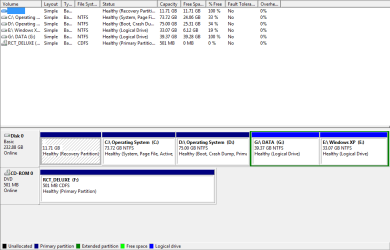
Ok, Here's what it says for my Partitions,

Drive C: Healthy (System, Page File, Active, Primary Partition)
Drive D: Healthy (Boot, Crash Dump, Primary Partition
 

My Computer

Computer Manufacturer/Model Number
acer 5720z
OS
Xp, Vista, 7
CPU
intel Pentium Dual Core
Motherboard
Acer
Memory
2 gig
Graphics Card(s)
Intel 965 chipset
Sound Card
integrated
Monitor(s) Displays
Laptop Display
Screen Resolution
1280 x 800
Hard Drives
Western Digital 250 Gig
Case
Laptop
Cooling
fan
Keyboard
Laptop
Mouse
HP wireless
Internet Speed
depends
Why are you wanting to dual boot a cloned OS with its clone? Please explain fully.

Then post back a full Disk Mgmt drive map and listings screenshot. Use Snipping tool in Start Menu, attach file with paper clip in Reply Box.

Are you using Ultimate version, with Offline Files (synch service) turned on?
 
This computer came with Windows Vista, I had a Hard Drive failure, and lost all my data. I then used my Windows 7 RC CD for my default OS, just for fun. I know my RC is going to be expired soon, so I was going to Clone it from Drive C to Drive D so I wouldn't lose all my Data when I install Vista on the computer. The reason I have to clone it is because the Windows Vista recovery disk will ONLY install onto drive D.

I am using Windows 7 Ultimate, and I'm not sure what Sync Service is.
 

Attachments

  • Capture.PNG
    Capture.PNG
    47.4 KB · Views: 112

My Computer

Computer Manufacturer/Model Number
acer 5720z
OS
Xp, Vista, 7
CPU
intel Pentium Dual Core
Motherboard
Acer
Memory
2 gig
Graphics Card(s)
Intel 965 chipset
Sound Card
integrated
Monitor(s) Displays
Laptop Display
Screen Resolution
1280 x 800
Hard Drives
Western Digital 250 Gig
Case
Laptop
Cooling
fan
Keyboard
Laptop
Mouse
HP wireless
Internet Speed
depends
What is that XP logical partition shown in screenshot?

Have you reinstalled Vista from Recov disk to D?

Offline files is set to "On" by default in Ultimate. It synchs any files you copy between computers on a network, and possibly between partitions on the same computer.

Type Offline Files in Start Search box and turn it off to see if that fixes your delay as all files cloned over are being constantly synch'ed.
 
Disabling Offline Flies didn't fix it.


What else could be causing this thing between my drives?


Add: The Logical Drive that Say Windows XP has XP on it, it doesn't work anymore since I had the Hard Drive crash. I've tried to reinstall the boot loader for it, and when I try to boot for it, the computer automatically restarts.
 

My Computer

Computer Manufacturer/Model Number
acer 5720z
OS
Xp, Vista, 7
CPU
intel Pentium Dual Core
Motherboard
Acer
Memory
2 gig
Graphics Card(s)
Intel 965 chipset
Sound Card
integrated
Monitor(s) Displays
Laptop Display
Screen Resolution
1280 x 800
Hard Drives
Western Digital 250 Gig
Case
Laptop
Cooling
fan
Keyboard
Laptop
Mouse
HP wireless
Internet Speed
depends
Do you have Win7 on both HD's or Vista on D now?

You seem confidant the performance hit is due to this file synching you describe. Do you have a Synch program on either partition?

Open Task Manager and study Processes to see which is tapping your CPU at the time of slowdown. Click the CPU column heading to order it highest to lowest.

I would consider a Repair Install using RC DVD or files run from deskstop. This will also correctly reconfigure the Dual boot and possibly include XP in a multi-boot.

Process Explorer will give you a greater breakdown of what is running at the time of slowdown. Uploaded here:
 
Weirdest thing in the world... I can't figure it out.

ADD: I got Windows XP partition working again. I messed around on BCDEdit and got it to boot up. :)
 
Last edited:

My Computer

Computer Manufacturer/Model Number
acer 5720z
OS
Xp, Vista, 7
CPU
intel Pentium Dual Core
Motherboard
Acer
Memory
2 gig
Graphics Card(s)
Intel 965 chipset
Sound Card
integrated
Monitor(s) Displays
Laptop Display
Screen Resolution
1280 x 800
Hard Drives
Western Digital 250 Gig
Case
Laptop
Cooling
fan
Keyboard
Laptop
Mouse
HP wireless
Internet Speed
depends
Do you have Win7 on both HD's or Vista on D now?

You seem confidant the performance hit is due to this file synching you describe. Do you have a Synch program on either partition?

Open Task Manager and study Processes to see which is tapping your CPU at the time of slowdown. Click the CPU column heading to order it highest to lowest.

I would consider a Repair Install using RC DVD or files run from deskstop. This will also correctly reconfigure the Dual boot and possibly include XP in a multi-boot.

Process Explorer will give you a greater breakdown of what is running at the time of slowdown. Uploaded here:


One question, If I just take my Vista recovery disk and install it onto drive C, will it totally format my Drive D as well?
 

My Computer

Computer Manufacturer/Model Number
acer 5720z
OS
Xp, Vista, 7
CPU
intel Pentium Dual Core
Motherboard
Acer
Memory
2 gig
Graphics Card(s)
Intel 965 chipset
Sound Card
integrated
Monitor(s) Displays
Laptop Display
Screen Resolution
1280 x 800
Hard Drives
Western Digital 250 Gig
Case
Laptop
Cooling
fan
Keyboard
Laptop
Mouse
HP wireless
Internet Speed
depends
Does it give you an option when you run Recovery to just install it to C: drive?

What I would do is obtain a clean-copy Vista installer of your version, which you can then clean install and activate using license key stickered to computer.

You can use any Vista installer and unlock all versions by extracting files, deleting ei.cfg file in Sources folder, then recompiling into ISO to burn an All-Versions DVD. Then select your licensed version to install.

This is what tech enthusiasts do anyway to overcome bloatware which always compromises performance to some degree.

Find any missing drivers and favorite apps on Support>Downloads webpage for your model computer, at Adobe, Java and other Program /Hardware device websites.
 
In the original partition, everything was installed to C:, so the registry has that. Cloning the partition doesn't change the registry settings, does it?

If you make the D: partition the system partition and reboot, would it not change the drive letters?
 

My Computer

Computer Manufacturer/Model Number
Homebuilt
OS
Windows 7 x64
CPU
i7-2600K
Motherboard
Asus P8Z77-v Pro
Memory
8 G
Graphics Card(s)
GTX 480
Sound Card
Onboard
Monitor(s) Displays
LG W2753V
Screen Resolution
1920x1080
Hard Drives
Crucial M4 128 G SSD
In the original partition, everything was installed to C:, so the registry has that. Cloning the partition doesn't change the registry settings, does it?

If you make the D: partition the system partition and reboot, would it not change the drive letters?

I marked D as Active, and I'ma test with a reboot to see if I messed up my computer. Rofl
 

My Computer

Computer Manufacturer/Model Number
acer 5720z
OS
Xp, Vista, 7
CPU
intel Pentium Dual Core
Motherboard
Acer
Memory
2 gig
Graphics Card(s)
Intel 965 chipset
Sound Card
integrated
Monitor(s) Displays
Laptop Display
Screen Resolution
1280 x 800
Hard Drives
Western Digital 250 Gig
Case
Laptop
Cooling
fan
Keyboard
Laptop
Mouse
HP wireless
Internet Speed
depends
That is not exactly how I would have done it, but I suppose in theory it should work. Hopefully the cloning software moved the boot files with everything else.....

Gosh, this is exciting!!!! ;)
 

My Computer

Computer Manufacturer/Model Number
Homebuilt
OS
Windows 7 x64
CPU
i7-2600K
Motherboard
Asus P8Z77-v Pro
Memory
8 G
Graphics Card(s)
GTX 480
Sound Card
Onboard
Monitor(s) Displays
LG W2753V
Screen Resolution
1920x1080
Hard Drives
Crucial M4 128 G SSD
That is not exactly how I would have done it, but I suppose in theory it should work. Hopefully the cloning software moved the boot files with everything else.....

Gosh, this is exciting!!!! ;)


Lol, it still works, but the retarded ass computer still copies things between drive C and D.

I just wanna install my Vista now, but Idk if it'll make the D version of windows 7 not work... Or worse case scenario, delete all of drive d when I format drive c. Rofl
 

My Computer

Computer Manufacturer/Model Number
acer 5720z
OS
Xp, Vista, 7
CPU
intel Pentium Dual Core
Motherboard
Acer
Memory
2 gig
Graphics Card(s)
Intel 965 chipset
Sound Card
integrated
Monitor(s) Displays
Laptop Display
Screen Resolution
1280 x 800
Hard Drives
Western Digital 250 Gig
Case
Laptop
Cooling
fan
Keyboard
Laptop
Mouse
HP wireless
Internet Speed
depends
MADE A DISCOVERY... It's weird...

I'm on my Drive D version of Windows 7, and it says the path for everything is C:
WtF?
 

My Computer

Computer Manufacturer/Model Number
acer 5720z
OS
Xp, Vista, 7
CPU
intel Pentium Dual Core
Motherboard
Acer
Memory
2 gig
Graphics Card(s)
Intel 965 chipset
Sound Card
integrated
Monitor(s) Displays
Laptop Display
Screen Resolution
1280 x 800
Hard Drives
Western Digital 250 Gig
Case
Laptop
Cooling
fan
Keyboard
Laptop
Mouse
HP wireless
Internet Speed
depends
Back
Top