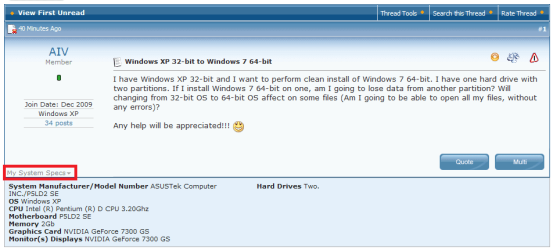
Windows XP 32-bit to Windows 7 64-bit

AIV

New member
Local time
6:39 PM
Messages
34
I have Windows XP 32-bit and I want to perform clean install of Windows 7 64-bit. I have one hard drive with two partitions. If I install Windows 7 64-bit on one, am I going to lose data from another partition? Will changing from 32-bit OS to 64-bit OS affect on some files (Am I going to be able to open all my files, without any errors)?

Any help will be appreciated!!! :D
 

My Computer My Computer

Computer Manufacturer/Model Number
ASUSTek Computer INC./P5LD2 SE
OS
Windows XP
CPU
Intel (R) Pentium (R) D CPU 3.20Ghz
Motherboard
P5LD2 SE
Memory
2Gb
Graphics Card(s)
NVIDIA GeForce 7300 GS
Monitor(s) Displays
NVIDIA GeForce 7300 GS
Hard Drives
Two.
if you install the 64bit version, you will need to get the 64bit drivers for all of your devices... you will also need to reinstall your programs... Hope this helps... ;)

Welcome to Seven Forums!!
 

My Computer My Computer

Computer type
PC/Desktop
Computer Manufacturer/Model Number
LENOVO K450 @3.0GHZ
OS
64-bit Windows 8.1 Pro
CPU
Core(TM) i5 CPU 4330 Haswell @ 3.20GHz
Motherboard
LENOVO
Memory
12.00 GB
Graphics Card(s)
Intel(R) HD Graphics
Sound Card
Intel HD integtrated
Monitor(s) Displays
HP 25' ISP Monitor
Screen Resolution
1900/1020
Hard Drives
(1) ST1000DM003-1CH162 (2) Generic STORAGE DEVICE USB Device (3) Generic STORAGE DEVICE USB Device
Internet Speed
100mb down/10mb up
Do I have to have 64-bit drivers CD? Can I download them from internet?
 

My Computer My Computer

Computer Manufacturer/Model Number
ASUSTek Computer INC./P5LD2 SE
OS
Windows XP
CPU
Intel (R) Pentium (R) D CPU 3.20Ghz
Motherboard
P5LD2 SE
Memory
2Gb
Graphics Card(s)
NVIDIA GeForce 7300 GS
Monitor(s) Displays
NVIDIA GeForce 7300 GS
Hard Drives
Two.
you will need to download them from the devices respective home page.. Windows 7 will have most of the needed drivers, but there may be a few that you will need to supply...
 

My Computer My Computer

Computer type
PC/Desktop
Computer Manufacturer/Model Number
LENOVO K450 @3.0GHZ
OS
64-bit Windows 8.1 Pro
CPU
Core(TM) i5 CPU 4330 Haswell @ 3.20GHz
Motherboard
LENOVO
Memory
12.00 GB
Graphics Card(s)
Intel(R) HD Graphics
Sound Card
Intel HD integtrated
Monitor(s) Displays
HP 25' ISP Monitor
Screen Resolution
1900/1020
Hard Drives
(1) ST1000DM003-1CH162 (2) Generic STORAGE DEVICE USB Device (3) Generic STORAGE DEVICE USB Device
Internet Speed
100mb down/10mb up
I downloaded Windows 7 Upgrade Advisor and checked compatibility with Windows 7 64-bit version and everything passed the test(everything has green colour). Does that mean that all of my drivers are 64-bit compatible?
 

My Computer My Computer

Computer Manufacturer/Model Number
ASUSTek Computer INC./P5LD2 SE
OS
Windows XP
CPU
Intel (R) Pentium (R) D CPU 3.20Ghz
Motherboard
P5LD2 SE
Memory
2Gb
Graphics Card(s)
NVIDIA GeForce 7300 GS
Monitor(s) Displays
NVIDIA GeForce 7300 GS
Hard Drives
Two.
32 bit 64

hi there

I' ve vist 32 bit system, I'd like to upgrade to windows 64 bit system so that I can increase my ram to 6gigs, do you know were I can get the drivers to do this? Thanks
 

My Computer My Computer

OS
windows 7
I have Windows XP 32-bit and I want to perform clean install of Windows 7 64-bit. I have one hard drive with two partitions. If I install Windows 7 64-bit on one, am I going to lose data from another partition? Will changing from 32-bit OS to 64-bit OS affect on some files (Am I going to be able to open all my files, without any errors)?

Any help will be appreciated!!! :D

Your system specs shows a Pentium machine with 2 gigs of RAM. With those specs it would be better to install a 32-bit Seven.

Kari
 

My Computer My Computer

Computer type
Laptop
Computer Manufacturer/Model Number
HP ENVY 17-1150eg
OS
Windows 10 Pro x64 EN-GB
CPU
1.6 GHz Intel Core i7-720QM Processor
Memory
6 GB
Graphics Card(s)
ATI Mobility Radeon HD 5850 Graphics
Sound Card
Beats sound system with integrated subwoofer
Monitor(s) Displays
17" laptop display, 22" LED and 32" Full HD TV through HDMI
Screen Resolution
1600*900 (1), 1920*1080 (2&3)
Hard Drives
Internal: 2 x 500 GB SATA Hard Disk Drive 7200 rpm
External: 2TB for backups, 3TB USB3 network drive for media
Cooling
As Envy runs a bit warm, I have it on a Cooler Master pad
Keyboard
Logitech diNovo Media Desktop Laser (bluetooth)
Mouse
Logitech Performance Mouse MX
Internet Speed
50/10 Mbps VDSL
Antivirus
Windows Defender 4.3.9431.0
Browser
Maxthon 3.5.2., IE11
How do you know I have 2 Gigs of ram?
 

My Computer My Computer

Computer Manufacturer/Model Number
ASUSTek Computer INC./P5LD2 SE
OS
Windows XP
CPU
Intel (R) Pentium (R) D CPU 3.20Ghz
Motherboard
P5LD2 SE
Memory
2Gb
Graphics Card(s)
NVIDIA GeForce 7300 GS
Monitor(s) Displays
NVIDIA GeForce 7300 GS
Hard Drives
Two.
I downloaded Windows 7 Upgrade Advisor and checked compatibility with Windows 7 64-bit version and everything passed the test(everything has green colour). Does that mean that all of my drivers are 64-bit compatible?
 

My Computer My Computer

Computer Manufacturer/Model Number
ASUSTek Computer INC./P5LD2 SE
OS
Windows XP
CPU
Intel (R) Pentium (R) D CPU 3.20Ghz
Motherboard
P5LD2 SE
Memory
2Gb
Graphics Card(s)
NVIDIA GeForce 7300 GS
Monitor(s) Displays
NVIDIA GeForce 7300 GS
Hard Drives
Two.
How do you know I have 2 Gigs of ram?
I just clicked My System Specs link in your post. System specs exists precisely for this reason: it's easier to assist in hardware related questions and issues when we know what kind of hardware you have.

Kari
 

Attachments

  • sys_specs.png
    sys_specs.png
    15.2 KB · Views: 77

My Computer My Computer

Computer type
Laptop
Computer Manufacturer/Model Number
HP ENVY 17-1150eg
OS
Windows 10 Pro x64 EN-GB
CPU
1.6 GHz Intel Core i7-720QM Processor
Memory
6 GB
Graphics Card(s)
ATI Mobility Radeon HD 5850 Graphics
Sound Card
Beats sound system with integrated subwoofer
Monitor(s) Displays
17" laptop display, 22" LED and 32" Full HD TV through HDMI
Screen Resolution
1600*900 (1), 1920*1080 (2&3)
Hard Drives
Internal: 2 x 500 GB SATA Hard Disk Drive 7200 rpm
External: 2TB for backups, 3TB USB3 network drive for media
Cooling
As Envy runs a bit warm, I have it on a Cooler Master pad
Keyboard
Logitech diNovo Media Desktop Laser (bluetooth)
Mouse
Logitech Performance Mouse MX
Internet Speed
50/10 Mbps VDSL
Antivirus
Windows Defender 4.3.9431.0
Browser
Maxthon 3.5.2., IE11
No, You will not be able to do an in place upgrade from 32 to 64bit...you will need to do a clean install..
 

My Computer My Computer

Computer type
PC/Desktop
Computer Manufacturer/Model Number
LENOVO K450 @3.0GHZ
OS
64-bit Windows 8.1 Pro
CPU
Core(TM) i5 CPU 4330 Haswell @ 3.20GHz
Motherboard
LENOVO
Memory
12.00 GB
Graphics Card(s)
Intel(R) HD Graphics
Sound Card
Intel HD integtrated
Monitor(s) Displays
HP 25' ISP Monitor
Screen Resolution
1900/1020
Hard Drives
(1) ST1000DM003-1CH162 (2) Generic STORAGE DEVICE USB Device (3) Generic STORAGE DEVICE USB Device
Internet Speed
100mb down/10mb up
I have Windows XP 32-bit and I want to perform clean install of Windows 7 64-bit. I have one hard drive with two partitions. If I install Windows 7 64-bit on one, am I going to lose data from another partition? Will changing from 32-bit OS to 64-bit OS affect on some files (Am I going to be able to open all my files, without any errors)?

Any help will be appreciated!!! :D
Do you have two partitions for one OS? Meaning are you installing os on one and have saved data on the other? And you are concerned that you will lose the data in the second partition. As long as you do not format the wrong partition you will not.
 

My Computer My Computer

Computer Manufacturer/Model Number
Gateway GT5692
OS
Windows 7 Ulti. x64
CPU
AMD Phenom 8450 triple-core 2.10 ghz
Memory
4GB
Graphics Card(s)
ATI Radion HD 3200
Monitor(s) Displays
Gateway FPD1775W
Screen Resolution
1280x720
Hard Drives
465.6613 Gibibytes
Thanks a lot...:D
 

My Computer My Computer

Computer Manufacturer/Model Number
ASUSTek Computer INC./P5LD2 SE
OS
Windows XP
CPU
Intel (R) Pentium (R) D CPU 3.20Ghz
Motherboard
P5LD2 SE
Memory
2Gb
Graphics Card(s)
NVIDIA GeForce 7300 GS
Monitor(s) Displays
NVIDIA GeForce 7300 GS
Hard Drives
Two.
I downloaded Windows 7 Upgrade Advisor and checked compatibility with Windows 7 64-bit version and everything passed the test(everything has green colour). Does that mean that all of my drivers are 64-bit compatible?

No, it means you can run a 64 bit OS on your system . Drivers are more or less an
afterthought with the most important being your ethernet driver. If you can`t get to the net you can`t dload drivers. But you can still use your XP drive to do that but don`t fret too much, as mentioned, W7 does a great job.
 

My Computer My Computer

Computer Manufacturer/Model Number
Myself
OS
Windows 7 Ultimate 64Bit
CPU
C2D E8200
Motherboard
XFX 750i
Memory
8GB PNY PC2-6400
Graphics Card(s)
BFG 9600GT x 2
Sound Card
Stock XFX Optical
Monitor(s) Displays
Gateway 22" HD Display
Hard Drives
C: 1 TB G: 500 GB H: 500 GB
PSU
Ultra LSP 550 Pro Lifetime Series
Case
Xion2
Cooling
ThermalTake
Only thing currently on the market that can handle a XP 32bit to Win7 64bit is Zinstall XP7.
It restores the XP stuff, apps included, after you install Win7 - so it works even if you discover the "all my apps are lost" part after the upgrade. :)
 

My Computer My Computer

OS
Windows 7
Back
Top