Originally:
that 100MB special system partition (no drive letter that I recall, maybe A: or B:?)
C: W7 (100G) (SATA partition #0)
D: My data (600G) (SATA partition #1)
E: IDE drive (partition #0) Expendable (recreatable data like music rips)
F: IDE drive (partition #1) (work/scratch area)
ALL USB/firewire items are totally disconnected prior to install (just mouse, keyboard and speakers).
During install, it showed in order:
DISK 0 100MB system
DISK 0 100G OS (formatted this partition during reinstall)
DISK 0 600G DATA
DISK 1 IDE part #0
DISK 1 IDE part #1
After W7 reinstall,
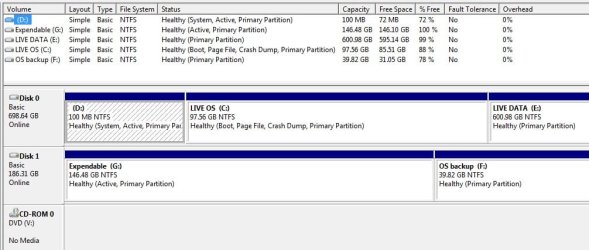
D: that 100MB special system paritition (which now also contains IE8 TIF files since I moved them without seeing D: had been changed)
C: W7 (100G) (SATA partition #0)
E: My data (600G) (SATA partition #1)
IDE drive (was E but now has no drive letter) (partition #0)
F: IDE drive (partition #1)
I did nothing but a clean install. Formatted C: (original OS 100G partition) during the install (neither created nor deleted any partitions). The only difference this time was the IDE drive (E: F: ) was already installed prior to the W7 install. I'm all ears on this one.
Have I screwed up the 100MB partition here somehow by placing TIF on it? You can't imagine the panic of seeing (thinking) that all my D: data was gone. Fortunately, it's E (I also backed it up to original F).
Suggestions/comments/solutions.
It seems Control Panel > IE options has moved the TIF back to its original location but there is a TIF folder on D: (the 100MB system partition) which I have deleted.
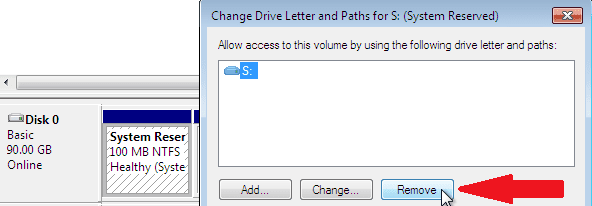
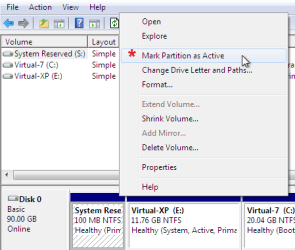
I assume the plan of action would be to REMOVE the DRIVE LETTER for the 100MB system partition via Disk Management, reletter the rest to leave a whole for ADDing a "new" drive letter for IDE partition that's now missing a drive letter (originally E: )?
I also assume this occurred becuase the 2nd IDE drive was attached (this time) during install?? Would it be easier to shutdown, disconnect IDE, and reinstall?
that 100MB special system partition (no drive letter that I recall, maybe A: or B:?)
C: W7 (100G) (SATA partition #0)
D: My data (600G) (SATA partition #1)
E: IDE drive (partition #0) Expendable (recreatable data like music rips)
F: IDE drive (partition #1) (work/scratch area)
ALL USB/firewire items are totally disconnected prior to install (just mouse, keyboard and speakers).
During install, it showed in order:
DISK 0 100MB system
DISK 0 100G OS (formatted this partition during reinstall)
DISK 0 600G DATA
DISK 1 IDE part #0
DISK 1 IDE part #1
After W7 reinstall,
D: that 100MB special system paritition (which now also contains IE8 TIF files since I moved them without seeing D: had been changed)
C: W7 (100G) (SATA partition #0)
E: My data (600G) (SATA partition #1)
IDE drive (was E but now has no drive letter) (partition #0)
F: IDE drive (partition #1)
I did nothing but a clean install. Formatted C: (original OS 100G partition) during the install (neither created nor deleted any partitions). The only difference this time was the IDE drive (E: F: ) was already installed prior to the W7 install. I'm all ears on this one.
Have I screwed up the 100MB partition here somehow by placing TIF on it? You can't imagine the panic of seeing (thinking) that all my D: data was gone. Fortunately, it's E (I also backed it up to original F).
Suggestions/comments/solutions.
It seems Control Panel > IE options has moved the TIF back to its original location but there is a TIF folder on D: (the 100MB system partition) which I have deleted.
I assume the plan of action would be to REMOVE the DRIVE LETTER for the 100MB system partition via Disk Management, reletter the rest to leave a whole for ADDing a "new" drive letter for IDE partition that's now missing a drive letter (originally E: )?
I also assume this occurred becuase the 2nd IDE drive was attached (this time) during install?? Would it be easier to shutdown, disconnect IDE, and reinstall?
My Computer
At a glance
Windows 7AMD Phenom II X2 (dual-core)4Gintegrated ATI HD 4200
- Computer type
- PC/Desktop
- Computer Manufacturer/Model Number
- Custom
- OS
- Windows 7
- CPU
- AMD Phenom II X2 (dual-core)
- Motherboard
- GA-MA785GM-US2H
- Memory
- 4G
- Graphics Card(s)
- integrated ATI HD 4200
- Sound Card
- integrated
- Monitor(s) Displays
- Samsung 24"
- Screen Resolution
- 1920x1080
- Hard Drives
- 1 SSD - Samsung 840 - 500 GB - OS and DATA partitions
1 SSD - Intel 320 - 120 GB (used for backups) - Misc/BACKUP
1 SATA HD - WD, 500 GB - BACKUP
- PSU
- Ultra X4 500W
- Case
- Ultra X-blaster
- Keyboard
- Microsoft Digital Media Pro
- Mouse
- Logitech WIRED!
- Internet Speed
- 15 Mbps FIOS
 was already installed prior to the W7 install. I'm all ears on this one.