drive letters changed - reinstall of W7 (boot still C:)

JimLewandowski

New member
Guru
Local time
3:16 AM
Messages
450
Location
Raleigh, NC
Originally:

that 100MB special system partition (no drive letter that I recall, maybe A: or B:?)
C: W7 (100G) (SATA partition #0)
D: My data (600G) (SATA partition #1)
E: IDE drive (partition #0) Expendable (recreatable data like music rips)
F: IDE drive (partition #1) (work/scratch area)


ALL USB/firewire items are totally disconnected prior to install (just mouse, keyboard and speakers).

During install, it showed in order:

DISK 0 100MB system
DISK 0 100G OS (formatted this partition during reinstall)
DISK 0 600G DATA
DISK 1 IDE part #0
DISK 1 IDE part #1

After W7 reinstall,

D: that 100MB special system paritition (which now also contains IE8 TIF files since I moved them without seeing D: had been changed)
C: W7 (100G) (SATA partition #0)
E: My data (600G) (SATA partition #1)
IDE drive (was E but now has no drive letter) (partition #0)
F: IDE drive (partition #1)

I did nothing but a clean install. Formatted C: (original OS 100G partition) during the install (neither created nor deleted any partitions). The only difference this time was the IDE drive (E: F: ) was already installed prior to the W7 install. I'm all ears on this one.
Have I screwed up the 100MB partition here somehow by placing TIF on it? You can't imagine the panic of seeing (thinking) that all my D: data was gone. Fortunately, it's E (I also backed it up to original F).

Suggestions/comments/solutions.

It seems Control Panel > IE options has moved the TIF back to its original location but there is a TIF folder on D: (the 100MB system partition) which I have deleted.


I assume the plan of action would be to REMOVE the DRIVE LETTER for the 100MB system partition via Disk Management, reletter the rest to leave a whole for ADDing a "new" drive letter for IDE partition that's now missing a drive letter (originally E: )?

I also assume this occurred becuase the 2nd IDE drive was attached (this time) during install?? Would it be easier to shutdown, disconnect IDE, and reinstall?
 

My Computer My Computer

At a glance

Windows 7AMD Phenom II X2 (dual-core)4Gintegrated ATI HD 4200
Computer type
PC/Desktop
Computer Manufacturer/Model Number
Custom
OS
Windows 7
CPU
AMD Phenom II X2 (dual-core)
Motherboard
GA-MA785GM-US2H
Memory
4G
Graphics Card(s)
integrated ATI HD 4200
Sound Card
integrated
Monitor(s) Displays
Samsung 24"
Screen Resolution
1920x1080
Hard Drives
1 SSD - Samsung 840 - 500 GB - OS and DATA partitions
1 SSD - Intel 320 - 120 GB (used for backups) - Misc/BACKUP
1 SATA HD - WD, 500 GB - BACKUP
PSU
Ultra X4 500W
Case
Ultra X-blaster
Keyboard
Microsoft Digital Media Pro
Mouse
Logitech WIRED!
Internet Speed
15 Mbps FIOS
Originally:

that 100MB special system partition (no drive letter that I recall, maybe A: or B:?)
C: W7 (100G) (SATA partition #0)
D: My data (600G) (SATA partition #1)
E: IDE drive (partition #0) Expendable (recreatable data like music rips)
F: IDE drive (partition #1) (work/scratch area)


ALL USB/firewire items are totally disconnected prior to install (just mouse, keyboard and speakers).

During install, it showed in order:

DISK 0 100MB system
DISK 0 100G OS (formatted this partition during reinstall)
DISK 0 600G DATA
DISK 1 IDE part #0
DISK 1 IDE part #1

After W7 reinstall,

D: that 100MB special system paritition (which now also contains IE8 TIF files since I moved them without seeing D: had been changed)
C: W7 (100G) (SATA partition #0)
E: My data (600G) (SATA partition #1)
IDE drive (was E but now has no drive letter) (partition #0)
F: IDE drive (partition #1)

I did nothing but a clean install. Formatted C: (original OS 100G partition) during the install (neither created nor deleted any partitions). The only difference this time was the IDE drive (E: F:) was already installed prior to the W7 install. I'm all ears on this one.
Have I screwed up the 100MB partition here somehow by placing TIF on it? You can't imagine the panic of seeing (thinking) that all my D: data was gone. Fortunately, it's E (I also backed it up to original F).

Suggestions/comments/solutions.

It seems Control Panel > IE options has moved the TIF back to its original location but there is a TIF folder on D: (the 100MB system partition) which I have deleted.


I assume the plan of action would be to REMOVE the DRIVE LETTER for the 100MB system partition via Disk Management, reletter the rest to leave a whole for ADDing a "new" drive letter for IDE partition that's now missing a drive letter (originally E:)?

I also assume this occurred becuase the 2nd IDE drive was attached (this time) during install?? Would it be easier to shutdown, disconnect IDE, and reinstall?
Hello JimLewandowski, and welcome to Windows Seven Forums.

The single most relevant determining factor here (at least in my humble opinion) is which partition was the "Active" partition during install?

The 100MB "Reserved Partition" is used as a boot partition and should not have a drive letter. I can not explain why 7 gave it a letter with the info at hand. You can safely move your data out of D before removing the drive letter, it should not have any other files in it except for the "System" files.

It does simplify things to only have one hard drive connected during an OS install, not sure if it had any affect.

It might help us to see a screen shot of your current drive map from Windows 7 Desk Management. If you need help attaching a screen shot to a post, please let us know?

Cheers!
Robert
 

My Computer My Computer

At a glance

...
OS
...
Reinstall had the DRIVE 0, C: partition already blued/highlighted when you get to the screen asking you WHERE to install.

Rechecking the IE options shows the TIF folder BACK to its original location in spite of me moving it to D:TIF. I have deleted the TIF on D (TIF did NOT show as hidden or opaqued).

How do I attach a Disk Management screen/jpg to a post?

Would it be easier to disconnect the IDE, and simply reinstall (that's only 30 minutes of time).
 

My Computer My Computer

At a glance

Windows 7AMD Phenom II X2 (dual-core)4Gintegrated ATI HD 4200
Computer type
PC/Desktop
Computer Manufacturer/Model Number
Custom
OS
Windows 7
CPU
AMD Phenom II X2 (dual-core)
Motherboard
GA-MA785GM-US2H
Memory
4G
Graphics Card(s)
integrated ATI HD 4200
Sound Card
integrated
Monitor(s) Displays
Samsung 24"
Screen Resolution
1920x1080
Hard Drives
1 SSD - Samsung 840 - 500 GB - OS and DATA partitions
1 SSD - Intel 320 - 120 GB (used for backups) - Misc/BACKUP
1 SATA HD - WD, 500 GB - BACKUP
PSU
Ultra X4 500W
Case
Ultra X-blaster
Keyboard
Microsoft Digital Media Pro
Mouse
Logitech WIRED!
Internet Speed
15 Mbps FIOS
Reinstall had the DRIVE 0, C: partition already blued/highlighted when you get to the screen asking you WHERE to install.

Rechecking the IE options shows the TIF folder BACK to its original location in spite of me moving it to D:TIF. I have deleted the TIF on D (TIF did NOT show as hidden or opaqued).

How do I attach a Disk Management screen/jpg to a post?

Would it be easier to disconnect the IDE, and simply reinstall (that's only 30 minutes of time).
Before giving any advice, please look at these:

http://www.sevenforums.com/tutorials/51160-screenshot-upload-using-mwsnap.html

http://www.sevenforums.com/tutorials/9717-screenshot-paint.html

http://www.sevenforums.com/tutorials/9733-how-post-screenshot-seven-forums.html

and post your current drive map?

Cheers!
 

My Computer My Computer

At a glance

...
OS
...
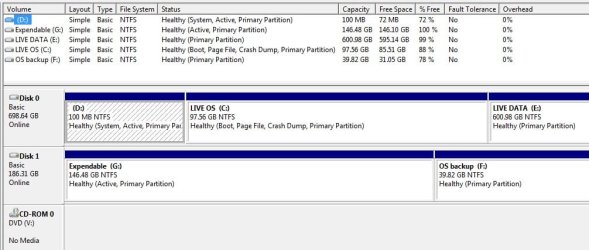
It seems that upon REBOOT this morning, the formerly UNlettered drive is now G:

diskmgmt.jpg
 

My Computer My Computer

At a glance

Windows 7AMD Phenom II X2 (dual-core)4Gintegrated ATI HD 4200
Computer type
PC/Desktop
Computer Manufacturer/Model Number
Custom
OS
Windows 7
CPU
AMD Phenom II X2 (dual-core)
Motherboard
GA-MA785GM-US2H
Memory
4G
Graphics Card(s)
integrated ATI HD 4200
Sound Card
integrated
Monitor(s) Displays
Samsung 24"
Screen Resolution
1920x1080
Hard Drives
1 SSD - Samsung 840 - 500 GB - OS and DATA partitions
1 SSD - Intel 320 - 120 GB (used for backups) - Misc/BACKUP
1 SATA HD - WD, 500 GB - BACKUP
PSU
Ultra X4 500W
Case
Ultra X-blaster
Keyboard
Microsoft Digital Media Pro
Mouse
Logitech WIRED!
Internet Speed
15 Mbps FIOS
It seems that upon REBOOT this morning, the formerly UNlettered drive is now G:
Everything looks good to me. I am assuming you have no difficulty booting? Windows 7 is on your C: drive, where you want it?

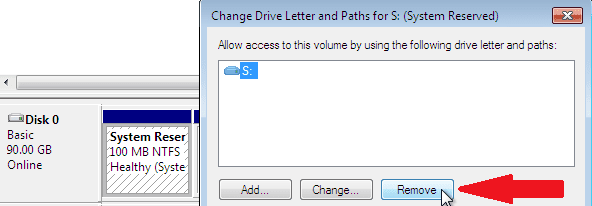
You can simply remove the drive letter from the "System Reserved" partition:

XP_plus_Win7_23.PNG

Then you can give the other partitions (including the CD DVD-Rom) the drive letters you want. I do not think a reinstall would be neccessary:

XP_plus_Win7_12.PNG

The first partition on your second hard drive is also marked "Active". While this is normal, unless you intend to install an OS to that partition and boot to it, it does not need "Active" status to hold data. It is an option to remove the "Active" status but it is not a necessity.

Cheers!
 

My Computer My Computer

At a glance

...
OS
...
I will do as you recommend. No, booting is no problem.

Do we have any idea HOW the 100MB partition got a drive letter in the first place?

The (now G: ) partition on the IDE drive (an old XP drive) was reformatted WHILE using W7 during my last W7 install. So, I don't recall if it said "active" after reformat.

On the "active" partition on my IDE drive, the "mark active" is greyed out.

EDIT: Changes done. I decided to restart/reboot after removing 100MB drive letter since it provided a message that you'd still have access to it during THIS boot cycle (and because my E was now going to acquire the former D letter I figure I'd play it safe).
 

My Computer My Computer

At a glance

Windows 7AMD Phenom II X2 (dual-core)4Gintegrated ATI HD 4200
Computer type
PC/Desktop
Computer Manufacturer/Model Number
Custom
OS
Windows 7
CPU
AMD Phenom II X2 (dual-core)
Motherboard
GA-MA785GM-US2H
Memory
4G
Graphics Card(s)
integrated ATI HD 4200
Sound Card
integrated
Monitor(s) Displays
Samsung 24"
Screen Resolution
1920x1080
Hard Drives
1 SSD - Samsung 840 - 500 GB - OS and DATA partitions
1 SSD - Intel 320 - 120 GB (used for backups) - Misc/BACKUP
1 SATA HD - WD, 500 GB - BACKUP
PSU
Ultra X4 500W
Case
Ultra X-blaster
Keyboard
Microsoft Digital Media Pro
Mouse
Logitech WIRED!
Internet Speed
15 Mbps FIOS
I will do as you recommend. No, booting is no problem.

Do we have any idea HOW the 100MB partition got a drive letter in the first place?

The (now G: ) partition on the IDE drive (an old XP drive) was reformatted WHILE using W7 during my last W7 install. So, I don't recall if it said "active" after reformat.

On the "active" partition on my IDE drive, the "mark active" is greyed out.
Well ... the 100MB partition is the "Active" partition now and contains the boot code so all is good. As for a definite answer ... I would guess if it ever had the correct partition type, a numeric identity as "Reserved Partition", it got altered so 7 saw it as an ordinary "Primary, Active" partition and obediently gave it a drive letter. Removing the drive letter will prevent any file exchanges and all will still be good.

For some intresting info, check this out: Understanding Disk Partitions

To remove the "Active" status of the IDE drive you would need to use a third party app like Partition Wizard. As I said, not a requirement, but might avoid some complications in your future (one of the reasons to remove all but the drive the OS is to be installed onto) and as you see the "Active" flag can easily be restored.

Cheers!
 

My Computer My Computer

At a glance

...
OS
...
Back
Top