JavaScript is disabled. For a better experience, please enable JavaScript in your browser before proceeding.
You are using an out of date browser. It may not display this or other websites correctly.
You should upgrade or use an
alternative browser .
How to add the show desktop shortcut to the taskbar
New member
Power User
VIP
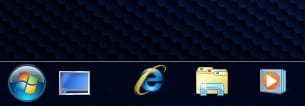
I'd like it on the left next to the start button.
windows 7 HP 64bit AMD Athlon 64 X2 Dual Core 5600+ 2.80GHz 4GB Asus ATI Radeon EAH2600XT HTDP Silent 256MB G... windows 7 HP 64bit AMD Athlon 64 X2 Dual Core 5600+ 2.80GHz Asus M2N-SLI Deluxe 4GB Asus ATI Radeon EAH2600XT HTDP Silent 256MB GDDR3 HDTV/Dual M-Audio 24/96 DELL 23" widescreen monitor 1920x 1080 3 x Samsung F1 Spinpoint Antec Quiet Mini Tower Case Latest slim Apple keyboard 5MB/s (50mb/s virgin broadband)
Administrator
Staff member
Hello Dave,
The taskbar already has the
Show Desktop feature built into it if you wanted to use that option instead.
Unfortunately, that shortcut can only be pinned inside the pinned Windows Explorer taskbar icon, or in the Start Menu pin area.
Hope this helps,
Shawn
64-bit Windows 11 Pro for Workstations Intel i7-8700K OC'd to 5 GHz 64 GB (4x16GB) G.SKILL TridentZ RGB DDR4 3600... ASUS ROG-STRIX-GTX1080TI-O11G-GAMING PC/Desktop Self built custom 64-bit Windows 11 Pro for Workstations Intel i7-8700K OC'd to 5 GHz ASUS ROG Maximus XI Formula Z390 64 GB (4x16GB) G.SKILL TridentZ RGB DDR4 3600 MHz ASUS ROG-STRIX-GTX1080TI-O11G-GAMING Integrated 2 x Samsung Odyssey G7 27" 2560x1440 1TB Samsung 990 PRO M.2, Seasonic Prime Titanium 850W Thermaltake Core P3 Corsair Hydro H115i Logitech wireless K800 Logitech MX Master 4 2 Gb/s Download and 100 Mb/s Upload Malwarebyte Anti-Malware Premium Google Chrome Logitech Z625 speaker system,
New member
Power User
VIP
Thread Starter
Thanks Shawn.
windows 7 HP 64bit AMD Athlon 64 X2 Dual Core 5600+ 2.80GHz 4GB Asus ATI Radeon EAH2600XT HTDP Silent 256MB G... windows 7 HP 64bit AMD Athlon 64 X2 Dual Core 5600+ 2.80GHz Asus M2N-SLI Deluxe 4GB Asus ATI Radeon EAH2600XT HTDP Silent 256MB GDDR3 HDTV/Dual M-Audio 24/96 DELL 23" widescreen monitor 1920x 1080 3 x Samsung F1 Spinpoint Antec Quiet Mini Tower Case Latest slim Apple keyboard 5MB/s (50mb/s virgin broadband)
AKA Mr GRiM
Guru
Gold Member
VIP
Last edited by a moderator: Apr 1, 2009
Windows 7 Ultimate Vista Ultimate x64 Core 2 Duo E8500 3.16Ghz @ 3.8Ghz 2x2Gigs Patriot PC2-6400 LL Inno3D GeForce GTX260 216 SP Home Brew Windows 7 Ultimate Vista Ultimate x64 Core 2 Duo E8500 3.16Ghz @ 3.8Ghz eVGA 750i FTW 2x2Gigs Patriot PC2-6400 LL Inno3D GeForce GTX260 216 SP ASUS VW222U 22" 2ms Response time 1680x1050 SATA 150GB HYTEC 600W & Thermaltake 650W Toughpower Power Exp Thermaltake Armor LCS (Liquid Cooling System) Liquid Cooling System Logitech G15 Gaming Keyboard Logitech G9 Gaming Mouse
New member
Power User
VIP
Thread Starter
Thanks. Thats exactly what i was looking for.
Although I already had the quicklaunch tool bar i couldn't resize the icons to match the pinned ones. i didn't see the large/small option before but i think I was just clicking on the wrong part of the task bar.
Have a beer on me.
Dave.
windows 7 HP 64bit AMD Athlon 64 X2 Dual Core 5600+ 2.80GHz 4GB Asus ATI Radeon EAH2600XT HTDP Silent 256MB G... windows 7 HP 64bit AMD Athlon 64 X2 Dual Core 5600+ 2.80GHz Asus M2N-SLI Deluxe 4GB Asus ATI Radeon EAH2600XT HTDP Silent 256MB GDDR3 HDTV/Dual M-Audio 24/96 DELL 23" widescreen monitor 1920x 1080 3 x Samsung F1 Spinpoint Antec Quiet Mini Tower Case Latest slim Apple keyboard 5MB/s (50mb/s virgin broadband)
Administrator
Staff member
Dave,
I'm happy to hear that you got it sorted.
64-bit Windows 11 Pro for Workstations Intel i7-8700K OC'd to 5 GHz 64 GB (4x16GB) G.SKILL TridentZ RGB DDR4 3600... ASUS ROG-STRIX-GTX1080TI-O11G-GAMING PC/Desktop Self built custom 64-bit Windows 11 Pro for Workstations Intel i7-8700K OC'd to 5 GHz ASUS ROG Maximus XI Formula Z390 64 GB (4x16GB) G.SKILL TridentZ RGB DDR4 3600 MHz ASUS ROG-STRIX-GTX1080TI-O11G-GAMING Integrated 2 x Samsung Odyssey G7 27" 2560x1440 1TB Samsung 990 PRO M.2, Seasonic Prime Titanium 850W Thermaltake Core P3 Corsair Hydro H115i Logitech wireless K800 Logitech MX Master 4 2 Gb/s Download and 100 Mb/s Upload Malwarebyte Anti-Malware Premium Google Chrome Logitech Z625 speaker system,
AKA Mr GRiM
Guru
Gold Member
VIP
Your welcome Dave, I'm already having one
Windows 7 Ultimate Vista Ultimate x64 Core 2 Duo E8500 3.16Ghz @ 3.8Ghz 2x2Gigs Patriot PC2-6400 LL Inno3D GeForce GTX260 216 SP Home Brew Windows 7 Ultimate Vista Ultimate x64 Core 2 Duo E8500 3.16Ghz @ 3.8Ghz eVGA 750i FTW 2x2Gigs Patriot PC2-6400 LL Inno3D GeForce GTX260 216 SP ASUS VW222U 22" 2ms Response time 1680x1050 SATA 150GB HYTEC 600W & Thermaltake 650W Toughpower Power Exp Thermaltake Armor LCS (Liquid Cooling System) Liquid Cooling System Logitech G15 Gaming Keyboard Logitech G9 Gaming Mouse
New member
Power User
VIP
Thread Starter
Yep, all working as i want it. Now, all i need to do is stop playing with the settings and get on with some work
Roll on RC1.
Dave.
EDIT: Mr Grim. Is that a "real" RC1 you have? I know it was due on 9th April.
windows 7 HP 64bit AMD Athlon 64 X2 Dual Core 5600+ 2.80GHz 4GB Asus ATI Radeon EAH2600XT HTDP Silent 256MB G... windows 7 HP 64bit AMD Athlon 64 X2 Dual Core 5600+ 2.80GHz Asus M2N-SLI Deluxe 4GB Asus ATI Radeon EAH2600XT HTDP Silent 256MB GDDR3 HDTV/Dual M-Audio 24/96 DELL 23" widescreen monitor 1920x 1080 3 x Samsung F1 Spinpoint Antec Quiet Mini Tower Case Latest slim Apple keyboard 5MB/s (50mb/s virgin broadband)
da Cleaner
Guru
Gold Member
VIP
You can also use the short-cut winkey+D
Windows 7 Professional 64-bit Intel E8400 3GHz Kingston PC3-10700H 4Gb XFX Radeon HD 5850 BlackEd. self built Windows 7 Professional 64-bit Intel E8400 3GHz Intel DX48BT2 Kingston PC3-10700H 4Gb XFX Radeon HD 5850 BlackEd. Asus Xonar DG 2x Samsung SM-T220HD 22" 1680x1050 on two monitors OCZ Vertex 2 120gb 3.5" (OS) Thermaltake ToughPower 850w Thermaltake Armor Scythe Mugen II Microsoft Comfort Curve USB Razer Diamondback 3G 8128/443
New member
Power User
VIP
Thread Starter
You can also use the short-cut winkey+D
Yeah but im more a mouse man. i would have to put my coffee down to use the keyboard :shock:
Dave.
windows 7 HP 64bit AMD Athlon 64 X2 Dual Core 5600+ 2.80GHz 4GB Asus ATI Radeon EAH2600XT HTDP Silent 256MB G... windows 7 HP 64bit AMD Athlon 64 X2 Dual Core 5600+ 2.80GHz Asus M2N-SLI Deluxe 4GB Asus ATI Radeon EAH2600XT HTDP Silent 256MB GDDR3 HDTV/Dual M-Audio 24/96 DELL 23" widescreen monitor 1920x 1080 3 x Samsung F1 Spinpoint Antec Quiet Mini Tower Case Latest slim Apple keyboard 5MB/s (50mb/s virgin broadband)
da Cleaner
Guru
Gold Member
VIP
lol
Windows 7 Professional 64-bit Intel E8400 3GHz Kingston PC3-10700H 4Gb XFX Radeon HD 5850 BlackEd. self built Windows 7 Professional 64-bit Intel E8400 3GHz Intel DX48BT2 Kingston PC3-10700H 4Gb XFX Radeon HD 5850 BlackEd. Asus Xonar DG 2x Samsung SM-T220HD 22" 1680x1050 on two monitors OCZ Vertex 2 120gb 3.5" (OS) Thermaltake ToughPower 850w Thermaltake Armor Scythe Mugen II Microsoft Comfort Curve USB Razer Diamondback 3G 8128/443