Theme - How to Apply Custom Themes

How to Apply Custom Themes in Windows 7

   Information
This will show you how to apply a custom theme from deviantART as your theme in Windows 7.


Here's How:
1. First you will need to click on the Download button below to download and install either the 32-bit (x86) or 64-bit (x64) Universal Theme Patcher (auto installer) below for your 32-bit or 64-bit Windows 7.
32-bit:

Download


64-bit:

Download


2. When downloaded, unrar the file using winrar, and run the exe.

3. Select your user interface language
2ngahdt.png

4. Click OK

5. The click yes when this box appear.
2dv7u3a.png

6. The you need to patch these 3 files (As you see i already have mine patched) Click the patch outside each file, after patching them all reboot.
2f09cp2.png

7. Now you need a custom theme, i will advise you to check these out:
New Orleans Saints by ~sergiogarcia9 on deviantART

Aero Evolution 1.0 by ~sergiogarcia9 on deviantART

Majestic Excellence by ~sergiogarcia9 on deviantART

Midnight by ~MrGRiM01 on deviantART

My DA profile: sergiogarcia9 on deviantART
Mr Grim's DA profile: MrGRiM01 on deviantART

   Note
You can also find more themes on Deviantart, but make sure they work with windows 7.

They need to be unzipped first.


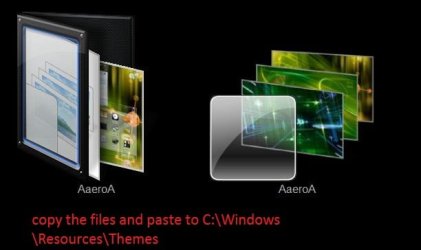
8. Now navigate to the Windows folder, find the folder called resources and click on the themes folder. (C:\Windows\Resources\Themes)
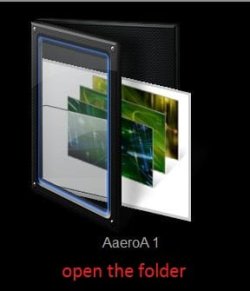
These are the files that has to be placed in the folder:

6dsthk.png

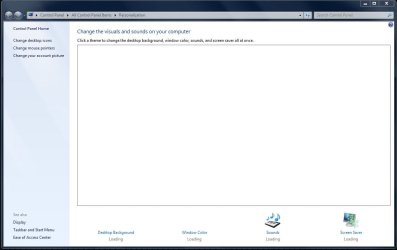
9. Then paste the folder and theme provided, then the theme should appear in your personalization menu :)

NOTE: In most themes there are only 2 files (a folder and a theme file)

Good luck :)


Attachments

Last edited by a moderator:
I ran the thing, pathced the files, restarted and it won't boot afterwards, I gotta go restore them!
 

My Computer

OS
Windows 7
I get as far as step 8 in tutorial and can't find the 3 files that need to be put in folder. Can someone enlighten me please? Thanks !
 

My Computer

Computer Manufacturer/Model Number
HP Pavillion- p6331-p
OS
Windows 7 (64bit)
CPU
AMD Athlon II X4 630 2.8 GHz
Motherboard
Foxconn: H-Rs780-uATX
Memory
8.00GB DDR3-SDRAM (1333 MHz) ( Max allowed-16GB)
Graphics Card(s)
ATI Radeon HD 4200
Sound Card
Realtek High Def Audio
Monitor(s) Displays
HP 20" high Def Widescreen
Screen Resolution
1600x 900
Hard Drives
Seagate ST3750528AS- 700 GB
Keyboard
Logitech EX110 Cordless
Mouse
Logitech LX Laser Cordless
Internet Speed
25/25
Files are in the theme (that you had downloaded earlier) folder.
 

My Computer

Computer Manufacturer/Model Number
Micro-Star International/MS-7529
OS
Windows 7 Ultimate x32
CPU
DualCore Intel Pentium E2200, 2218 MHz (11 x 202)
Motherboard
MSI G31M3 V2 (MS-7529) (2 PCI, 1 PCI-E x16,2 DDR2 DIMM)
Memory
2 GB DDR2-800 DDR2 SDRAM
Graphics Card(s)
nVIDIA GeForce 9500GT 1GB
Sound Card
Realtek ALC888/1200 @ Intel 82801GB ICH7
Monitor(s) Displays
Samsung SyncMaster 2253BW (Digital) 22'' LCD
Screen Resolution
1680x1050
Hard Drives
SAMSUNG HD322IJ ATA Device (298 GB , IDE)
Files are in the theme (that you had downloaded earlier) folder.
When I try to open the theme i get the " Windows cannot open this file" message. I am completely lost now.:cry:
 

My Computer

Computer Manufacturer/Model Number
HP Pavillion- p6331-p
OS
Windows 7 (64bit)
CPU
AMD Athlon II X4 630 2.8 GHz
Motherboard
Foxconn: H-Rs780-uATX
Memory
8.00GB DDR3-SDRAM (1333 MHz) ( Max allowed-16GB)
Graphics Card(s)
ATI Radeon HD 4200
Sound Card
Realtek High Def Audio
Monitor(s) Displays
HP 20" high Def Widescreen
Screen Resolution
1600x 900
Hard Drives
Seagate ST3750528AS- 700 GB
Keyboard
Logitech EX110 Cordless
Mouse
Logitech LX Laser Cordless
Internet Speed
25/25
Files are in the theme (that you had downloaded earlier) folder.
When I try to open the theme i get the " Windows cannot open this file" message. I am completely lost now.:cry:

Capture6.jpg Capture7.jpg
some of the themes have and additional files, you don't have to use them.
cheers
 

My Computer

Computer Manufacturer/Model Number
Micro-Star International/MS-7529
OS
Windows 7 Ultimate x32
CPU
DualCore Intel Pentium E2200, 2218 MHz (11 x 202)
Motherboard
MSI G31M3 V2 (MS-7529) (2 PCI, 1 PCI-E x16,2 DDR2 DIMM)
Memory
2 GB DDR2-800 DDR2 SDRAM
Graphics Card(s)
nVIDIA GeForce 9500GT 1GB
Sound Card
Realtek ALC888/1200 @ Intel 82801GB ICH7
Monitor(s) Displays
Samsung SyncMaster 2253BW (Digital) 22'' LCD
Screen Resolution
1680x1050
Hard Drives
SAMSUNG HD322IJ ATA Device (298 GB , IDE)
Now everything make senses hehe just try out red fusion it work finally, thanks 4 teaching
 

My Computer

Computer Manufacturer/Model Number
Asus GSG2
OS
windows 7 Pro 64 bit
CPU
Intel
Memory
4 gb
Graphics Card(s)
Nvidia 8700
Monitor(s) Displays
46" Sony Bravia
Screen Resolution
1080p
Hard Drives
4,5 tb
Now everything make senses hehe just try out red fusion it work finally, thanks 4 teaching
Glad that I helped, enjoy the theme
cheers
 

My Computer

Computer Manufacturer/Model Number
Micro-Star International/MS-7529
OS
Windows 7 Ultimate x32
CPU
DualCore Intel Pentium E2200, 2218 MHz (11 x 202)
Motherboard
MSI G31M3 V2 (MS-7529) (2 PCI, 1 PCI-E x16,2 DDR2 DIMM)
Memory
2 GB DDR2-800 DDR2 SDRAM
Graphics Card(s)
nVIDIA GeForce 9500GT 1GB
Sound Card
Realtek ALC888/1200 @ Intel 82801GB ICH7
Monitor(s) Displays
Samsung SyncMaster 2253BW (Digital) 22'' LCD
Screen Resolution
1680x1050
Hard Drives
SAMSUNG HD322IJ ATA Device (298 GB , IDE)
Thanks for this helpful tutorial Sergio!
 

My Computer

Computer Manufacturer/Model Number
Gateway NV5378u
OS
Windows 7 Ultimate 64-bit
CPU
AMD Athlon II X2 M300
Motherboard
Gateway SJV50TR 0100
Memory
4GB
Graphics Card(s)
AMD M880G with ATI Mobility Radeon HD 4200
Sound Card
Conexant High Definition Audio
Monitor(s) Displays
Generic PnP Monitor
Screen Resolution
15.6" 16:9 HD LED LCD
Hard Drives
Hitachi HTS545050B9A300 Disk Device 500GB
Did NOT work

Did all the steps, but taskbar and windows did not change colors. any ideas ?
 

My Computer

Computer Manufacturer/Model Number
Xplorer X6-2900 Notebook
OS
Win7PRo/Ubuntu9.04
CPU
i5-520 Intel
Motherboard
Intel(R) PM55 Chipset Mainboard
Memory
4.0 gig
Graphics Card(s)
Geforce GT330M
Sound Card
BUILT-IN AC 97 SOUND
Screen Resolution
1280X768
Hard Drives
320 gig 7200rpm
Other Info
Built-in 1.3 Mega Pixel Webcam
RED Fusion theme......can't get it to change taskbar or window color
 

My Computer

Computer Manufacturer/Model Number
Xplorer X6-2900 Notebook
OS
Win7PRo/Ubuntu9.04
CPU
i5-520 Intel
Motherboard
Intel(R) PM55 Chipset Mainboard
Memory
4.0 gig
Graphics Card(s)
Geforce GT330M
Sound Card
BUILT-IN AC 97 SOUND
Screen Resolution
1280X768
Hard Drives
320 gig 7200rpm
Other Info
Built-in 1.3 Mega Pixel Webcam
tried the other method......still no good. I think it may have to do with my old hardware. (intel 82852 video drivers)
 

My Computer

Computer Manufacturer/Model Number
Xplorer X6-2900 Notebook
OS
Win7PRo/Ubuntu9.04
CPU
i5-520 Intel
Motherboard
Intel(R) PM55 Chipset Mainboard
Memory
4.0 gig
Graphics Card(s)
Geforce GT330M
Sound Card
BUILT-IN AC 97 SOUND
Screen Resolution
1280X768
Hard Drives
320 gig 7200rpm
Other Info
Built-in 1.3 Mega Pixel Webcam
Thanks for this Tut.

Tye
 

My Computer

OS
Windows 7 Ultimate 32 bit
CPU
AMD Phenom 8450 Triple Core 2.1GHz
Motherboard
MSI MS-7388
Memory
Corsair 4GB
Graphics Card(s)
ATI Radeon HD3650 1GB
Sound Card
Onboard 7.1
Monitor(s) Displays
Samsung 24" LCD - Philips 42" LCD
Screen Resolution
1600 x 900 32bit @60Hz
Hard Drives
Maxtor 120GB IDE - Hitachi 1TB SATA
PSU
650w
I have followed the tut and now have no themes at all showing. Any ideas where I went wrong?
win7 rtm 64bit
 

My Computer

Computer Manufacturer/Model Number
Me
OS
Windows 7 64 Ultimate
CPU
Athlon II x4 2.8 Ghz 630
Motherboard
ASUS M4A785TD-V EVO
Memory
4 GB Corsair XMS3-DDR3-1333 unganged
Graphics Card(s)
Nvidia Geforce 9500GT 512MB GDDR3
Sound Card
VIA VT1708S HD audio (8Ch) - onboard
Monitor(s) Displays
LG Flatron W2253V
Screen Resolution
1920x1080
Hard Drives
Seagate ST31000528AS 1TB (931GB)
PSU
Jeantech 405W
Case
XIGMATEK Asgard
Keyboard
Logitech Media Keyboard 600
Mouse
Logitech LX8 Laser Mouse - cordless
Internet Speed
8 Mbit
Hi Germulvey

Can you show a screenshot of what you mean?
 
looks like this!
 

Attachments

  • pers.JPG
    pers.JPG
    73.3 KB · Views: 164

My Computer

Computer Manufacturer/Model Number
Me
OS
Windows 7 64 Ultimate
CPU
Athlon II x4 2.8 Ghz 630
Motherboard
ASUS M4A785TD-V EVO
Memory
4 GB Corsair XMS3-DDR3-1333 unganged
Graphics Card(s)
Nvidia Geforce 9500GT 512MB GDDR3
Sound Card
VIA VT1708S HD audio (8Ch) - onboard
Monitor(s) Displays
LG Flatron W2253V
Screen Resolution
1920x1080
Hard Drives
Seagate ST31000528AS 1TB (931GB)
PSU
Jeantech 405W
Case
XIGMATEK Asgard
Keyboard
Logitech Media Keyboard 600
Mouse
Logitech LX8 Laser Mouse - cordless
Internet Speed
8 Mbit
looks like this!
Hmm thats very odd. Have you tried the following
a) letting the computer load for a few minutes at that screen
b) rebooting
c) Looking in C:\Windows\Resources\Themes, to see if any folders/themes are in there?
 
I tried letting it load and then thought I'd try system restore.
Which has resolved. Will try again to see if it works differently.
Thanks for the help!

::edit::
After reapplying it seems to be working fine!
:)
 

My Computer

Computer Manufacturer/Model Number
Me
OS
Windows 7 64 Ultimate
CPU
Athlon II x4 2.8 Ghz 630
Motherboard
ASUS M4A785TD-V EVO
Memory
4 GB Corsair XMS3-DDR3-1333 unganged
Graphics Card(s)
Nvidia Geforce 9500GT 512MB GDDR3
Sound Card
VIA VT1708S HD audio (8Ch) - onboard
Monitor(s) Displays
LG Flatron W2253V
Screen Resolution
1920x1080
Hard Drives
Seagate ST31000528AS 1TB (931GB)
PSU
Jeantech 405W
Case
XIGMATEK Asgard
Keyboard
Logitech Media Keyboard 600
Mouse
Logitech LX8 Laser Mouse - cordless
Internet Speed
8 Mbit

My Computer

Computer Manufacturer/Model Number
dell optiplex - 2003
OS
windows7 7600 x86
CPU
itel pentium 4
Memory
3.00 GB
Graphics Card(s)
diamond radion x1050
Sound Card
SoundMax
Monitor(s) Displays
dell 2408wfp dell e172fp
Screen Resolution
1920 x 1200 1280 x 1024
Hard Drives
2 - 80 GB internals WD
1 - 01 TB ext
2 - 750 GB ext
1- 500 GB ext
all running on system no problems
Keyboard
old logitech cordless
Mouse
logitech wireless
Internet Speed
16 / 4
Other Info
networked into my sbs2003 server running sp1 still
it's a wonder I could even get windows 7 to connect to it
Back
Top