Theme - Specify Default Theme to Load for New Users

How to Specify a Default Theme to Load for New Users in Windows 7

   Information
This will show you how to have a theme that you specifiy to be applied by default when a new user logs on for the first time.

You must be logged in as an administrator to be able to do this tutorial.
   Note
If enabled, this does not prevent the user from changing their theme or any of the theme elements such as the desktop background, window color, sounds, or screen saver after the first logon. It only sets the theme you selected to be used by default until changed.
   Warning
Your millage may vary.

It has been reported that this does not always work properly in 64-bit Windows 7, but does in 32-bit Windows 7. If you experience this issue, then see: The "Load a specific theme" Group Policy setting is not applied correctly for a new user in Windows 7 or in Windows Server 2008 R2

The Windows 7 Starter and Home Basic editions do not have the Personalization features included in them, such as changing and saving themes.


OPTION ONE

Through the Local Group Policy Editor


1. Open the all users, specific users or groups, or all users except administrators Local Group Policy Editor for how you want this policy applied.

2. In the left pane, click on to expand User Configuration, Administrative Templates, Control Panel, and Personalization. (See screenshot below)
GPEDIT-1.jpg
3. In the right pane, right click on Load a specific theme and click on Edit. (See screenshot above)

4. To Disable Loading a Specific Theme for New Users
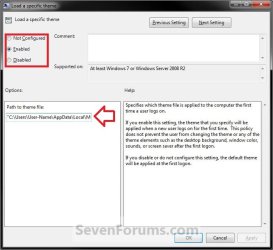
A) Select (dot) either Not Configured or Disabled. (see screenshot below step 6)

B) Go to step 6.
5. To Enable Loading a Specific Theme for New Users
A) Select (dot) Enabled. (see screenshot below step 6)

B) In the Path to theme file box under Options, type in the full path of the .theme file with file extension in quotes that you want to be used by default for new users. (see screenshot below step 6)

For example:
Code:
"C:\Users\User-Name\AppData\Local\Microsoft\Windows\Themes\Brink-Theme.theme"


   Tip

6. Click on OK. (see screenshot below)
GPEDIT-2.jpg
7. Close the Local Group Policy Editor window.


OPTION TWO

Manually in Registry Editor


1. Open the Start Menu, then type regedit in the search box and press enter.

2. If prompted by UAC, click on Yes.

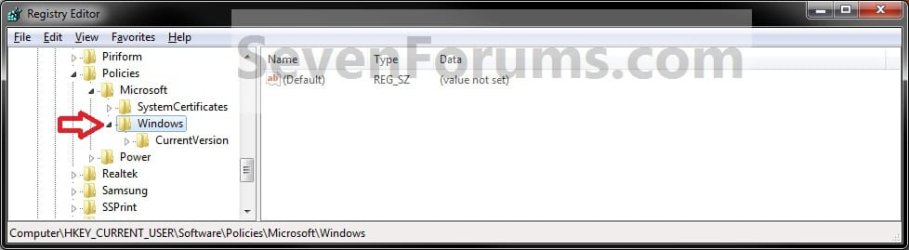
3. In regedit, navigate to the location below. (see screenshot below)
HKEY_CURRENT_USER\Software\Policies\Microsoft\Windows
reg.jpg
4. To Enable Loading a Specific Theme for New Users
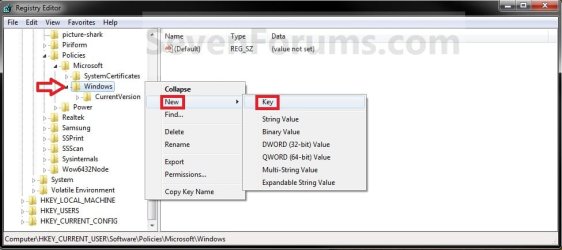
A) In the left pane, right click on Windows and click on New and Key. Type Personalization and press enter. (see screenshot below)
NOTE: If you already have the Personalization key, then skip this step and continue to 4B below.
Reg1.jpg
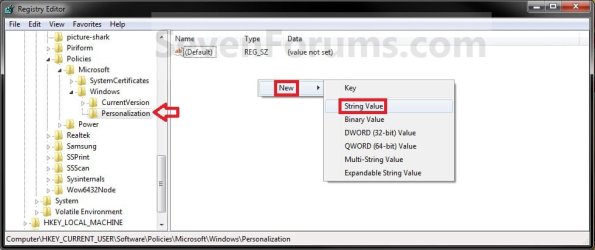
B) In the right pane of Personalization, right click on a empty space and click on New and String Value. (see screenshot below)
Reg2.jpg
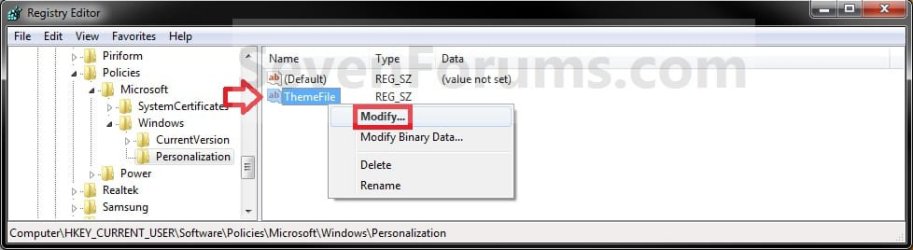
C) Type in ThemeFile and press Enter. Right click on ThemeFile and click on Modify. (see screenshot below)
Reg3.jpg
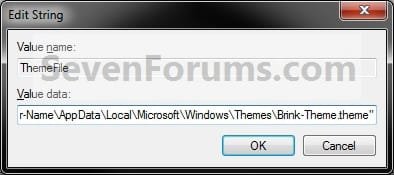
D) type in the full path of the .theme file with file extension in quotes that you want to be used by default for new users. (see screenshot below)
Modify.jpg

For example:
Code:
"C:\Users\User-Name\AppData\Local\Microsoft\Windows\Themes\Brink-Theme.theme"


   Tip


E) Go to step 6.
5. To Disable Loading a Specific Theme for New Users
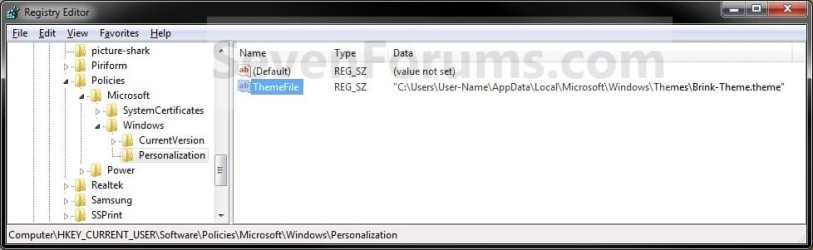
A) In the right pane of Personalization, right click on ThemeFile and click on Delete. (see screenshot below)
Reg4.jpg
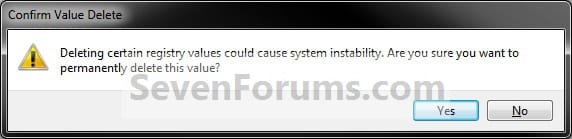
B) Click on Yes to confirm deletion. (see screenshot below)
Delete.jpg
6. Close regedit.
That's it,
Shawn


Last edited:
Hi Shawn:

I was able to use this procedure to set the default theme in Window 7 Pro 32 bit OS. But, in Windows 7 Ultimate 64 bit OS the new user doesn't get the default theme. I checked the registry key and the key is enabled and the group poliocy to load a specific thjeme is enabled and the path is correct. Is there a bug in windows 7 Ultimate 64 bit thta prevents the common theme to be set for all new users?

Thank you,

Erin
 

My Computer

OS
Windows
Hello Erin,

Umm, it worked before on my 64- bit Windows 7 Ultimate, but I'm getting a the Windows Classic theme instead now for the new user no matter what them I specify. I'll have to do some more test to see what happened. Perhaps some update or something?
 

My Computer

Computer type
PC/Desktop
Computer Manufacturer/Model Number
Self built custom
OS
64-bit Windows 11 Pro for Workstations
CPU
Intel i7-8700K OC'd to 5 GHz
Motherboard
ASUS ROG Maximus XI Formula Z390
Memory
64 GB (4x16GB) G.SKILL TridentZ RGB DDR4 3600 MHz
Graphics Card(s)
ASUS ROG-STRIX-GTX1080TI-O11G-GAMING
Sound Card
Integrated
Monitor(s) Displays
2 x Samsung Odyssey G7 27"
Screen Resolution
2560x1440
Hard Drives
1TB Samsung 990 PRO M.2,
4TB Samsung 990 PRO PRO M.2,
TerraMaster F8 SSD Plus NAS
PSU
Seasonic Prime Titanium 850W
Case
Thermaltake Core P3
Cooling
Corsair Hydro H115i
Keyboard
Logitech wireless K800
Mouse
Logitech MX Master 4
Internet Speed
2 Gb/s Download and 100 Mb/s Upload
Antivirus
Malwarebyte Anti-Malware Premium
Browser
Google Chrome
Other Info
Logitech Z625 speaker system,
Logitech BRIO 4K Pro webcam,
HP Color LaserJet Pro MFP M477fdn,
APC SMART-UPS RT 1000 XL - SURT1000XLI,
Galaxy S23 Plus phone
Default Theme is working better in W7 Ultimate 64 bit

Hi all:

There must have been an update because now when I set a default theme for new users, the new user does get the correct wallpaper and start menu confugurations. The new user still doesn't get all of the desktop ICONs specified though. There may be other settign that are missed but, at least we are moving in the right direction!
 

My Computer

OS
Windows
That's great news Erco.

Did you mean the actual icon used for the desktop icons, or not having some of the desktop shortcuts?
 

My Computer

Computer type
PC/Desktop
Computer Manufacturer/Model Number
Self built custom
OS
64-bit Windows 11 Pro for Workstations
CPU
Intel i7-8700K OC'd to 5 GHz
Motherboard
ASUS ROG Maximus XI Formula Z390
Memory
64 GB (4x16GB) G.SKILL TridentZ RGB DDR4 3600 MHz
Graphics Card(s)
ASUS ROG-STRIX-GTX1080TI-O11G-GAMING
Sound Card
Integrated
Monitor(s) Displays
2 x Samsung Odyssey G7 27"
Screen Resolution
2560x1440
Hard Drives
1TB Samsung 990 PRO M.2,
4TB Samsung 990 PRO PRO M.2,
TerraMaster F8 SSD Plus NAS
PSU
Seasonic Prime Titanium 850W
Case
Thermaltake Core P3
Cooling
Corsair Hydro H115i
Keyboard
Logitech wireless K800
Mouse
Logitech MX Master 4
Internet Speed
2 Gb/s Download and 100 Mb/s Upload
Antivirus
Malwarebyte Anti-Malware Premium
Browser
Google Chrome
Other Info
Logitech Z625 speaker system,
Logitech BRIO 4K Pro webcam,
HP Color LaserJet Pro MFP M477fdn,
APC SMART-UPS RT 1000 XL - SURT1000XLI,
Galaxy S23 Plus phone
Sorry, the shortcuts are missing from the desktop for a new user. I also found that the IE favorites are missing as well.
 

My Computer

OS
Windows
These would not be part of a theme though. :(

However, you can copy any shortcuts that you would like to have included on all users desktops to the hidden C:\Users\Public\Public Desktop folder.

Unfortunately, you will need to manually copy any favorites that you would like to have included into the users C:\Users\(user-name)\Favorites folder.
 

My Computer

Computer type
PC/Desktop
Computer Manufacturer/Model Number
Self built custom
OS
64-bit Windows 11 Pro for Workstations
CPU
Intel i7-8700K OC'd to 5 GHz
Motherboard
ASUS ROG Maximus XI Formula Z390
Memory
64 GB (4x16GB) G.SKILL TridentZ RGB DDR4 3600 MHz
Graphics Card(s)
ASUS ROG-STRIX-GTX1080TI-O11G-GAMING
Sound Card
Integrated
Monitor(s) Displays
2 x Samsung Odyssey G7 27"
Screen Resolution
2560x1440
Hard Drives
1TB Samsung 990 PRO M.2,
4TB Samsung 990 PRO PRO M.2,
TerraMaster F8 SSD Plus NAS
PSU
Seasonic Prime Titanium 850W
Case
Thermaltake Core P3
Cooling
Corsair Hydro H115i
Keyboard
Logitech wireless K800
Mouse
Logitech MX Master 4
Internet Speed
2 Gb/s Download and 100 Mb/s Upload
Antivirus
Malwarebyte Anti-Malware Premium
Browser
Google Chrome
Other Info
Logitech Z625 speaker system,
Logitech BRIO 4K Pro webcam,
HP Color LaserJet Pro MFP M477fdn,
APC SMART-UPS RT 1000 XL - SURT1000XLI,
Galaxy S23 Plus phone
Shawn:

I was too hasty in saying that the default theme is set for new users. In fact, it is not set for new users and this is a problem for my team. We build HW platforms and proprietary applications that require specific settings for menu size, windows color, fonts etc. I am able to capture these configuration settings in my saved theme and I am able to make the theme available to a new user by putting the .theme file in C:\Windows\Resources\Themes\myTheme.theme I used the group policy editor to enable the default theme and I checked the registry key to verify the setting is saved there. However, on my Windows 7 Ultimate 64 bit OS, the default theme is not set for a new user by default. Can you verify that the default theme functinality is working for you? Or is it not working for you on a Win7 Ult 64 bit OS?
Please let me know if I'm doing something wrong or if MSFT can fix this. We are preparing to go to market in a few weeks and we need to get this resolved.

Thank you very much for your help,
erco
 

My Computer

OS
Windows
Erco,

I think it may only be a issue with 64-bit. It seems to be working fine in 32-bit as reported so far. :(
 

My Computer

Computer type
PC/Desktop
Computer Manufacturer/Model Number
Self built custom
OS
64-bit Windows 11 Pro for Workstations
CPU
Intel i7-8700K OC'd to 5 GHz
Motherboard
ASUS ROG Maximus XI Formula Z390
Memory
64 GB (4x16GB) G.SKILL TridentZ RGB DDR4 3600 MHz
Graphics Card(s)
ASUS ROG-STRIX-GTX1080TI-O11G-GAMING
Sound Card
Integrated
Monitor(s) Displays
2 x Samsung Odyssey G7 27"
Screen Resolution
2560x1440
Hard Drives
1TB Samsung 990 PRO M.2,
4TB Samsung 990 PRO PRO M.2,
TerraMaster F8 SSD Plus NAS
PSU
Seasonic Prime Titanium 850W
Case
Thermaltake Core P3
Cooling
Corsair Hydro H115i
Keyboard
Logitech wireless K800
Mouse
Logitech MX Master 4
Internet Speed
2 Gb/s Download and 100 Mb/s Upload
Antivirus
Malwarebyte Anti-Malware Premium
Browser
Google Chrome
Other Info
Logitech Z625 speaker system,
Logitech BRIO 4K Pro webcam,
HP Color LaserJet Pro MFP M477fdn,
APC SMART-UPS RT 1000 XL - SURT1000XLI,
Galaxy S23 Plus phone
I'm not sure how this is helpful to my team?

Can somebody at MSFT please take a look at win 7 64 bit OS and confirm that the default theme policy can be enabled?

If I'm doing something wrong I need to know and if the OS is at fault then MSFT needs to know.
 

My Computer

OS
Windows
erco61,

Did you figure this problem out? I was able to set the default theme for all new users using the group policy editor in 64 bit windows 7 as shown above. Didn't bother with the registry keys. Just copied my theme to the themes directory and set the path in GPO to C:\Windows\Resources\Themes\mytheme.theme.

You still need to follow post #6 for the desktop shortcuts. I don't know if you put IE favorites into C:\Users\Default\Favorites if they will be copied to new profiles or not. If not, you can load the default user hive and add a RunOnce entry (i.e. newUser.bat) to copy the shortcuts from a directory (i.e. C:\bin\favorites) to C:\Users\%username%\Favorites. That should automate that process of copying the shortcuts to newly created profiles the first time the user logs on.

Hope that helps.
 

My Computer

Computer Manufacturer/Model Number
Personal Build
OS
Windows 7 Pro/Ultimate x64
CPU
Intel Core i5-650 3.2Ghz
Motherboard
ASUS P7H55-M Pro
Memory
Patriot Gaming i5 8GB DDR3 1333MHz 9-9-9
Graphics Card(s)
EVGA GeForce 9500 GT 1GB PCIe
Sound Card
Audigy 2 ZS
Monitor(s) Displays
Dell UltraSharp 1704FPV
Hard Drives
2x WD Caviar Green 1.5TB 64MB/SATA-3G
Case
Thermaltake V4 Black Edition Mid Tower
Yes and No.

I did get the default theme policy working after a fresh OS install.

But, since the theme doesn't save all aspects of the user's environment as desired, I have worked around the problem by replacing the c:\Users\Default User folder. Now all aspects of the user's environment are configured by default for a new user.
 

My Computer

OS
Windows
Thank you Jay. :)
 

My Computer

Computer type
PC/Desktop
Computer Manufacturer/Model Number
Self built custom
OS
64-bit Windows 11 Pro for Workstations
CPU
Intel i7-8700K OC'd to 5 GHz
Motherboard
ASUS ROG Maximus XI Formula Z390
Memory
64 GB (4x16GB) G.SKILL TridentZ RGB DDR4 3600 MHz
Graphics Card(s)
ASUS ROG-STRIX-GTX1080TI-O11G-GAMING
Sound Card
Integrated
Monitor(s) Displays
2 x Samsung Odyssey G7 27"
Screen Resolution
2560x1440
Hard Drives
1TB Samsung 990 PRO M.2,
4TB Samsung 990 PRO PRO M.2,
TerraMaster F8 SSD Plus NAS
PSU
Seasonic Prime Titanium 850W
Case
Thermaltake Core P3
Cooling
Corsair Hydro H115i
Keyboard
Logitech wireless K800
Mouse
Logitech MX Master 4
Internet Speed
2 Gb/s Download and 100 Mb/s Upload
Antivirus
Malwarebyte Anti-Malware Premium
Browser
Google Chrome
Other Info
Logitech Z625 speaker system,
Logitech BRIO 4K Pro webcam,
HP Color LaserJet Pro MFP M477fdn,
APC SMART-UPS RT 1000 XL - SURT1000XLI,
Galaxy S23 Plus phone
Thank you for the excellent tutorial.:geek:
 

My Computer

Computer type
PC/Desktop
Computer Manufacturer/Model Number
Dell
OS
Windows 7 64-bit Enterprise
No .theme

Hi,
when i try to set this, i find my theme file but it is not a .theme
it is a .deskthemepack
what do i do?:eek:
 

My Computer

Computer type
Laptop
Computer Manufacturer/Model Number
Toshiba
OS
Windows 8.1 pro 64bit
Memory
8GB RAM
Graphics Card(s)
Intel HD
Hard Drives
1TB
Antivirus
McAfee
Browser
Chrome
Hello Corriganc, and welcome to Seven Forums. :)

For Windows 8 issues, it would be best to post at out sister site www.eightforums.com instead.


Windows 8 uses a desktop theme pack .deskthemepack instead of a .themepack file in Windows 7. You would need to save your theme using the method in step 7 below to have it saved as a .theme file instead. :)

Theme - Save in Windows 8
 

My Computer

Computer type
PC/Desktop
Computer Manufacturer/Model Number
Self built custom
OS
64-bit Windows 11 Pro for Workstations
CPU
Intel i7-8700K OC'd to 5 GHz
Motherboard
ASUS ROG Maximus XI Formula Z390
Memory
64 GB (4x16GB) G.SKILL TridentZ RGB DDR4 3600 MHz
Graphics Card(s)
ASUS ROG-STRIX-GTX1080TI-O11G-GAMING
Sound Card
Integrated
Monitor(s) Displays
2 x Samsung Odyssey G7 27"
Screen Resolution
2560x1440
Hard Drives
1TB Samsung 990 PRO M.2,
4TB Samsung 990 PRO PRO M.2,
TerraMaster F8 SSD Plus NAS
PSU
Seasonic Prime Titanium 850W
Case
Thermaltake Core P3
Cooling
Corsair Hydro H115i
Keyboard
Logitech wireless K800
Mouse
Logitech MX Master 4
Internet Speed
2 Gb/s Download and 100 Mb/s Upload
Antivirus
Malwarebyte Anti-Malware Premium
Browser
Google Chrome
Other Info
Logitech Z625 speaker system,
Logitech BRIO 4K Pro webcam,
HP Color LaserJet Pro MFP M477fdn,
APC SMART-UPS RT 1000 XL - SURT1000XLI,
Galaxy S23 Plus phone
Hello all,

I was able to fix this issue I was having on a 64 bit (x64) version of Windows 7 by editing the registry since the GPO setting nor the Hotfix did anything for me.

Opening the registry with regedit, in HKLM\SOFTWARE\Wow6432Node\Microsoft\Windows\CurrentVersion\Themes
Change the data entry for "InstallTheme" to the location of which your .theme file is located. After restarting, this worked perfectly!
 

My Computer

Computer type
PC/Desktop
Computer Manufacturer/Model Number
Custom
OS
Windows 7 Ultimate x64
Hello DarkOnyx, and welcome to Seven Forums.

Thank you for your feedback.

The registry location in Option Two didn't work for you to use the specified theme when creating a new user account?
 

My Computer

Computer type
PC/Desktop
Computer Manufacturer/Model Number
Self built custom
OS
64-bit Windows 11 Pro for Workstations
CPU
Intel i7-8700K OC'd to 5 GHz
Motherboard
ASUS ROG Maximus XI Formula Z390
Memory
64 GB (4x16GB) G.SKILL TridentZ RGB DDR4 3600 MHz
Graphics Card(s)
ASUS ROG-STRIX-GTX1080TI-O11G-GAMING
Sound Card
Integrated
Monitor(s) Displays
2 x Samsung Odyssey G7 27"
Screen Resolution
2560x1440
Hard Drives
1TB Samsung 990 PRO M.2,
4TB Samsung 990 PRO PRO M.2,
TerraMaster F8 SSD Plus NAS
PSU
Seasonic Prime Titanium 850W
Case
Thermaltake Core P3
Cooling
Corsair Hydro H115i
Keyboard
Logitech wireless K800
Mouse
Logitech MX Master 4
Internet Speed
2 Gb/s Download and 100 Mb/s Upload
Antivirus
Malwarebyte Anti-Malware Premium
Browser
Google Chrome
Other Info
Logitech Z625 speaker system,
Logitech BRIO 4K Pro webcam,
HP Color LaserJet Pro MFP M477fdn,
APC SMART-UPS RT 1000 XL - SURT1000XLI,
Galaxy S23 Plus phone
Hey Brink,

Sorry, it didn't work for me. I tried Option #2 again just to make sure and still was not able to make it work.
 

My Computer

Computer type
PC/Desktop
Computer Manufacturer/Model Number
Custom
OS
Windows 7 Ultimate x64
Back
Top