Xp to Windows 7 and No Sound

ggc

New member
Local time
1:46 PM
Messages
4
I will try to go through everything I have checked, drivers etc and hopefully someone will see something I have not.

I just upgraded to Windows 7 from XP. A few problems but not bad. However I cannot get any sound.

system
Gigabyte EP45 - DS3L
Gigabyte HD 4670 video
Realtek ALC888 codec Onboard

Device Manager No exclamation marks or issues showing
High Definition Audio Device Microsoft Driver 6.1.7600.16385
Realtek High Definition Audio Realtek 1/19/2010 6.0.1.6029
I have updated the Realtek driver a couple of times with the download from Realtek with no change in sound

Volume Meter
Speakers 66%
System Sounds 66$=%
Realtek Digital Output 82%

Sound
Playback
Digital Audio HDME not plugged in
Speakers Default Device with Green Arrow
Realtek Digital Output Ready

When I use the Test button on Speakers and Realtek DO a scale appears on the right with a verying level of green, but not sound.

Recording
Realtek Digital Input Default Device
MIcrophone & Line IN are Not plugged in
CD audio & Stereo Mix Disabled

Communications: Do Nothing

Volume Control Options Dialog
All device currently playing sound checked
The default communition device unchecked
No device checked (I have tried both checked and unchecked only affects which have separate volume control)

Realtek HD Audio Manager:

Speaker Config Stereo Click on test and speakers next to monitor highlight but no sound
Main Volume Balanced L/R at 66%
Disable Front Panel Jack Detection Not Checked
Enable Auto Popup Dialog when device plugged in Checked
Sound Effects Generic
Equalizer None
Default Format 16 Bits 48000 Hz DVD Quality
Mute Rear Output when fron headphone plugged in Not checked

Digital Output
Environment None
Equalizer None
Digital Input
Recording Volume Balanced & 100%
Default Format 16 Bits 48000 Hz DVD Quality

When I plug in the speaker the dialog box pops and and I select Side Speakers

Speakers
Power is on, Green Light
All plugs connected at speakers
Volume UP
Plug at Computer plugged into jack and Side Speaker Selected.

Tried all plugs with no sound (System Sounds/iTunes/Test)

I have tried to list everything I have looked at. No sound at all. (Prior to OS change working fine)

I also tried a Codec Tool Utility Tweak which had no effect.

The board and Realtek sound seem to be Windows 7 compliant and passed the Microsoft Compatibility Check

I ran the Windows 7 Troubleshooter which found no problems.

HELP I am out of things to check. Next stop either reinstall OS and try a fresh start again or buy a separate sound board. Neither of these should be necessary. This has to be a simple fix if I could just figure it out.
 

My Computer My Computer

At a glance

Windows 7Intel E73004GBATI Radeon HD 4670
Computer Manufacturer/Model Number
Barebone System
OS
Windows 7
CPU
Intel E7300
Motherboard
Gigabyte EP45 - DS3L
Memory
4GB
Graphics Card(s)
ATI Radeon HD 4670
Sound Card
Realtek ALC888 codec Onboard
Monitor(s) Displays
LCD
Hard Drives
Seagate 500GB
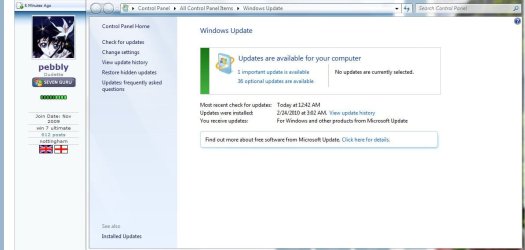
Have you run Windows Update to check for Microsoft updates ?
 

Attachments

  • Windows_Update_Snip.JPG
    Windows_Update_Snip.JPG
    62.3 KB · Views: 91

My Computer My Computer

At a glance

Win7 Enterprise, Win7 x86 (Ult 7600), Win7 x6...AMD fx8350 4ghz, AMD-32 2400mhz, AMD-64 3200m...2gb, 4gb on the Ult 7600, 4gb on Technet RTM,...Draw my own Graphics, several nVidia cards
Computer type
PC/Desktop
Computer Manufacturer/Model Number
Built them myself, Science Experiments !
OS
Win7 Enterprise, Win7 x86 (Ult 7600), Win7 x64 Ult 7600, TechNet RTM on AMD x64 (2.8Ghz)
CPU
AMD fx8350 4ghz, AMD-32 2400mhz, AMD-64 3200mhz, AMDx64 2.8G
Motherboard
SIS 755, ECS-K8M890M-M (Ult 7600), GigaByte & others
Memory
2gb, 4gb on the Ult 7600, 4gb on Technet RTM, 32gb on FX8350
Graphics Card(s)
Draw my own Graphics, several nVidia cards
Sound Card
on motherboard
Monitor(s) Displays
19" flat scr, 28" I-Inc widescr,22" Emprex Widescr, 23" Acer
Screen Resolution
1280 x 1024, 1440 x 900, 1920 x 1080
Hard Drives
6 pata Ide HD's & 2 Sata HD's
added 80gb external on Ult 7600 computer,
numerous extra 1tb, 2TB, 3Tb SATA HD's
A collection of ext HD Docks w/ HDs
PSU
430w, 550w, 600w, 700, 800, etc
Case
All Generic Full Towers
Cooling
Open Air & a few fans, some w/ colored LEDs
Keyboard
Compaq & Dell recycled from GoodWill
Mouse
Made in China Optical Wired Mouse
Internet Speed
Fast Cable InterNet
Antivirus
AVG Free on 24 different Desktops, NO Problems!
Browser
IE 8 is preferred, but use FireFox sometimes
Other Info
Linksys Routers, switches, & Hubs
Too Many USB Flash Drives to count, Biggest is 64GB !
Eight computers in my home network.
Sixteen computers at my business network.
Linked via TeamViewer !
Lots of old used spare computer parts everywhere!
I can think of a couple of things to try.

You should have only one HD Device in Device Manager

>Device Manager No exclamation marks or issues showing
>High Definition Audio Device Microsoft Driver 6.1.7600.16385
>Realtek High Definition Audio Realtek 1/19/2010 6.0.1.6029

In Device Manager, disable (do not uninstall) the Microsoft 7.1.7600.... driver.
Reboot.

Enable the disabled "Stereo Mix and CD Audio" devices.

Choose Stereo Mix as your input device, click the "Set Default" button to make it your default input.

Speaker are the default output device, correct? That should be the light Green jack on the back of the machine. (or wherever the rear output is located.

Might want to reboot again...

Now, what's your status, any sound yet?

Have you checked "Playback Devices" (select Speakers/Properties/Levels Tab) are the level controls properly, any of them muted?

Ap
 

My Computer My Computer

At a glance

Windows 7 Home PremiumIntel Core 2 Duo @ 3.00gHz4 GBATI Radeon HD 2600 XT
Computer Manufacturer/Model Number
Assembled in my workshop
OS
Windows 7 Home Premium
CPU
Intel Core 2 Duo @ 3.00gHz
Motherboard
Gigabyte GA-P35-S3G
Memory
4 GB
Graphics Card(s)
ATI Radeon HD 2600 XT
Sound Card
RME 24/96 Card, Realtek Internal Audio PreSonus FireStudio
Monitor(s) Displays
Acer 1917 (x2)
Screen Resolution
1280 x 1024 on both monitors
Hard Drives
Three 250GB Seagate SATA Barracuda 7200rpm
PSU
Rosewill 500-watt
Case
Rosewill mid-tower
Cooling
Noctua NH-U9B (CPU), PwrSupply fan + single large case Fan
Keyboard
Macally w/2/USB ports.
Mouse
Trackman Wheel
Other Info
Event 20/20 bas studio monitors, Yamaha sub.
Rackmount Korg/Roland/Yamaha synthesizers,
Cubase MIDI/audio recording. Sony Soundforge audio/mastering software. CD Architect Mastering. RME & Presonus audio interfaces.
XP to Windows 7 and No Sound

DocBrown: Yes I have updated Windows & when I installed it. thanks for the suggestion

Aphelion: I tried these suggestions with no change. Thanks but no luck. Anything else.

What about the two options: Reinstall Windows 7 or buy and install a sound card?

Thanks for the ideas, I am fresh out of them.
 

My Computer My Computer

At a glance

Windows 7Intel E73004GBATI Radeon HD 4670
Computer Manufacturer/Model Number
Barebone System
OS
Windows 7
CPU
Intel E7300
Motherboard
Gigabyte EP45 - DS3L
Memory
4GB
Graphics Card(s)
ATI Radeon HD 4670
Sound Card
Realtek ALC888 codec Onboard
Monitor(s) Displays
LCD
Hard Drives
Seagate 500GB
DocBrown: Yes I have updated Windows & when I installed it. thanks for the suggestion

Aphelion: I tried these suggestions with no change. Thanks but no luck. Anything else.

What about the two options: Reinstall Windows 7 or buy and install a sound card?

Thanks for the ideas, I am fresh out of them.

One question... If you play an mp3 file and go to the Recording Devices window and you've selected "Stereo Out" as your default Input... do you see a green bar moving, indicating signal is passing thru?

And a suggestion:
Before your two options I'd try using the Control Panel "Programs and Features" option to completely remove the Realtek driver then go to Device Manager and uninstall the MS HD audio driver... reboot and let Win-7 find the device and reload the MS drivers.

Just a thought.

Ap
 

My Computer My Computer

At a glance

Windows 7 Home PremiumIntel Core 2 Duo @ 3.00gHz4 GBATI Radeon HD 2600 XT
Computer Manufacturer/Model Number
Assembled in my workshop
OS
Windows 7 Home Premium
CPU
Intel Core 2 Duo @ 3.00gHz
Motherboard
Gigabyte GA-P35-S3G
Memory
4 GB
Graphics Card(s)
ATI Radeon HD 2600 XT
Sound Card
RME 24/96 Card, Realtek Internal Audio PreSonus FireStudio
Monitor(s) Displays
Acer 1917 (x2)
Screen Resolution
1280 x 1024 on both monitors
Hard Drives
Three 250GB Seagate SATA Barracuda 7200rpm
PSU
Rosewill 500-watt
Case
Rosewill mid-tower
Cooling
Noctua NH-U9B (CPU), PwrSupply fan + single large case Fan
Keyboard
Macally w/2/USB ports.
Mouse
Trackman Wheel
Other Info
Event 20/20 bas studio monitors, Yamaha sub.
Rackmount Korg/Roland/Yamaha synthesizers,
Cubase MIDI/audio recording. Sony Soundforge audio/mastering software. CD Architect Mastering. RME & Presonus audio interfaces.
Late Breaking News on No Sound in Windows 7

Well, I am happy to report that I now have sound. Here is what I did.

In Device Manager, disable (do not uninstall) the Microsoft 7.1.7600.... driver.
Reboot. Done

Enable the disabled "Stereo Mix and CD Audio" devices. Done

Choose Stereo Mix as your input device, click the "Set Default" button to make it your default input. done

Rebooted.

On reboot, Windows 7 informed me it was installing 2 updates (who knows what)

I tried the sound again. No Luck

I then decided to try something I already did yesterday..because I really had no other ideas. I began plugging the speakers in all the jacks and checking the dialog box that came up in the Realtek software and trying each setting. I did this all yesterday, but I know there is output because I can see the scales when I test.

Well on the third one, I did get sound on the test and in Itunes.

You can all take credit for this, because I surely have not clue as to what worked.

Thanks
 

My Computer My Computer

At a glance

Windows 7Intel E73004GBATI Radeon HD 4670
Computer Manufacturer/Model Number
Barebone System
OS
Windows 7
CPU
Intel E7300
Motherboard
Gigabyte EP45 - DS3L
Memory
4GB
Graphics Card(s)
ATI Radeon HD 4670
Sound Card
Realtek ALC888 codec Onboard
Monitor(s) Displays
LCD
Hard Drives
Seagate 500GB
Well, I am happy to report that I now have sound. Here is what I did.

Well on the third one, I did get sound on the test and in Itunes.


Great, now, what color is the jack that you're now plugged into, and is working?

Ap
 

My Computer My Computer

At a glance

Windows 7 Home PremiumIntel Core 2 Duo @ 3.00gHz4 GBATI Radeon HD 2600 XT
Computer Manufacturer/Model Number
Assembled in my workshop
OS
Windows 7 Home Premium
CPU
Intel Core 2 Duo @ 3.00gHz
Motherboard
Gigabyte GA-P35-S3G
Memory
4 GB
Graphics Card(s)
ATI Radeon HD 2600 XT
Sound Card
RME 24/96 Card, Realtek Internal Audio PreSonus FireStudio
Monitor(s) Displays
Acer 1917 (x2)
Screen Resolution
1280 x 1024 on both monitors
Hard Drives
Three 250GB Seagate SATA Barracuda 7200rpm
PSU
Rosewill 500-watt
Case
Rosewill mid-tower
Cooling
Noctua NH-U9B (CPU), PwrSupply fan + single large case Fan
Keyboard
Macally w/2/USB ports.
Mouse
Trackman Wheel
Other Info
Event 20/20 bas studio monitors, Yamaha sub.
Rackmount Korg/Roland/Yamaha synthesizers,
Cubase MIDI/audio recording. Sony Soundforge audio/mastering software. CD Architect Mastering. RME & Presonus audio interfaces.
Late Breaking News re Sound

Well the answer is that it was green, but the rest of the answer is that withthe Realtek software utility you can retask the plugs any way you want. I do see that in Stereo, only the Front speaker out produces output, not the side speakers I had assumed would work on a computer with speakers on each side. Silly me.

That is the answer. In stereo only the front speaker out produces output in stereo mode.

Thanks for your help and interest.
 

My Computer My Computer

At a glance

Windows 7Intel E73004GBATI Radeon HD 4670
Computer Manufacturer/Model Number
Barebone System
OS
Windows 7
CPU
Intel E7300
Motherboard
Gigabyte EP45 - DS3L
Memory
4GB
Graphics Card(s)
ATI Radeon HD 4670
Sound Card
Realtek ALC888 codec Onboard
Monitor(s) Displays
LCD
Hard Drives
Seagate 500GB
Back
Top