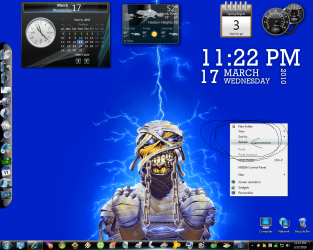
Yeah.... this might sound weird.... but here goes anyways.
First off, is it always that same "refresh" thing? If so, think of what you do just before it appears for the first time. Often it is something very simple which causes this. I've had this happen to me, and I couldn't get rid of it for a while.
How I finally got rid of it, weirdly enough (yes, I said it would be weird) was to clean both my keyboard and my mouse. Dirt accumulates under and beside buttons. Sometimes this causes buttons (keyboard and mouse) to hang in a certain position. which, in turn, sometimes means they are just barely in the press/not press position....
Also, if you have a wireless mouse, try changing the batteries. You never know.
By the way, have you tried pressing that "refresh" thing? See what it does?
If what I said above doesn't fix it, try eliminating your other programs (as you seem to be running quite a few) to see which one gets rid of the refresh. You should do the same for the background programs which don't show up in the taskbar.... sometimes they cause some weird behaviour in explorer/ the shell. It might just be that one of the background programs is doing this. So another good tip would be to update every single one of your programs to its latest version. Including drivers. And also, look up if any of these programs have any known issues with windows 7. You never know if they have.
edit: looking at the picture a little more closely.... it almost looks like it's either a right click on the c: prompt in the taskbar which left something behind, or a right click on the desktop background which left something behind. You could try right clicking either again, look for the refresh, clicking it and seeing whether that takes away the "burned in" image.... Usually does for me....